Imports Nevron.Nov
Imports Nevron.Nov.Diagram
Imports Nevron.Nov.Diagram.Shapes
Imports Nevron.Nov.Diagram.UI
Imports Nevron.Nov.Dom
Imports Nevron.Nov.Graphics
Imports Nevron.Nov.Layout
Imports Nevron.Nov.UI
Imports Nevron.Nov.Windows.Forms
Imports System

Public Class Form1

#Region "Constructors"

    Public Sub New()
        ' This call is required by the designer.
        InitializeComponent()

        ' Add any initialization after the InitializeComponent() call.

        ' Set form title
        Text = "NOV WinForms - NBackgroundPagesExample"

        ' Create the NOV example and its controls
        Dim exampleContent As NWidget = CreateExampleContent()
        Dim exampleControls As NWidget = CreateExampleControls()
        If Not exampleControls Is Nothing Then
            exampleControls.PreferredWidth = 300
        End If

        ' Place the example and its controls in a pair box
        Dim pairBox As NPairBox = New NPairBox(exampleContent, exampleControls)
        pairBox.FillMode = ENStackFillMode.First
        pairBox.FitMode = ENStackFitMode.First
        pairBox.Margins = New NMargins(NDesign.HorizontalSpacing, NDesign.VerticalSpacing)

        ' Host the example in the form
        Dim host As NNovWidgetHost(Of NWidget) = New NNovWidgetHost(Of NWidget)(pairBox)
        host.Dock = DockStyle.Fill
        Controls.Add(host)
    End Sub


#End Region

#Region "Example"

        Public Function CreateExampleContent() As NWidget
            ' Create a simple drawing
            Dim drawingViewWithRibbon As NDrawingViewWithRibbon = New NDrawingViewWithRibbon()
            m_DrawingView = drawingViewWithRibbon.View

            m_DrawingView.Document.HistoryService.Pause()
            Try
                InitDiagram(m_DrawingView.Document)
            Finally
                m_DrawingView.Document.HistoryService.Resume()
            End Try

            Return drawingViewWithRibbon
        End Function
        Public Function CreateExampleControls() As NWidget
            Dim stackPanel As NStackPanel = New NStackPanel()
            stackPanel.FillMode = ENStackFillMode.Last
            stackPanel.FitMode = ENStackFitMode.Last

            Dim drawingExplorer As NDrawingExplorer = New NDrawingExplorer()
            drawingExplorer.DrawingView = m_DrawingView
            stackPanel.Add(drawingExplorer)

            Return stackPanel
        End Function
        Public Function GetExampleDescription() As String
            Return "

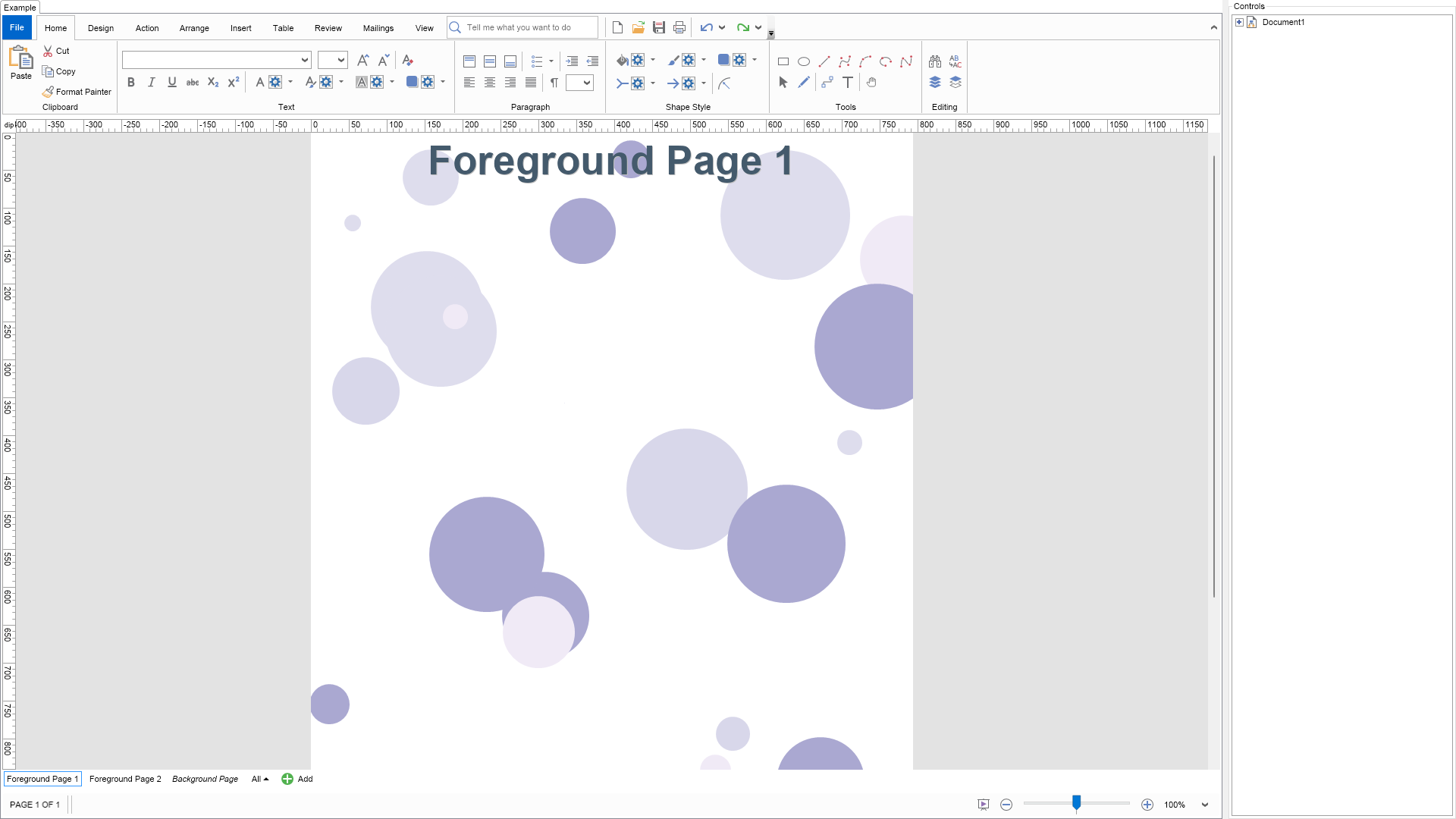
This example demonstrates background pages. Background pages serve as a backdrop for other pages. In this example, there are 2 two foreground pages that use a single background page (animated bubbles).


Whether a page is a background page or not depends on the PageType property. By default, pages are of the Foreground type.


Background pages can be mapped inside the foreground page like ordinary vector textures (stretched, fitted, tiled, etc.). Background pages are also automatically excluded from presentations.


In the Drawing Explorer, background and foreground pages are automatically separated into ""Foreground Pages"" and ""Background Pages"" folders.
"
        End Function

        '''
        ''' Gets the relevant documentation links for the example
        '''
        '''
        Public Function GetDocumentationUrls() As (String, String)()
            Return {("Page Types", "https://www.nevron.com/docs/openvision/diagram-page-types.html"), ("Pages", "https://www.nevron.com/docs/openvision/diagram-pages.html")}
        End Function

        Private Sub InitDiagram(drawingDocument As NDrawingDocument)
            Dim drawing = drawingDocument.Content

            drawing.Pages.Clear()

            Dim colors As NColor() = New NColor() {New NColor(222, 221, 237), New NColor(240, 234, 246), New NColor(216, 215, 234), New NColor(170, 168, 209)}

            ' create a page for background
            Dim backgroundPage As NPage = New NPage()
            backgroundPage.Title = "Background Page"
            backgroundPage.PageType = ENPageType.Background
            Dim rnd As Random = New Random()

            ' create bubbles in this page
            Dim factory As NBasicShapeFactory = New NBasicShapeFactory()
            For i = 0 To 29
                Dim shape = factory.CreateShape(ENBasicShape.Circle)

                ' select random x, y, size and color
                Dim x As Double = rnd.Next(backgroundPage.Width)
                Dim y As Double = rnd.Next(backgroundPage.Height)
                Dim size As Double = rnd.Next(200)
                Dim colorIndex As Integer = CByte(rnd.Next(colors.Length))

                backgroundPage.Items.Add(shape)
                shape.SetBounds(NRectangle.FromCenterAndSize(New NPoint(x, y), size, size))

                shape.Geometry.Fill = New NColorFill(colors(colorIndex))
                shape.Geometry.Stroke = Nothing
            Next

            drawing.Pages.Add(backgroundPage)

            ' create a foreground page
            Dim foregroundPage1 As NPage = New NPage()
            foregroundPage1.Title = "Foreground Page 1"
            foregroundPage1.BackgroundPage = backgroundPage
            drawing.Pages.Insert(0, foregroundPage1)

            CreateTitle("Foreground Page 1", foregroundPage1)

            Dim foregroundPage2 As NPage = New NPage()
            foregroundPage2.Title = "Foreground Page 2"
            foregroundPage2.BackgroundPage = backgroundPage
            drawing.Pages.Insert(1, foregroundPage2)

            CreateTitle("Foreground Page 2", foregroundPage2)

            ' get shapes and assign a mover to each of them them
            Dim shapes = backgroundPage.GetShapes(False)
            For i = 0 To shapes.Count - 1
                Dim shape = shapes(i)

                ' create a shape mover that will move the shapes in random directions inside the page
                Dim vx As Single = CSng((rnd.NextDouble() * 4 + 1)) * If(rnd.Next(2) = 0, -1, 1)
                Dim vy As Single = CSng((rnd.NextDouble() * 4 + 1)) * If(rnd.Next(2) = 0, -1, 1)

                Dim shapeMover As NShapeMover = New NShapeMover(vx, vy)
                shape.Tag = shapeMover
            Next

            ' create a timer to move the shapes
            m_MoveTimer = New NTimer()
            m_MoveTimer.Interval = 100
            m_MoveTimer.Start()
            m_MoveTimer.Tick += Sub()
                                    shapes = backgroundPage.GetShapes(False)
                                    For i = 0 To shapes.Count - 1
                                        Dim shape = shapes(i)

                                        Dim shapeMover As NShapeMover = TryCast(shape.Tag, NShapeMover)
                                        If shapeMover IsNot Nothing Then
                                            shapeMover.MoveShape(shape, backgroundPage)
                                        End If
                                    Next
                                End Sub
        End Sub

        Private Sub CreateTitle(title As String, page As NPage)
            ' create title
            Dim titleShape As NShape = New NShape()
            titleShape.Width = page.Width
            titleShape.Height = 75
            titleShape.PinX = page.X + page.Width / 2
            titleShape.PinY = page.Y + titleShape.Height / 2
            titleShape.Text = title
            titleShape.TextBlock.FontName = "Arial"
            titleShape.TextBlock.FontSize = 40
            titleShape.TextBlock.FontStyle = ENFontStyle.Bold
            titleShape.TextBlock.Fill = New NColorFill(New NColor(68, 90, 108))
            titleShape.TextBlock.Shadow = New NShadow()
            page.Items.AddChild(titleShape)
        End Sub

        Protected Sub OnUnregistered()
            MyBase.OnUnregistered()

            If m_MoveTimer IsNot Nothing Then
                m_MoveTimer.Stop()
            End If
        End Sub

#End Region

#Region "Implementation"
#End Region

#Region "Event Handlers"
#End Region

#Region "Fields"

        Private m_DrawingView As NDrawingView
        Private m_MoveTimer As NTimer

#End Region

#Region "Static Methods"
#End Region

#Region "Constants"
#End Region

#Region "Nested Types"
#End Region

End Class

 Chart for .NET
 Diagram for .NET
 User Interface for .NET
 Vision for SSRS
 Chart for SSRS
 Gauge for SSRS
 Map for SSRS
 Barcode for SSRS
 Vision for SharePoint
 Chart for SharePoint
 Gauge for SharePoint
 Map for SharePoint
 Barcode for SharePoint
 Open Vision for .NET


 Vision for .NET