Imports Nevron.Nov
Imports Nevron.Nov.Dom
Imports Nevron.Nov.Graphics
Imports Nevron.Nov.Layout
Imports Nevron.Nov.UI
Imports Nevron.Nov.Windows.Forms
Imports System
Imports System.Globalization

Public Class Form1

#Region "Constructors"

    Public Sub New()
        ' This call is required by the designer.
        InitializeComponent()

        ' Add any initialization after the InitializeComponent() call.

        ' Set form title
        Text = "NOV WinForms - NPredefinedSymbolsExample"

        ' Create the NOV example and its controls
        Dim exampleContent As NWidget = CreateExampleContent()
        Dim exampleControls As NWidget = CreateExampleControls()
        If Not exampleControls Is Nothing Then
            exampleControls.PreferredWidth = 300
        End If

        ' Place the example and its controls in a pair box
        Dim pairBox As NPairBox = New NPairBox(exampleContent, exampleControls)
        pairBox.FillMode = ENStackFillMode.First
        pairBox.FitMode = ENStackFitMode.First
        pairBox.Margins = New NMargins(NDesign.HorizontalSpacing, NDesign.VerticalSpacing)

        ' Host the example in the form
        Dim host As NNovWidgetHost(Of NWidget) = New NNovWidgetHost(Of NWidget)(pairBox)
        host.Dock = DockStyle.Fill
        Controls.Add(host)
    End Sub


#End Region

#Region "Example"

        Public Function CreateExampleContent() As NWidget
            m_SymbolsTable = New NTableFlowPanel()
            m_SymbolsTable.BackgroundFill = New NColorFill(NColor.White)
            m_SymbolsTable.HorizontalSpacing = NDesign.HorizontalSpacing * 3
            m_SymbolsTable.VerticalSpacing = NDesign.VerticalSpacing * 3
            m_SymbolsTable.Direction = ENHVDirection.LeftToRight
            m_SymbolsTable.MaxOrdinal = 4
            m_SymbolsTable.Padding = New NMargins(NDesign.HorizontalSpacing, NDesign.VerticalSpacing, NDesign.HorizontalSpacing * 6, NDesign.VerticalSpacing)

            RecreateSymbols()

            Dim scrollContent As NScrollContent = New NScrollContent(m_SymbolsTable)
            scrollContent.HorizontalPlacement = ENHorizontalPlacement.Left
            Return scrollContent
        End Function
        Public Function CreateExampleControls() As NWidget
            Dim stack As NStackPanel = New NStackPanel()

            ' Create the color box
            m_ColorBox = New NColorBox()
            m_ColorBox.SelectedColor = DefaultSymbolColor
            Me.m_ColorBox.SelectedColorChanged += AddressOf OnColorBoxSelectedColorChanged
            stack.Add(NPairBox.Create("Color:", m_ColorBox))

            ' Create the size radio button group
            Dim radioStack As NStackPanel = New NStackPanel()
            Dim size = MinSymbolSize
            Dim selectedIndex = 0

            For i = 0 To 3
                If size = DefaultSymbolSize Then
                    selectedIndex = i
                End If

                Dim sizeStr = size.ToString(CultureInfo.InvariantCulture)
                Dim radioButton As NRadioButton = New NRadioButton(sizeStr & "x" & sizeStr)
                radioStack.Add(radioButton)
                size *= 2
            Next

            m_RadioGroup = New NRadioButtonGroup(radioStack)
            m_RadioGroup.SelectedIndex = 1
            Me.m_RadioGroup.SelectedIndexChanged += AddressOf OnRadioGroupSelectedIndexChanged
            Dim pairBox = NPairBox.Create("Size:", m_RadioGroup)
            pairBox.Box1.VerticalPlacement = ENVerticalPlacement.Top
            stack.Add(pairBox)

            Return New NUniSizeBoxGroup(stack)
        End Function
        Public Function GetExampleDescription() As String
            Dim symbolCount As Integer = NEnum.GetValues(Of ENSymbolShape)().Length
            Dim symbolCountStr = symbolCount.ToString(CultureInfo.InvariantCulture)

            Return "

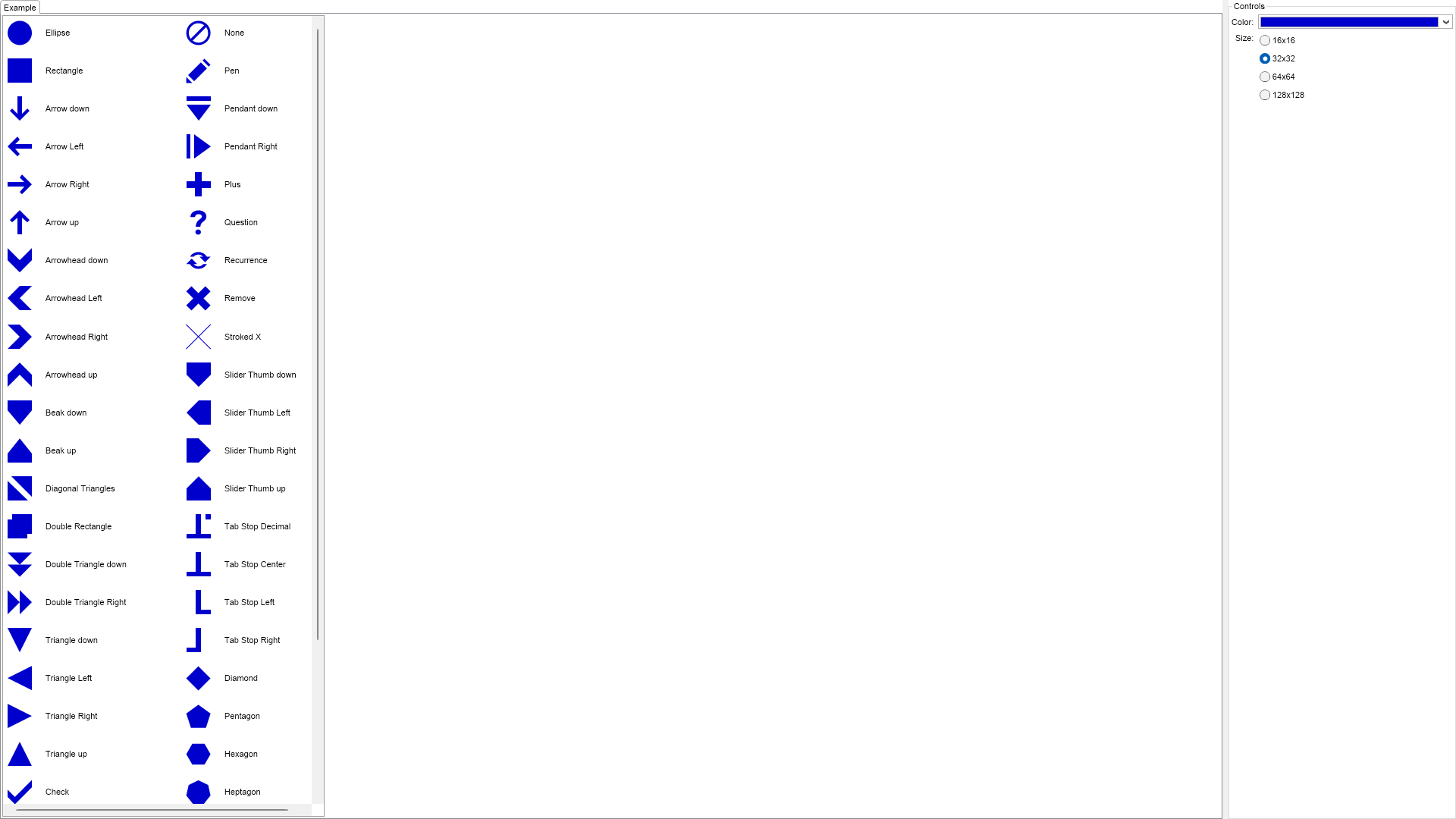
	Nevron Open Vision provides support for drawing of vector based shapes called symbols. The advantage of such vector
	based shapes over regular raster images is that they do not blur and look nice at any size. This example demonstrates
	how to create and use predefined symbols. Nevron Open Vision currently provides support for " & symbolCountStr & "
	predefined symbols. Use the radio buttons on the right to see the symbols at different sizes.

"
        End Function

        '''
        ''' Gets the relevant documentation links for the example
        '''
        '''
        Public Function GetDocumentationUrls() As (String, String)()
            Return {("Symbols", "https://www.nevron.com/docs/openvision/ui-symbols.html"), ("Widget Elements", "https://www.nevron.com/docs/openvision/ui-widget-elements.html")}
        End Function

#End Region

#Region "Implementation"

        Private Sub RecreateSymbols()
            Dim color = If(m_ColorBox IsNot Nothing, m_ColorBox.SelectedColor, DefaultSymbolColor)
            Dim length = If(m_RadioGroup IsNot Nothing, MinSymbolSize * Math.Pow(2, m_RadioGroup.SelectedIndex), DefaultSymbolSize)
            Dim size As NSize = New NSize(length, length)

            m_SymbolsTable.Clear()

            Dim symbolShapes As ENSymbolShape() = NEnum.GetValues(Of ENSymbolShape)()
            Dim count As Integer = symbolShapes.Length / 2 + symbolShapes.Length Mod 2
            For i = 0 To count - 1
                ' Add a symbol box to the first column
                Dim column1Index = i
                AddSymbolBox(symbolShapes(column1Index), size, color)

                ' Add a symbol box to the second column
                Dim column2Index = count + i
                If column2Index < symbolShapes.Length Then
                    Dim symbolBox = AddSymbolBox(symbolShapes(column2Index), size, color)
                    symbolBox.Margins = New NMargins(NDesign.HorizontalSpacing * 10, 0, 0, 0)
                End If
            Next
        End Sub
        Private Function AddSymbolBox(symbolShape As ENSymbolShape, size As NSize, color As NColor) As NSymbolBox
            Dim symbol = NSymbol.Create(symbolShape, size, color)
            Dim symbolBox As NSymbolBox = New NSymbolBox(symbol)
            m_SymbolsTable.Add(symbolBox)

            Dim label As NLabel = New NLabel(NStringHelpers.InsertSpacesBeforeUppersAndDigits(symbolShape.ToString()))
            label.VerticalPlacement = ENVerticalPlacement.Center
            m_SymbolsTable.Add(label)

            Return symbolBox
        End Function

#End Region

#Region "Event Handlers"

        Private Sub OnColorBoxSelectedColorChanged(arg As NValueChangeEventArgs)
            RecreateSymbols()
        End Sub
        Private Sub OnRadioGroupSelectedIndexChanged(arg As NValueChangeEventArgs)
            RecreateSymbols()
        End Sub

#End Region

#Region "Fields"

        Private m_SymbolsTable As NTableFlowPanel
        Private m_ColorBox As NColorBox
        Private m_RadioGroup As NRadioButtonGroup

#End Region

#Region "Static Methods"
#End Region

#Region "Constants"

        Private Const MinSymbolSize As Double = 16
        Private Const DefaultSymbolSize As Double = 32
        Private Shared ReadOnly DefaultSymbolColor As NColor = NColor.MediumBlue

#End Region

#Region "Nested Types"
#End Region

End Class

 Chart for .NET
 Diagram for .NET
 User Interface for .NET
 Vision for SSRS
 Chart for SSRS
 Gauge for SSRS
 Map for SSRS
 Barcode for SSRS
 Vision for SharePoint
 Chart for SharePoint
 Gauge for SharePoint
 Map for SharePoint
 Barcode for SharePoint
 Open Vision for .NET


 Vision for .NET