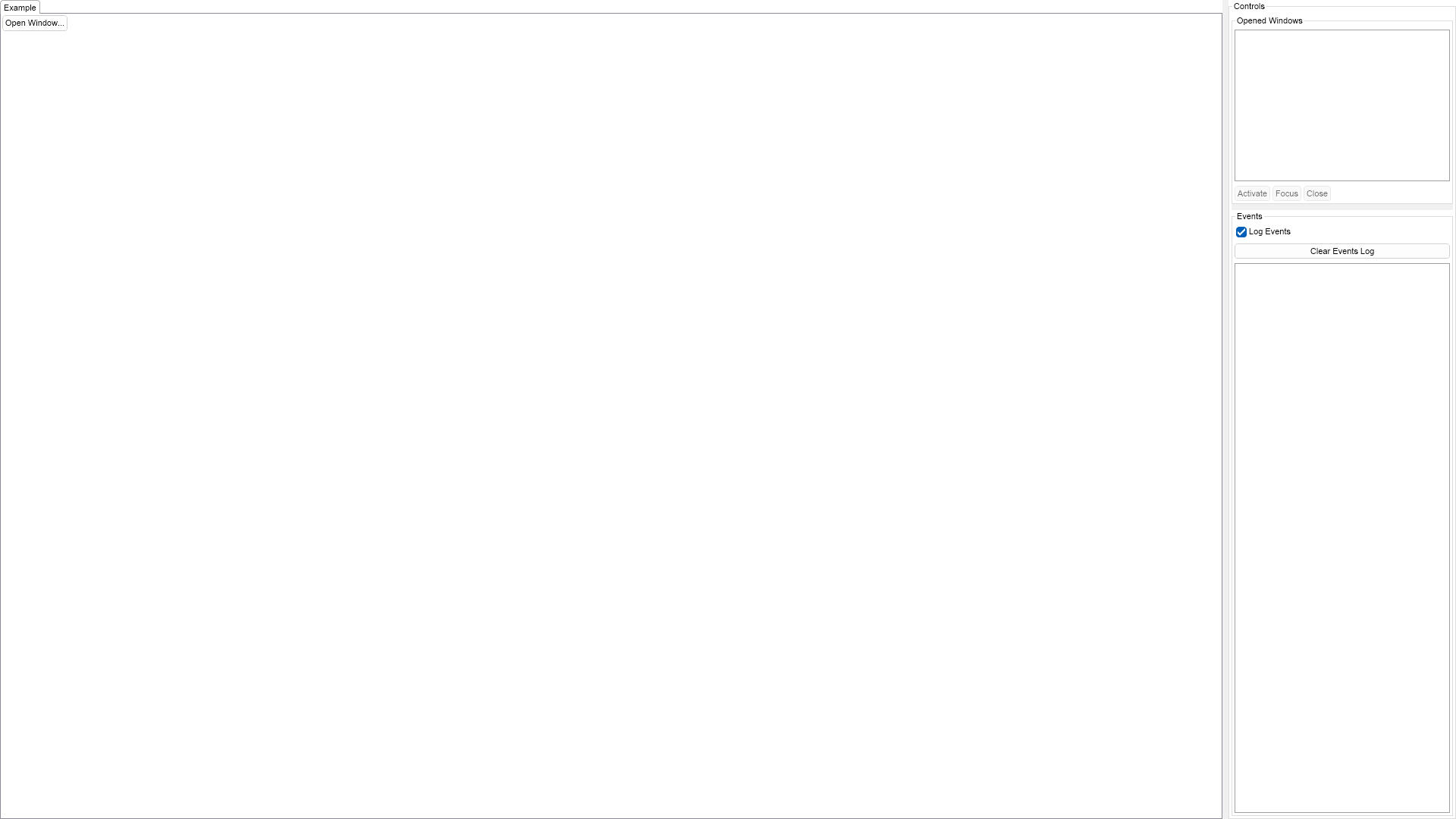
Imports Nevron.Nov
Imports Nevron.Nov.Dom
Imports Nevron.Nov.Graphics
Imports Nevron.Nov.Layout
Imports Nevron.Nov.UI
Imports Nevron.Nov.Windows.Forms

Public Class Form1

#Region "Constructors"

    Public Sub New()
        ' This call is required by the designer.
        InitializeComponent()

        ' Add any initialization after the InitializeComponent() call.

        ' Set form title
        Text = "NOV WinForms - NTopLevelWindowEventsExample"

        ' Create the NOV example and its controls
        Dim exampleContent As NWidget = CreateExampleContent()
        Dim exampleControls As NWidget = CreateExampleControls()
        If Not exampleControls Is Nothing Then
            exampleControls.PreferredWidth = 300
        End If

        ' Place the example and its controls in a pair box
        Dim pairBox As NPairBox = New NPairBox(exampleContent, exampleControls)
        pairBox.FillMode = ENStackFillMode.First
        pairBox.FitMode = ENStackFitMode.First
        pairBox.Margins = New NMargins(NDesign.HorizontalSpacing, NDesign.VerticalSpacing)

        ' Host the example in the form
        Dim host As NNovWidgetHost(Of NWidget) = New NNovWidgetHost(Of NWidget)(pairBox)
        host.Dock = DockStyle.Fill
        Controls.Add(host)
    End Sub


#End Region

#Region "Example"

        Public Function CreateExampleContent() As NWidget
            m_ChildWindowIndex = 1

            ' Create the example's content
            Dim openWindowButton As NButton = New NButton("Open Window...")
            openWindowButton.HorizontalPlacement = ENHorizontalPlacement.Left
            openWindowButton.VerticalPlacement = ENVerticalPlacement.Top
            openWindowButton.Click += AddressOf OnOpenChildWindowButtonClicked

            Return openWindowButton
        End Function
        Public Function CreateExampleControls() As NWidget
            Dim stack As NStackPanel = New NStackPanel()
            stack.FitMode = ENStackFitMode.First
            stack.FillMode = ENStackFillMode.First

            ' Create the opened windows tree view
            m_TreeView = New NTreeView()
            Me.m_TreeView.SelectedPathChanged += AddressOf OnTreeViewSelectedPathChanged
            stack.Add(m_TreeView)

            ' create some command buttons
            m_ButtonsStack = New NStackPanel()
            m_ButtonsStack.HorizontalSpacing = 3
            m_ButtonsStack.Direction = ENHVDirection.LeftToRight
            m_ButtonsStack.Add(New NButton(ActivateButtonText))
            m_ButtonsStack.Add(New NButton(FocusButtonText))
            m_ButtonsStack.Add(New NButton(CloseButtonText))

            ' capture the button click for the buttons at stack panel level
            m_ButtonsStack.AddEventHandler(NButtonBase.ClickEvent, New NEventHandler(Of NEventArgs)(AddressOf OnWindowActionButtonClicked))

            m_ButtonsStack.Enabled = False
            stack.Add(m_ButtonsStack)

            Dim openedWindowsGroupBox As NGroupBox = New NGroupBox("Opened Windows", stack)

            ' Add the events log
            m_EventsLog = New NExampleEventsLog()

            ' Add the opened windows group box and the events log to a splitter
            Dim splitter As NSplitter = New NSplitter(openedWindowsGroupBox, m_EventsLog, ENSplitterSplitMode.OffsetFromNearSide, 250)
            splitter.Orientation = ENHVOrientation.Vertical
            Return splitter
        End Function
        Public Function GetExampleDescription() As String
            Return "

	This example demonstrates how to create and open and manage top level windows. The events that
	occur during the lifetime of each window are logged and displayed in a list box on the right.

"
        End Function

        '''
        ''' Gets the relevant documentation links for the example
        '''
        '''
        Public Function GetDocumentationUrls() As (String, String)()
            Return {("Top Level Windows", "https://www.nevron.com/docs/openvision/ui-top-level-windows.html"), ("Windows and the Desktop", "https://www.nevron.com/docs/openvision/ui-windows-and-the-desktop.html"), ("Events", "https://www.nevron.com/docs/openvision/dom-events.html")}
        End Function
        Protected Friend Sub OnClosing()
            MyBase.OnClosing()

            ' Loop through the tree view items to close all opened windows
            Dim items As NTreeViewItemCollection = m_TreeView.Items
            For i = items.Count - 1 To 0 Step -1
                CType(items(i).Tag, NTopLevelWindow).Close()
            Next
        End Sub

#End Region

#Region "Implementation"

        Private Function CreateOpenChildWindowButton() As NButton
            Dim button As NButton = New NButton("Open Child Window...")
            button.HorizontalPlacement = ENHorizontalPlacement.Center
            button.VerticalPlacement = ENVerticalPlacement.Bottom
            button.Click += AddressOf OnOpenChildWindowButtonClicked

            Return button
        End Function
        '''
        ''' Creates and opens a child window of the specified owner window.
        '''
        '''
        Private Sub OpenChildWindow(ownerWindow As NWindow)
            ' Create the window
            Dim window = NApplication.CreateTopLevelWindow(ownerWindow)
            window.Title = "Window " & Math.Min(System.Threading.Interlocked.Increment(m_ChildWindowIndex), m_ChildWindowIndex - 1).ToString()
            window.PreferredSize = WindowSize

            ' subscribe for window state events
            window.Opened += AddressOf OnWindowStateEvent
            window.Activated += AddressOf OnWindowStateEvent
            window.Deactivated += AddressOf OnWindowStateEvent
            window.Closing += AddressOf OnWindowStateEvent
            window.Closed += AddressOf OnWindowStateEvent
            ' subscribe for window UI events
            window.GotFocus += AddressOf OnWindowUIEvent
            window.LostFocus += AddressOf OnWindowUIEvent

            ' Create its content
            Dim stack As NStackPanel = New NStackPanel()
            stack.FillMode = ENStackFillMode.First
            stack.FitMode = ENStackFitMode.First

            Dim ownerName = If(TypeOf ownerWindow Is NTopLevelWindow, CType(ownerWindow, NTopLevelWindow).Title, "Examples Window")
            Dim label As NLabel = New NLabel("Child Of """ & ownerName & """")
            label.HorizontalPlacement = ENHorizontalPlacement.Center
            label.VerticalPlacement = ENVerticalPlacement.Center
            stack.Add(label)

            stack.Add(CreateOpenChildWindowButton())
            window.Content = stack

            ' Open the window
            AddTreeViewItemForWindow(window)
            window.Open()

            If TypeOf ownerWindow Is NTopLevelWindow Then
                window.X = ownerWindow.X + 25
                window.Y = ownerWindow.Y + 25
            End If
        End Sub
        Private Sub AddTreeViewItemForWindow(window As NTopLevelWindow)
            Dim item As NTreeViewItem = New NTreeViewItem(window.Title)
            item.Tag = window
            window.Tag = item

            Dim parentWindow As NTopLevelWindow = TryCast(window.ParentWindow, NTopLevelWindow)
            If parentWindow Is Nothing Then
                m_TreeView.Items.Add(item)
            Else
                Dim parentItem As NTreeViewItem = parentWindow.Tag
                parentItem.Items.Add(item)
                parentItem.Expanded = True
            End If
        End Sub

#End Region

#Region "Event Handlers"

        '''
        '''
        '''
        '''
        Private Sub OnOpenChildWindowButtonClicked(args As NEventArgs)
            Dim button = CType(args.TargetNode, NButton)
            OpenChildWindow(button.DisplayWindow)
        End Sub
        '''
        '''
        '''
        '''
        Private Sub OnTreeViewSelectedPathChanged(args As NValueChangeEventArgs)
            Dim treeView = CType(args.TargetNode, NTreeView)
            m_ButtonsStack.Enabled = treeView.SelectedItem IsNot Nothing
        End Sub
        '''
        ''' Event handler for window state events (Opened, Activated, Deactivated, Closing, Closed)
        '''
        '''
        Private Sub OnWindowStateEvent(args As NEventArgs)
            If args.EventPhase IsNot ENEventPhase.AtTarget Then Return

            Dim window = CType(args.CurrentTargetNode, NTopLevelWindow)
            Dim eventName = args.Event.Name
            m_EventsLog.LogEvent(window.Title & " " & eventName.Substring(eventName.LastIndexOf("."c) + 1))

            If args.Event Is NTopLevelWindow.ActivatedEvent Then
                ' Select the corresponding item from the tree view
                Dim item As NTreeViewItem = window.Tag
                m_TreeView.SelectedItem = item
            ElseIf args.Event Is NTopLevelWindow.ClosedEvent Then
                ' Remove the corresponding item from the tree view
                Dim item As NTreeViewItem = window.Tag
                Dim items = CType(item.ParentNode, NTreeViewItemCollection)
                items.Remove(item)
            End If
        End Sub
        '''
        '''
        '''
        '''
        Private Sub OnWindowUIEvent(args As NEventArgs)
            Dim window = CType(args.CurrentTargetNode, NTopLevelWindow)

            Dim eventName = args.Event.Name
            eventName = eventName.Substring(eventName.LastIndexOf("."c) + 1)

            m_EventsLog.LogEvent(window.Title & " " & eventName & " from target: " & args.TargetNode.GetType().Name)
        End Sub
        '''
        ''' Called when some of the window action buttons has been clicked.
        '''
        '''
        Private Sub OnWindowActionButtonClicked(args As NEventArgs)
            If m_TreeView.SelectedItem Is Nothing Then Return

            Dim window As NTopLevelWindow = TryCast(m_TreeView.SelectedItem.Tag, NTopLevelWindow)
            If window Is Nothing Then Return

            Dim button = CType(args.TargetNode, NButton)
            Dim label = CType(button.Content, NLabel)

            Select Case label.Text
                Case ActivateButtonText
                    window.Activate()
                Case FocusButtonText
                    window.Focus()
                Case CloseButtonText
                    window.Close()
            End Select
        End Sub

#End Region

#Region "Fields"

        Private m_ChildWindowIndex As Integer
        Private m_TreeView As NTreeView
        Private m_ButtonsStack As NStackPanel
        Private m_EventsLog As NExampleEventsLog

#End Region

#Region "Static Methods"
#End Region

#Region "Constants"

        Private Shared ReadOnly WindowSize As NSize = New NSize(300, 300)

        Private Const ActivateButtonText As String = "Activate"
        Private Const FocusButtonText As String = "Focus"
        Private Const CloseButtonText As String = "Close"

#End Region

#Region "Nested Types"
#End Region

End Class

 Chart for .NET
 Diagram for .NET
 User Interface for .NET
 Vision for SSRS
 Chart for SSRS
 Gauge for SSRS
 Map for SSRS
 Barcode for SSRS
 Vision for SharePoint
 Chart for SharePoint
 Gauge for SharePoint
 Map for SharePoint
 Barcode for SharePoint
 Open Vision for .NET


 Vision for .NET