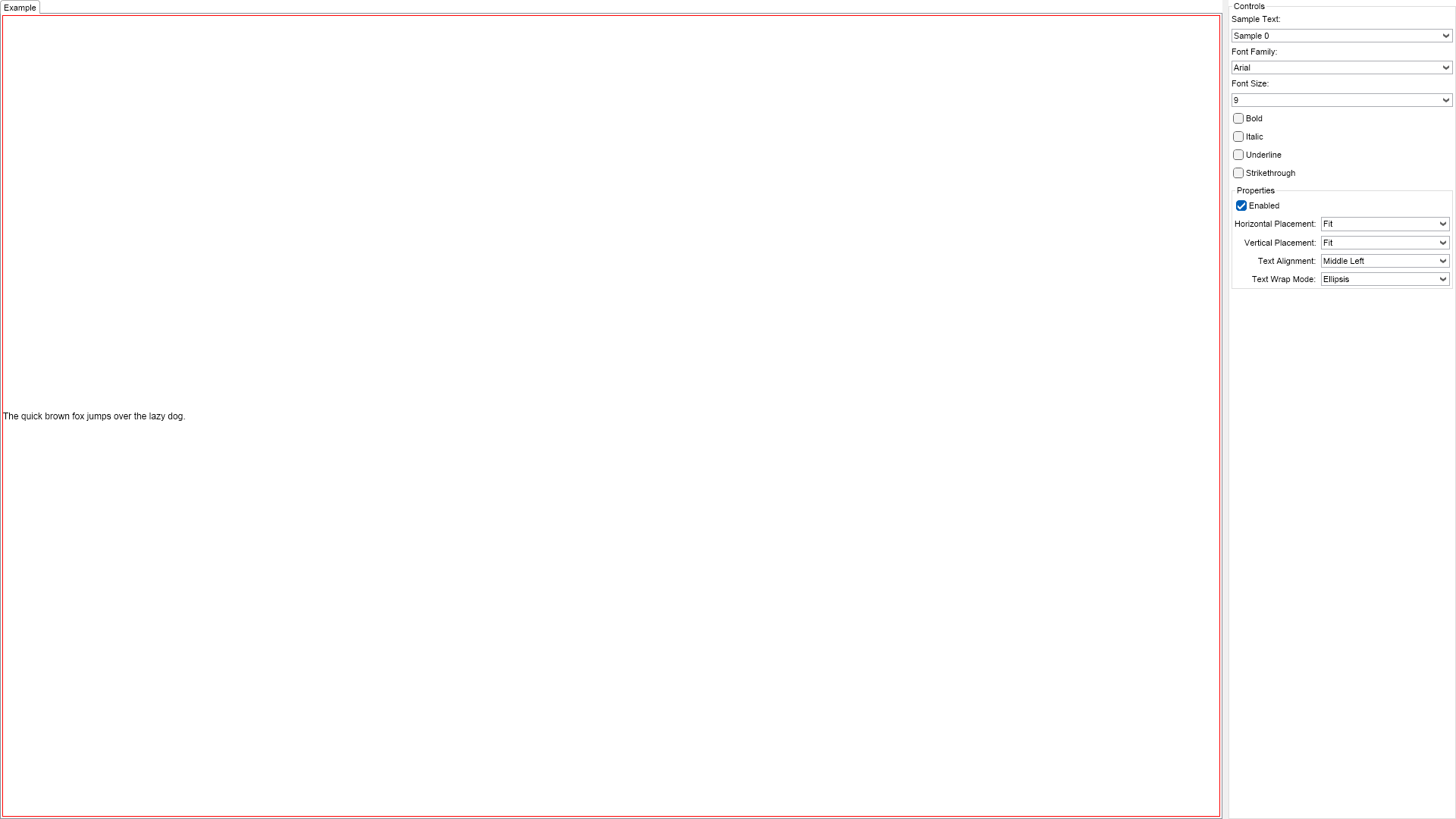
This example demonstrates how to create and use labels. The controls on the right let you change the label's font, alignment, placement, etc.

| Language: C# |
using Nevron.Nov;
using Nevron.Nov.DataStructures;
using Nevron.Nov.Dom;
using Nevron.Nov.Editors;
using Nevron.Nov.Graphics;
using Nevron.Nov.Layout;
using Nevron.Nov.Presentation;
using Nevron.Nov.UI;
using Nevron.Nov.Windows.Forms;
using System;
using System.Windows.Forms;
namespace NovWinFormsProject
{
public partial class Form1 : Form
{
#region Constructors
public Form1()
{
InitializeComponent();
// Set form title
Text = "NOV WinForms - NLabelExample";
// Create the NOV example and its controls
NWidget exampleContent = CreateExampleContent();
NWidget exampleControls = CreateExampleControls();
if (exampleControls != null)
{
exampleControls.PreferredWidth = 300;
}
// Place the example and its controls in a pair box
NPairBox pairBox = new NPairBox(exampleContent, exampleControls);
pairBox.FillMode = ENStackFillMode.First;
pairBox.FitMode = ENStackFitMode.First;
pairBox.Margins = new NMargins(NDesign.HorizontalSpacing, NDesign.VerticalSpacing);
// Host the example in the form
NNovWidgetHost host = new NNovWidgetHost(pairBox);
host.Dock = DockStyle.Fill;
Controls.Add(host);
}
#endregion
#region Example
public NWidget CreateExampleContent()
{
m_Label = new NLabel();
m_Label.SetBorder(1, NColor.Red);
return m_Label;
}
public NWidget CreateExampleControls()
{
NStackPanel stack = new NStackPanel();
m_SampleTextComboBox = new NComboBox();
for (int i = 0; i < 2; i++)
{
m_SampleTextComboBox.Items.Add(new NComboBoxItem("Sample " + i.ToString()));
}
m_SampleTextComboBox.SelectedIndexChanged += OnSampleTextChanged;
m_SampleTextComboBox.SelectedIndex = 0;
stack.Add(new NLabel("Sample Text:"));
stack.Add(m_SampleTextComboBox);
// font families
stack.Add(new NLabel("Font Family:"));
m_FontFamiliesComboBox = new NComboBox();
string[] fontFamilies = NApplication.FontService.InstalledFontsMap.FontFamilies;
int selectedIndex = 0;
for (int i = 0; i < fontFamilies.Length; i++)
{
m_FontFamiliesComboBox.Items.Add(new NComboBoxItem(fontFamilies[i]));
if (fontFamilies[i] == NFontDescriptor.DefaultSansFamilyName)
{
selectedIndex = i;
}
}
m_FontFamiliesComboBox.SelectedIndex = selectedIndex;
m_FontFamiliesComboBox.SelectedIndexChanged += OnFontStyleChanged;
stack.Add(m_FontFamiliesComboBox);
// font sizes
stack.Add(new NLabel("Font Size:"));
m_FontSizeComboBox = new NComboBox();
for (int i = 5; i < 72; i++)
{
m_FontSizeComboBox.Items.Add(new NComboBoxItem(i.ToString()));
}
m_FontSizeComboBox.SelectedIndex = 4;
m_FontSizeComboBox.SelectedIndexChanged += OnFontStyleChanged;
stack.Add(m_FontSizeComboBox);
// add style controls
m_BoldCheckBox = new NCheckBox();
m_BoldCheckBox.Content = new NLabel("Bold");
m_BoldCheckBox.CheckedChanged += OnFontStyleChanged;
stack.Add(m_BoldCheckBox);
m_ItalicCheckBox = new NCheckBox();
m_ItalicCheckBox.Content = new NLabel("Italic");
m_ItalicCheckBox.CheckedChanged += OnFontStyleChanged;
stack.Add(m_ItalicCheckBox);
m_UnderlineCheckBox = new NCheckBox();
m_UnderlineCheckBox.Content = new NLabel("Underline");
m_UnderlineCheckBox.CheckedChanged += OnFontStyleChanged;
stack.Add(m_UnderlineCheckBox);
m_StrikeThroughCheckBox = new NCheckBox();
m_StrikeThroughCheckBox.Content = new NLabel("Strikethrough");
m_StrikeThroughCheckBox.CheckedChanged += OnFontStyleChanged;
stack.Add(m_StrikeThroughCheckBox);
// properties
NList editors = NDesigner.GetDesigner(m_Label).CreateMemberEditors(
m_Label,
NLabel.EnabledProperty,
NLabel.HorizontalPlacementProperty,
NLabel.VerticalPlacementProperty,
NLabel.TextAlignmentProperty,
NLabel.TextWrapModeProperty);
NStackPanel propertiesStack = new NStackPanel();
for (int i = 0; i < editors.Count; i++)
{
propertiesStack.Add(editors[i]);
}
// make sure font style is updated
OnFontStyleChanged(null);
stack.Add(new NGroupBox("Properties", new NUniSizeBoxGroup(propertiesStack)));
return stack;
}
public string GetExampleDescription()
{
return @"
This example demonstrates how to create and use labels. The controls on the right let you
change the label's font, alignment, placement, etc.
";
}
///
/// Gets the relevant documentation links for the example
///
///
public (string Name, string Url)[] GetDocumentationUrls()
{
return new[]
{
("Label", "https://www.nevron.com/docs/openvision/ui-label.html"),
("Text Widgets Overview", "https://www.nevron.com/docs/openvision/ui-text-widgets-overview.html"),
};
}
#endregion
#region Implementation
#endregion
#region Event Handlers
private void OnSampleTextChanged(NValueChangeEventArgs args)
{
switch (m_SampleTextComboBox.SelectedIndex)
{
case 0:
m_Label.Text = "The quick brown fox jumps over the lazy dog.";
break;
case 1:
m_Label.Text = "This is the first line of a multi line label.\nThis is the second line.";
break;
}
}
private void OnFontStyleChanged(NValueChangeEventArgs args)
{
string fontFamily = (m_FontFamiliesComboBox.SelectedItem.Content as NLabel).Text;
int fontSize = Int32.Parse((m_FontSizeComboBox.SelectedItem.Content as NLabel).Text);
ENFontStyle fontStyle = ENFontStyle.Regular;
if (m_BoldCheckBox.Checked)
{
fontStyle |= ENFontStyle.Bold;
}
if (m_ItalicCheckBox.Checked)
{
fontStyle |= ENFontStyle.Italic;
}
if (m_UnderlineCheckBox.Checked)
{
fontStyle |= ENFontStyle.Underline;
}
if (m_StrikeThroughCheckBox.Checked)
{
fontStyle |= ENFontStyle.Strikethrough;
}
m_Label.Font = new NFont(fontFamily, fontSize, fontStyle, ENFontRasterizationMode.Antialiased);
}
#endregion
#region Fields
private NLabel m_Label;
private NComboBox m_SampleTextComboBox;
private NComboBox m_FontFamiliesComboBox;
private NComboBox m_FontSizeComboBox;
private NCheckBox m_BoldCheckBox;
private NCheckBox m_ItalicCheckBox;
private NCheckBox m_UnderlineCheckBox;
private NCheckBox m_StrikeThroughCheckBox;
#endregion
#region Static Methods
#endregion
#region Constants
#endregion
#region Nested Types
#endregion
}
} | Language: VB.NET |
Imports Nevron.Nov
Imports Nevron.Nov.Dom
Imports Nevron.Nov.Editors
Imports Nevron.Nov.Graphics
Imports Nevron.Nov.Layout
Imports Nevron.Nov.UI
Imports Nevron.Nov.Windows.Forms
Imports System
Public Class Form1
#Region "Constructors"
Public Sub New()
' This call is required by the designer.
InitializeComponent()
' Add any initialization after the InitializeComponent() call.
' Set form title
Text = "NOV WinForms - NLabelExample"
' Create the NOV example and its controls
Dim exampleContent As NWidget = CreateExampleContent()
Dim exampleControls As NWidget = CreateExampleControls()
If Not exampleControls Is Nothing Then
exampleControls.PreferredWidth = 300
End If
' Place the example and its controls in a pair box
Dim pairBox As NPairBox = New NPairBox(exampleContent, exampleControls)
pairBox.FillMode = ENStackFillMode.First
pairBox.FitMode = ENStackFitMode.First
pairBox.Margins = New NMargins(NDesign.HorizontalSpacing, NDesign.VerticalSpacing)
' Host the example in the form
Dim host As NNovWidgetHost(Of NWidget) = New NNovWidgetHost(Of NWidget)(pairBox)
host.Dock = DockStyle.Fill
Controls.Add(host)
End Sub
#End Region
#Region "Example"
Public Function CreateExampleContent() As NWidget
m_Label = New NLabel()
m_Label.SetBorder(1, NColor.Red)
Return m_Label
End Function
Public Function CreateExampleControls() As NWidget
Dim stack As NStackPanel = New NStackPanel()
m_SampleTextComboBox = New NComboBox()
For i = 0 To 1
m_SampleTextComboBox.Items.Add(New NComboBoxItem("Sample " & i.ToString()))
Next
Me.m_SampleTextComboBox.SelectedIndexChanged += AddressOf OnSampleTextChanged
m_SampleTextComboBox.SelectedIndex = 0
stack.Add(New NLabel("Sample Text:"))
stack.Add(m_SampleTextComboBox)
' font families
stack.Add(New NLabel("Font Family:"))
m_FontFamiliesComboBox = New NComboBox()
Dim fontFamilies = NApplication.FontService.InstalledFontsMap.FontFamilies
Dim selectedIndex = 0
For i = 0 To fontFamilies.Length - 1
m_FontFamiliesComboBox.Items.Add(New NComboBoxItem(fontFamilies(i)))
If Equals(fontFamilies(i), NFontDescriptor.DefaultSansFamilyName) Then
selectedIndex = i
End If
Next
m_FontFamiliesComboBox.SelectedIndex = selectedIndex
Me.m_FontFamiliesComboBox.SelectedIndexChanged += AddressOf OnFontStyleChanged
stack.Add(m_FontFamiliesComboBox)
' font sizes
stack.Add(New NLabel("Font Size:"))
m_FontSizeComboBox = New NComboBox()
For i = 5 To 71
m_FontSizeComboBox.Items.Add(New NComboBoxItem(i.ToString()))
Next
m_FontSizeComboBox.SelectedIndex = 4
Me.m_FontSizeComboBox.SelectedIndexChanged += AddressOf OnFontStyleChanged
stack.Add(m_FontSizeComboBox)
' add style controls
m_BoldCheckBox = New NCheckBox()
m_BoldCheckBox.Content = New NLabel("Bold")
Me.m_BoldCheckBox.CheckedChanged += AddressOf OnFontStyleChanged
stack.Add(m_BoldCheckBox)
m_ItalicCheckBox = New NCheckBox()
m_ItalicCheckBox.Content = New NLabel("Italic")
Me.m_ItalicCheckBox.CheckedChanged += AddressOf OnFontStyleChanged
stack.Add(m_ItalicCheckBox)
m_UnderlineCheckBox = New NCheckBox()
m_UnderlineCheckBox.Content = New NLabel("Underline")
Me.m_UnderlineCheckBox.CheckedChanged += AddressOf OnFontStyleChanged
stack.Add(m_UnderlineCheckBox)
m_StrikeThroughCheckBox = New NCheckBox()
m_StrikeThroughCheckBox.Content = New NLabel("Strikethrough")
Me.m_StrikeThroughCheckBox.CheckedChanged += AddressOf OnFontStyleChanged
stack.Add(m_StrikeThroughCheckBox)
' properties
Dim editors = NDesigner.GetDesigner(m_Label).CreateMemberEditors(m_Label, NInputElement.EnabledProperty, NWidget.HorizontalPlacementProperty, NWidget.VerticalPlacementProperty, NLabel.TextAlignmentProperty, NLabel.TextWrapModeProperty)
Dim propertiesStack As NStackPanel = New NStackPanel()
For i = 0 To editors.Count - 1
propertiesStack.Add(editors(i))
Next
' make sure font style is updated
OnFontStyleChanged(Nothing)
stack.Add(New NGroupBox("Properties", New NUniSizeBoxGroup(propertiesStack)))
Return stack
End Function
Public Function GetExampleDescription() As String
Return "
This example demonstrates how to create and use labels. The controls on the right let you
change the label's font, alignment, placement, etc.
"
End Function
'''
''' Gets the relevant documentation links for the example
'''
'''
Public Function GetDocumentationUrls() As (String, String)()
Return {("Label", "https://www.nevron.com/docs/openvision/ui-label.html"), ("Text Widgets Overview", "https://www.nevron.com/docs/openvision/ui-text-widgets-overview.html")}
End Function
#End Region
#Region "Implementation"
#End Region
#Region "Event Handlers"
Private Sub OnSampleTextChanged(args As NValueChangeEventArgs)
Select Case m_SampleTextComboBox.SelectedIndex
Case 0
m_Label.Text = "The quick brown fox jumps over the lazy dog."
Case 1
m_Label.Text = "This is the first line of a multi line label." & vbLf & "This is the second line."
End Select
End Sub
Private Sub OnFontStyleChanged(args As NValueChangeEventArgs)
Dim fontFamily As String = TryCast(m_FontFamiliesComboBox.SelectedItem.Content, NLabel).Text
Dim fontSize As Integer = Integer.Parse(TryCast(m_FontSizeComboBox.SelectedItem.Content, NLabel).Text)
Dim fontStyle = ENFontStyle.Regular
If m_BoldCheckBox.Checked Then
fontStyle = fontStyle Or ENFontStyle.Bold
End If
If m_ItalicCheckBox.Checked Then
fontStyle = fontStyle Or ENFontStyle.Italic
End If
If m_UnderlineCheckBox.Checked Then
fontStyle = fontStyle Or ENFontStyle.Underline
End If
If m_StrikeThroughCheckBox.Checked Then
fontStyle = fontStyle Or ENFontStyle.Strikethrough
End If
m_Label.Font = New NFont(fontFamily, fontSize, fontStyle, ENFontRasterizationMode.Antialiased)
End Sub
#End Region
#Region "Fields"
Private m_Label As NLabel
Private m_SampleTextComboBox As NComboBox
Private m_FontFamiliesComboBox As NComboBox
Private m_FontSizeComboBox As NComboBox
Private m_BoldCheckBox As NCheckBox
Private m_ItalicCheckBox As NCheckBox
Private m_UnderlineCheckBox As NCheckBox
Private m_StrikeThroughCheckBox As NCheckBox
#End Region
#Region "Static Methods"
#End Region
#Region "Constants"
#End Region
#Region "Nested Types"
#End Region
End Class