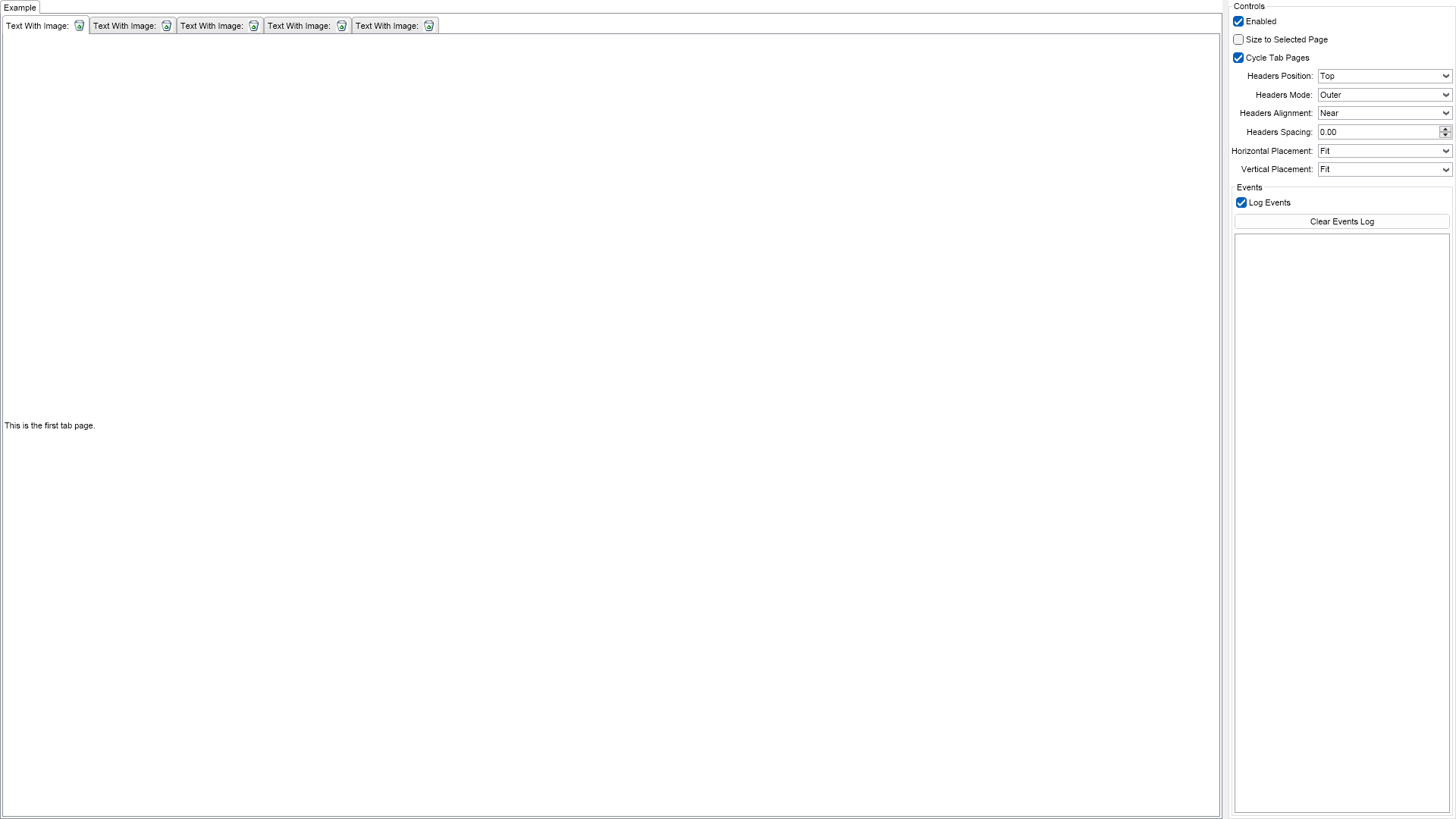
This example demonstrates how to create tab widgets. The tab is a widget that contains tab pages. Their order in the TabPages collection of the tab widget reflects the order they appear in the widget. The SelectedIndex property stores the index of the currently selected tab page. The HeadersPosition property determines the way the tab page headers are position in respect to the tab widget. The possible values are: Left, Top (default), Right and Bottom. You can also specify the spacing between the headers. To do so, use the HeadersSpacing property. The HeadersAlignment property determines how the tab page headers are aligned on the tab widget side they are placed on. The supported values are Near (default), Center and Far. The CycleTablePages instructs the control to cycle pages when the tab has focus and the user presseses the left or right arrow keys.

| Language: C# |
using Nevron.Nov;
using Nevron.Nov.DataStructures;
using Nevron.Nov.Dom;
using Nevron.Nov.Editors;
using Nevron.Nov.Graphics;
using Nevron.Nov.Layout;
using Nevron.Nov.Presentation;
using Nevron.Nov.UI;
using Nevron.Nov.Windows.Forms;
using System.Windows.Forms;
namespace NovWinFormsProject
{
public partial class Form1 : Form
{
#region Constructors
public Form1()
{
InitializeComponent();
// Set form title
Text = "NOV WinForms - NTabExample";
// Create the NOV example and its controls
NWidget exampleContent = CreateExampleContent();
NWidget exampleControls = CreateExampleControls();
if (exampleControls != null)
{
exampleControls.PreferredWidth = 300;
}
// Place the example and its controls in a pair box
NPairBox pairBox = new NPairBox(exampleContent, exampleControls);
pairBox.FillMode = ENStackFillMode.First;
pairBox.FitMode = ENStackFitMode.First;
pairBox.Margins = new NMargins(NDesign.HorizontalSpacing, NDesign.VerticalSpacing);
// Host the example in the form
NNovWidgetHost host = new NNovWidgetHost(pairBox);
host.Dock = DockStyle.Fill;
Controls.Add(host);
}
#endregion
#region Example
public NWidget CreateExampleContent()
{
// create a tab
m_Tab = new NTab();
m_Tab.TabPages.Add(CreatePage("Page 1", "This is the first tab page."));
m_Tab.TabPages.Add(CreatePage("Page 2", "This is the second tab page."));
m_Tab.TabPages.Add(CreatePage("Page 3", "This is the third tab page.\nIt is the largest both horizontally and vertically."));
m_Tab.TabPages.Add(CreatePage("Page 4", "This is the fourth tab page."));
m_Tab.TabPages.Add(CreatePage("Page 5", "This is the fifth tab page."));
m_Tab.SelectedIndex = 0;
m_Tab.SelectedIndexChanged += OnTabSelectedIndexChanged;
// host it
return m_Tab;
}
public NWidget CreateExampleControls()
{
NList editors = NDesigner.GetDesigner(m_Tab).CreateMemberEditors(
m_Tab,
NTab.EnabledProperty,
NTab.SizeToSelectedPageProperty,
NTab.CycleTabPagesProperty,
NTab.HeadersPositionProperty,
NTab.HeadersModeProperty,
NTab.HeadersAlignmentProperty,
NTab.HeadersSpacingProperty,
NTab.HorizontalPlacementProperty,
NTab.VerticalPlacementProperty);
NStackPanel stack = new NStackPanel();
stack.FillMode = ENStackFillMode.Last;
stack.FitMode = ENStackFitMode.Last;
for (int i = 0; i < editors.Count; i++)
{
stack.Add(editors[i]);
}
// create the events list box
m_EventsLog = new NExampleEventsLog();
stack.Add(m_EventsLog);
return new NUniSizeBoxGroup(stack);
}
public string GetExampleDescription()
{
return @"
This example demonstrates how to create tab widgets. The tab is a widget that contains tab pages. Their order in the
TabPages collection of the tab widget reflects the order they appear in the widget. The SelectedIndex
property stores the index of the currently selected tab page. The HeadersPosition property determines the
way the tab page headers are position in respect to the tab widget. The possible values are: Left, Top
(default), Right and Bottom. You can also specify the spacing between the headers. To do so, use the
HeadersSpacing property. The HeadersAlignment property determines how the tab page headers are aligned
on the tab widget side they are placed on. The supported values are Near (default), Center and Far.
The CycleTablePages instructs the control to cycle pages when the tab has focus and the user presseses the left
or right arrow keys.
";
}
///
/// Gets the relevant documentation links for the example
///
///
public (string Name, string Url)[] GetDocumentationUrls()
{
return new[]
{
("Tab", "https://www.nevron.com/docs/openvision/ui-tab.html"),
("Containers Overview", "https://www.nevron.com/docs/openvision/ui-containers-overview.html"),
};
}
#endregion
#region Implementation
private NTabPage CreatePage(string name, string content)
{
NTabPage tabPage = new NTabPage(name, content);
tabPage.Header.Content = NPairBox.Create("Text With Image:", new NImageBox(Nevron.Nov.Graphics.NImage.FromBytes(Nevron.Nov.NConvert.FromBase64String("iVBORw0KGgoAAAANSUhEUgAAABAAAAAQCAIAAACQkWg2AAABtUlEQVR42o2RA4wkURBAO/Z07JxjHONbW9Hatm3btm3btm3bNmts1DdeEXmnlof7x3eWQgDu7x7i0vKd/WMsXYJsPEJhhq5j4SqgYCqvbXF9dUMF3N3dB0enuEdkdnR0XFxcvDy/kJ43NjY6e4YsPKOAIQN5Ve1WrsGgLyajdGZhFZjrewID+56B0cmZJX1zBwLw8PDoH5XhGZLkE5HqExAKM2WHe+gyGqb/eKXIFuCK6AmVgJ3tc2yvnjjlkVAgA2ABjNInZBsHTJ2/RFeMQuhkoKC8sbKmifRv/mUDU40JXwy/fsf+7tp/sQ5IdfePIAMLK5uRKUUk4FP3J8QIQTWRnM1WAKrWXyGG0ck5MoCP+wLk4cJ90f1z0me4/On5E7VCu9axAfwVVb25viUDeK9mF9cmLifgNz6emM7Sz5Zo9GBrRsuShLwObaUHR6YKSip3Hk61G00QLQQRw3aeyJ/VC6fWEaWmruG0wPr6BiQXNpBcfDbx4YJL0gaueWX1tABIbEZZ7dA6/NsmJidr/hUCEFOzPjg4ZABMTC8q6lr9+MWF77//i0MH75OzS25ubmkBzuUDyRRobn6CnbIAAAAASUVORK5CYII="))));
return tabPage;
}
#endregion
#region Event Handlers
private void OnHeadersPositionComboSelectedIndexChanged(NValueChangeEventArgs args)
{
NComboBox combo = (NComboBox)args.TargetNode;
ENTabHeadersPosition headersPosition = (ENTabHeadersPosition)args.NewValue;
m_Tab.HeadersPosition = headersPosition;
}
private void OnHeadersSpacingComboSelectedIndexChanged(NValueChangeEventArgs args)
{
NComboBox combo = (NComboBox)args.TargetNode;
m_Tab.HeadersSpacing = combo.SelectedIndex;
}
private void OnTabSelectedIndexChanged(NValueChangeEventArgs args)
{
m_EventsLog.LogEvent("Selected Index: " + args.NewValue);
}
#endregion
#region Fields
private NTab m_Tab;
private NExampleEventsLog m_EventsLog;
#endregion
#region Static Methods
#endregion
#region Constants
#endregion
#region Nested Types
#endregion
}
} | Language: VB.NET |
Imports Nevron.Nov
Imports Nevron.Nov.Dom
Imports Nevron.Nov.Editors
Imports Nevron.Nov.Graphics
Imports Nevron.Nov.Layout
Imports Nevron.Nov.Presentation
Imports Nevron.Nov.UI
Imports Nevron.Nov.Windows.Forms
Public Class Form1
#Region "Constructors"
Public Sub New()
' This call is required by the designer.
InitializeComponent()
' Add any initialization after the InitializeComponent() call.
' Set form title
Text = "NOV WinForms - NTabExample"
' Create the NOV example and its controls
Dim exampleContent As NWidget = CreateExampleContent()
Dim exampleControls As NWidget = CreateExampleControls()
If Not exampleControls Is Nothing Then
exampleControls.PreferredWidth = 300
End If
' Place the example and its controls in a pair box
Dim pairBox As NPairBox = New NPairBox(exampleContent, exampleControls)
pairBox.FillMode = ENStackFillMode.First
pairBox.FitMode = ENStackFitMode.First
pairBox.Margins = New NMargins(NDesign.HorizontalSpacing, NDesign.VerticalSpacing)
' Host the example in the form
Dim host As NNovWidgetHost(Of NWidget) = New NNovWidgetHost(Of NWidget)(pairBox)
host.Dock = DockStyle.Fill
Controls.Add(host)
End Sub
#End Region
#Region "Example"
Public Function CreateExampleContent() As NWidget
' create a tab
m_Tab = New NTab()
m_Tab.TabPages.Add(CreatePage("Page 1", "This is the first tab page."))
m_Tab.TabPages.Add(CreatePage("Page 2", "This is the second tab page."))
m_Tab.TabPages.Add(CreatePage("Page 3", "This is the third tab page." & vbLf & "It is the largest both horizontally and vertically."))
m_Tab.TabPages.Add(CreatePage("Page 4", "This is the fourth tab page."))
m_Tab.TabPages.Add(CreatePage("Page 5", "This is the fifth tab page."))
m_Tab.SelectedIndex = 0
Me.m_Tab.SelectedIndexChanged += AddressOf OnTabSelectedIndexChanged
' host it
Return m_Tab
End Function
Public Function CreateExampleControls() As NWidget
Dim editors = NDesigner.GetDesigner(m_Tab).CreateMemberEditors(m_Tab, NInputElement.EnabledProperty, NTab.SizeToSelectedPageProperty, NTab.CycleTabPagesProperty, NTab.HeadersPositionProperty, NTab.HeadersModeProperty, NTab.HeadersAlignmentProperty, NTab.HeadersSpacingProperty, NWidget.HorizontalPlacementProperty, NWidget.VerticalPlacementProperty)
Dim stack As NStackPanel = New NStackPanel()
stack.FillMode = ENStackFillMode.Last
stack.FitMode = ENStackFitMode.Last
For i = 0 To editors.Count - 1
stack.Add(editors(i))
Next
' create the events list box
m_EventsLog = New NExampleEventsLog()
stack.Add(m_EventsLog)
Return New NUniSizeBoxGroup(stack)
End Function
Public Function GetExampleDescription() As String
Return "
This example demonstrates how to create tab widgets. The tab is a widget that contains tab pages. Their order in the
TabPages collection of the tab widget reflects the order they appear in the widget. The SelectedIndex
property stores the index of the currently selected tab page. The HeadersPosition property determines the
way the tab page headers are position in respect to the tab widget. The possible values are: Left, Top
(default), Right and Bottom. You can also specify the spacing between the headers. To do so, use the
HeadersSpacing property. The HeadersAlignment property determines how the tab page headers are aligned
on the tab widget side they are placed on. The supported values are Near (default), Center and Far.
The CycleTablePages instructs the control to cycle pages when the tab has focus and the user presseses the left
or right arrow keys.
"
End Function
'''
''' Gets the relevant documentation links for the example
'''
'''
Public Function GetDocumentationUrls() As (String, String)()
Return {("Tab", "https://www.nevron.com/docs/openvision/ui-tab.html"), ("Containers Overview", "https://www.nevron.com/docs/openvision/ui-containers-overview.html")}
End Function
#End Region
#Region "Implementation"
Private Function CreatePage(name As String, content As String) As NTabPage
Dim tabPage As NTabPage = New NTabPage(name, content)
tabPage.Header.Content = NPairBox.Create("Text With Image:", New NImageBox(Nevron.Nov.Graphics.NImage.FromBytes(Nevron.Nov.NConvert.FromBase64String("iVBORw0KGgoAAAANSUhEUgAAABAAAAAQCAIAAACQkWg2AAABtUlEQVR42o2RA4wkURBAO/Z07JxjHONbW9Hatm3btm3btm3bNmts1DdeEXmnlof7x3eWQgDu7x7i0vKd/WMsXYJsPEJhhq5j4SqgYCqvbXF9dUMF3N3dB0enuEdkdnR0XFxcvDy/kJ43NjY6e4YsPKOAIQN5Ve1WrsGgLyajdGZhFZjrewID+56B0cmZJX1zBwLw8PDoH5XhGZLkE5HqExAKM2WHe+gyGqb/eKXIFuCK6AmVgJ3tc2yvnjjlkVAgA2ABjNInZBsHTJ2/RFeMQuhkoKC8sbKmifRv/mUDU40JXwy/fsf+7tp/sQ5IdfePIAMLK5uRKUUk4FP3J8QIQTWRnM1WAKrWXyGG0ck5MoCP+wLk4cJ90f1z0me4/On5E7VCu9axAfwVVb25viUDeK9mF9cmLifgNz6emM7Sz5Zo9GBrRsuShLwObaUHR6YKSip3Hk61G00QLQQRw3aeyJ/VC6fWEaWmruG0wPr6BiQXNpBcfDbx4YJL0gaueWX1tABIbEZZ7dA6/NsmJidr/hUCEFOzPjg4ZABMTC8q6lr9+MWF77//i0MH75OzS25ubmkBzuUDyRRobn6CnbIAAAAASUVORK5CYII="))))
Return tabPage
End Function
#End Region
#Region "Event Handlers"
Private Sub OnHeadersPositionComboSelectedIndexChanged(args As NValueChangeEventArgs)
Dim combo = CType(args.TargetNode, NComboBox)
Dim headersPosition As ENTabHeadersPosition = args.NewValue
m_Tab.HeadersPosition = headersPosition
End Sub
Private Sub OnHeadersSpacingComboSelectedIndexChanged(args As NValueChangeEventArgs)
Dim combo = CType(args.TargetNode, NComboBox)
m_Tab.HeadersSpacing = combo.SelectedIndex
End Sub
Private Sub OnTabSelectedIndexChanged(args As NValueChangeEventArgs)
m_EventsLog.LogEvent("Selected Index: " & args.NewValue.ToString())
End Sub
#End Region
#Region "Fields"
Private m_Tab As NTab
Private m_EventsLog As NExampleEventsLog
#End Region
#Region "Static Methods"
#End Region
#Region "Constants"
#End Region
#Region "Nested Types"
#End Region
End Class