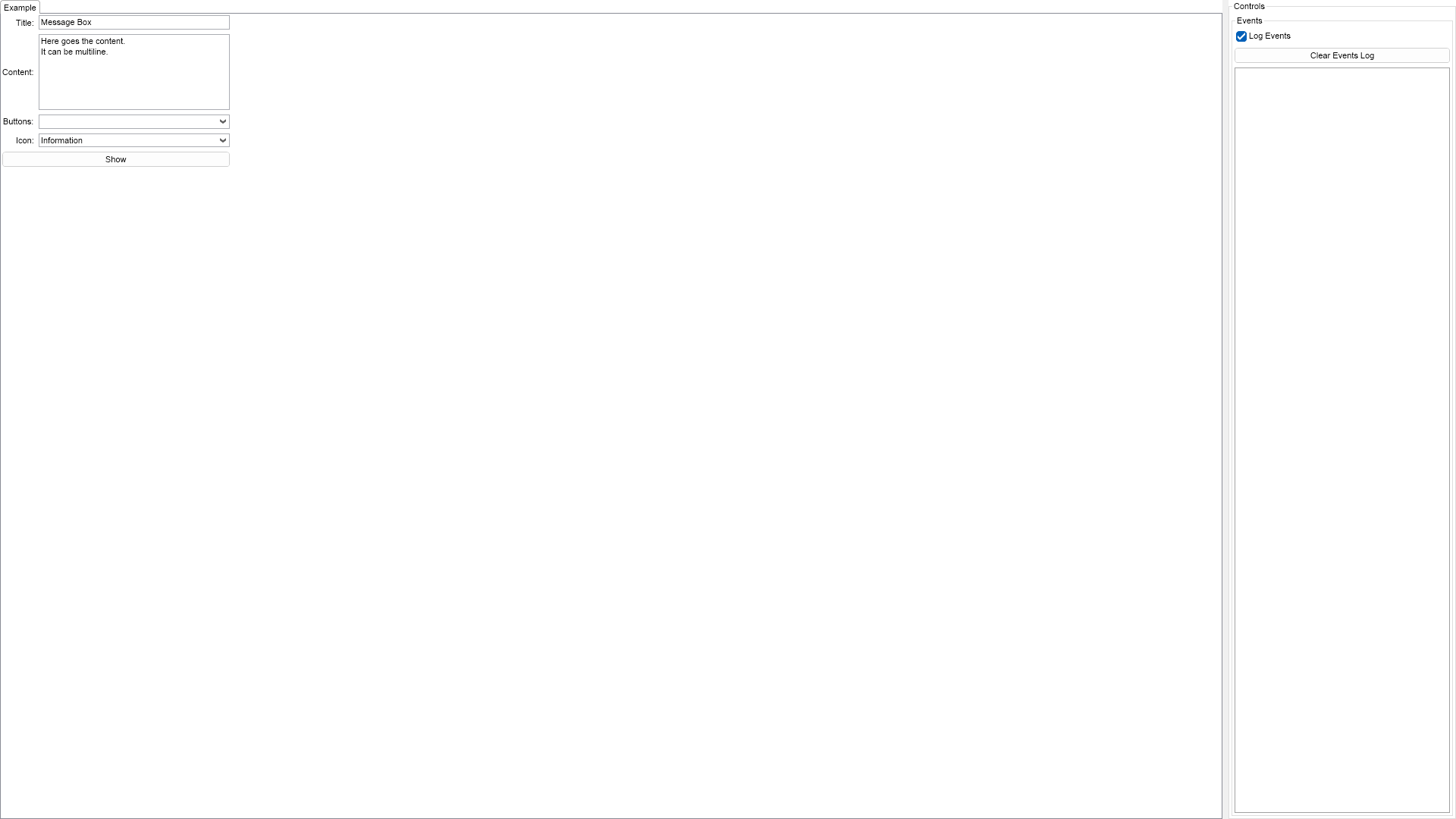
This example demonstrates how to create message boxes in NOV. Use the controls at the top to set the title, the content and the buttons of the message box.

| Language: C# |
using Nevron.Nov;
using Nevron.Nov.Dom;
using Nevron.Nov.Editors;
using Nevron.Nov.Graphics;
using Nevron.Nov.Layout;
using Nevron.Nov.UI;
using Nevron.Nov.Windows.Forms;
using System.Windows.Forms;
namespace NovWinFormsProject
{
public partial class Form1 : Form
{
#region Constructors
public Form1()
{
InitializeComponent();
// Set form title
Text = "NOV WinForms - NMessageBoxExample";
// Create the NOV example and its controls
NWidget exampleContent = CreateExampleContent();
NWidget exampleControls = CreateExampleControls();
if (exampleControls != null)
{
exampleControls.PreferredWidth = 300;
}
// Place the example and its controls in a pair box
NPairBox pairBox = new NPairBox(exampleContent, exampleControls);
pairBox.FillMode = ENStackFillMode.First;
pairBox.FitMode = ENStackFitMode.First;
pairBox.Margins = new NMargins(NDesign.HorizontalSpacing, NDesign.VerticalSpacing);
// Host the example in the form
NNovWidgetHost host = new NNovWidgetHost(pairBox);
host.Dock = DockStyle.Fill;
Controls.Add(host);
}
#endregion
#region Example
public NWidget CreateExampleContent()
{
NStackPanel stack = new NStackPanel();
stack.PreferredWidth = 300;
stack.HorizontalPlacement = ENHorizontalPlacement.Left;
// Create a text box for the message box title
m_TitleTextBox = new NTextBox("Message Box");
stack.Add(CreatePairBox("Title:", m_TitleTextBox));
// Create a text box for the message box content
m_ContentTextBox = new NTextBox("Here goes the content.\nIt can be multiline.");
m_ContentTextBox.Multiline = true;
m_ContentTextBox.AcceptsEnter = true;
m_ContentTextBox.AcceptsTab = true;
m_ContentTextBox.PreferredHeight = 100;
m_ContentTextBox.HScrollMode = ENScrollMode.WhenNeeded;
m_ContentTextBox.VScrollMode = ENScrollMode.WhenNeeded;
m_ContentTextBox.WordWrap = false;
stack.Add(CreatePairBox("Content:", m_ContentTextBox));
// Create the message box buttons combo box
m_ButtonsComboBox = new NComboBox();
m_ButtonsComboBox.Items.FillFromEnum();
stack.Add(CreatePairBox("Buttons:", m_ButtonsComboBox));
// Create the message box icon combo box
m_IconComboBox = new NComboBox();
m_IconComboBox.Items.FillFromEnum();
m_IconComboBox.SelectedIndex = 1;
stack.Add(CreatePairBox("Icon:", m_IconComboBox));
// Create the show button
NLabel label = new NLabel("Show");
label.HorizontalPlacement = ENHorizontalPlacement.Center;
NButton showButton = new NButton(label);
showButton.Click += OnShowButtonClick;
stack.Add(showButton);
return new NUniSizeBoxGroup(stack);
}
public NWidget CreateExampleControls()
{
// Create the events log
m_EventsLog = new NExampleEventsLog();
return m_EventsLog;
}
public string GetExampleDescription()
{
return @"
This example demonstrates how to create message boxes in NOV. Use the controls at the top to set
the title, the content and the buttons of the message box.
";
}
///
/// Gets the relevant documentation links for the example
///
///
public (string Name, string Url)[] GetDocumentationUrls()
{
return new[]
{
("Message Box", "https://www.nevron.com/docs/openvision/ui-message-box.html"),
("Common Dialogs", "https://www.nevron.com/docs/openvision/ui-common-dialogs.html"),
};
}
#endregion
#region Implementation
#endregion
#region Event Handlers
private void OnShowButtonClick(NEventArgs args)
{
NButton button = (NButton)args.TargetNode;
NMessageBoxSettings settings = new NMessageBoxSettings(
m_ContentTextBox.Text, // the message box content
m_TitleTextBox.Text, // the message box title
(ENMessageBoxButtons)m_ButtonsComboBox.SelectedIndex, // the button configuration of the message box
(ENMessageBoxIcon)m_IconComboBox.SelectedIndex, // the icon to use
ENMessageBoxDefaultButton.Button1, // the default focused button
DisplayWindow); // the parent window of the message box
NMessageBox.Show(settings).Then(delegate(ENWindowResult result) // delegate that gets called when the message box is closed
{
m_EventsLog.LogEvent("Message box result: '" + result.ToString() + "'");
});
}
#endregion
#region Fields
private NTextBox m_TitleTextBox;
private NTextBox m_ContentTextBox;
private NComboBox m_ButtonsComboBox;
private NComboBox m_IconComboBox;
private NExampleEventsLog m_EventsLog;
#endregion
#region Static Methods
private static NPairBox CreatePairBox(string text, NWidget widget)
{
NLabel label = new NLabel(text);
label.HorizontalPlacement = ENHorizontalPlacement.Right;
label.VerticalPlacement = ENVerticalPlacement.Center;
widget.VerticalPlacement = ENVerticalPlacement.Center;
return new NPairBox(label, widget, true);
}
#endregion
#region Constants
#endregion
#region Nested Types
#endregion
}
} | Language: VB.NET |
Imports Nevron.Nov
Imports Nevron.Nov.Dom
Imports Nevron.Nov.Graphics
Imports Nevron.Nov.Layout
Imports Nevron.Nov.UI
Imports Nevron.Nov.Windows.Forms
Public Class Form1
#Region "Constructors"
Public Sub New()
' This call is required by the designer.
InitializeComponent()
' Add any initialization after the InitializeComponent() call.
' Set form title
Text = "NOV WinForms - NMessageBoxExample"
' Create the NOV example and its controls
Dim exampleContent As NWidget = CreateExampleContent()
Dim exampleControls As NWidget = CreateExampleControls()
If Not exampleControls Is Nothing Then
exampleControls.PreferredWidth = 300
End If
' Place the example and its controls in a pair box
Dim pairBox As NPairBox = New NPairBox(exampleContent, exampleControls)
pairBox.FillMode = ENStackFillMode.First
pairBox.FitMode = ENStackFitMode.First
pairBox.Margins = New NMargins(NDesign.HorizontalSpacing, NDesign.VerticalSpacing)
' Host the example in the form
Dim host As NNovWidgetHost(Of NWidget) = New NNovWidgetHost(Of NWidget)(pairBox)
host.Dock = DockStyle.Fill
Controls.Add(host)
End Sub
#End Region
#Region "Example"
Public Function CreateExampleContent() As NWidget
Dim stack As NStackPanel = New NStackPanel()
stack.PreferredWidth = 300
stack.HorizontalPlacement = ENHorizontalPlacement.Left
' Create a text box for the message box title
m_TitleTextBox = New NTextBox("Message Box")
stack.Add(CreatePairBox("Title:", m_TitleTextBox))
' Create a text box for the message box content
m_ContentTextBox = New NTextBox("Here goes the content." & vbLf & "It can be multiline.")
m_ContentTextBox.Multiline = True
m_ContentTextBox.AcceptsEnter = True
m_ContentTextBox.AcceptsTab = True
m_ContentTextBox.PreferredHeight = 100
m_ContentTextBox.HScrollMode = ENScrollMode.WhenNeeded
m_ContentTextBox.VScrollMode = ENScrollMode.WhenNeeded
m_ContentTextBox.WordWrap = False
stack.Add(CreatePairBox("Content:", m_ContentTextBox))
' Create the message box buttons combo box
m_ButtonsComboBox = New NComboBox()
m_ButtonsComboBox.Items.FillFromEnum(Of ENMessageBoxButtons)()
stack.Add(CreatePairBox("Buttons:", m_ButtonsComboBox))
' Create the message box icon combo box
m_IconComboBox = New NComboBox()
m_IconComboBox.Items.FillFromEnum(Of ENMessageBoxIcon)()
m_IconComboBox.SelectedIndex = 1
stack.Add(CreatePairBox("Icon:", m_IconComboBox))
' Create the show button
Dim label As NLabel = New NLabel("Show")
label.HorizontalPlacement = ENHorizontalPlacement.Center
Dim showButton As NButton = New NButton(label)
showButton.Click += AddressOf OnShowButtonClick
stack.Add(showButton)
Return New NUniSizeBoxGroup(stack)
End Function
Public Function CreateExampleControls() As NWidget
' Create the events log
m_EventsLog = New NExampleEventsLog()
Return m_EventsLog
End Function
Public Function GetExampleDescription() As String
Return "
This example demonstrates how to create message boxes in NOV. Use the controls at the top to set
the title, the content and the buttons of the message box.
"
End Function
'''
''' Gets the relevant documentation links for the example
'''
'''
Public Function GetDocumentationUrls() As (String, String)()
Return {("Message Box", "https://www.nevron.com/docs/openvision/ui-message-box.html"), ("Common Dialogs", "https://www.nevron.com/docs/openvision/ui-common-dialogs.html")}
End Function
#End Region
#Region "Implementation"
#End Region
#Region "Event Handlers"
Private Sub OnShowButtonClick(args As NEventArgs)
Dim button = CType(args.TargetNode, NButton)
Dim settings As NMessageBoxSettings = New NMessageBoxSettings(m_ContentTextBox.Text, m_TitleTextBox.Text, m_ButtonsComboBox.SelectedIndex, m_IconComboBox.SelectedIndex, ENMessageBoxDefaultButton.Button1, DisplayWindow) ' the message box content
' the message box title
' the button configuration of the message box
' the icon to use
' the default focused button
' the parent window of the message box
Call NMessageBox.Show(CType(settings, NMessageBoxSettings)).[Then](Sub(result As ENWindowResult) m_EventsLog.LogEvent("Message box result: '" & result.ToString() & "'")) ' delegate that gets called when the message box is closed
End Sub
#End Region
#Region "Fields"
Private m_TitleTextBox As NTextBox
Private m_ContentTextBox As NTextBox
Private m_ButtonsComboBox As NComboBox
Private m_IconComboBox As NComboBox
Private m_EventsLog As NExampleEventsLog
#End Region
#Region "Static Methods"
Private Shared Function CreatePairBox(text As String, widget As NWidget) As NPairBox
Dim label As NLabel = New NLabel(text)
label.HorizontalPlacement = ENHorizontalPlacement.Right
label.VerticalPlacement = ENVerticalPlacement.Center
widget.VerticalPlacement = ENVerticalPlacement.Center
Return New NPairBox(label, widget, True)
End Function
#End Region
#Region "Constants"
#End Region
#Region "Nested Types"
#End Region
End Class