Imports Nevron.Nov
Imports Nevron.Nov.Dom
Imports Nevron.Nov.Graphics
Imports Nevron.Nov.Layout
Imports Nevron.Nov.UI
Imports Nevron.Nov.Windows.Forms
Imports System.Text

Public Class Form1

#Region "Constructors"

    Public Sub New()
        ' This call is required by the designer.
        InitializeComponent()

        ' Add any initialization after the InitializeComponent() call.

        ' Set form title
        Text = "NOV WinForms - NTaskDialogExample"

        ' Create the NOV example and its controls
        Dim exampleContent As NWidget = CreateExampleContent()
        Dim exampleControls As NWidget = CreateExampleControls()
        If Not exampleControls Is Nothing Then
            exampleControls.PreferredWidth = 300
        End If

        ' Place the example and its controls in a pair box
        Dim pairBox As NPairBox = New NPairBox(exampleContent, exampleControls)
        pairBox.FillMode = ENStackFillMode.First
        pairBox.FitMode = ENStackFitMode.First
        pairBox.Margins = New NMargins(NDesign.HorizontalSpacing, NDesign.VerticalSpacing)

        ' Host the example in the form
        Dim host As NNovWidgetHost(Of NWidget) = New NNovWidgetHost(Of NWidget)(pairBox)
        host.Dock = DockStyle.Fill
        Controls.Add(host)
    End Sub


#End Region

#Region "Example"

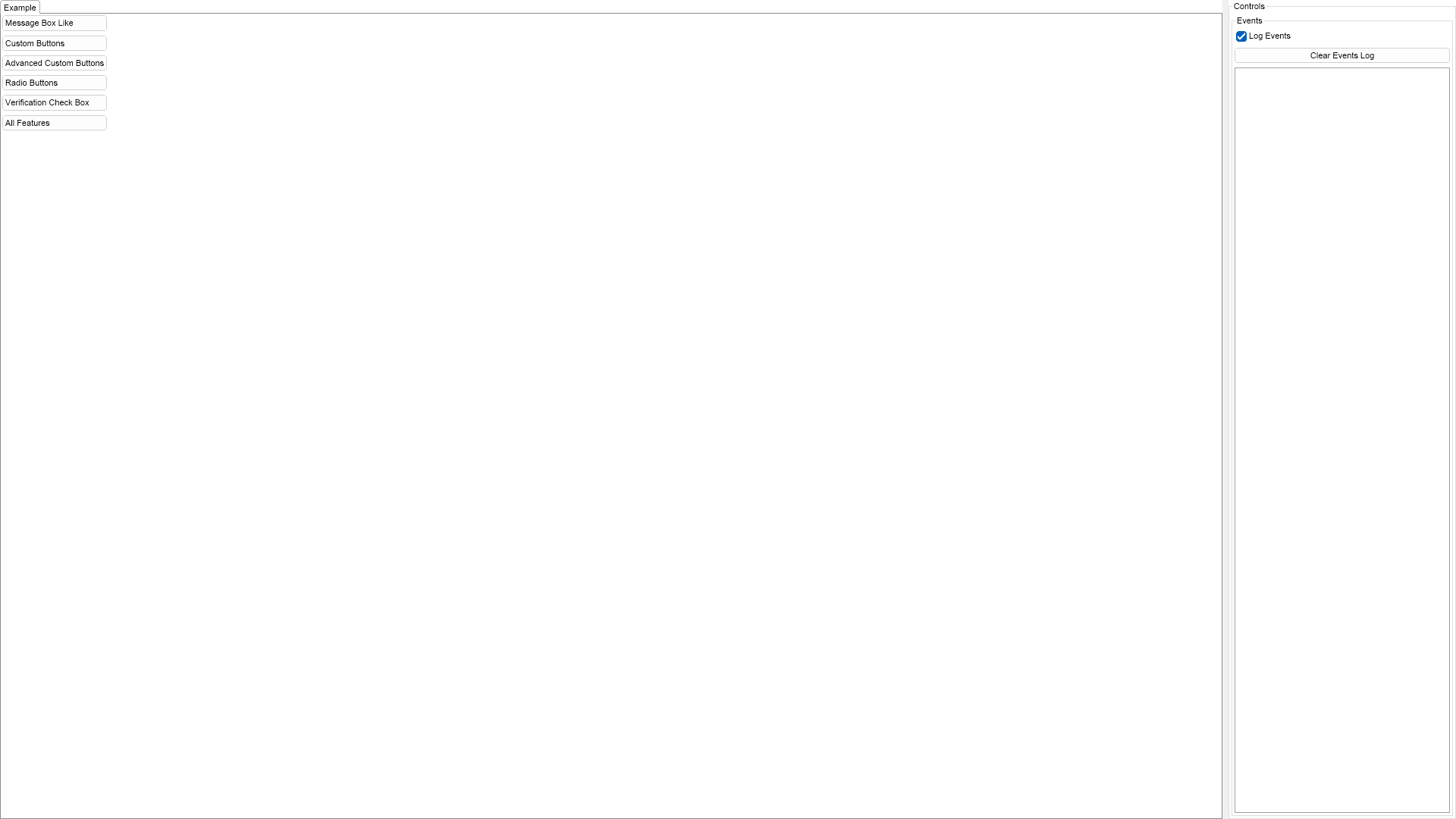
        Public Function CreateExampleContent() As NWidget
            Dim stack As NStackPanel = New NStackPanel()
            stack.HorizontalPlacement = ENHorizontalPlacement.Left

            Dim messageBoxLikeButton As NButton = New NButton("Message Box Like")
            messageBoxLikeButton.Click += AddressOf OnMessageBoxLikeButtonClick
            stack.Add(messageBoxLikeButton)

            Dim customButtonsButton As NButton = New NButton("Custom Buttons")
            customButtonsButton.Click += AddressOf OnCustomButtonsButtonClick
            stack.Add(customButtonsButton)

            Dim advancedCustomButtonsButton As NButton = New NButton("Advanced Custom Buttons")
            advancedCustomButtonsButton.Click += AddressOf OnAdvancedCustomButtonsButtonClick
            stack.Add(advancedCustomButtonsButton)

            Dim radioButtonsButton As NButton = New NButton("Radio Buttons")
            radioButtonsButton.Click += AddressOf OnRadioButtonsButtonClick
            stack.Add(radioButtonsButton)

            Dim verificationButton As NButton = New NButton("Verification Check Box")
            verificationButton.Click += AddressOf OnVerificationButtonClick
            stack.Add(verificationButton)

            Dim allFeaturesButton As NButton = New NButton("All Features")
            allFeaturesButton.Click += AddressOf OnAllFeaturesButtonClick
            stack.Add(allFeaturesButton)

            Return stack
        End Function
        Public Function CreateExampleControls() As NWidget
            m_EventsLog = New NExampleEventsLog()
            Return m_EventsLog
        End Function
        Public Function GetExampleDescription() As String
            Return "

	This example demonstrates how to create task dialogs in NOV. Click any of the buttons above to show
	a preconfigured task dialog, which demonstrates different task dialog features.

"
        End Function

        '''
        ''' Gets the relevant documentation links for the example
        '''
        '''
        Public Function GetDocumentationUrls() As (String, String)()
            Return {("Task Dialog", "https://www.nevron.com/docs/openvision/ui-task-dialog.html"), ("Common Dialogs", "https://www.nevron.com/docs/openvision/ui-common-dialogs.html")}
        End Function

#End Region

#Region "Implementation"
#End Region

#Region "Event Handlers"

        Private Sub OnMessageBoxLikeButtonClick(arg As NEventArgs)
            Dim taskDialog = NTaskDialog.Create(DisplayWindow)
            taskDialog.Title = "Task Dialog"
            taskDialog.Header = New NTaskDialogHeader(ENMessageBoxIcon.Question, "Do you want to save the changes?")
            taskDialog.Buttons = ENTaskDialogButton.Yes Or ENTaskDialogButton.No Or ENTaskDialogButton.Cancel

            ' Change the texts of the Yes and No buttons
            Dim stack As NStackPanel = taskDialog.ButtonStrip.GetPredefinedButtonsStack()
            Dim label = CType(stack(0).GetFirstDescendant(NLabel.NLabelSchema), NLabel)
            label.Text = "Save"

            label = CType(stack(1).GetFirstDescendant(NLabel.NLabelSchema), NLabel)
            label.Text = "Don't Save"

            ' Subscribe to the Closed event and open the task dialog
            taskDialog.Closed += AddressOf OnTaskDialogClosed
            taskDialog.Open()
        End Sub
        Private Sub OnCustomButtonsButtonClick(arg As NEventArgs)
            Dim taskDialog = NTaskDialog.Create(DisplayWindow)
            taskDialog.Title = "Task Dialog"
            taskDialog.Header = New NTaskDialogHeader(ENMessageBoxIcon.Information, "This is a task dialog with custom buttons.")
            taskDialog.CustomButtons = New NTaskDialogCustomButtonCollection("Custom Button 1", "Custom Button 2", "Custom Button 3")

            ' Subscribe to the Closed event and open the task dialog
            taskDialog.Closed += AddressOf OnTaskDialogClosed
            taskDialog.Open()
        End Sub
        Private Sub OnAdvancedCustomButtonsButtonClick(arg As NEventArgs)
            Dim taskDialog = NTaskDialog.Create(DisplayWindow)
            taskDialog.Title = "Task Dialog"
            taskDialog.Header = New NTaskDialogHeader(ENMessageBoxIcon.Information, "This is a task dialog with custom buttons.")
            taskDialog.Content = New NLabel("These custom buttons contain a symbol/image, a title and a description.")

            ' Create some custom buttons
            taskDialog.CustomButtons = New NTaskDialogCustomButtonCollection()
            taskDialog.CustomButtons.Add(New NTaskDialogCustomButton("Title Only"))
            taskDialog.CustomButtons.Add(New NTaskDialogCustomButton("Title and Description", "This button has a title and a description."))
            taskDialog.CustomButtons.Add(New NTaskDialogCustomButton(NTaskDialogCustomButton.CreateDefaultSymbol(), "Symbol, Title, and Description", "This button has a symbol, a title and a description."))
            taskDialog.CustomButtons.Add(New NTaskDialogCustomButton(Nevron.Nov.Graphics.NImage.FromBytes(Nevron.Nov.NConvert.FromBase64String("iVBORw0KGgoAAAANSUhEUgAAABAAAAAQCAYAAAAf8/9hAAACs0lEQVR4Aa2SA8wtRwBGz+xePtu2bSus7Tao7aBmVEW1bdvus237v76rUad2o/cli8E5Q8G/5IHnl/TMeP4juYyYDbEslaP37rz+HBfVcPPNGyx/yl8E9z21tHne46JmTdJ3jB+RpmfHEMI9rFpdYUNxgFy1cfeVqlR4/OabTw3+Irj5sS9zXZq2nJ7xvLub5LzBh8/Ik04nqFoFL9iPF29Cl3fxwc4j2Liz/KZo0uayy8+asB1APPDEkh7C98/o1FbcOnawT4f2GiKDTkKELCCCA4hwF7gHvZNdyWS+2zPEzF2+7+TmLdt+KR55dunanu1U/9mjKtC07f/C+F1BFtG17XwbXcji3W1eT6VTqf6zhy5F1ZvhBWVE7Kbs1i2S3WACLMoJI2QkMXI1SRjgmYDpmWtZqh87NmWBoJLg9TuG1N921gKJAe0e5R4Ta4xOKJRL1BdfwI4dB0lh4eONg5jaPiSX8dm9v0KzplmEEFgLBovwfIyxlKqSlq1aUIpCPtx83M99UsYY2nbpzxdzdzB7QhdatcjzyQ+7fga0/ukxaGXBCKZN68reAwf45vNN1LvMQe394hfB5GFtmJcWfL1oL77n0Tjnk836GPMTDArBwUKNL77YQakW4HXoRN/BHZk71/wiMMDAfq346oftjBrcmnHDOuE5kbFQk1CWgtZ1yVdfb2bXxiqTZ46mEoGSTuCmSNU9r7y1jsmjOzB8cDsH+kQGImVxnFuzdeUMfUf1JRAp5j8/FztmLFprnEDz4qtrGDagNYOHtKMWCwqRppoIlDFECURSuMeSSOjYq5e71pLK59872LpHaUaM7kzfPi1YX4A9ZaiEPuW6RUkPYwRBoB1sqQcGqSBo1JtaY0Wzov1lCd+9s4TPY0kcJURhTOL+ZSJRTm6t5bfY31/QDMshyY/gFJCcZo3GBQAAAABJRU5ErkJggg==")), "Image, Title and Description", "This button has an icon, a title and a description."))

            ' Subscribe to the Closed event and open the task dialog
            taskDialog.Closed += AddressOf OnTaskDialogClosed
            taskDialog.Open()
        End Sub
        Private Sub OnRadioButtonsButtonClick(arg As NEventArgs)
            Dim taskDialog = NTaskDialog.Create(DisplayWindow)
            taskDialog.Title = "Task Dialog"
            taskDialog.Header = New NTaskDialogHeader(ENMessageBoxIcon.Information, "This is a task dialog with radio buttons.")
            taskDialog.RadioButtonGroup = New NTaskDialogRadioButtonGroup("Radio Button 1", "Radio Button 2")
            taskDialog.Buttons = ENTaskDialogButton.OK

            ' Subscribe to the Closed event and open the task dialog
            taskDialog.Closed += AddressOf OnTaskDialogClosed
            taskDialog.Open()
        End Sub
        Private Sub OnVerificationButtonClick(arg As NEventArgs)
            Dim taskDialog = NTaskDialog.Create(DisplayWindow)
            taskDialog.Title = "Task Dialog"
            taskDialog.Header = New NTaskDialogHeader(ENMessageBoxIcon.Information, "This is the header.")
            taskDialog.Content = New NLabel("This is the content.")
            taskDialog.VerificationCheckBox = New NCheckBox("This is the verification check box.")
            taskDialog.Buttons = ENTaskDialogButton.OK Or ENTaskDialogButton.Cancel

            ' Subscribe to the Closed event and open the task dialog
            taskDialog.Closed += AddressOf OnTaskDialogClosed
            taskDialog.Open()
        End Sub
        Private Sub OnAllFeaturesButtonClick(arg As NEventArgs)
            Dim taskDialog = NTaskDialog.Create(DisplayWindow)
            taskDialog.Title = "Task Dialog"

            ' Add header and content
            taskDialog.Header = New NTaskDialogHeader(ENMessageBoxIcon.Information, "This is the header.")
            taskDialog.Content = New NLabel("This is the content.")

            ' Add some radio buttons and custom buttons
            taskDialog.RadioButtonGroup = New NTaskDialogRadioButtonGroup("Radio Button 1", "Radio Button 2", "Radio Button 3")
            taskDialog.CustomButtons = New NTaskDialogCustomButtonCollection("Custom Button 1", "Custom Button 2", "Custom Button 3")

            ' Set the common buttons
            taskDialog.Buttons = ENTaskDialogButton.OK Or ENTaskDialogButton.Cancel

            ' Add a verification check box and a footer
            taskDialog.VerificationCheckBox = New NCheckBox("This is the verification check box.")
            taskDialog.Footer = New NLabel("This is the footer.")

            ' Subscribe to the Closed event and open the task dialog
            taskDialog.Closed += AddressOf OnTaskDialogClosed
            taskDialog.Open()
        End Sub

        Private Sub OnTaskDialogClosed(arg As NEventArgs)
            Dim taskDialog = CType(arg.TargetNode, NTaskDialog)
            Dim radioButtonIndex = If(taskDialog.RadioButtonGroup IsNot Nothing, taskDialog.RadioButtonGroup.SelectedIndex, -1)
            Dim verificationChecked = If(taskDialog.VerificationCheckBox IsNot Nothing, taskDialog.VerificationCheckBox.Checked, False)

            Dim sb As StringBuilder = New StringBuilder()
            sb.AppendLine("Task result: " & taskDialog.TaskResult.ToString())
            sb.AppendLine("Radio button: " & radioButtonIndex.ToString())
            sb.AppendLine("Custom button: " & taskDialog.CustomButtonIndex.ToString())
            sb.AppendLine("Verification: " & verificationChecked.ToString())

            m_EventsLog.LogEvent(sb.ToString())
        End Sub

#End Region

#Region "Fields"

        Private m_EventsLog As NExampleEventsLog

#End Region

#Region "Static Methods"
#End Region

#Region "Constants"
#End Region

#Region "Nested Types"
#End Region

End Class

 Chart for .NET
 Diagram for .NET
 User Interface for .NET
 Vision for SSRS
 Chart for SSRS
 Gauge for SSRS
 Map for SSRS
 Barcode for SSRS
 Vision for SharePoint
 Chart for SharePoint
 Gauge for SharePoint
 Map for SharePoint
 Barcode for SharePoint
 Open Vision for .NET


 Vision for .NET