Single Cycle Graph Layout Example for WPF

Nevron NOV Diagram for WPF ships with hundreds of examples with full source code, as part of the Nevron Open Vision Suite. All WPF Diagram examples are also available as a stand-alone Visual Studio solution in C# and VB.NET, which you can download from the links below.

Single Cycle Graph Layout Example for WPF Description

The single cycle layout layouts all graph vertices on a single circle, trying to minimize the number of edge crossings. The most important properties are:

  • Aspect Ratio - determines the aspect (width/height) ratio of the layout. By default set to 1 which layouts the nodes in a circle. A value different from 1 will make the layout order the nodes in an ellipse.
  • AutoSizeRings - if set to true the RingRadius property is automatically calculated to have such value that the total area of the drawing is minimized and there is no node overlapping.
  • RingRadius - determines the size of the radius of the imaginary circle where nodes are placed. This value is automatically determined if the AutoSizeRings property is set to true.

To experiment with their behavior just change the properties of the layout in the property grid and click the Layout button.
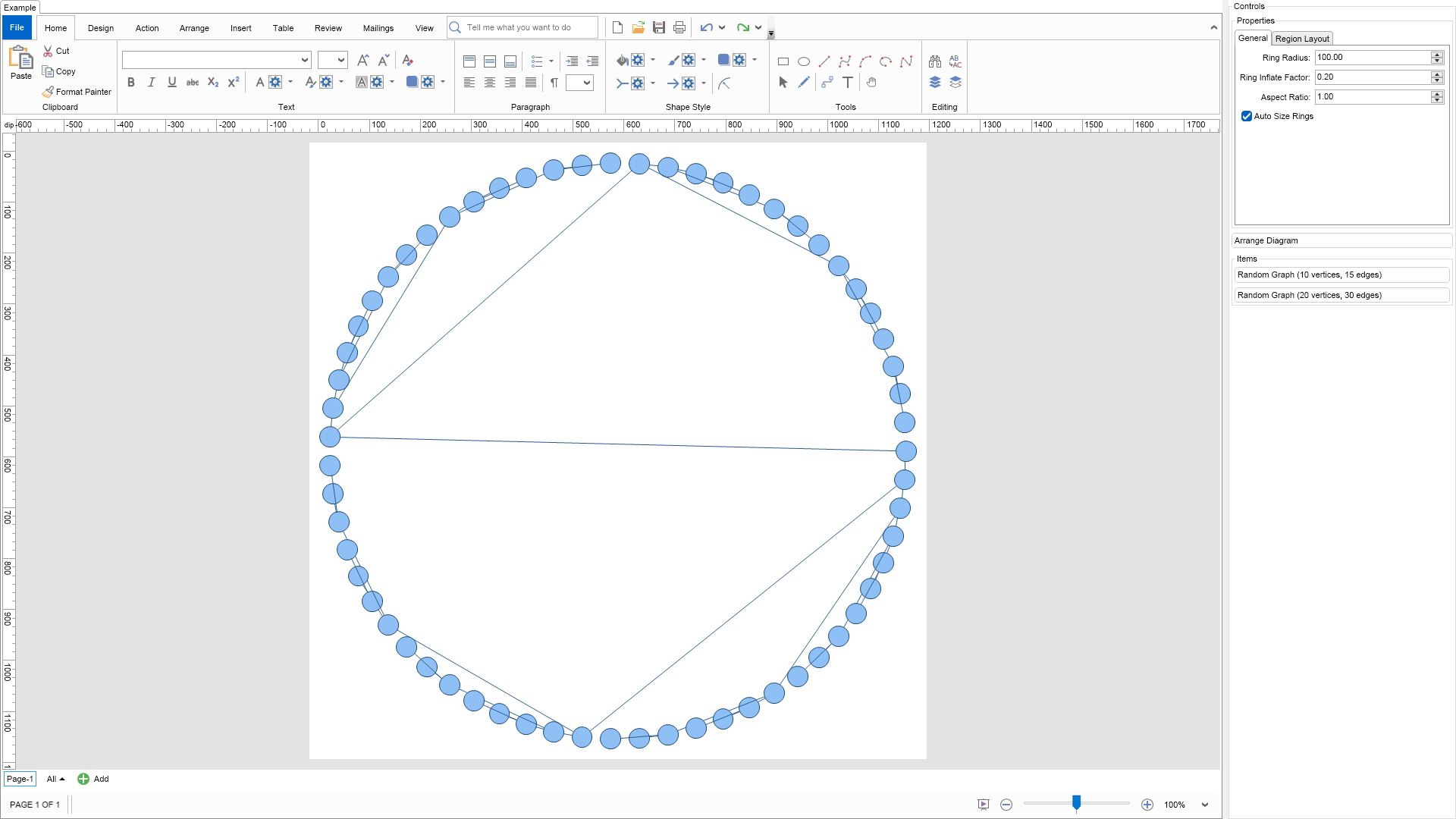

Single Cycle Graph Layout Example

C# Single Cycle Graph Layout Example Code for Nevron Diagram for WPF
Language: C#

using Nevron.Nov;
using Nevron.Nov.DataStructures;
using Nevron.Nov.Diagram;
using Nevron.Nov.Diagram.Layout;
using Nevron.Nov.Diagram.Shapes;
using Nevron.Nov.Dom;
using Nevron.Nov.Editors;
using Nevron.Nov.Graphics;
using Nevron.Nov.Layout;
using Nevron.Nov.UI;
using Nevron.Nov.Windows.Forms;
using System.Windows.Forms;

namespace NovWinFormsProject
{
	public partial class Form1 : Form
	{
		#region Constructors

		public Form1()
		{
			InitializeComponent();

			// Set form title
			Text = "NOV WinForms - NSingleCycleGraphLayoutExample";

			// Create the NOV example and its controls
			NWidget exampleContent = CreateExampleContent();
			NWidget exampleControls = CreateExampleControls();
			if (exampleControls != null)
			{
				exampleControls.PreferredWidth = 300;
			}

			// Place the example and its controls in a pair box
			NPairBox pairBox = new NPairBox(exampleContent, exampleControls);
			pairBox.FillMode = ENStackFillMode.First;
			pairBox.FitMode = ENStackFitMode.First;
			pairBox.Margins = new NMargins(NDesign.HorizontalSpacing, NDesign.VerticalSpacing);

			// Host the example in the form
			NNovWidgetHost host = new NNovWidgetHost(pairBox);
			host.Dock = DockStyle.Fill;
			Controls.Add(host);
		}

		#endregion

		#region Example

		public NWidget CreateExampleContent()
		{
			// Create a simple drawing
			NDrawingViewWithRibbon drawingViewWithRibbon = new NDrawingViewWithRibbon();
			m_DrawingView = drawingViewWithRibbon.View;

			m_DrawingView.Document.HistoryService.Pause();
			try
			{
				InitDiagram(m_DrawingView.Document);
			}
			finally
			{
				m_DrawingView.Document.HistoryService.Resume();
			}

			return drawingViewWithRibbon;
		}
		public NWidget CreateExampleControls()
		{
			m_Layout.Changed += OnLayoutChanged;

			NStackPanel stack = new NStackPanel();

			// property editor
			NEditor editor = NDesigner.GetDesigner(m_Layout).CreateStandaloneEditor(m_Layout);
			stack.Add(new NGroupBox("Properties", editor));

			NButton arrangeButton = new NButton("Arrange Diagram");
			arrangeButton.Click += OnArrangeButtonClick;
			stack.Add(arrangeButton);

			// items stack
			NStackPanel itemsStack = new NStackPanel();

			// NOTE: For Graph layouts we provide the user with the ability to generate random graph diagrams so that he/she can test the layouts
			NButton randomGraph1Button = new NButton("Random Graph (10 vertices, 15 edges)");
			randomGraph1Button.Click += OnRandomGraph1ButtonClick;
			itemsStack.Add(randomGraph1Button);

			NButton randomGraph2Button = new NButton("Random Graph (20 vertices, 30 edges)");
			randomGraph2Button.Click += OnRandomGraph2ButtonClick;
			itemsStack.Add(randomGraph2Button);

			stack.Add(new NGroupBox("Items", itemsStack));

			return stack;
		}
		public string GetExampleDescription()
        {
            return @"

The single cycle layout layouts all graph vertices on a single circle, trying to minimize the number of edge crossings. The most important properties are:

  • Aspect Ratio - determines the aspect (width/height) ratio of the layout. By default set to 1 which layouts the nodes in a circle. A value different from 1 will make the layout order the nodes in an ellipse.
  • AutoSizeRings - if set to true the RingRadius property is automatically calculated to have such value that the total area of the drawing is minimized and there is no node overlapping.
  • RingRadius - determines the size of the radius of the imaginary circle where nodes are placed. This value is automatically determined if the AutoSizeRings property is set to true.

To experiment with their behavior just change the properties of the layout in the property grid and click the Layout button.

"; } /// /// Gets the relevant documentation links for the example /// /// public (string Name, string Url)[] GetDocumentationUrls() { return new[] { ("Single Cycle Graph Layout", "https://www.nevron.com/docs/openvision/diagram-single-cycle-graph-layout.html"), ("Layouts Overview", "https://www.nevron.com/docs/openvision/diagram-drawing-layouts-overview.html"), ("Graph Regions and Regions Layouts", "https://www.nevron.com/docs/openvision/diagram-graph-regions-and-region-layouts.html"), ("Shape Navigation", "https://www.nevron.com/docs/openvision/diagram-shape-navigation.html"), }; } private void InitDiagram(NDrawingDocument drawingDocument) { // Hide ports drawingDocument.Content.ScreenVisibility.ShowPorts = false; // Create a tree NGenericTreeTemplate tree = new NGenericTreeTemplate(); tree.ConnectorType = ENConnectorShape.RoutableConnector; tree.VertexShape = ENBasicShape.Circle; tree.Levels = 6; tree.BranchNodes = 2; tree.HorizontalSpacing = 10; tree.VerticalSpacing = 10; tree.VertexSize = new NSize(40, 40); tree.Create(drawingDocument); // Arrange diagram ArrangeDiagram(drawingDocument); // Fit active page drawingDocument.Content.ActivePage.ZoomMode = ENZoomMode.Fit; } #endregion #region Implementation /// /// Arranges the shapes in the active page. /// /// private void ArrangeDiagram(NDrawingDocument drawingDocument) { // get all top-level shapes that reside in the active page NPage activePage = drawingDocument.Content.ActivePage; NList shapes = activePage.GetShapes(false); // create a layout context and use it to arrange the shapes using the current layout NDrawingLayoutContext layoutContext = new NDrawingLayoutContext(drawingDocument, activePage); m_Layout.Arrange(shapes.CastAll(), layoutContext); // size the page to the content size activePage.SizeToContent(); } #endregion #region Event Handlers private void OnRandomGraph1ButtonClick(NEventArgs arg) { NDrawingDocument drawingDocument = m_DrawingView.Document; drawingDocument.StartHistoryTransaction("Create Random Graph 1"); try { m_DrawingView.ActivePage.Items.Clear(); // create a test tree NRandomGraphTemplate graph = new NRandomGraphTemplate(); graph.EdgeUserClass = NDR.StyleSheetNameConnectors; graph.VertexCount = 10; graph.EdgeCount = 15; graph.VertexShape = VertexShape; graph.VertexSize = VertexSize; graph.Create(drawingDocument); // layout the tree ArrangeDiagram(drawingDocument); } finally { drawingDocument.CommitHistoryTransaction(); } } private void OnRandomGraph2ButtonClick(NEventArgs arg) { NDrawingDocument drawingDocument = m_DrawingView.Document; drawingDocument.StartHistoryTransaction("Create Random Graph 2"); try { m_DrawingView.ActivePage.Items.Clear(); // create a test tree NRandomGraphTemplate graph = new NRandomGraphTemplate(); graph.EdgeUserClass = NDR.StyleSheetNameConnectors; graph.VertexCount = 20; graph.EdgeCount = 30; graph.VertexShape = VertexShape; graph.VertexSize = VertexSize; graph.Create(drawingDocument); // layout the tree ArrangeDiagram(drawingDocument); } finally { drawingDocument.CommitHistoryTransaction(); } } private void OnLayoutChanged(NEventArgs arg) { ArrangeDiagram(m_DrawingView.Document); } protected virtual void OnArrangeButtonClick(NEventArgs arg) { ArrangeDiagram(m_DrawingView.Document); } #endregion #region Fields private NDrawingView m_DrawingView; private NSingleCycleGraphLayout m_Layout = new NSingleCycleGraphLayout(); #endregion #region Static Methods #endregion #region Constants private const ENBasicShape VertexShape = ENBasicShape.Circle; private static readonly NSize VertexSize = new NSize(50, 50); #endregion #region Nested Types #endregion } }

Download a fully functional C# (.cs) Single Cycle Graph Layout Example for WPF Solution

VB.NET Single Cycle Graph Layout Example Code for Nevron Diagram for WPF
Language: VB.NET

Imports Nevron.Nov
Imports Nevron.Nov.Diagram
Imports Nevron.Nov.Diagram.Layout
Imports Nevron.Nov.Diagram.Shapes
Imports Nevron.Nov.Dom
Imports Nevron.Nov.Editors
Imports Nevron.Nov.Graphics
Imports Nevron.Nov.Layout
Imports Nevron.Nov.UI
Imports Nevron.Nov.Windows.Wpf

Class MainWindow

#Region "Constructors"

	Public Sub New()
		' This call is required by the designer.
		InitializeComponent()

		' Add any initialization after the InitializeComponent() call.

		' Set form title
		Title = "NOV WPF - NSingleCycleGraphLayoutExample"

		' Create the NOV example and its controls
		Dim exampleContent As NWidget = CreateExampleContent()
		Dim exampleControls As NWidget = CreateExampleControls()
		If Not exampleControls Is Nothing Then
			exampleControls.PreferredWidth = 300
		End If

		' Place the example and its controls in a pair box
		Dim pairBox As NPairBox = New NPairBox(exampleContent, exampleControls)
		pairBox.FillMode = ENStackFillMode.First
		pairBox.FitMode = ENStackFitMode.First
		pairBox.Margins = New NMargins(NDesign.HorizontalSpacing, NDesign.VerticalSpacing)

		' Host the example in the form
		Dim host As NNovWidgetHost(Of NWidget) = New NNovWidgetHost(Of NWidget)(pairBox)
		Content = host
	End Sub


#End Region

#Region "Example"

        Public Function CreateExampleContent() As NWidget
            ' Create a simple drawing
            Dim drawingViewWithRibbon As NDrawingViewWithRibbon = New NDrawingViewWithRibbon()
            m_DrawingView = drawingViewWithRibbon.View

            m_DrawingView.Document.HistoryService.Pause()
            Try
                InitDiagram(m_DrawingView.Document)
            Finally
                m_DrawingView.Document.HistoryService.Resume()
            End Try

            Return drawingViewWithRibbon
        End Function
        Public Function CreateExampleControls() As NWidget
            Me.m_Layout.Changed += AddressOf OnLayoutChanged

            Dim stack As NStackPanel = New NStackPanel()

            ' property editor
            Dim editor As NEditor = NDesigner.GetDesigner(m_Layout).CreateStandaloneEditor(m_Layout)
            stack.Add(New NGroupBox("Properties", editor))

            Dim arrangeButton As NButton = New NButton("Arrange Diagram")
            arrangeButton.Click += AddressOf OnArrangeButtonClick
            stack.Add(arrangeButton)

            ' items stack
            Dim itemsStack As NStackPanel = New NStackPanel()

            ' NOTE: For Graph layouts we provide the user with the ability to generate random graph diagrams so that he/she can test the layouts
            Dim randomGraph1Button As NButton = New NButton("Random Graph (10 vertices, 15 edges)")
            randomGraph1Button.Click += AddressOf OnRandomGraph1ButtonClick
            itemsStack.Add(randomGraph1Button)

            Dim randomGraph2Button As NButton = New NButton("Random Graph (20 vertices, 30 edges)")
            randomGraph2Button.Click += AddressOf OnRandomGraph2ButtonClick
            itemsStack.Add(randomGraph2Button)

            stack.Add(New NGroupBox("Items", itemsStack))

            Return stack
        End Function
        Public Function GetExampleDescription() As String
            Return "

The single cycle layout layouts all graph vertices on a single circle, trying to minimize the number of edge crossings. The most important properties are:

  • Aspect Ratio - determines the aspect (width/height) ratio of the layout. By default set to 1 which layouts the nodes in a circle. A value different from 1 will make the layout order the nodes in an ellipse.
  • AutoSizeRings - if set to true the RingRadius property is automatically calculated to have such value that the total area of the drawing is minimized and there is no node overlapping.
  • RingRadius - determines the size of the radius of the imaginary circle where nodes are placed. This value is automatically determined if the AutoSizeRings property is set to true.

To experiment with their behavior just change the properties of the layout in the property grid and click the Layout button.

" End Function ''' ''' Gets the relevant documentation links for the example ''' ''' Public Function GetDocumentationUrls() As (String, String)() Return {("Single Cycle Graph Layout", "https://www.nevron.com/docs/openvision/diagram-single-cycle-graph-layout.html"), ("Layouts Overview", "https://www.nevron.com/docs/openvision/diagram-drawing-layouts-overview.html"), ("Graph Regions and Regions Layouts", "https://www.nevron.com/docs/openvision/diagram-graph-regions-and-region-layouts.html"), ("Shape Navigation", "https://www.nevron.com/docs/openvision/diagram-shape-navigation.html")} End Function Private Sub InitDiagram(drawingDocument As NDrawingDocument) ' Hide ports drawingDocument.Content.ScreenVisibility.ShowPorts = False ' Create a tree Dim tree As NGenericTreeTemplate = New NGenericTreeTemplate() tree.ConnectorType = ENConnectorShape.RoutableConnector tree.VertexShape = ENBasicShape.Circle tree.Levels = 6 tree.BranchNodes = 2 tree.HorizontalSpacing = 10 tree.VerticalSpacing = 10 tree.VertexSize = New NSize(40, 40) tree.Create(drawingDocument) ' Arrange diagram ArrangeDiagram(drawingDocument) ' Fit active page drawingDocument.Content.ActivePage.ZoomMode = ENZoomMode.Fit End Sub #End Region #Region "Implementation" ''' ''' Arranges the shapes in the active page. ''' ''' Private Sub ArrangeDiagram(drawingDocument As NDrawingDocument) ' get all top-level shapes that reside in the active page Dim activePage = drawingDocument.Content.ActivePage Dim shapes = activePage.GetShapes(False) ' create a layout context and use it to arrange the shapes using the current layout Dim layoutContext As NDrawingLayoutContext = New NDrawingLayoutContext(drawingDocument, activePage) m_Layout.Arrange(shapes.CastAll(Of Object)(), layoutContext) ' size the page to the content size activePage.SizeToContent() End Sub #End Region #Region "Event Handlers" Private Sub OnRandomGraph1ButtonClick(arg As NEventArgs) Dim drawingDocument = m_DrawingView.Document drawingDocument.StartHistoryTransaction("Create Random Graph 1") Try m_DrawingView.ActivePage.Items.Clear() ' create a test tree Dim graph As NRandomGraphTemplate = New NRandomGraphTemplate() graph.EdgeUserClass = NDR.StyleSheetNameConnectors graph.VertexCount = 10 graph.EdgeCount = 15 graph.VertexShape = VertexShape graph.VertexSize = VertexSize graph.Create(drawingDocument) ' layout the tree ArrangeDiagram(drawingDocument) Finally drawingDocument.CommitHistoryTransaction() End Try End Sub Private Sub OnRandomGraph2ButtonClick(arg As NEventArgs) Dim drawingDocument = m_DrawingView.Document drawingDocument.StartHistoryTransaction("Create Random Graph 2") Try m_DrawingView.ActivePage.Items.Clear() ' create a test tree Dim graph As NRandomGraphTemplate = New NRandomGraphTemplate() graph.EdgeUserClass = NDR.StyleSheetNameConnectors graph.VertexCount = 20 graph.EdgeCount = 30 graph.VertexShape = VertexShape graph.VertexSize = VertexSize graph.Create(drawingDocument) ' layout the tree ArrangeDiagram(drawingDocument) Finally drawingDocument.CommitHistoryTransaction() End Try End Sub Private Sub OnLayoutChanged(arg As NEventArgs) ArrangeDiagram(m_DrawingView.Document) End Sub Protected Overridable Sub OnArrangeButtonClick(arg As NEventArgs) ArrangeDiagram(m_DrawingView.Document) End Sub #End Region #Region "Fields" Private m_DrawingView As NDrawingView Private m_Layout As NSingleCycleGraphLayout = New NSingleCycleGraphLayout() #End Region #Region "Static Methods" #End Region #Region "Constants" Private Const VertexShape As ENBasicShape = ENBasicShape.Circle Private Shared ReadOnly VertexSize As NSize = New NSize(50, 50) #End Region #Region "Nested Types" #End Region End Class

Download a fully functional VB.NET (.vb) Single Cycle Graph Layout Example for WPF Solution