End Points Glue Example for WPF

Nevron NOV Diagram for WPF ships with hundreds of examples with full source code, as part of the Nevron Open Vision Suite. All WPF Diagram examples are also available as a stand-alone Visual Studio solution in C# and VB.NET, which you can download from the links below.

End Points Glue Example for WPF Description

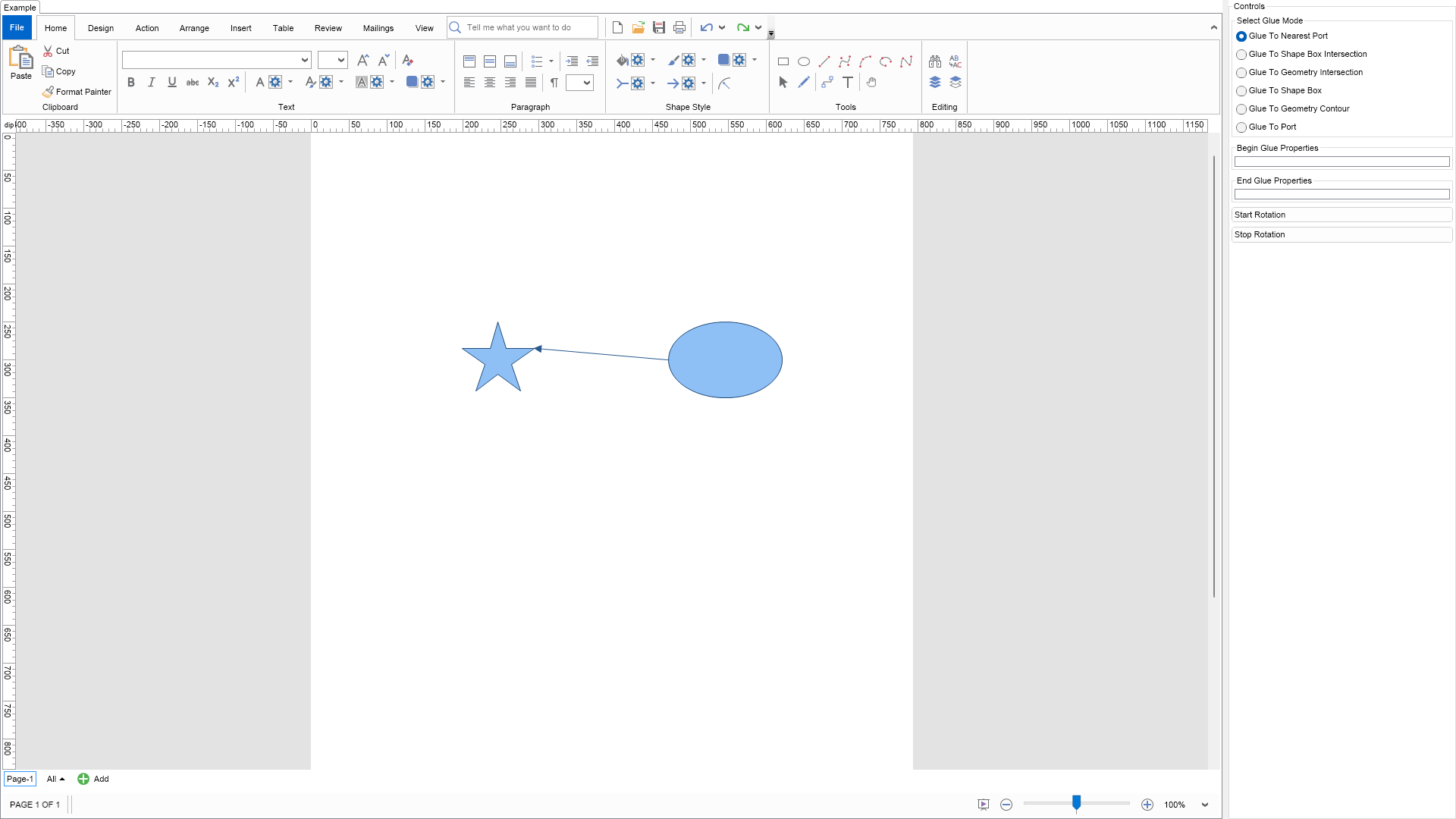
Demonstrates the End-Points glue and the API you can use to glue the begin and end points.

The begin or end point of a 1D shape can be glued in the following ways:

  • Glue To Nearest Port The begin or end point is glued to the nearest port in respect to the other end-point.
  • Glue To Shape Box Intersection The begin or end point is glued to the intersection of the shape box and the line formed by the shape center and the other end-point.
  • Glue To Geometry Intersection The begin or end point is glued to the intersection of the shape geometry and the line formed by the shape center and the other end-point.
  • Glue To Shape Box The begin or end point is glued to a point in the shape Width-Height box. The point is defined in relative coordinates.
  • Glue To Geometry Contour The begin or end point is glued to a point along the shape geometry contour (outline). The point is defined a factor - 0 is the contour begin, 1 is the contour end.
  • Glue To Port The begin or end point is glued to a port of the target shape. The port is defined by its index.


End Points Glue Example

C# End Points Glue Example Code for Nevron Diagram for WPF
Language: C#

using Nevron.Nov;
using Nevron.Nov.Diagram;
using Nevron.Nov.Diagram.Shapes;
using Nevron.Nov.Dom;
using Nevron.Nov.Editors;
using Nevron.Nov.Graphics;
using Nevron.Nov.Layout;
using Nevron.Nov.UI;
using Nevron.Nov.Windows.Forms;
using System;
using System.Windows.Forms;

namespace NovWinFormsProject
{
	public partial class Form1 : Form
	{
		#region Constructors

		public Form1()
		{
			InitializeComponent();

			// Set form title
			Text = "NOV WinForms - NEndPointsGlueExample";

			// Create the NOV example and its controls
			NWidget exampleContent = CreateExampleContent();
			NWidget exampleControls = CreateExampleControls();
			if (exampleControls != null)
			{
				exampleControls.PreferredWidth = 300;
			}

			// Place the example and its controls in a pair box
			NPairBox pairBox = new NPairBox(exampleContent, exampleControls);
			pairBox.FillMode = ENStackFillMode.First;
			pairBox.FitMode = ENStackFitMode.First;
			pairBox.Margins = new NMargins(NDesign.HorizontalSpacing, NDesign.VerticalSpacing);

			// Host the example in the form
			NNovWidgetHost host = new NNovWidgetHost(pairBox);
			host.Dock = DockStyle.Fill;
			Controls.Add(host);
		}

		#endregion

		#region Example

		public NWidget CreateExampleContent()
		{
			// Create a simple drawing
			NDrawingViewWithRibbon drawingViewWithRibbon = new NDrawingViewWithRibbon();
			m_DrawingView = drawingViewWithRibbon.View;

			m_DrawingView.Document.HistoryService.Pause();
			try
			{
				InitDiagram(m_DrawingView.Document);
			}
			finally
			{
				m_DrawingView.Document.HistoryService.Resume();
			}

			m_DrawingView.Registered += OnDrawingViewRegistered;
			m_DrawingView.Unregistered += OnDrawingViewUnregistered;

			return drawingViewWithRibbon;
		}
		public NWidget CreateExampleControls()
		{
			NStackPanel stack = new NStackPanel();
			stack.FillMode = ENStackFillMode.Last;

			// selection mode
			{
				m_RadioGroup = new NRadioButtonGroup();

				NStackPanel radioStack = new NStackPanel();
				m_RadioGroup.Content = radioStack;

				radioStack.Add(new NRadioButton("Glue To Nearest Port"));
				radioStack.Add(new NRadioButton("Glue To Shape Box Intersection"));
				radioStack.Add(new NRadioButton("Glue To Geometry Intersection"));
				radioStack.Add(new NRadioButton("Glue To Shape Box")); ;
				radioStack.Add(new NRadioButton("Glue To Geometry Contour"));
				radioStack.Add(new NRadioButton("Glue To Port"));

				stack.Add(new NGroupBox("Select Glue Mode", m_RadioGroup));
			}

			// glue properties
			{
				NStackPanel holdersStack = new NStackPanel();
				stack.Add(holdersStack);

				m_BeginGlueHolder = new NGroupBox("Begin Glue Properties");
				holdersStack.Add(m_BeginGlueHolder);

				m_EndGlueHolder = new NGroupBox("End Glue Properties");
				holdersStack.Add(m_EndGlueHolder);
			}

			// timer
			{
				NStackPanel timerStack = new NStackPanel();

				NButton startRotationButton = new NButton("Start Rotation");
				startRotationButton.Click += delegate (NEventArgs args) { m_Timer.Start(); };
				timerStack.Add(startRotationButton);

				NButton stopRotationButton = new NButton("Stop Rotation");
				stopRotationButton.Click += delegate (NEventArgs args) { m_Timer.Stop(); };
				timerStack.Add(stopRotationButton);

				stack.Add(timerStack);
			}

			// select the first glue mode
			m_RadioGroup.SelectedIndexChanged += OnRadioGroupSelectedIndexChanged;
			m_RadioGroup.SelectedIndex = 0;

			return stack;
		}
		public string GetExampleDescription()
		{
			return @"

Demonstrates the End-Points glue and the API you can use to glue the begin and end points.

The begin or end point of a 1D shape can be glued in the following ways:

  • Glue To Nearest Port The begin or end point is glued to the nearest port in respect to the other end-point.
  • Glue To Shape Box Intersection The begin or end point is glued to the intersection of the shape box and the line formed by the shape center and the other end-point.
  • Glue To Geometry Intersection The begin or end point is glued to the intersection of the shape geometry and the line formed by the shape center and the other end-point.
  • Glue To Shape Box The begin or end point is glued to a point in the shape Width-Height box. The point is defined in relative coordinates.
  • Glue To Geometry Contour The begin or end point is glued to a point along the shape geometry contour (outline). The point is defined a factor - 0 is the contour begin, 1 is the contour end.
  • Glue To Port The begin or end point is glued to a port of the target shape. The port is defined by its index.

"; } /// /// Gets the relevant documentation links for the example /// /// public (string Name, string Url)[] GetDocumentationUrls() { return new[] { ("Snap and Glue", "https://www.nevron.com/docs/openvision/diagram-snap-and-glue.html"), ("Ports", "https://www.nevron.com/docs/openvision/diagram-ports.html"), ("Routable Connectors", "https://www.nevron.com/docs/openvision/diagram-routable-connectors.html"), }; } private void InitDiagram(NDrawingDocument drawingDocument) { NDrawing drawing = drawingDocument.Content; // Hide the grid drawing.ScreenVisibility.ShowGrid = false; NBasicShapeFactory basicShapes = new NBasicShapeFactory(); NConnectorShapeFactory connectorShapes = new NConnectorShapeFactory(); // Create two shapes and a line connector between them m_BeginShape = basicShapes.CreateShape(ENBasicShape.Ellipse); m_BeginShape.Size = new NSize(150, 100); drawing.ActivePage.Items.Add(m_BeginShape); m_EndShape = basicShapes.CreateShape(ENBasicShape.Pentagram); m_EndShape.Size = new NSize(100, 100); drawing.ActivePage.Items.Add(m_EndShape); m_Connector = connectorShapes.CreateShape(ENConnectorShape.Line); m_Connector.GlueBeginToNearestPort(m_BeginShape); m_Connector.GlueEndToNearestPort(m_EndShape); drawing.ActivePage.Items.Add(m_Connector); // Perform inital layout of shapes OnTimerTick(); } #endregion #region Implementation #endregion #region Event Handlers private void OnDrawingViewRegistered(NEventArgs arg) { m_Timer.Start(); } private void OnDrawingViewUnregistered(NEventArgs arg) { m_Timer.Stop(); } private void OnTimerTick() { NPoint centerOfRotation = new NPoint(m_DrawingView.ActivePage.Bounds.CenterX, 300); const double radius = 150; NPoint beginCenter = centerOfRotation + new NPoint(Math.Cos(m_dAngle) * radius, Math.Sin(m_dAngle) * radius); m_BeginShape.SetBounds(NRectangle.FromCenterAndSize(beginCenter, m_BeginShape.Width, m_BeginShape.Height)); NPoint endCenter = centerOfRotation + new NPoint(Math.Cos(m_dAngle + NMath.PI) * radius, Math.Sin(m_dAngle + NMath.PI) * radius); m_EndShape.SetBounds(NRectangle.FromCenterAndSize(endCenter, m_EndShape.Width, m_EndShape.Height)); m_dAngle += NMath.PI / 180; } private void OnRadioGroupSelectedIndexChanged(NValueChangeEventArgs arg) { switch (m_RadioGroup.SelectedIndex) { case 0: // glue to nearest port m_Connector.GlueBeginToNearestPort(m_BeginShape); m_Connector.GlueEndToNearestPort(m_EndShape); break; case 1: // glue to box intersection m_Connector.GlueBeginToShapeBoxIntersection(m_BeginShape); m_Connector.GlueEndToShapeBoxIntersection(m_EndShape); break; case 2: // glue to box intersection m_Connector.GlueBeginToGeometryIntersection(m_BeginShape); m_Connector.GlueEndToGeometryIntersection(m_EndShape); break; case 3: // glue to box location m_Connector.GlueBeginToShapeBox(m_BeginShape, 0.3d, 0.3d); m_Connector.GlueEndToShapeBox(m_EndShape, 0.3d, 0.3d); break; case 4: // glue to geometry contour m_Connector.GlueBeginToGeometryContour(m_BeginShape, 0.5d); m_Connector.GlueEndToGeometryContour(m_EndShape, 0.5d); break; case 5: // glue to port m_Connector.GlueBeginToPort(m_BeginShape.Ports[0]); m_Connector.GlueEndToPort(m_EndShape.Ports[0]); break; } // update the begin point glue properties if (m_Connector.BeginPointGlue == null) { m_BeginGlueHolder.Content = null; m_BeginGlueHolder.Visibility = ENVisibility.Collapsed; } else { m_BeginGlueHolder.Visibility = ENVisibility.Visible; m_BeginGlueHolder.Content = NDesigner.GetDesigner(m_Connector.BeginPointGlue).CreateStandaloneEditor(m_Connector.BeginPointGlue); } // update the end point glue properties if (m_Connector.EndPointGlue == null) { m_EndGlueHolder.Content = null; m_EndGlueHolder.Visibility = ENVisibility.Collapsed; } else { m_EndGlueHolder.Visibility = ENVisibility.Visible; m_EndGlueHolder.Content = NDesigner.GetDesigner(m_Connector.EndPointGlue).CreateStandaloneEditor(m_Connector.EndPointGlue); } } #endregion #region Fields private NDrawingView m_DrawingView; private NShape m_BeginShape; private NShape m_EndShape; private NShape m_Connector; private NTimer m_Timer = new NTimer(50); private NRadioButtonGroup m_RadioGroup; private NGroupBox m_BeginGlueHolder; private NGroupBox m_EndGlueHolder; private double m_dAngle = 0; #endregion #region Static Methods #endregion #region Constants #endregion #region Nested Types #endregion } }

Download a fully functional C# (.cs) End Points Glue Example for WPF Solution

VB.NET End Points Glue Example Code for Nevron Diagram for WPF
Language: VB.NET

Imports Nevron.Nov
Imports Nevron.Nov.Diagram
Imports Nevron.Nov.Diagram.Shapes
Imports Nevron.Nov.Dom
Imports Nevron.Nov.Editors
Imports Nevron.Nov.Graphics
Imports Nevron.Nov.Layout
Imports Nevron.Nov.UI
Imports Nevron.Nov.Windows.Wpf
Imports System

Class MainWindow

#Region "Constructors"

	Public Sub New()
		' This call is required by the designer.
		InitializeComponent()

		' Add any initialization after the InitializeComponent() call.

		' Set form title
		Title = "NOV WPF - NEndPointsGlueExample"

		' Create the NOV example and its controls
		Dim exampleContent As NWidget = CreateExampleContent()
		Dim exampleControls As NWidget = CreateExampleControls()
		If Not exampleControls Is Nothing Then
			exampleControls.PreferredWidth = 300
		End If

		' Place the example and its controls in a pair box
		Dim pairBox As NPairBox = New NPairBox(exampleContent, exampleControls)
		pairBox.FillMode = ENStackFillMode.First
		pairBox.FitMode = ENStackFitMode.First
		pairBox.Margins = New NMargins(NDesign.HorizontalSpacing, NDesign.VerticalSpacing)

		' Host the example in the form
		Dim host As NNovWidgetHost(Of NWidget) = New NNovWidgetHost(Of NWidget)(pairBox)
		Content = host
	End Sub


#End Region

#Region "Example"

        Public Function CreateExampleContent() As NWidget
            ' Create a simple drawing
            Dim drawingViewWithRibbon As NDrawingViewWithRibbon = New NDrawingViewWithRibbon()
            m_DrawingView = drawingViewWithRibbon.View

            m_DrawingView.Document.HistoryService.Pause()
            Try
                InitDiagram(m_DrawingView.Document)
            Finally
                m_DrawingView.Document.HistoryService.Resume()
            End Try

            Me.m_DrawingView.Registered += AddressOf OnDrawingViewRegistered
            Me.m_DrawingView.Unregistered += AddressOf OnDrawingViewUnregistered

            Return drawingViewWithRibbon
        End Function
        Public Function CreateExampleControls() As NWidget
            Dim stack As NStackPanel = New NStackPanel()
            stack.FillMode = ENStackFillMode.Last

            ' selection mode
            If True Then
                m_RadioGroup = New NRadioButtonGroup()

                Dim radioStack As NStackPanel = New NStackPanel()
                m_RadioGroup.Content = radioStack

                radioStack.Add(New NRadioButton("Glue To Nearest Port"))
                radioStack.Add(New NRadioButton("Glue To Shape Box Intersection"))
                radioStack.Add(New NRadioButton("Glue To Geometry Intersection"))
                radioStack.Add(New NRadioButton("Glue To Shape Box"))
                radioStack.Add(New NRadioButton("Glue To Geometry Contour"))
                radioStack.Add(New NRadioButton("Glue To Port"))

                stack.Add(New NGroupBox("Select Glue Mode", m_RadioGroup))
            End If

            ' glue properties
            If True Then
                Dim holdersStack As NStackPanel = New NStackPanel()
                stack.Add(holdersStack)

                m_BeginGlueHolder = New NGroupBox("Begin Glue Properties")
                holdersStack.Add(m_BeginGlueHolder)

                m_EndGlueHolder = New NGroupBox("End Glue Properties")
                holdersStack.Add(m_EndGlueHolder)
            End If

            ' timer
            If True Then
                Dim timerStack As NStackPanel = New NStackPanel()

                Dim startRotationButton As NButton = New NButton("Start Rotation")
                startRotationButton.Click += Sub(args As NEventArgs) m_Timer.Start()
                timerStack.Add(startRotationButton)

                Dim stopRotationButton As NButton = New NButton("Stop Rotation")
                stopRotationButton.Click += Sub(args As NEventArgs) m_Timer.Stop()
                timerStack.Add(stopRotationButton)

                stack.Add(timerStack)
            End If

            ' select the first glue mode
            Me.m_RadioGroup.SelectedIndexChanged += AddressOf OnRadioGroupSelectedIndexChanged
            m_RadioGroup.SelectedIndex = 0

            Return stack
        End Function
        Public Function GetExampleDescription() As String
            Return "

Demonstrates the End-Points glue and the API you can use to glue the begin and end points.

The begin or end point of a 1D shape can be glued in the following ways:

  • Glue To Nearest Port The begin or end point is glued to the nearest port in respect to the other end-point.
  • Glue To Shape Box Intersection The begin or end point is glued to the intersection of the shape box and the line formed by the shape center and the other end-point.
  • Glue To Geometry Intersection The begin or end point is glued to the intersection of the shape geometry and the line formed by the shape center and the other end-point.
  • Glue To Shape Box The begin or end point is glued to a point in the shape Width-Height box. The point is defined in relative coordinates.
  • Glue To Geometry Contour The begin or end point is glued to a point along the shape geometry contour (outline). The point is defined a factor - 0 is the contour begin, 1 is the contour end.
  • Glue To Port The begin or end point is glued to a port of the target shape. The port is defined by its index.

" End Function ''' ''' Gets the relevant documentation links for the example ''' ''' Public Function GetDocumentationUrls() As (String, String)() Return {("Snap and Glue", "https://www.nevron.com/docs/openvision/diagram-snap-and-glue.html"), ("Ports", "https://www.nevron.com/docs/openvision/diagram-ports.html"), ("Routable Connectors", "https://www.nevron.com/docs/openvision/diagram-routable-connectors.html")} End Function Private Sub InitDiagram(drawingDocument As NDrawingDocument) Dim drawing = drawingDocument.Content ' Hide the grid drawing.ScreenVisibility.ShowGrid = False Dim basicShapes As NBasicShapeFactory = New NBasicShapeFactory() Dim connectorShapes As NConnectorShapeFactory = New NConnectorShapeFactory() ' Create two shapes and a line connector between them m_BeginShape = basicShapes.CreateShape(ENBasicShape.Ellipse) m_BeginShape.Size = New NSize(150, 100) drawing.ActivePage.Items.Add(m_BeginShape) m_EndShape = basicShapes.CreateShape(ENBasicShape.Pentagram) m_EndShape.Size = New NSize(100, 100) drawing.ActivePage.Items.Add(m_EndShape) m_Connector = connectorShapes.CreateShape(ENConnectorShape.Line) m_Connector.GlueBeginToNearestPort(m_BeginShape) m_Connector.GlueEndToNearestPort(m_EndShape) drawing.ActivePage.Items.Add(m_Connector) ' Perform inital layout of shapes OnTimerTick() End Sub #End Region #Region "Implementation" #End Region #Region "Event Handlers" Private Sub OnDrawingViewRegistered(arg As NEventArgs) m_Timer.Start() End Sub Private Sub OnDrawingViewUnregistered(arg As NEventArgs) m_Timer.Stop() End Sub Private Sub OnTimerTick() Dim centerOfRotation As NPoint = New NPoint(m_DrawingView.ActivePage.Bounds.CenterX, 300) Const radius As Double = 150 Dim beginCenter As NPoint = centerOfRotation + New NPoint(Math.Cos(m_dAngle) * radius, Math.Sin(m_dAngle) * radius) m_BeginShape.SetBounds(NRectangle.FromCenterAndSize(beginCenter, m_BeginShape.Width, m_BeginShape.Height)) Dim endCenter As NPoint = centerOfRotation + New NPoint(Math.Cos(m_dAngle + NMath.PI) * radius, Math.Sin(m_dAngle + NMath.PI) * radius) m_EndShape.SetBounds(NRectangle.FromCenterAndSize(endCenter, m_EndShape.Width, m_EndShape.Height)) m_dAngle += NMath.PI / 180 End Sub Private Sub OnRadioGroupSelectedIndexChanged(arg As NValueChangeEventArgs) Select Case m_RadioGroup.SelectedIndex Case 0 ' glue to nearest port m_Connector.GlueBeginToNearestPort(m_BeginShape) m_Connector.GlueEndToNearestPort(m_EndShape) Case 1 ' glue to box intersection m_Connector.GlueBeginToShapeBoxIntersection(m_BeginShape) m_Connector.GlueEndToShapeBoxIntersection(m_EndShape) Case 2 ' glue to box intersection m_Connector.GlueBeginToGeometryIntersection(m_BeginShape) m_Connector.GlueEndToGeometryIntersection(m_EndShape) Case 3 ' glue to box location m_Connector.GlueBeginToShapeBox(m_BeginShape, 0.3R, 0.3R) m_Connector.GlueEndToShapeBox(m_EndShape, 0.3R, 0.3R) Case 4 ' glue to geometry contour m_Connector.GlueBeginToGeometryContour(m_BeginShape, 0.5R) m_Connector.GlueEndToGeometryContour(m_EndShape, 0.5R) Case 5 ' glue to port m_Connector.GlueBeginToPort(m_BeginShape.Ports(0)) m_Connector.GlueEndToPort(m_EndShape.Ports(0)) End Select ' update the begin point glue properties If m_Connector.BeginPointGlue Is Nothing Then m_BeginGlueHolder.Content = Nothing m_BeginGlueHolder.Visibility = ENVisibility.Collapsed Else m_BeginGlueHolder.Visibility = ENVisibility.Visible m_BeginGlueHolder.Content = NDesigner.GetDesigner(m_Connector.BeginPointGlue).CreateStandaloneEditor(m_Connector.BeginPointGlue) End If ' update the end point glue properties If m_Connector.EndPointGlue Is Nothing Then m_EndGlueHolder.Content = Nothing m_EndGlueHolder.Visibility = ENVisibility.Collapsed Else m_EndGlueHolder.Visibility = ENVisibility.Visible m_EndGlueHolder.Content = NDesigner.GetDesigner(m_Connector.EndPointGlue).CreateStandaloneEditor(m_Connector.EndPointGlue) End If End Sub #End Region #Region "Fields" Private m_DrawingView As NDrawingView Private m_BeginShape As NShape Private m_EndShape As NShape Private m_Connector As NShape Private m_Timer As NTimer = New NTimer(50) Private m_RadioGroup As NRadioButtonGroup Private m_BeginGlueHolder As NGroupBox Private m_EndGlueHolder As NGroupBox Private m_dAngle As Double = 0 #End Region #Region "Static Methods" #End Region #Region "Constants" #End Region #Region "Nested Types" #End Region End Class

Download a fully functional VB.NET (.vb) End Points Glue Example for WPF Solution

Related Documentation Links