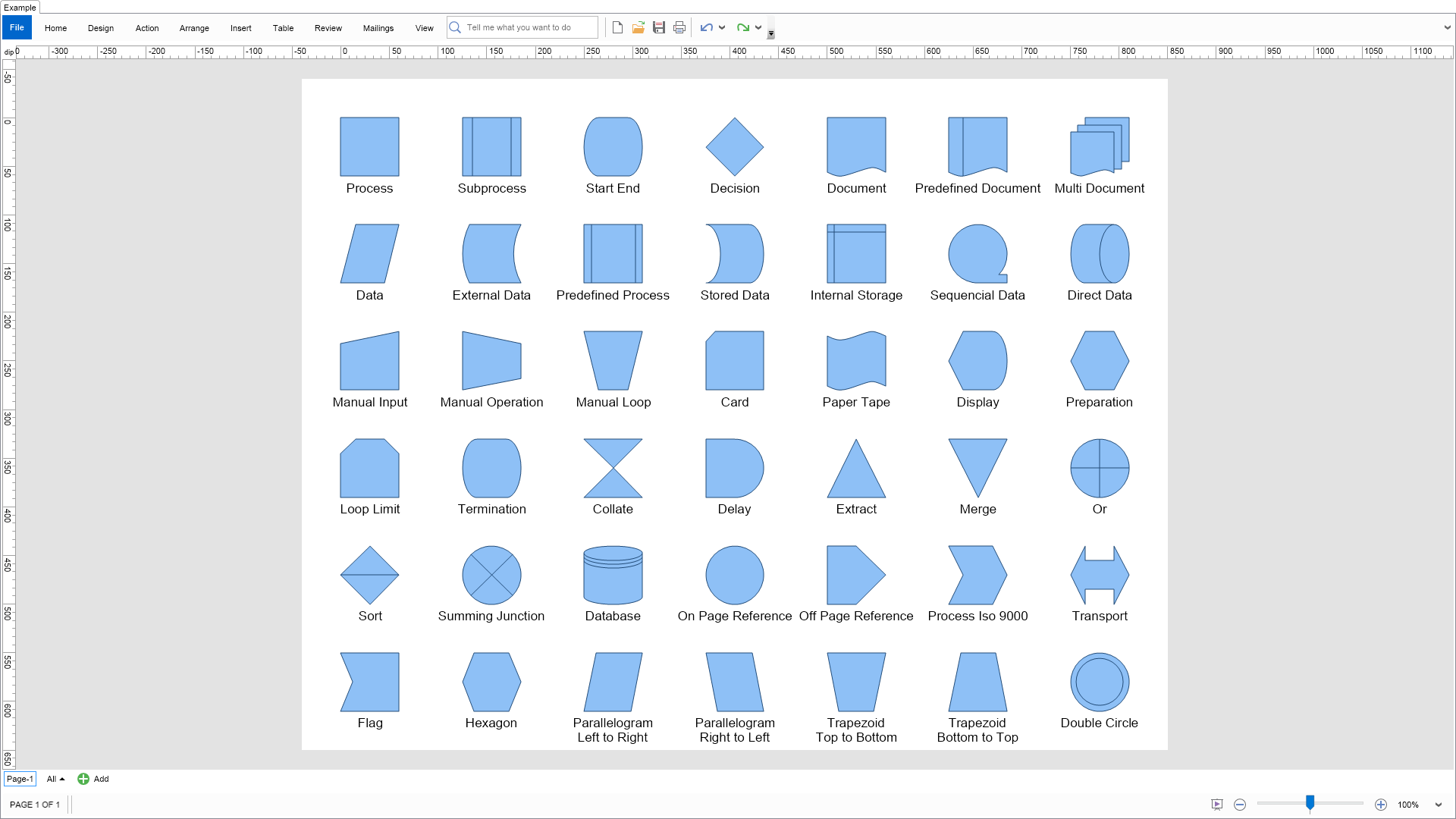
This example shows the flowchart shapes created by the NFlowchartShapeFactory.

| Language: C# |
using Nevron.Nov;
using Nevron.Nov.DataStructures;
using Nevron.Nov.Diagram;
using Nevron.Nov.Diagram.Layout;
using Nevron.Nov.Diagram.Shapes;
using Nevron.Nov.Dom;
using Nevron.Nov.Graphics;
using Nevron.Nov.Layout;
using Nevron.Nov.UI;
using Nevron.Nov.Windows.Forms;
using System;
using System.Windows.Forms;
namespace NovWinFormsProject
{
public partial class Form1 : Form
{
#region Constructors
public Form1()
{
InitializeComponent();
// Set form title
Text = "NOV WinForms - NFlowchartShapesExample";
// Create the NOV example and its controls
NWidget exampleContent = CreateExampleContent();
NWidget exampleControls = CreateExampleControls();
if (exampleControls != null)
{
exampleControls.PreferredWidth = 300;
}
// Place the example and its controls in a pair box
NPairBox pairBox = new NPairBox(exampleContent, exampleControls);
pairBox.FillMode = ENStackFillMode.First;
pairBox.FitMode = ENStackFitMode.First;
pairBox.Margins = new NMargins(NDesign.HorizontalSpacing, NDesign.VerticalSpacing);
// Host the example in the form
NNovWidgetHost host = new NNovWidgetHost(pairBox);
host.Dock = DockStyle.Fill;
Controls.Add(host);
}
#endregion
#region Example
public NWidget CreateExampleContent()
{
// Create a simple drawing
NDrawingViewWithRibbon drawingViewWithRibbon = new NDrawingViewWithRibbon();
drawingViewWithRibbon.GetRibbon().Tab.Expanded = false;
m_DrawingView = drawingViewWithRibbon.View;
m_DrawingView.Document.HistoryService.Pause();
try
{
InitDiagram(m_DrawingView.Document);
}
finally
{
m_DrawingView.Document.HistoryService.Resume();
}
return drawingViewWithRibbon;
}
public NWidget CreateExampleControls()
{
return null;
}
public string GetExampleDescription()
{
return @"This example shows the flowchart shapes created by the NFlowchartShapeFactory.
";
}
///
/// Gets the relevant documentation links for the example
///
///
public (string Name, string Url)[] GetDocumentationUrls()
{
return new[]
{
("Predefined Libraries", "https://www.nevron.com/docs/openvision/diagram-predefined-libraries.html"),
("Libraries", "https://www.nevron.com/docs/openvision/diagram-libraries.html"),
("Shapes", "https://www.nevron.com/docs/openvision/diagram-shapes.html"),
("Library Browser", "https://www.nevron.com/docs/openvision/diagram-library-browser.html"),
};
}
private void InitDiagram(NDrawingDocument drawingDocument)
{
NDrawing drawing = drawingDocument.Content;
NPage activePage = drawing.ActivePage;
activePage.ZoomMode = ENZoomMode.Fit;
// Hide grid and ports
drawing.ScreenVisibility.ShowGrid = false;
drawing.ScreenVisibility.ShowPorts = false;
// Create all shapes from the factory
NFlowchartShapeFactory factory = new NFlowchartShapeFactory(60, 60);
for (int i = 0; i < factory.ShapeCount; i++)
{
NShape shape = factory.CreateShape(i);
shape.HorizontalPlacement = ENHorizontalPlacement.Center;
shape.VerticalPlacement = ENVerticalPlacement.Center;
string text = shape.Name;
if (text.StartsWith("Parallelogram") || text.StartsWith("Trapezoid"))
{
// The name of these shapes is too long, so replace the first space with a new line
int index = text.IndexOf(' ');
if (index != -1)
{
text = text.Substring(0, index) + Environment.NewLine + text.Substring(index + 1);
}
}
shape.Text = text;
shape.MoveTextBlockBelowShape();
activePage.Items.Add(shape);
}
// arrange them
NList shapes = activePage.GetShapes(false);
NLayoutContext layoutContext = new NLayoutContext
{
BodyAdapter = new NShapeBodyAdapter(drawingDocument),
GraphAdapter = new NShapeGraphAdapter(),
LayoutArea = activePage.Bounds
};
NTableFlowLayout tableLayout = new NTableFlowLayout
{
HorizontalSpacing = 65,
VerticalSpacing = 50,
Direction = ENHVDirection.LeftToRight,
MaxOrdinal = 7
};
tableLayout.Arrange(shapes.CastAll | Language: VB.NET |
Imports Nevron.Nov
Imports Nevron.Nov.Diagram
Imports Nevron.Nov.Diagram.Layout
Imports Nevron.Nov.Diagram.Shapes
Imports Nevron.Nov.Dom
Imports Nevron.Nov.Graphics
Imports Nevron.Nov.Layout
Imports Nevron.Nov.UI
Imports Nevron.Nov.Windows.Wpf
Imports System
Class MainWindow
#Region "Constructors"
Public Sub New()
' This call is required by the designer.
InitializeComponent()
' Add any initialization after the InitializeComponent() call.
' Set form title
Title = "NOV WPF - NFlowchartShapesExample"
' Create the NOV example and its controls
Dim exampleContent As NWidget = CreateExampleContent()
Dim exampleControls As NWidget = CreateExampleControls()
If Not exampleControls Is Nothing Then
exampleControls.PreferredWidth = 300
End If
' Place the example and its controls in a pair box
Dim pairBox As NPairBox = New NPairBox(exampleContent, exampleControls)
pairBox.FillMode = ENStackFillMode.First
pairBox.FitMode = ENStackFitMode.First
pairBox.Margins = New NMargins(NDesign.HorizontalSpacing, NDesign.VerticalSpacing)
' Host the example in the form
Dim host As NNovWidgetHost(Of NWidget) = New NNovWidgetHost(Of NWidget)(pairBox)
Content = host
End Sub
#End Region
#Region "Example"
Public Function CreateExampleContent() As NWidget
' Create a simple drawing
Dim drawingViewWithRibbon As NDrawingViewWithRibbon = New NDrawingViewWithRibbon()
drawingViewWithRibbon.GetRibbon().Tab.Expanded = False
m_DrawingView = drawingViewWithRibbon.View
m_DrawingView.Document.HistoryService.Pause()
Try
InitDiagram(m_DrawingView.Document)
Finally
m_DrawingView.Document.HistoryService.Resume()
End Try
Return drawingViewWithRibbon
End Function
Public Function CreateExampleControls() As NWidget
Return Nothing
End Function
Public Function GetExampleDescription() As String
Return "This example shows the flowchart shapes created by the NFlowchartShapeFactory.
"
End Function
'''
''' Gets the relevant documentation links for the example
'''
'''
Public Function GetDocumentationUrls() As (String, String)()
Return {("Predefined Libraries", "https://www.nevron.com/docs/openvision/diagram-predefined-libraries.html"), ("Libraries", "https://www.nevron.com/docs/openvision/diagram-libraries.html"), ("Shapes", "https://www.nevron.com/docs/openvision/diagram-shapes.html"), ("Library Browser", "https://www.nevron.com/docs/openvision/diagram-library-browser.html")}
End Function
Private Sub InitDiagram(drawingDocument As NDrawingDocument)
Dim drawing = drawingDocument.Content
Dim activePage = drawing.ActivePage
activePage.ZoomMode = ENZoomMode.Fit
' Hide grid and ports
drawing.ScreenVisibility.ShowGrid = False
drawing.ScreenVisibility.ShowPorts = False
' Create all shapes from the factory
Dim factory As NFlowchartShapeFactory = New NFlowchartShapeFactory(60, 60)
For i = 0 To factory.ShapeCount - 1
Dim shape = factory.CreateShape(i)
shape.HorizontalPlacement = ENHorizontalPlacement.Center
shape.VerticalPlacement = ENVerticalPlacement.Center
Dim text = shape.Name
If text.StartsWith("Parallelogram") OrElse text.StartsWith("Trapezoid") Then
' The name of these shapes is too long, so replace the first space with a new line
Dim index = text.IndexOf(" "c)
If index <> -1 Then
text = text.Substring(0, index) & Environment.NewLine & text.Substring(index + 1)
End If
End If
shape.Text = text
shape.MoveTextBlockBelowShape()
activePage.Items.Add(shape)
Next
' arrange them
Dim shapes = activePage.GetShapes(False)
Dim layoutContext As NLayoutContext = New NLayoutContext With {
.BodyAdapter = New NShapeBodyAdapter(drawingDocument),
.GraphAdapter = New NShapeGraphAdapter(),
.LayoutArea = activePage.Bounds
}
Dim tableLayout As NTableFlowLayout = New NTableFlowLayout With {
.HorizontalSpacing = 65,
.VerticalSpacing = 50,
.Direction = ENHVDirection.LeftToRight,
.MaxOrdinal = 7
}
tableLayout.Arrange(shapes.CastAll(Of Object)(), layoutContext)
' size page to content
activePage.Layout.ContentPadding = New NMargins(40)
activePage.SizeToContent()
End Sub
#End Region
#Region "Implementation"
#End Region
#Region "Event Handlers"
#End Region
#Region "Fields"
Private m_DrawingView As NDrawingView
#End Region
#Region "Static Methods"
#End Region
#Region "Constants"
#End Region
#Region "Nested Types"
#End Region
End Class