using Nevron.Nov;
using Nevron.Nov.Diagram;
using Nevron.Nov.Dom;
using Nevron.Nov.Graphics;
using Nevron.Nov.Layout;
using Nevron.Nov.UI;
using Nevron.Nov.Windows.Forms;
using System.Windows.Forms;

namespace NovWinFormsProject
{
	public partial class Form1 : Form
	{
		#region Constructors

		public Form1()
		{
			InitializeComponent();

			// Set form title
			Text = "NOV WinForms - NGeometryCommandsExample";

			// Create the NOV example and its controls
			NWidget exampleContent = CreateExampleContent();
			NWidget exampleControls = CreateExampleControls();
			if (exampleControls != null)
			{
				exampleControls.PreferredWidth = 300;
			}

			// Place the example and its controls in a pair box
			NPairBox pairBox = new NPairBox(exampleContent, exampleControls);
			pairBox.FillMode = ENStackFillMode.First;
			pairBox.FitMode = ENStackFitMode.First;
			pairBox.Margins = new NMargins(NDesign.HorizontalSpacing, NDesign.VerticalSpacing);

			// Host the example in the form
			NNovWidgetHost host = new NNovWidgetHost(pairBox);
			host.Dock = DockStyle.Fill;
			Controls.Add(host);
		}

		#endregion

        #region Example

        public NWidget CreateExampleContent()
        {
            // Create a simple drawing
            NDrawingViewWithRibbon drawingViewWithRibbon = new NDrawingViewWithRibbon();
            m_DrawingView = drawingViewWithRibbon.View;

            m_DrawingView.Document.HistoryService.Pause();
            try
            {
                InitDiagram(m_DrawingView);
            }
            finally
            {
                m_DrawingView.Document.HistoryService.Resume();
            }

            return drawingViewWithRibbon;
        }
        public NWidget CreateExampleControls()
        {
            return null;
        }
        public string GetExampleDescription()
        {
            return @"

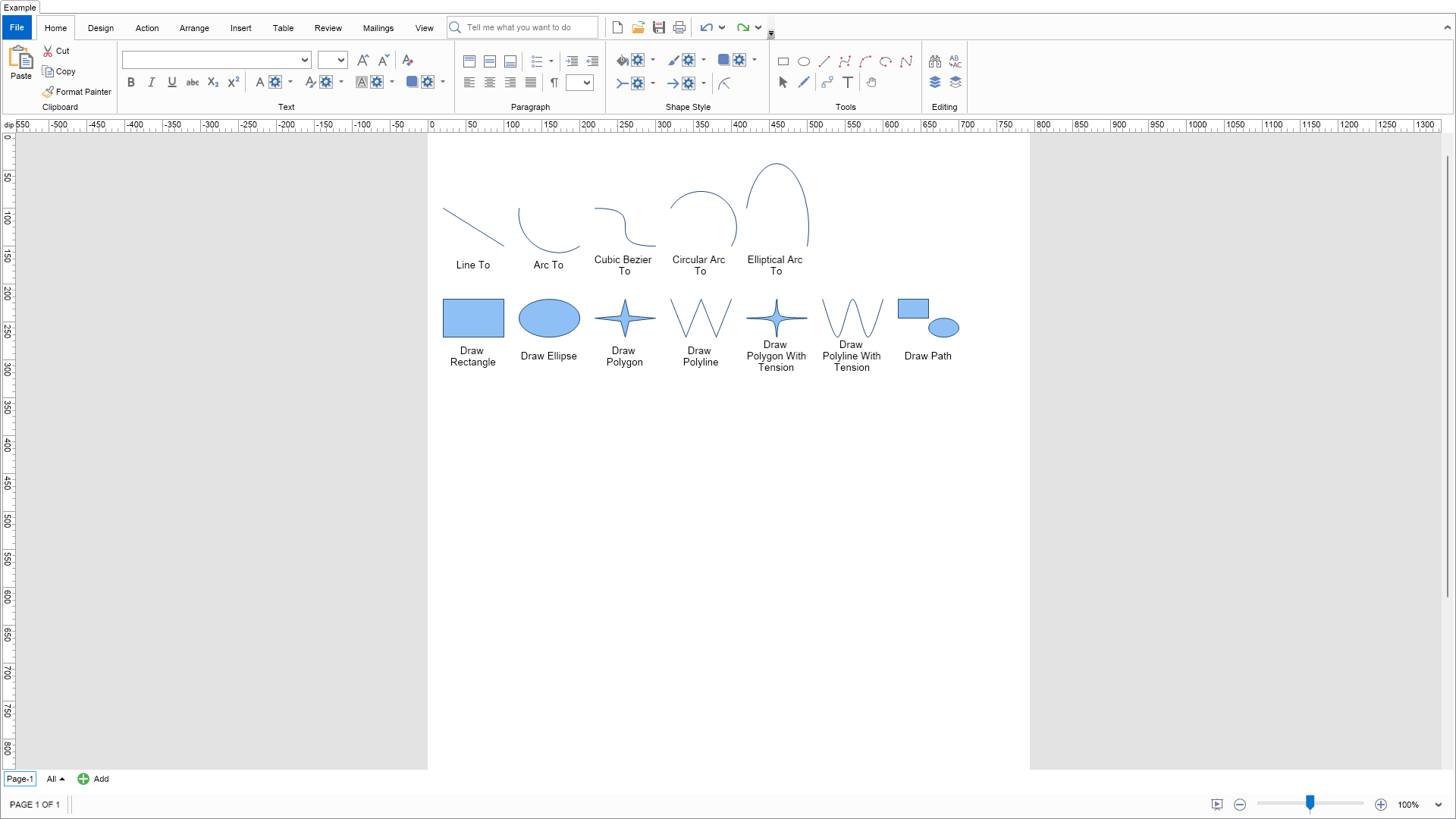
    Demonstrates the geometry commands that you can use to construct the shapes geometry.


    On the first row you can see the different types of geometry commands that you can use to plot geometry.
    Plotter commands are designed to be placed in a sequence so that you can create arbitrary geometry by combining
    MoveTo, LineTo, CubicBezierTo, ArcTo, CircularActTo and EllipticalArcTo commands.


    On the second row you can see the different types of draw box commands.
    These commands are used when you want to output more vertices or generally draw more complex clipart shapes with single geometry commands.


    The active page is switched to geometry edit mode, so when you select shapes you can see handles you can move to modify the geometry.

";
        }

        ///
        /// Gets the relevant documentation links for the example
        ///
        ///
        public (string Name, string Url)[] GetDocumentationUrls()
        {
            return new[]
            {
                ("Geometry", "https://www.nevron.com/docs/openvision/diagram-shape-geometry.html"),
                ("Graphics Paths", "https://www.nevron.com/docs/openvision/graphics-paths.html"),
                ("Shapes", "https://www.nevron.com/docs/openvision/diagram-shapes.html"),
                ("Stroke", "https://www.nevron.com/docs/openvision/graphics-stroke.html"),
            };
        }

        private void InitDiagram(NDrawingView drawingView)
        {
            NDrawingDocument drawingDocument = drawingView.Document;
            NDrawing drawing = drawingDocument.Content;

            // drawingView.Interactor.SingleEnableTool(NPe

            // switch selected edit mode to geometry
            // this instructs the diagram to show geometry handles for the selected shapes.
            drawing.ScreenVisibility.ShowGrid = false;

            // plotter commands
            CreateDescriptionPair(0, 0, CreateLineTo(), "Line To");
            CreateDescriptionPair(0, 1, CreateArcTo(), "Arc To");
            CreateDescriptionPair(0, 2, CreateCubicBezierTo(), "Cubic Bezier To");
            CreateDescriptionPair(0, 3, CreateCircularArcTo(), "Circular Arc To");
            CreateDescriptionPair(0, 4, CreateEllipticalArcTo(), "Elliptical Arc To");

            // draw box commands
            CreateDescriptionPair(1, 0, CreateDrawRectangle(), "Draw Rectangle");
            CreateDescriptionPair(1, 1, CreateDrawEllipse(), "Draw Ellipse");
            CreateDescriptionPair(1, 2, CreateDrawPolygon(0), "Draw Polygon");
            CreateDescriptionPair(1, 3, CreateDrawPolyline(0), "Draw Polyline");
            CreateDescriptionPair(1, 4, CreateDrawPolygon(1), "Draw Polygon With Tension");
            CreateDescriptionPair(1, 5, CreateDrawPolyline(1), "Draw Polyline With Tension");
            CreateDescriptionPair(1, 6, CreateDrawPath(), "Draw Path");
        }

        private NShape CreateLineTo()
        {
            NShape shape = new NShape();
            shape.Init2DShape();

            // the LineTo command draws a line from the prev plotter command to the command location
            {
                NMoveTo plotFigure =
                shape.Geometry.RelMoveTo(0, 0);
                shape.Geometry.RelLineTo(1, 1);
                plotFigure.ShowFill = false;
            }

            return shape;
        }
        private NShape CreateArcTo()
        {
            NShape shape = new NShape();
            shape.Init2DShape();

            // the ArcTo command draws a circular arc from the prev plotter command to the command location.
            // the ArcTo Bow parameter defines the distance of the arc from the line formed by previous command location and the command location
            {
                NMoveTo plotFigure =
                shape.Geometry.RelMoveTo(0, 0);
                shape.Geometry.RelArcTo(1, 1, 30);
                plotFigure.ShowFill = false;
            }

            return shape;
        }
        private NShape CreateCubicBezierTo()
        {
            NShape shape = new NShape();
            shape.Init2DShape();

            // the CubicBezierTo command draws a cubic bezier from the prev plotter command to the command location.
            // the cubic bezier curve is controled by two control points.
            {
                NMoveTo plotFigure =
                shape.Geometry.RelMoveTo(0, 0);
                shape.Geometry.RelCubicBezierTo(1, 1, 1, 0, 0, 1);
                plotFigure.ShowFill = false;
            }

            return shape;
        }
        private NShape CreateCircularArcTo()
        {
            NShape shape = new NShape();
            shape.Init2DShape();

            // the CircularAcrTo command draws a circular arc from the prev plotter command to the command location.
            // the circular acr curve is controled by a control point which defines the circle trough which the arc passes.
            {
                NMoveTo plotFigure =
                shape.Geometry.RelMoveTo(0, 0);
                shape.Geometry.RelCircularArcTo(1, 1, 1, 0);
                plotFigure.ShowFill = false;
            }

            return shape;
        }
        private NShape CreateEllipticalArcTo()
        {
            NShape shape = new NShape();
            shape.Init2DShape();

            // the EllipticalArcTo command draws an elliptical arc from the prev plotter command to the command location.
            // the elliptical acr curve is controled by a control point which defines the ellipse trough which the arc passes,
            // the angle of the ellipse and the ratio between the ellipse radiuses.
            {
                NMoveTo plotFigure =
                shape.Geometry.RelMoveTo(0, 0);
                shape.Geometry.RelEllipticalArcTo(1, 1, 1, 0, new NAngle(0, NUnit.Degree), 0.5);
                plotFigure.ShowFill = false;
            }

            return shape;
        }

        private NShape CreateDrawRectangle()
        {
            NShape shape = new NShape();
            shape.Init2DShape();

            // the draw rectangle command draws a rect inside a relative or absolute rect inside the shape coordinate system.
            // The following draws a rect that fills the shape.
            NDrawRectangle drawRectangle = new NDrawRectangle(0, 0, 1, 1);
            shape.Geometry.AddRelative(drawRectangle);

            return shape;
        }
        private NShape CreateDrawEllipse()
        {
            NShape shape = new NShape();
            shape.Init2DShape();

            // the draw ellipse command draws an ellipse inside a relative or absolute rect inside the shape coordinate system.
            // The following draws an ellipse that fills the shape.
            NDrawEllipse drawEllipse = new NDrawEllipse(0, 0, 1, 1);
            shape.Geometry.AddRelative(drawEllipse);

            return shape;
        }
        private NShape CreateDrawPolygon(double tension)
        {
            NShape shape = new NShape();
            shape.Init2DShape();

            NGenericNGram ngon = new NGenericNGram(4, 0, 0.5, 0.1, new NPoint(0.5, 0.5));
            NPoint[] points = ngon.CreateVertices();

            // the draw polygon command draws a polygon inside a relative or absolute rect inside the shape coordinate system.
            // The following draws a polygon that fills the shape.
            NDrawPolygon drawPolygon = new NDrawPolygon(0, 0, 1, 1, points);
            drawPolygon.Tension = tension;
            shape.Geometry.AddRelative(drawPolygon);

            return shape;
        }
        private NShape CreateDrawPolyline(double tension)
        {
            NShape shape = new NShape();
            shape.Init2DShape();

            NPoint[] points = new NPoint[] {
                new NPoint(0, 0),
                new NPoint(0.25, 1),
                new NPoint(0.50, 0),
                new NPoint(0.75, 1),
                new NPoint(1, 0),
            };

            // the draw polyline command draws a polyline inside a relative or absolute rect inside the shape coordinate system.
            // The following draws a polyline that fills the shape.
            NDrawPolyline drawPolyline = new NDrawPolyline(0, 0, 1, 1, points);
            drawPolyline.Tension = tension;
            drawPolyline.ShowFill = false;
            shape.Geometry.AddRelative(drawPolyline);

            return shape;
        }
        private NShape CreateDrawPath()
        {
            NShape shape = new NShape();
            shape.Init2DShape();

            NGraphicsPath path = new NGraphicsPath();
            path.AddRectangle(0, 0, 0.5, 0.5);
            path.AddEllipse(0.5, 0.5, 0.5, 0.5);

            // the draw path command draws a path inside a relative or absolute rect inside the shape coordinate system.
            // The following draws a path that contains a rectangle and an ellipse that fills the shape.
            NDrawPath drawPath = new NDrawPath(0, 0, 1, 1, path);
            shape.Geometry.AddRelative(drawPath);

            return shape;
        }

        private void CreateDescriptionPair(int row, int col, NShape shape, string text)
        {
            const double startX = 20;
            const double startY = 100;
            const double width = 80;
            const double height = 100;
            const double spacing = 20;

            m_DrawingView.ActivePage.Items.Add(shape);
            shape.SetBounds(new NRectangle(startX + col * (width + spacing), startY + row * (height + spacing), width, height / 2));

            NShape textShape = new NShape();
            textShape.Init2DShape();
            textShape.Text = text;
            textShape.SetBounds(new NRectangle(startX + col * (width + spacing), startY + row * (height + spacing) + height / 2, width, height / 2));
            m_DrawingView.ActivePage.Items.Add(textShape);
        }

        #endregion

		#region Implementation
		#endregion

		#region Event Handlers
		#endregion

        #region Fields

        private NDrawingView m_DrawingView;

        #endregion

		#region Static Methods
		#endregion

		#region Constants
		#endregion

		#region Nested Types
		#endregion
	}
}

 Chart for .NET
 Diagram for .NET
 User Interface for .NET
 Vision for SSRS
 Chart for SSRS
 Gauge for SSRS
 Map for SSRS
 Barcode for SSRS
 Vision for SharePoint
 Chart for SharePoint
 Gauge for SharePoint
 Map for SharePoint
 Barcode for SharePoint
 Open Vision for .NET


 Vision for .NET