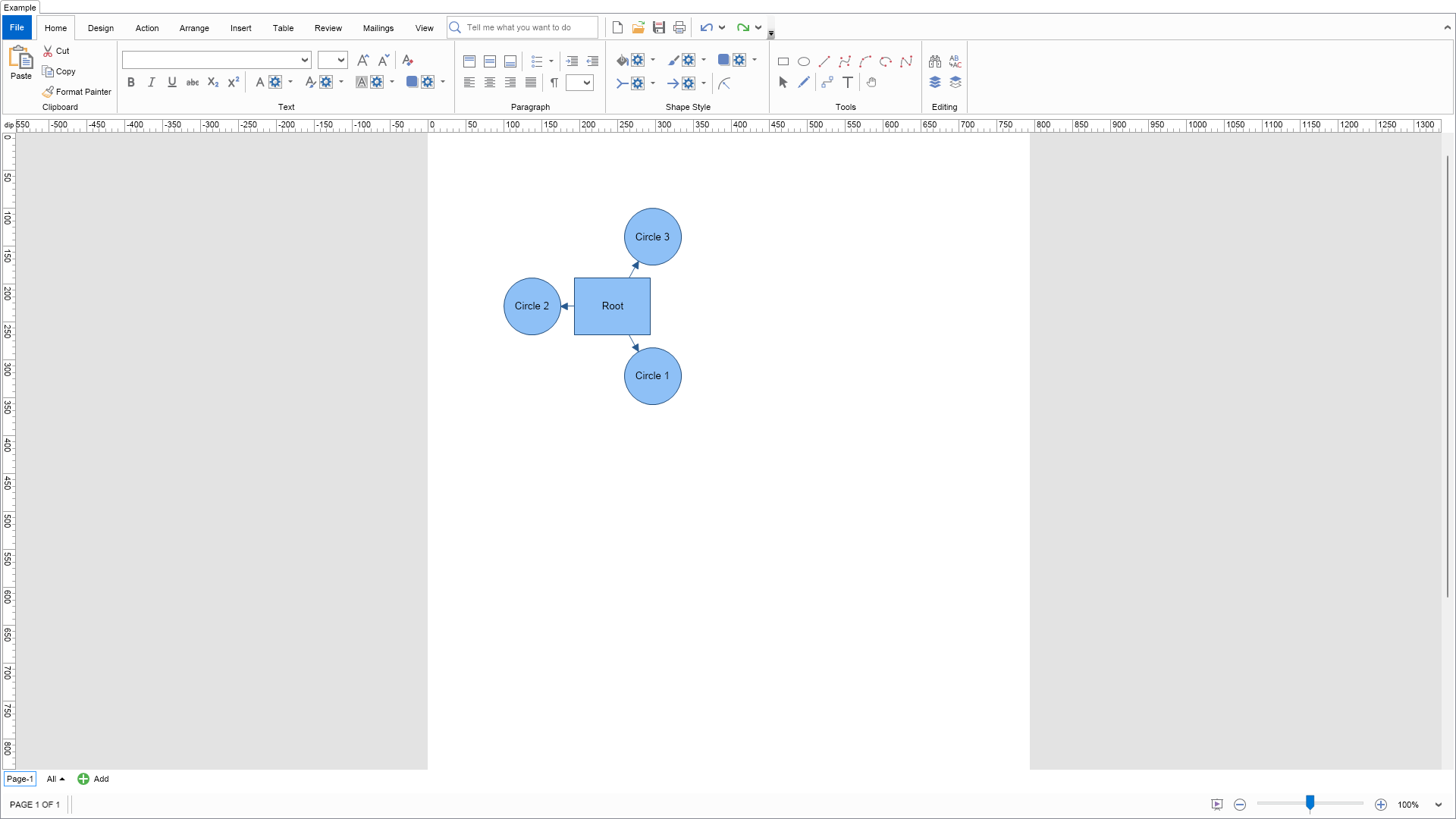
| Language: C# |
using Nevron.Nov;
using Nevron.Nov.Diagram;
using Nevron.Nov.Diagram.Layout;
using Nevron.Nov.Diagram.Shapes;
using Nevron.Nov.Dom;
using Nevron.Nov.Graphics;
using Nevron.Nov.Layout;
using Nevron.Nov.UI;
using Nevron.Nov.Windows.Forms;
using System.Windows.Forms;
namespace NovWinFormsProject
{
public partial class Form1 : Form
{
#region Constructors
public Form1()
{
InitializeComponent();
// Set form title
Text = "NOV WinForms - NLayoutGroupExample";
// Create the NOV example and its controls
NWidget exampleContent = CreateExampleContent();
NWidget exampleControls = CreateExampleControls();
if (exampleControls != null)
{
exampleControls.PreferredWidth = 300;
}
// Place the example and its controls in a pair box
NPairBox pairBox = new NPairBox(exampleContent, exampleControls);
pairBox.FillMode = ENStackFillMode.First;
pairBox.FitMode = ENStackFitMode.First;
pairBox.Margins = new NMargins(NDesign.HorizontalSpacing, NDesign.VerticalSpacing);
// Host the example in the form
NNovWidgetHost host = new NNovWidgetHost(pairBox);
host.Dock = DockStyle.Fill;
Controls.Add(host);
}
#endregion
#region Example
public NWidget CreateExampleContent()
{
// Create a simple drawing
NDrawingViewWithRibbon drawingViewWithRibbon = new NDrawingViewWithRibbon();
m_DrawingView = drawingViewWithRibbon.View;
m_DrawingView.Document.HistoryService.Pause();
try
{
InitDiagram(m_DrawingView.Document);
}
finally
{
m_DrawingView.Document.HistoryService.Resume();
}
return drawingViewWithRibbon;
}
public NWidget CreateExampleControls()
{
return null;
}
public string GetExampleDescription()
{
return "Demonstrates how to layout the shapes in a group.";
}
///
/// Gets the relevant documentation links for the example
///
///
public (string Name, string Url)[] GetDocumentationUrls()
{
return new[]
{
("Groups", "https://www.nevron.com/docs/openvision/diagram-groups.html"),
("Layouts Overview", "https://www.nevron.com/docs/openvision/diagram-drawing-layouts-overview.html"),
("Shapes", "https://www.nevron.com/docs/openvision/diagram-shapes.html"),
};
}
private void InitDiagram(NDrawingDocument drawingDocument)
{
// Create a group
NGroup group = new NGroup();
drawingDocument.Content.ActivePage.Items.Add(group);
group.PinX = 300;
group.PinY = 300;
// Create some shapes and add them to the group
NBasicShapeFactory factory = new NBasicShapeFactory();
NShape root = factory.CreateShape(ENBasicShape.Rectangle);
root.Text = "Root";
group.Shapes.Add(root);
NShape shape1 = factory.CreateShape(ENBasicShape.Circle);
shape1.Text = "Circle 1";
group.Shapes.Add(shape1);
NShape shape2 = factory.CreateShape(ENBasicShape.Circle);
shape2.Text = "Circle 2";
group.Shapes.Add(shape2);
NShape shape3 = factory.CreateShape(ENBasicShape.Circle);
shape3.Text = "Circle 3";
group.Shapes.Add(shape3);
// Connect the shapes
ConnectShapes(root, shape1);
ConnectShapes(root, shape2);
ConnectShapes(root, shape3);
// Update group bounds
group.UpdateBounds();
// Create a layout context and configure the area you want the group to be arranged in.
// The layout area is in page coordinates
NDrawingLayoutContext layoutContext = new NDrawingLayoutContext(drawingDocument, group);
layoutContext.LayoutArea = new NRectangle(100, 100, 200, 200);
// Layout the shapes in the group
NRadialGraphLayout layout = new NRadialGraphLayout();
layout.Arrange(group.Shapes.ToArray(), layoutContext);
// Update the group bounds
group.UpdateBounds();
}
#endregion
#region Implementation
private void ConnectShapes(NShape shape1, NShape shape2)
{
NGroup group = shape1.OwnerGroup;
NRoutableConnector connector = new NRoutableConnector();
connector.UserClass = NDR.StyleSheetNameConnectors;
group.Shapes.Add(connector);
connector.GlueBeginToShape(shape1);
connector.GlueEndToShape(shape2);
}
#endregion
#region Event Handlers
#endregion
#region Fields
private NDrawingView m_DrawingView;
#endregion
#region Static Methods
#endregion
#region Constants
#endregion
#region Nested Types
#endregion
}
} | Language: VB.NET |
Imports Nevron.Nov
Imports Nevron.Nov.Diagram
Imports Nevron.Nov.Diagram.Layout
Imports Nevron.Nov.Diagram.Shapes
Imports Nevron.Nov.Dom
Imports Nevron.Nov.Graphics
Imports Nevron.Nov.Layout
Imports Nevron.Nov.UI
Imports Nevron.Nov.Windows.Wpf
Class MainWindow
#Region "Constructors"
Public Sub New()
' This call is required by the designer.
InitializeComponent()
' Add any initialization after the InitializeComponent() call.
' Set form title
Title = "NOV WPF - NLayoutGroupExample"
' Create the NOV example and its controls
Dim exampleContent As NWidget = CreateExampleContent()
Dim exampleControls As NWidget = CreateExampleControls()
If Not exampleControls Is Nothing Then
exampleControls.PreferredWidth = 300
End If
' Place the example and its controls in a pair box
Dim pairBox As NPairBox = New NPairBox(exampleContent, exampleControls)
pairBox.FillMode = ENStackFillMode.First
pairBox.FitMode = ENStackFitMode.First
pairBox.Margins = New NMargins(NDesign.HorizontalSpacing, NDesign.VerticalSpacing)
' Host the example in the form
Dim host As NNovWidgetHost(Of NWidget) = New NNovWidgetHost(Of NWidget)(pairBox)
Content = host
End Sub
#End Region
#Region "Example"
Public Function CreateExampleContent() As NWidget
' Create a simple drawing
Dim drawingViewWithRibbon As NDrawingViewWithRibbon = New NDrawingViewWithRibbon()
m_DrawingView = drawingViewWithRibbon.View
m_DrawingView.Document.HistoryService.Pause()
Try
InitDiagram(m_DrawingView.Document)
Finally
m_DrawingView.Document.HistoryService.Resume()
End Try
Return drawingViewWithRibbon
End Function
Public Function CreateExampleControls() As NWidget
Return Nothing
End Function
Public Function GetExampleDescription() As String
Return "Demonstrates how to layout the shapes in a group."
End Function
'''
''' Gets the relevant documentation links for the example
'''
'''
Public Function GetDocumentationUrls() As (String, String)()
Return {("Groups", "https://www.nevron.com/docs/openvision/diagram-groups.html"), ("Layouts Overview", "https://www.nevron.com/docs/openvision/diagram-drawing-layouts-overview.html"), ("Shapes", "https://www.nevron.com/docs/openvision/diagram-shapes.html")}
End Function
Private Sub InitDiagram(drawingDocument As NDrawingDocument)
' Create a group
Dim group As NGroup = New NGroup()
drawingDocument.Content.ActivePage.Items.Add(group)
group.PinX = 300
group.PinY = 300
' Create some shapes and add them to the group
Dim factory As NBasicShapeFactory = New NBasicShapeFactory()
Dim root = factory.CreateShape(ENBasicShape.Rectangle)
root.Text = "Root"
group.Shapes.Add(root)
Dim shape1 = factory.CreateShape(ENBasicShape.Circle)
shape1.Text = "Circle 1"
group.Shapes.Add(shape1)
Dim shape2 = factory.CreateShape(ENBasicShape.Circle)
shape2.Text = "Circle 2"
group.Shapes.Add(shape2)
Dim shape3 = factory.CreateShape(ENBasicShape.Circle)
shape3.Text = "Circle 3"
group.Shapes.Add(shape3)
' Connect the shapes
ConnectShapes(root, shape1)
ConnectShapes(root, shape2)
ConnectShapes(root, shape3)
' Update group bounds
group.UpdateBounds()
' Create a layout context and configure the area you want the group to be arranged in.
' The layout area is in page coordinates
Dim layoutContext As NDrawingLayoutContext = New NDrawingLayoutContext(drawingDocument, group)
layoutContext.LayoutArea = New NRectangle(100, 100, 200, 200)
' Layout the shapes in the group
Dim layout As NRadialGraphLayout = New NRadialGraphLayout()
layout.Arrange(group.Shapes.ToArray(), layoutContext)
' Update the group bounds
group.UpdateBounds()
End Sub
#End Region
#Region "Implementation"
Private Sub ConnectShapes(shape1 As NShape, shape2 As NShape)
Dim group = shape1.OwnerGroup
Dim connector As NRoutableConnector = New NRoutableConnector()
connector.UserClass = NDR.StyleSheetNameConnectors
group.Shapes.Add(connector)
connector.GlueBeginToShape(shape1)
connector.GlueEndToShape(shape2)
End Sub
#End Region
#Region "Event Handlers"
#End Region
#Region "Fields"
Private m_DrawingView As NDrawingView
#End Region
#Region "Static Methods"
#End Region
#Region "Constants"
#End Region
#Region "Nested Types"
#End Region
End Class