Imports Nevron.Nov
Imports Nevron.Nov.Diagram
Imports Nevron.Nov.Diagram.Layout
Imports Nevron.Nov.Diagram.Themes
Imports Nevron.Nov.Dom
Imports Nevron.Nov.Graphics
Imports Nevron.Nov.Layout
Imports Nevron.Nov.Text
Imports Nevron.Nov.UI
Imports Nevron.Nov.Windows.Wpf
Class MainWindow
#Region "Constructors"
Public Sub New()
' This call is required by the designer.
InitializeComponent()
' Add any initialization after the InitializeComponent() call.
' Set form title
Title = "NOV WPF - NSoccerTournamentExample"
' Create the NOV example and its controls
Dim exampleContent As NWidget = CreateExampleContent()
Dim exampleControls As NWidget = CreateExampleControls()
If Not exampleControls Is Nothing Then
exampleControls.PreferredWidth = 300
End If
' Place the example and its controls in a pair box
Dim pairBox As NPairBox = New NPairBox(exampleContent, exampleControls)
pairBox.FillMode = ENStackFillMode.First
pairBox.FitMode = ENStackFitMode.First
pairBox.Margins = New NMargins(NDesign.HorizontalSpacing, NDesign.VerticalSpacing)
' Host the example in the form
Dim host As NNovWidgetHost(Of NWidget) = New NNovWidgetHost(Of NWidget)(pairBox)
Content = host
End Sub
#End Region
#Region "Example"
Public Function CreateExampleContent() As NWidget
' Create a simple drawing
Dim drawingViewWithRibbon As NDrawingViewWithRibbon = New NDrawingViewWithRibbon()
m_DrawingView = drawingViewWithRibbon.View
' hide grid and ports
m_DrawingView.Content.ScreenVisibility.ShowGrid = False
m_DrawingView.Content.ScreenVisibility.ShowPorts = False
m_DrawingView.Document.HistoryService.Pause()
Try
InitDiagram(m_DrawingView.Document)
Finally
m_DrawingView.Document.HistoryService.Resume()
End Try
Return drawingViewWithRibbon
End Function
Public Function CreateExampleControls() As NWidget
Return Nothing
End Function
Public Function GetExampleDescription() As String
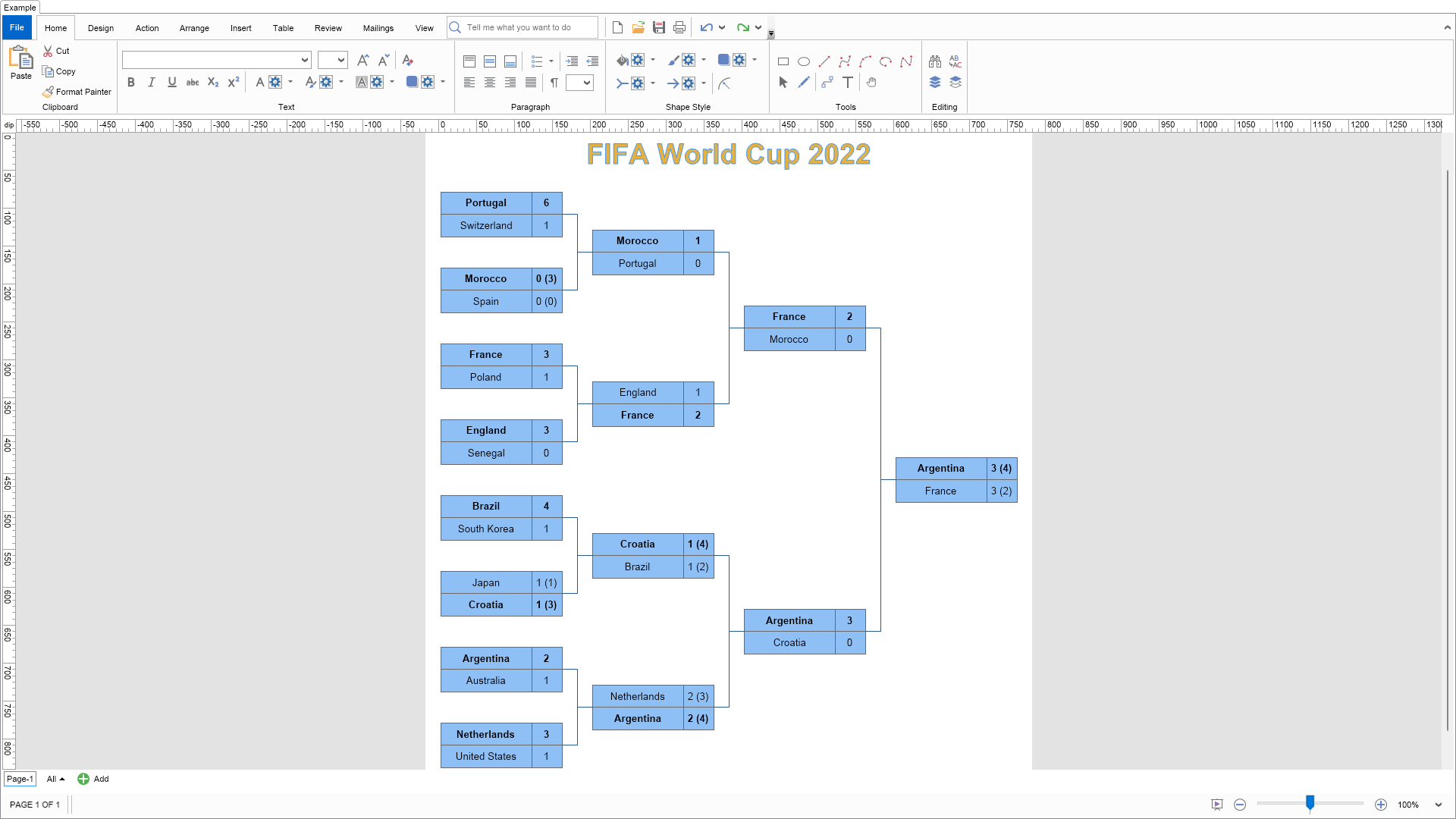
Return "Demonstrates how to create a soccer tournament scoreboard using the following NOV Diagram features:
- Theme-based colors for the title - change the page theme from the ""Design"" tab to see how the style of the title will change, too.
- Table blocks - used for the match shapes.
- Layered Graph Layout - used to arrange the shapes.
"
End Function
'''
''' Gets the relevant documentation links for the example
'''
'''
Public Function GetDocumentationUrls() As (String, String)()
Return {("Shapes", "https://www.nevron.com/docs/openvision/diagram-shapes.html"), ("Text Block", "https://www.nevron.com/docs/openvision/diagram-text-block.html"), ("Routable Connectors", "https://www.nevron.com/docs/openvision/diagram-routable-connectors.html")}
End Function
Private Sub InitDiagram(drawingDocument As NDrawingDocument)
Dim page = drawingDocument.Content.ActivePage
' Create a title shape
Dim titleShape = CreateTitleShape("FIFA World Cup 2022")
page.Items.Add(titleShape)
' Create the match shapes
Dim roundOf16Shapes = CreateMatchShapes(page, RoundOf16)
Dim quarterFinalsShapes = CreateMatchShapes(page, QuarterFinals)
Dim semiFinalsShapes = CreateMatchShapes(page, SemiFinals)
Dim finalShape = CreateMatchShape(Final)
page.Items.Add(finalShape)
' Connect the shapes
For i = 0 To quarterFinalsShapes.Length - 1
ConnectShapes(roundOf16Shapes(i * 2), roundOf16Shapes(i * 2 + 1), quarterFinalsShapes(i))
Next
ConnectShapes(quarterFinalsShapes(0), quarterFinalsShapes(1), semiFinalsShapes(0))
ConnectShapes(quarterFinalsShapes(2), quarterFinalsShapes(3), semiFinalsShapes(1))
ConnectShapes(semiFinalsShapes(0), semiFinalsShapes(1), finalShape)
' Arrange the shapes using a Layered Graph Layout
Dim layout As NLayeredGraphLayout = New NLayeredGraphLayout()
layout.Direction = ENHVDirection.LeftToRight
layout.UseSingleBus = True
layout.PlugSpacing.Mode = ENPlugSpacingMode.None
layout.RegionLayout.VerticalSpacing = 25 ' Controls the spacing between the title and the diagram
Dim shapes = page.GetShapes(False, NDiagramFilters.ShapeType2D)
layout.Arrange(shapes.CastAll(Of Object)(), New NDrawingLayoutContext(page))
page.SizeToContent()
End Sub
#End Region
#Region "Implementation"
Private Function CreateTitleShape(title As String) As NShape
Dim theme = NDrawingTheme.MyDrawNature
Dim titleShape As NShape = New NShape()
titleShape.SetBounds(0, 0, 500, 50)
titleShape.Text = title
titleShape.SetProtectionMask(ENDiagramItemOperationMask.All)
Dim titleTextBlock = CType(titleShape.TextBlock, NTextBlock)
titleTextBlock.ResizeMode = ENTextBlockResizeMode.ShapeSize
titleTextBlock.FontSize = 28
titleTextBlock.FontStyleBold = True
' Set theme-based colors to the title text, so that it changes when the user changes the theme
Dim strokeColor = theme.ColorPalette.Variants(0)(0)
strokeColor.Tag = New NThemeVariantColorInfo(0)
titleTextBlock.Stroke = New NStroke(strokeColor)
Dim fillColor = theme.ColorPalette.Variants(0)(4)
fillColor.Tag = New NThemeVariantColorInfo(4)
titleTextBlock.Fill = New NColorFill(fillColor)
' Alternatively, you can also use fixed colors (uncomment the 2 lines below)
'titleTextBlock.Stroke = new NStroke(NColor.DarkBlue);
'titleTextBlock.Fill = new NColorFill(NColor.LightBlue);
' Set an expression to center the title horizontally in the page
titleShape.SetFx(NShape.PinXProperty, New NFormulaFx("$ParentSheet.X + $ParentSheet.Width / 2", True))
Return titleShape
End Function
Private Function CreateMatchShapes(page As NPage, matches As Match()) As NShape()
Dim matchShapes = New NShape(matches.Length - 1) {}
For i = 0 To matches.Length - 1
Dim matchShape = CreateMatchShape(matches(i))
page.Items.Add(matchShape)
matchShapes(i) = matchShape
Next
Return matchShapes
End Function
Private Function CreateMatchShape(match As Match) As NShape
Dim shape As NShape = New NShape()
shape.SetBounds(0, 0, MatchShapeSize.Width, MatchShapeSize.Height)
' Create a table block
Dim tableBlock As NTableBlock = New NTableBlock(2, 2, NBorder.CreateFilledBorder(MatchBorderColor), MatchBorderThickness)
tableBlock.PortsDistributionMode = ENPortsDistributionMode.None
tableBlock.ResizeMode = ENTableBlockResizeMode.FitToShape
shape.TextBlock = tableBlock
' Configure the table block content
Dim table = tableBlock.Content
table.AllowSpacingBetweenCells = False
table.Columns(1).PreferredWidth = NMultiLength.NewFixed(MatchShapeSize.Width / 4)
' Add the match info to the table
table.Rows(0).Cells(0).Blocks(0) = New NParagraph(match.Team1)
table.Rows(0).Cells(1).Blocks(0) = New NParagraph(match.Score1String)
table.Rows(1).Cells(0).Blocks(0) = New NParagraph(match.Team2)
table.Rows(1).Cells(1).Blocks(0) = New NParagraph(match.Score2String)
' Apply center vertical alignment to all cells
For i = 0 To table.Rows.Count - 1
For j = 0 To table.Columns.Count - 1
table.Rows(i).Cells(j).VerticalAlignment = ENVAlign.Center
Next
Next
' Make the winner's row bold
table.Rows(match.WinnerTeamIndex - 1).FontStyleBold = True
Return shape
End Function
Private Sub ConnectShapes(matchShape1 As NShape, matchShape2 As NShape, nextMatchShape As NShape)
Dim page = matchShape1.OwnerPage
Dim con1 As NRoutableConnector = New NRoutableConnector()
page.Items.Add(con1)
con1.GlueBeginToShape(matchShape1)
con1.GlueEndToShape(nextMatchShape)
Dim con2 As NRoutableConnector = New NRoutableConnector()
page.Items.Add(con2)
con2.GlueBeginToShape(matchShape2)
con2.GlueEndToShape(nextMatchShape)
End Sub
#End Region
#Region "Event Handlers"
#End Region
#Region "Fields"
Private m_DrawingView As NDrawingView
#End Region
#Region "Static Methods"
#End Region
#Region "Constants"
#End Region
#Region "Nested Types"
Private Class Match
Public Sub New(team1 As String, goals1 As Integer, team2 As String, goals2 As Integer)
Me.New(team1, goals1, -1, team2, goals2, -1)
End Sub
Public Sub New(team1 As String, goals1 As Integer, penalty1 As Integer, team2 As String, goals2 As Integer, penalty2 As Integer)
Me.Team1 = team1
m_Goals1 = goals1
m_Penalty1 = penalty1
Me.Team2 = team2
m_Goals2 = goals2
m_Penalty2 = penalty2
End Sub
'''
''' Returns the index of the winner team - 1 or 2.
'''
Public ReadOnly Property WinnerTeamIndex As Integer
Get
If m_Goals1 > m_Goals2 Then
Return 1
ElseIf m_Goals1 < m_Goals2 Then
Return 2
Else
Return If(m_Penalty1 > m_Penalty2, 1, 2)
End If
End Get
End Property
Public ReadOnly Property Score1String As String
Get
Dim score As String = m_Goals1.ToString()
If m_Penalty1 <> -1 Then
score += $" ({m_Penalty1})"
End If
Return score
End Get
End Property
Public ReadOnly Property Score2String As String
Get
Dim score As String = m_Goals2.ToString()
If m_Penalty2 <> -1 Then
score += $" ({m_Penalty2})"
End If
Return score
End Get
End Property
Public Team1 As String
Public Team2 As String
Private m_Goals1 As Integer
Private m_Goals2 As Integer
Private m_Penalty1 As Integer
Private m_Penalty2 As Integer
End Class
#End Region
End Class

 Chart for .NET
 Diagram for .NET
 User Interface for .NET
 Vision for SSRS
 Chart for SSRS
 Gauge for SSRS
 Map for SSRS
 Barcode for SSRS
 Vision for SharePoint
 Chart for SharePoint
 Gauge for SharePoint
 Map for SharePoint
 Barcode for SharePoint
 Open Vision for .NET


 Vision for .NET