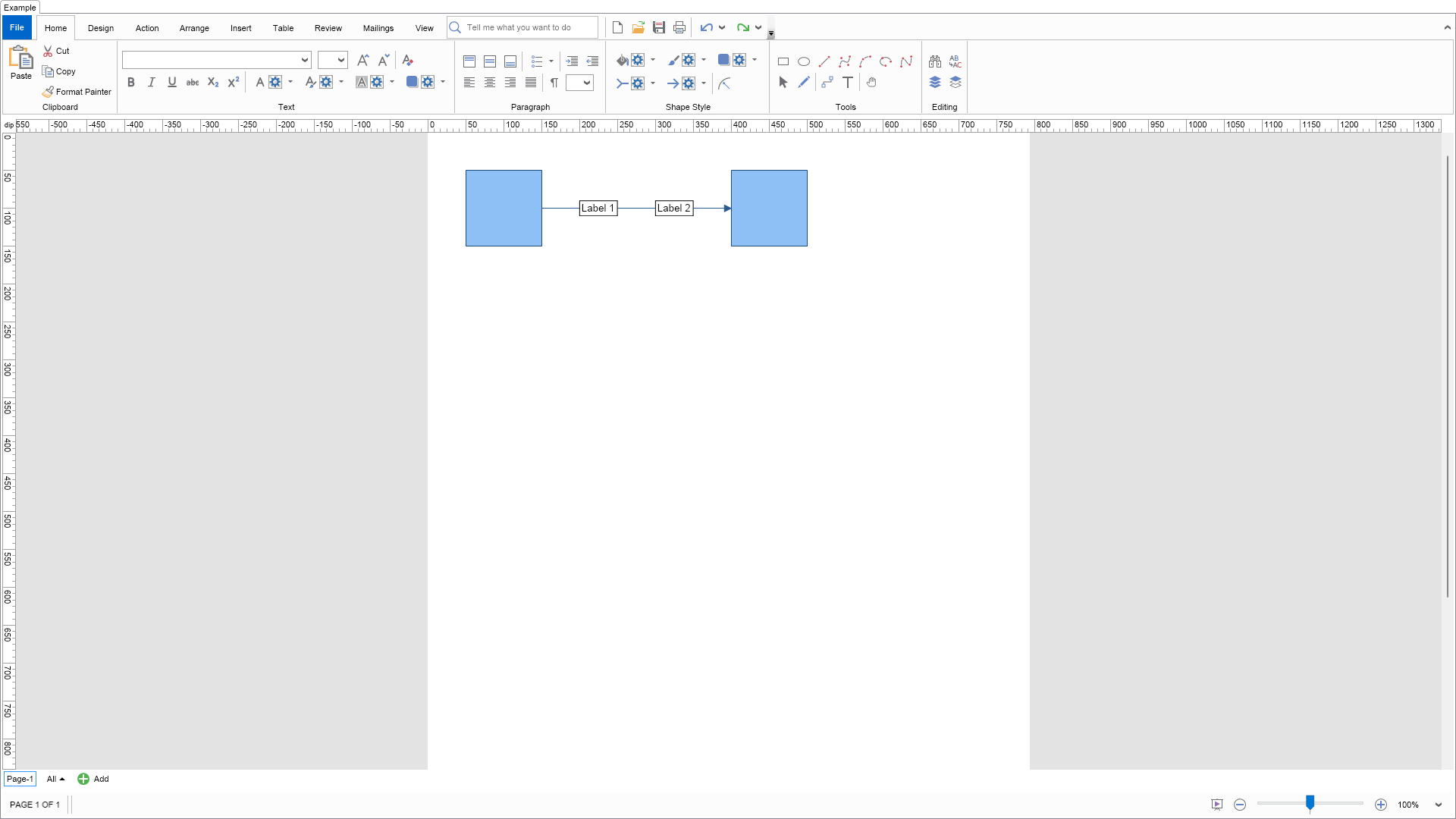
using Nevron.Nov;
using Nevron.Nov.Diagram;
using Nevron.Nov.Diagram.Shapes;
using Nevron.Nov.Dom;
using Nevron.Nov.Graphics;
using Nevron.Nov.Layout;
using Nevron.Nov.UI;
using Nevron.Nov.Windows.Forms;
using System.Windows.Forms;

namespace NovWinFormsProject
{
	public partial class Form1 : Form
	{
		#region Constructors

		public Form1()
		{
			InitializeComponent();

			// Set form title
			Text = "NOV WinForms - NConnectorWithMultipleLabelsExample";

			// Create the NOV example and its controls
			NWidget exampleContent = CreateExampleContent();
			NWidget exampleControls = CreateExampleControls();
			if (exampleControls != null)
			{
				exampleControls.PreferredWidth = 300;
			}

			// Place the example and its controls in a pair box
			NPairBox pairBox = new NPairBox(exampleContent, exampleControls);
			pairBox.FillMode = ENStackFillMode.First;
			pairBox.FitMode = ENStackFitMode.First;
			pairBox.Margins = new NMargins(NDesign.HorizontalSpacing, NDesign.VerticalSpacing);

			// Host the example in the form
			NNovWidgetHost host = new NNovWidgetHost(pairBox);
			host.Dock = DockStyle.Fill;
			Controls.Add(host);
		}

		#endregion

		#region Example

		public NWidget CreateExampleContent()
		{
			// Create a simple drawing
			NDrawingViewWithRibbon drawingViewWithRibbon = new NDrawingViewWithRibbon();
			m_DrawingView = drawingViewWithRibbon.View;

			m_DrawingView.Document.HistoryService.Pause();
			try
			{
				InitDiagram(m_DrawingView.Document);
			}
			finally
			{
				m_DrawingView.Document.HistoryService.Resume();
			}

			return drawingViewWithRibbon;
		}
		public NWidget CreateExampleControls()
		{
			return null;
		}
		public string GetExampleDescription()
		{
			return @"
This example demonstrates how to create a connector with multiple labels. This can be done by adding
outward ports to a connector and then gluing shapes that only have text to these outward ports.
";
		}

		///
		/// Gets the relevant documentation links for the example
		///
		///
		public (string Name, string Url)[] GetDocumentationUrls()
		{
			return new[]
			{
				("Routable Connectors", "https://www.nevron.com/docs/openvision/diagram-routable-connectors.html"),
				("Text Block", "https://www.nevron.com/docs/openvision/diagram-text-block.html"),
				("Rich Text Paragraphs", "https://www.nevron.com/docs/openvision/rich-text-paragraphs.html"),
			};
		}

		private void InitDiagram(NDrawingDocument drawingDocument)
		{
			NDrawing drawing = drawingDocument.Content;
			NPage activePage = drawing.ActivePage;

			NBasicShapeFactory basicShapes = new NBasicShapeFactory();
			NConnectorShapeFactory connectorShapes = new NConnectorShapeFactory();

			// Create and add some shapes
			NShape shape1 = basicShapes.CreateShape(ENBasicShape.Rectangle);
			shape1.SetBounds(new NRectangle(50, 50, 100, 100));
			activePage.Items.Add(shape1);

			NShape shape2 = basicShapes.CreateShape(ENBasicShape.Rectangle);
			shape2.SetBounds(new NRectangle(400, 50, 100, 100));
			activePage.Items.Add(shape2);

			// Connect the shapes
			NShape connector = connectorShapes.CreateShape(ENConnectorShape.Line);
			activePage.Items.Add(connector);
			connector.GlueBeginToShape(shape1);
			connector.GlueEndToShape(shape2);

			// Add 2 outward ports to the connector
			NPort port1 = new NPort(0.3, 0.3, true);
			port1.GlueMode = ENPortGlueMode.Outward;
			connector.Ports.Add(port1);

			NPort port2 = new NPort(0.7, 0.7, true);
			port2.GlueMode = ENPortGlueMode.Outward;
			connector.Ports.Add(port2);

			// Attach label shapes to the outward ports of the connector
			NShape labelShape1 = CreateLabelShape("Label 1");
			activePage.Items.Add(labelShape1);
			labelShape1.GlueMasterPortToPort(labelShape1.Ports[0], port1);

			NShape labelShape2 = CreateLabelShape("Label 2");
			activePage.Items.Add(labelShape2);
			labelShape2.GlueMasterPortToPort(labelShape2.Ports[0], port2);
		}

		#endregion

		#region Implementation

		private NShape CreateLabelShape(string text)
		{
			NShape labelShape = new NShape();

			// Configure shape
			labelShape.SetBounds(0, 0, 100, 30);
			labelShape.SetProtectionMask(ENDiagramItemOperationMask.All);
			labelShape.CanSplit = false;
			labelShape.GraphPart = false;
			labelShape.RouteThroughHorizontally = true;
			labelShape.RouteThroughVertically = true;

			// Set text and make text block resize to text
			labelShape.Text = text;
			((NTextBlock)labelShape.TextBlock).ResizeMode = ENTextBlockResizeMode.TextSize;

			// Set text background and border
			labelShape.TextBlock.BackgroundFill = new NColorFill(NColor.White);
			labelShape.TextBlock.Border = NBorder.CreateFilledBorder(NColor.Black);
			labelShape.TextBlock.BorderThickness = new NMargins(1);
			labelShape.TextBlock.Padding = new NMargins(2);

			// Add a port to the shape
			labelShape.Ports.Add(new NPort(0.5, 0.5, true));

			return labelShape;
		}

		#endregion

		#region Event Handlers
		#endregion

		#region Fields

		private NDrawingView m_DrawingView;

		#endregion

		#region Static Methods
		#endregion

		#region Constants
		#endregion

		#region Nested Types
		#endregion
	}
}

 Chart for .NET
 Diagram for .NET
 User Interface for .NET
 Vision for SSRS
 Chart for SSRS
 Gauge for SSRS
 Map for SSRS
 Barcode for SSRS
 Vision for SharePoint
 Chart for SharePoint
 Gauge for SharePoint
 Map for SharePoint
 Barcode for SharePoint
 Open Vision for .NET


 Vision for .NET