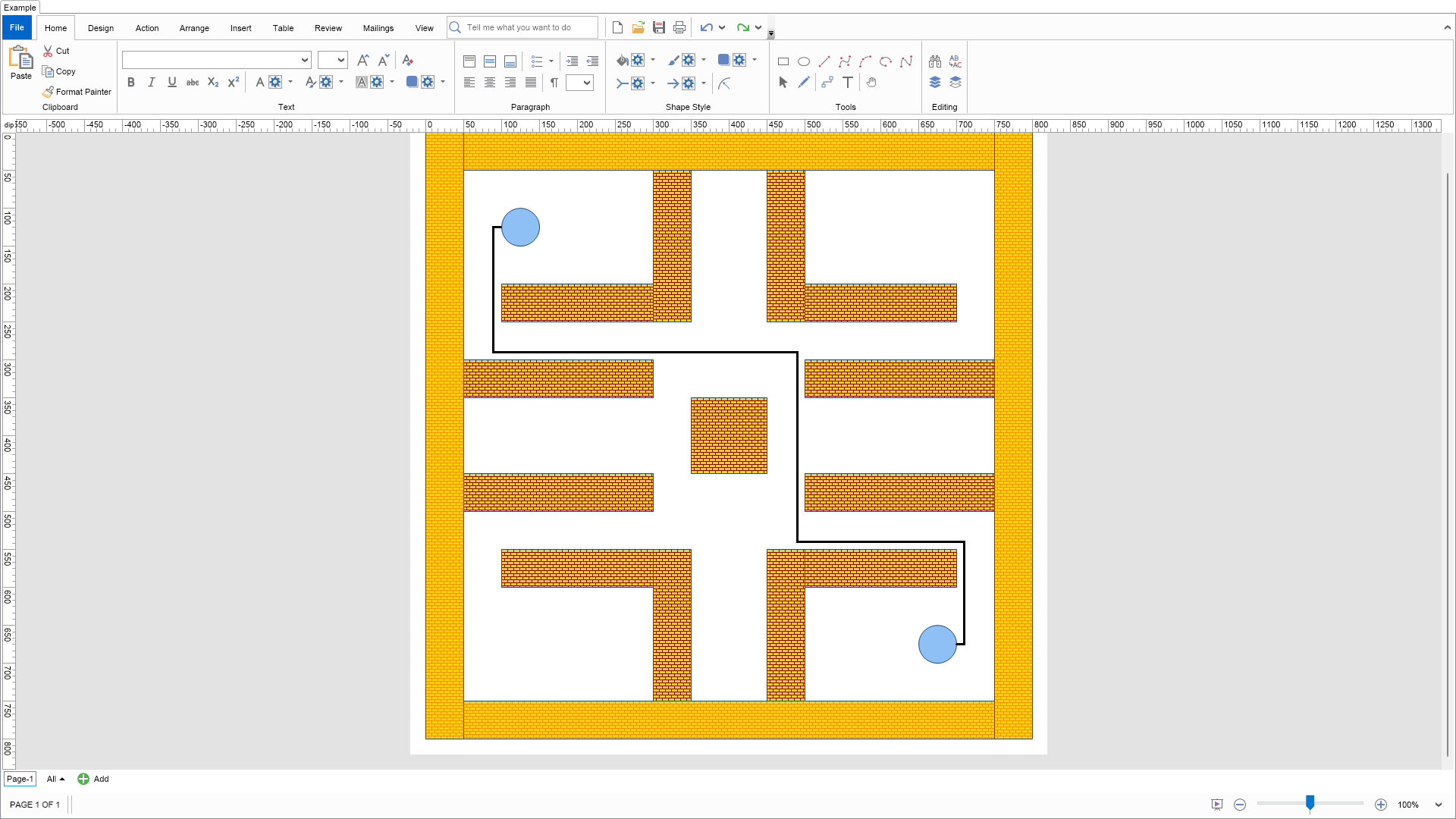
This example demonstrates routable connectors and routing.
Routing is the process of finding a path between two points, which strives not to cross any obstacles and also tries to obey certain aesthetic criteria (such as minimal number of turns, port orientation etc.).
Routing works with three corner stone objects: routable connector, obstacle shapes and router. A routable connector tries to avoid the current set of obstacle shapes (residing in the page) by obtaining routing points from the router. The router is responsible for creating and maintaining a routing graph for the current set of obstacle shapes existing in the page.
A routable connector can be automatically rerouted in three modes:

| Language: C# |
using Nevron.Nov;
using Nevron.Nov.Diagram;
using Nevron.Nov.Diagram.Shapes;
using Nevron.Nov.Dom;
using Nevron.Nov.Graphics;
using Nevron.Nov.Layout;
using Nevron.Nov.UI;
using Nevron.Nov.Windows.Forms;
using System.Windows.Forms;
namespace NovWinFormsProject
{
public partial class Form1 : Form
{
#region Constructors
public Form1()
{
InitializeComponent();
// Set form title
Text = "NOV WinForms - NRoutableConnectorsExample";
// Create the NOV example and its controls
NWidget exampleContent = CreateExampleContent();
NWidget exampleControls = CreateExampleControls();
if (exampleControls != null)
{
exampleControls.PreferredWidth = 300;
}
// Place the example and its controls in a pair box
NPairBox pairBox = new NPairBox(exampleContent, exampleControls);
pairBox.FillMode = ENStackFillMode.First;
pairBox.FitMode = ENStackFitMode.First;
pairBox.Margins = new NMargins(NDesign.HorizontalSpacing, NDesign.VerticalSpacing);
// Host the example in the form
NNovWidgetHost host = new NNovWidgetHost(pairBox);
host.Dock = DockStyle.Fill;
Controls.Add(host);
}
#endregion
#region Example
public NWidget CreateExampleContent()
{
// Create a simple drawing
NDrawingViewWithRibbon drawingViewWithRibbon = new NDrawingViewWithRibbon();
m_DrawingView = drawingViewWithRibbon.View;
m_DrawingView.Document.HistoryService.Pause();
try
{
InitDiagram(m_DrawingView.Document);
}
finally
{
m_DrawingView.Document.HistoryService.Resume();
}
return drawingViewWithRibbon;
}
public NWidget CreateExampleControls()
{
return null;
}
public string GetExampleDescription()
{
return @"
This example demonstrates routable connectors and routing.
Routing is the process of finding a path between two points, which strives not
to cross any obstacles and also tries to obey certain aesthetic criteria (such
as minimal number of turns, port orientation etc.).
Routing works with three corner stone objects: routable connector, obstacle shapes and router.
A routable connector tries to avoid the current set of obstacle shapes (residing in the page) by obtaining routing points from the router.
The router is responsible for creating and maintaining a routing graph for the current set of obstacle shapes existing in the page.
A routable connector can be automatically rerouted in three modes:
-
Never - the connector is never automatically rerouted. You can still reroute the
route by executing the Reroute command (from the context menu or from code).
-
Always - the connector is automatically rerouted when any of the obstacles have
changed (i.e. there is a possibility for the route to be rerouted in a better way).
-
When Needed - the connector is automatically rerouted when an obstacle is placed on it
(i.e. the route needs to be rerouted cause it crosses an obstacle).
";
}
///
/// Gets the relevant documentation links for the example
///
///
public (string Name, string Url)[] GetDocumentationUrls()
{
return new[]
{
("Routable Connectors", "https://www.nevron.com/docs/openvision/diagram-routable-connectors.html"),
("Ports", "https://www.nevron.com/docs/openvision/diagram-ports.html"),
("Snap and Glue", "https://www.nevron.com/docs/openvision/diagram-snap-and-glue.html"),
};
}
private void InitDiagram(NDrawingDocument drawingDocument)
{
NDrawing drawing = drawingDocument.Content;
NPage activePage = drawing.ActivePage;
// hide grid and ports
drawing.ScreenVisibility.ShowGrid = false;
drawing.ScreenVisibility.ShowPorts = false;
// create a stylesheet for styling the different bricks
NStyleSheet styleSheet = new NStyleSheet();
drawingDocument.StyleSheets.AddChild(styleSheet);
// the first rule fills brichs with UserClass BRICK1
NRule ruleBrick1 = new NRule();
styleSheet.Add(ruleBrick1);
NSelectorBuilder sb = ruleBrick1.GetSelectorBuilder();
sb.Start();
sb.Type(NGeometry.NGeometrySchema);
sb.ChildOf();
sb.UserClass("BRICK1");
sb.End();
ruleBrick1.Declarations.Add(new NValueDeclaration(NGeometry.FillProperty, new NHatchFill(ENHatchStyle.HorizontalBrick, NColor.DarkOrange, NColor.Gold)));
// the second rule fills brichs with UserClass BRICK2
NRule ruleBrick2 = new NRule();
styleSheet.Add(ruleBrick2);
sb = ruleBrick2.GetSelectorBuilder();
sb.Start();
sb.Type(NGeometry.NGeometrySchema);
sb.ChildOf();
sb.UserClass("BRICK2");
sb.End();
ruleBrick2.Declarations.Add(new NValueDeclaration(NGeometry.FillProperty, new NHatchFill(ENHatchStyle.HorizontalBrick, NColor.DarkRed, NColor.Gold)));
// create all shapes
// create the maze frame
CreateBrick(new NRectangle(50, 0, 700, 50), "BRICK1");
CreateBrick(new NRectangle(750, 0, 50, 800), "BRICK1");
CreateBrick(new NRectangle(50, 750, 700, 50), "BRICK1");
CreateBrick(new NRectangle(0, 0, 50, 800), "BRICK1");
// create the maze obstacles
CreateBrick(new NRectangle(100, 200, 200, 50), "BRICK2");
CreateBrick(new NRectangle(300, 50, 50, 200), "BRICK2");
CreateBrick(new NRectangle(450, 50, 50, 200), "BRICK2");
CreateBrick(new NRectangle(500, 200, 200, 50), "BRICK2");
CreateBrick(new NRectangle(50, 300, 250, 50), "BRICK2");
CreateBrick(new NRectangle(500, 300, 250, 50), "BRICK2");
CreateBrick(new NRectangle(350, 350, 100, 100), "BRICK2");
CreateBrick(new NRectangle(50, 450, 250, 50), "BRICK2");
CreateBrick(new NRectangle(500, 450, 250, 50), "BRICK2");
CreateBrick(new NRectangle(100, 550, 200, 50), "BRICK2");
CreateBrick(new NRectangle(300, 550, 50, 200), "BRICK2");
CreateBrick(new NRectangle(450, 550, 50, 200), "BRICK2");
CreateBrick(new NRectangle(500, 550, 200, 50), "BRICK2");
// create the first set of start/end shapes
NShape start = CreateEllipse(new NRectangle(100, 100, 50, 50), "START");
NShape end = CreateEllipse(new NRectangle(650, 650, 50, 50), "END");
// connect them with a dynamic HV routable connector,
// which is rerouted whenever the obstacles have changed
NRoutableConnector routableConnector = new NRoutableConnector();
routableConnector.RerouteMode = ENRoutableConnectorRerouteMode.Always;
routableConnector.Geometry.Stroke = new NStroke(3, NColor.Black);
activePage.Items.Add(routableConnector);
// connect the start and end shapes
routableConnector.GlueBeginToShape(start);
routableConnector.GlueEndToShape(end);
// reroute the connector
routableConnector.RequestReroute();
// size document to fit the maze
activePage.SizeToContent();
}
#endregion
#region Implementation
///
/// Creates a brick shape (Rectangle) and applies the specified class to ut
///
///
///
///
NShape CreateBrick(NRectangle bounds, string userClass)
{
NShape shape = m_BasicShapes.CreateShape(ENBasicShape.Rectangle);
shape.SetBounds(bounds);
shape.UserClass = userClass;
m_DrawingView.ActivePage.Items.Add(shape);
return shape;
}
///
/// Creates an ellipse shapeand applies the specified class to ut (used for Start and End shapes)
///
///
///
///
NShape CreateEllipse(NRectangle bounds, string userClass)
{
NShape shape = m_BasicShapes.CreateShape(ENBasicShape.Ellipse);
shape.SetBounds(bounds);
shape.UserClass = userClass;
m_DrawingView.ActivePage.Items.Add(shape);
return shape;
}
#endregion
#region Event Handlers
#endregion
#region Fields
private NDrawingView m_DrawingView;
NBasicShapeFactory m_BasicShapes = new NBasicShapeFactory();
#endregion
#region Static Methods
#endregion
#region Constants
#endregion
#region Nested Types
#endregion
}
} | Language: VB.NET |
Imports Nevron.Nov
Imports Nevron.Nov.Diagram
Imports Nevron.Nov.Diagram.Shapes
Imports Nevron.Nov.Dom
Imports Nevron.Nov.Graphics
Imports Nevron.Nov.Layout
Imports Nevron.Nov.UI
Imports Nevron.Nov.Windows.Wpf
Class MainWindow
#Region "Constructors"
Public Sub New()
' This call is required by the designer.
InitializeComponent()
' Add any initialization after the InitializeComponent() call.
' Set form title
Title = "NOV WPF - NRoutableConnectorsExample"
' Create the NOV example and its controls
Dim exampleContent As NWidget = CreateExampleContent()
Dim exampleControls As NWidget = CreateExampleControls()
If Not exampleControls Is Nothing Then
exampleControls.PreferredWidth = 300
End If
' Place the example and its controls in a pair box
Dim pairBox As NPairBox = New NPairBox(exampleContent, exampleControls)
pairBox.FillMode = ENStackFillMode.First
pairBox.FitMode = ENStackFitMode.First
pairBox.Margins = New NMargins(NDesign.HorizontalSpacing, NDesign.VerticalSpacing)
' Host the example in the form
Dim host As NNovWidgetHost(Of NWidget) = New NNovWidgetHost(Of NWidget)(pairBox)
Content = host
End Sub
#End Region
#Region "Example"
Public Function CreateExampleContent() As NWidget
' Create a simple drawing
Dim drawingViewWithRibbon As NDrawingViewWithRibbon = New NDrawingViewWithRibbon()
m_DrawingView = drawingViewWithRibbon.View
m_DrawingView.Document.HistoryService.Pause()
Try
InitDiagram(m_DrawingView.Document)
Finally
m_DrawingView.Document.HistoryService.Resume()
End Try
Return drawingViewWithRibbon
End Function
Public Function CreateExampleControls() As NWidget
Return Nothing
End Function
Public Function GetExampleDescription() As String
Return "
This example demonstrates routable connectors and routing.
Routing is the process of finding a path between two points, which strives not
to cross any obstacles and also tries to obey certain aesthetic criteria (such
as minimal number of turns, port orientation etc.).
Routing works with three corner stone objects: routable connector, obstacle shapes and router.
A routable connector tries to avoid the current set of obstacle shapes (residing in the page) by obtaining routing points from the router.
The router is responsible for creating and maintaining a routing graph for the current set of obstacle shapes existing in the page.
A routable connector can be automatically rerouted in three modes:
-
Never - the connector is never automatically rerouted. You can still reroute the
route by executing the Reroute command (from the context menu or from code).
-
Always - the connector is automatically rerouted when any of the obstacles have
changed (i.e. there is a possibility for the route to be rerouted in a better way).
-
When Needed - the connector is automatically rerouted when an obstacle is placed on it
(i.e. the route needs to be rerouted cause it crosses an obstacle).
"
End Function
'''
''' Gets the relevant documentation links for the example
'''
'''
Public Function GetDocumentationUrls() As (String, String)()
Return {("Routable Connectors", "https://www.nevron.com/docs/openvision/diagram-routable-connectors.html"), ("Ports", "https://www.nevron.com/docs/openvision/diagram-ports.html"), ("Snap and Glue", "https://www.nevron.com/docs/openvision/diagram-snap-and-glue.html")}
End Function
Private Sub InitDiagram(drawingDocument As NDrawingDocument)
Dim drawing = drawingDocument.Content
Dim activePage = drawing.ActivePage
' hide grid and ports
drawing.ScreenVisibility.ShowGrid = False
drawing.ScreenVisibility.ShowPorts = False
' create a stylesheet for styling the different bricks
Dim styleSheet As NStyleSheet = New NStyleSheet()
drawingDocument.StyleSheets.AddChild(styleSheet)
' the first rule fills brichs with UserClass BRICK1
Dim ruleBrick1 As NRule = New NRule()
styleSheet.Add(ruleBrick1)
Dim sb As NSelectorBuilder = ruleBrick1.GetSelectorBuilder()
sb.Start()
sb.Type(NGeometry.NGeometrySchema)
sb.ChildOf()
sb.UserClass("BRICK1")
sb.End()
ruleBrick1.Declarations.Add(New NValueDeclaration(Of NFill)(NGeometry.FillProperty, New NHatchFill(ENHatchStyle.HorizontalBrick, NColor.DarkOrange, NColor.Gold)))
' the second rule fills brichs with UserClass BRICK2
Dim ruleBrick2 As NRule = New NRule()
styleSheet.Add(ruleBrick2)
sb = ruleBrick2.GetSelectorBuilder()
sb.Start()
sb.Type(NGeometry.NGeometrySchema)
sb.ChildOf()
sb.UserClass("BRICK2")
sb.End()
ruleBrick2.Declarations.Add(New NValueDeclaration(Of NFill)(NGeometry.FillProperty, New NHatchFill(ENHatchStyle.HorizontalBrick, NColor.DarkRed, NColor.Gold)))
' create all shapes
' create the maze frame
CreateBrick(New NRectangle(50, 0, 700, 50), "BRICK1")
CreateBrick(New NRectangle(750, 0, 50, 800), "BRICK1")
CreateBrick(New NRectangle(50, 750, 700, 50), "BRICK1")
CreateBrick(New NRectangle(0, 0, 50, 800), "BRICK1")
' create the maze obstacles
CreateBrick(New NRectangle(100, 200, 200, 50), "BRICK2")
CreateBrick(New NRectangle(300, 50, 50, 200), "BRICK2")
CreateBrick(New NRectangle(450, 50, 50, 200), "BRICK2")
CreateBrick(New NRectangle(500, 200, 200, 50), "BRICK2")
CreateBrick(New NRectangle(50, 300, 250, 50), "BRICK2")
CreateBrick(New NRectangle(500, 300, 250, 50), "BRICK2")
CreateBrick(New NRectangle(350, 350, 100, 100), "BRICK2")
CreateBrick(New NRectangle(50, 450, 250, 50), "BRICK2")
CreateBrick(New NRectangle(500, 450, 250, 50), "BRICK2")
CreateBrick(New NRectangle(100, 550, 200, 50), "BRICK2")
CreateBrick(New NRectangle(300, 550, 50, 200), "BRICK2")
CreateBrick(New NRectangle(450, 550, 50, 200), "BRICK2")
CreateBrick(New NRectangle(500, 550, 200, 50), "BRICK2")
' create the first set of start/end shapes
Dim start As NShape = CreateEllipse(New NRectangle(100, 100, 50, 50), "START")
Dim [end] As NShape = CreateEllipse(New NRectangle(650, 650, 50, 50), "END")
' connect them with a dynamic HV routable connector,
' which is rerouted whenever the obstacles have changed
Dim routableConnector As NRoutableConnector = New NRoutableConnector()
routableConnector.RerouteMode = ENRoutableConnectorRerouteMode.Always
routableConnector.Geometry.Stroke = New NStroke(3, NColor.Black)
activePage.Items.Add(routableConnector)
' connect the start and end shapes
routableConnector.GlueBeginToShape(start)
routableConnector.GlueEndToShape([end])
' reroute the connector
routableConnector.RequestReroute()
' size document to fit the maze
activePage.SizeToContent()
End Sub
#End Region
#Region "Implementation"
'''
''' Creates a brick shape (Rectangle) and applies the specified class to ut
'''
'''
'''
'''
Private Function CreateBrick(bounds As NRectangle, userClass As String) As NShape
Dim shape = m_BasicShapes.CreateShape(ENBasicShape.Rectangle)
shape.SetBounds(bounds)
shape.UserClass = userClass
m_DrawingView.ActivePage.Items.Add(shape)
Return shape
End Function
'''
''' Creates an ellipse shapeand applies the specified class to ut (used for Start and End shapes)
'''
'''
'''
'''
Private Function CreateEllipse(bounds As NRectangle, userClass As String) As NShape
Dim shape = m_BasicShapes.CreateShape(ENBasicShape.Ellipse)
shape.SetBounds(bounds)
shape.UserClass = userClass
m_DrawingView.ActivePage.Items.Add(shape)
Return shape
End Function
#End Region
#Region "Event Handlers"
#End Region
#Region "Fields"
Private m_DrawingView As NDrawingView
Private m_BasicShapes As NBasicShapeFactory = New NBasicShapeFactory()
#End Region
#Region "Static Methods"
#End Region
#Region "Constants"
#End Region
#Region "Nested Types"
#End Region
End Class