using Nevron.Nov;
using Nevron.Nov.Chart;
using Nevron.Nov.Dom;
using Nevron.Nov.Examples.ExamplesUI;
using Nevron.Nov.Graphics;
using Nevron.Nov.Layout;
using Nevron.Nov.UI;
using Nevron.Nov.Windows.Forms;
using System;
using System.Windows.Forms;
namespace NovWinFormsProject
{
public partial class Form1 : Form
{
#region Constructors
public Form1()
{
InitializeComponent();
// Set form title
Text = "NOV WinForms - NScaleRulerCapsExample";
// Create the NOV example and its controls
NWidget exampleContent = CreateExampleContent();
NWidget exampleControls = CreateExampleControls();
if (exampleControls != null)
{
exampleControls.PreferredWidth = 300;
}
// Place the example and its controls in a pair box
NPairBox pairBox = new NPairBox(exampleContent, exampleControls);
pairBox.FillMode = ENStackFillMode.First;
pairBox.FitMode = ENStackFitMode.First;
pairBox.Margins = new NMargins(NDesign.HorizontalSpacing, NDesign.VerticalSpacing);
// Host the example in the form
NNovWidgetHost host = new NNovWidgetHost(pairBox);
host.Dock = DockStyle.Fill;
Controls.Add(host);
}
#endregion
#region Example
public NWidget CreateExampleContent()
{
NChartViewWithCommandBars chartViewWithCommandBars = new NChartViewWithCommandBars();
NChartView chartView = chartViewWithCommandBars.View;
chartView.Surface.CreatePredefinedChart(ENPredefinedChartType.Cartesian);
// configure title
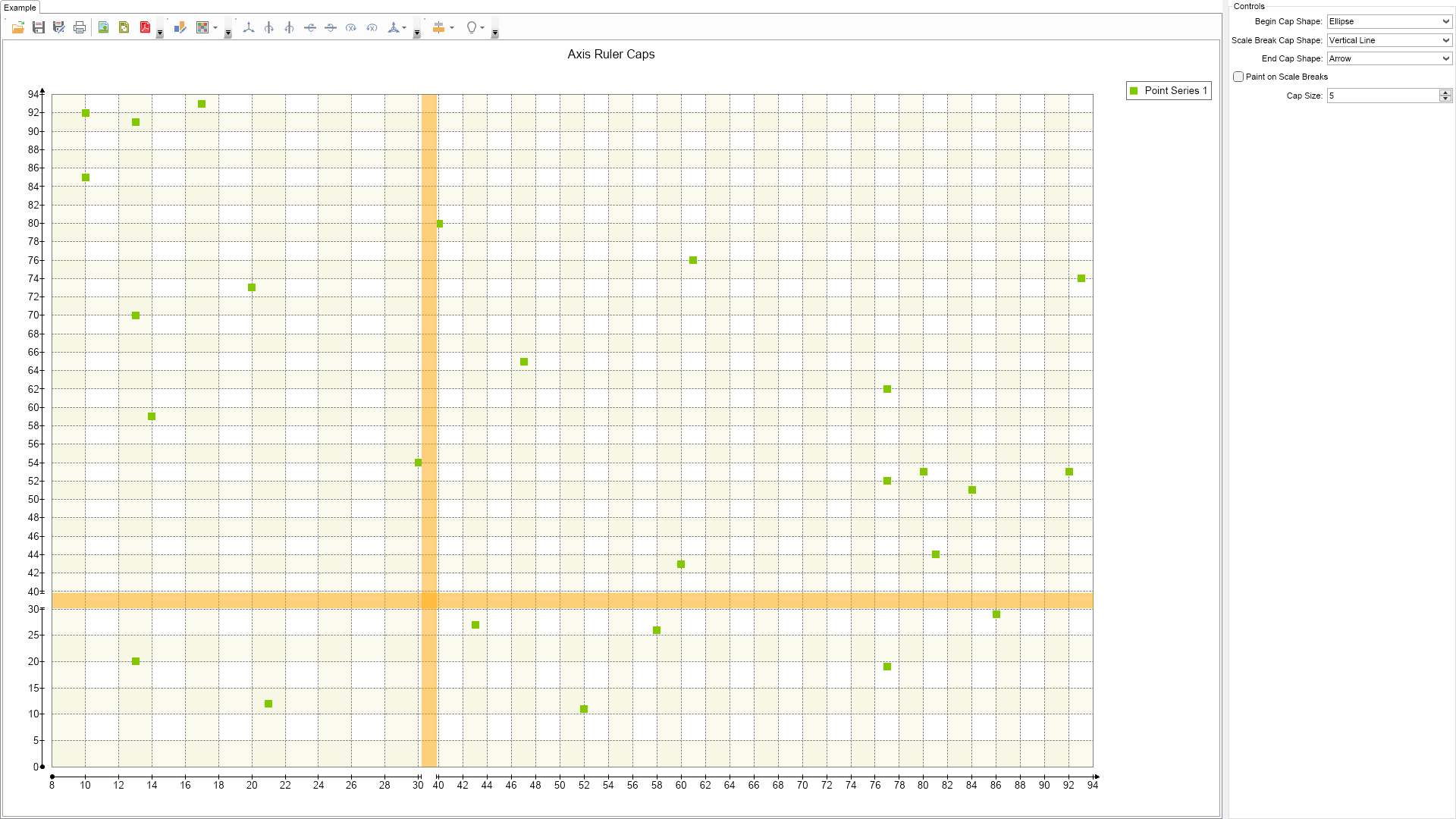
chartView.Surface.Titles[0].Text = "Axis Ruler Caps";
// configure chart
m_Chart = (NCartesianChart)chartView.Surface.Charts[0];
m_Chart.Padding = new NMargins(20);
// configure axes
m_Chart.SetPredefinedCartesianAxes(ENPredefinedCartesianAxis.XYLinear);
// feed some random data
NPointSeries point = new NPointSeries();
point.UseXValues = true;
point.DataLabelStyle = new NDataLabelStyle(false);
// fill in some random data
Random random = new Random();
for (int i = 0; i < 30; i++)
{
point.DataPoints.Add(new NPointDataPoint(5 + random.Next(90), 5 + random.Next(90)));
}
m_Chart.Series.Add(point);
// X Axis
NLinearScale xScale = new NLinearScale();
xScale.MajorGridLines = CreateScaleGrid();
NCustomScaleBreak xScaleBreak = new NCustomScaleBreak();
xScaleBreak.Style = ENScaleBreakStyle.Line;
xScaleBreak.Fill = new NColorFill(new NColor(NColor.Orange, 124));
xScaleBreak.Length = 20;
xScaleBreak.Range = new NRange(29, 41);
xScale.ScaleBreaks.Add(xScaleBreak);
// add an interlaced strip to the X axis
NScaleStrip xInterlacedStrip = new NScaleStrip();
xInterlacedStrip.Interlaced = true;
xInterlacedStrip.Fill = new NColorFill(new NColor(NColor.Beige, 125));
xScale.Strips.Add(xInterlacedStrip);
NCartesianAxis xAxis = m_Chart.Axes[ENCartesianAxis.PrimaryX];
xAxis.Scale = xScale;
NDockCartesianAxisAnchor xAxisAnchor = new NDockCartesianAxisAnchor(ENCartesianAxisDockZone.Bottom);
xAxisAnchor.BeforeSpace = 10;
xAxis.Anchor = xAxisAnchor;
// Y Axis
NLinearScale yScale = new NLinearScale();
yScale.MajorGridLines = CreateScaleGrid();
NCustomScaleBreak yScaleBreak = new NCustomScaleBreak();
yScaleBreak.Style = ENScaleBreakStyle.Line;
yScaleBreak.Fill = new NColorFill(new NColor(NColor.Orange, 124));
yScaleBreak.Length = 20;
yScaleBreak.Range = new NRange(29, 41);
yScale.ScaleBreaks.Add(yScaleBreak);
// add an interlaced strip to the Y axis
NScaleStrip yInterlacedStrip = new NScaleStrip();
yInterlacedStrip.Interlaced = true;
yInterlacedStrip.Fill = new NColorFill(new NColor(NColor.Beige, 125));
yInterlacedStrip.Interval = 1;
yInterlacedStrip.Length = 1;
yScale.Strips.Add(yInterlacedStrip);
NCartesianAxis yAxis = m_Chart.Axes[ENCartesianAxis.PrimaryY];
yAxis.Scale = yScale;
NDockCartesianAxisAnchor yAxisAnchor = new NDockCartesianAxisAnchor(ENCartesianAxisDockZone.Left);
yAxisAnchor.BeforeSpace = 10;
yAxis.Anchor = yAxisAnchor;
chartView.Document.StyleSheets.ApplyTheme(new NChartTheme(ENChartPalette.Bright, ENChartPaletteTarget.Series));
return chartViewWithCommandBars;
}
public NWidget CreateExampleControls()
{
NStackPanel stack = new NStackPanel();
NUniSizeBoxGroup boxGroup = new NUniSizeBoxGroup(stack);
m_BeginCapShapeComboBox = new NComboBox();
m_BeginCapShapeComboBox.Items.FillFromEnum();
stack.Add(NPairBox.Create("Begin Cap Shape:", m_BeginCapShapeComboBox));
m_BeginCapShapeComboBox.SelectedIndex = (int)ENCapShape.Ellipse;
m_ScaleBreakCapShapeComboBox = new NComboBox();
m_ScaleBreakCapShapeComboBox.Items.FillFromEnum();
stack.Add(NPairBox.Create("Scale Break Cap Shape:", m_ScaleBreakCapShapeComboBox));
m_ScaleBreakCapShapeComboBox.SelectedIndex = (int)ENCapShape.VerticalLine;
m_EndCapShapeComboBox = new NComboBox();
m_EndCapShapeComboBox.Items.FillFromEnum();
stack.Add(NPairBox.Create("End Cap Shape:", m_EndCapShapeComboBox));
m_EndCapShapeComboBox.SelectedIndex = (int)ENCapShape.Arrow;
m_PaintOnScaleBreaksCheckBox = new NCheckBox("Paint on Scale Breaks");
stack.Add(m_PaintOnScaleBreaksCheckBox);
m_PaintOnScaleBreaksCheckBox.Checked = false;
m_SizeUpDown = new NNumericUpDown();
stack.Add(NPairBox.Create("Cap Size:", m_SizeUpDown));
m_SizeUpDown.Value = 5;
// wire for events
m_BeginCapShapeComboBox.SelectedIndexChanged += OnRulerStyleChanged;
m_ScaleBreakCapShapeComboBox.SelectedIndexChanged += OnRulerStyleChanged;
m_EndCapShapeComboBox.SelectedIndexChanged += OnRulerStyleChanged;
m_PaintOnScaleBreaksCheckBox.CheckedChanged += OnRulerStyleChanged;
m_SizeUpDown.ValueChanged += OnRulerStyleChanged;
OnRulerStyleChanged(null);
return boxGroup;
}
public string GetExampleDescription()
{
return @"This example demonstrates how to alter the appearance of axis ruler caps.
";
}
///
/// Gets the relevant documentation links for the example
///
///
public (string Name, string Url)[] GetDocumentationUrls()
{
return new[]
{
("Ordinal Scale", "https://www.nevron.com/docs/openvision/ordinal-scale.html"),
("Scales Overview", "https://www.nevron.com/docs/openvision/scales-overview.html"),
("Common Axis Functionality", "https://www.nevron.com/docs/openvision/chart-common-axis-functionality.html"),
("Stroke", "https://www.nevron.com/docs/openvision/graphics-stroke.html"),
};
}
#endregion
#region Implementation
private void UpdateRulerStyleForAxis(NCartesianAxis axis)
{
NStandardScale scale = (NStandardScale)axis.Scale;
NSize capSize = new NSize(m_SizeUpDown.Value, m_SizeUpDown.Value);
// apply style to begin and end caps
scale.Ruler.BeginCap = new NScaleRulerCapStyle((ENCapShape)m_BeginCapShapeComboBox.SelectedIndex, capSize, 0, new NColorFill(NColor.Black), new NStroke(NColor.Black));
scale.Ruler.EndCap = new NScaleRulerCapStyle((ENCapShape)m_EndCapShapeComboBox.SelectedIndex, capSize, 3, new NColorFill(NColor.Black), new NStroke(NColor.Black));
scale.Ruler.ScaleBreakCap = new NScaleRulerCapStyle((ENCapShape)m_ScaleBreakCapShapeComboBox.SelectedIndex, capSize, 0, new NColorFill(NColor.Black), new NStroke(NColor.Black));
scale.Ruler.PaintOnScaleBreaks = m_PaintOnScaleBreaksCheckBox.Checked;
}
private NScaleGridLines CreateScaleGrid()
{
NScaleGridLines scaleGrid = new NScaleGridLines();
scaleGrid.Visible = true;
scaleGrid.Stroke = new NStroke(1, NColor.Gray, ENDashStyle.Dash);
return scaleGrid;
}
#endregion
#region Event Handlers
private void OnRulerStyleChanged(NValueChangeEventArgs arg)
{
UpdateRulerStyleForAxis(m_Chart.Axes[ENCartesianAxis.PrimaryX]);
UpdateRulerStyleForAxis(m_Chart.Axes[ENCartesianAxis.PrimaryY]);
}
#endregion
#region Fields
NCartesianChart m_Chart;
NComboBox m_BeginCapShapeComboBox;
NComboBox m_ScaleBreakCapShapeComboBox;
NComboBox m_EndCapShapeComboBox;
NCheckBox m_PaintOnScaleBreaksCheckBox;
NNumericUpDown m_SizeUpDown;
#endregion
#region Static Methods
#endregion
#region Constants
#endregion
#region Nested Types
#endregion
}
}

 Chart for .NET
 Diagram for .NET
 User Interface for .NET
 Vision for SSRS
 Chart for SSRS
 Gauge for SSRS
 Map for SSRS
 Barcode for SSRS
 Vision for SharePoint
 Chart for SharePoint
 Gauge for SharePoint
 Map for SharePoint
 Barcode for SharePoint
 Open Vision for .NET


 Vision for .NET