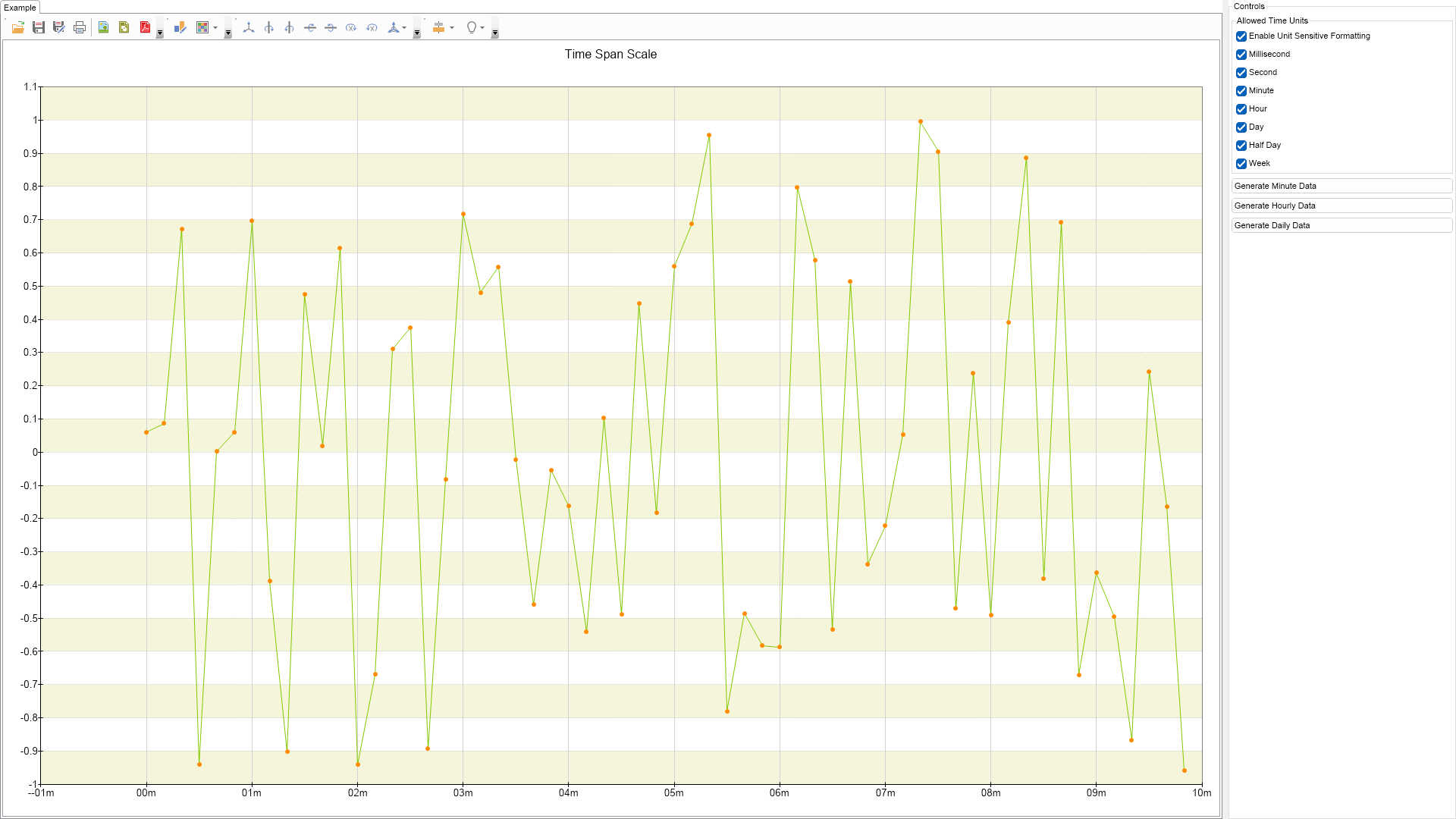
using Nevron.Nov;
using Nevron.Nov.Chart;
using Nevron.Nov.DataStructures;
using Nevron.Nov.Dom;
using Nevron.Nov.Graphics;
using Nevron.Nov.Layout;
using Nevron.Nov.UI;
using Nevron.Nov.Windows.Forms;
using System;
using System.Windows.Forms;
namespace NovWinFormsProject
{
public partial class Form1 : Form
{
#region Constructors
public Form1()
{
InitializeComponent();
// Set form title
Text = "NOV WinForms - NTimeSpanScaleExampe";
// Create the NOV example and its controls
NWidget exampleContent = CreateExampleContent();
NWidget exampleControls = CreateExampleControls();
if (exampleControls != null)
{
exampleControls.PreferredWidth = 300;
}
// Place the example and its controls in a pair box
NPairBox pairBox = new NPairBox(exampleContent, exampleControls);
pairBox.FillMode = ENStackFillMode.First;
pairBox.FitMode = ENStackFitMode.First;
pairBox.Margins = new NMargins(NDesign.HorizontalSpacing, NDesign.VerticalSpacing);
// Host the example in the form
NNovWidgetHost host = new NNovWidgetHost(pairBox);
host.Dock = DockStyle.Fill;
Controls.Add(host);
}
#endregion
#region Example
///
///
///
///
public NWidget CreateExampleContent()
{
NChartViewWithCommandBars chartViewWithCommandBars = new NChartViewWithCommandBars();
NChartView chartView = chartViewWithCommandBars.View;
chartView.Surface.CreatePredefinedChart(ENPredefinedChartType.Cartesian);
// configure title
chartView.Surface.Titles[0].Text = "Time Span Scale";
// configure chart
NCartesianChart chart = (NCartesianChart)chartView.Surface.Charts[0];
chart.SetPredefinedInteractor(ENPredefinedInteractor.DataZoomingAndScrolling);
// configure axes
chart.SetPredefinedCartesianAxes(ENPredefinedCartesianAxis.XTimeSpanYLinear);
m_TimeSpanScale = new NTimeSpanScale();
chart.Axes[ENCartesianAxis.PrimaryX].Scale = m_TimeSpanScale;
// configure the y axis
NLinearScale linearScale = (NLinearScale)chart.Axes[ENCartesianAxis.PrimaryY].Scale;
NScaleGridLines majorGrid = new NScaleGridLines();
majorGrid.Stroke = new NStroke(1, NColor.DarkGray, ENDashStyle.Dot);
linearScale.MajorGridLines = majorGrid;
// add a strip line style
NScaleStrip strip = new NScaleStrip();
strip.Fill = new NColorFill(NColor.Beige);
strip.Interlaced = true;
linearScale.Strips.Add(strip);
m_Line = new NLineSeries();
m_Line.UseXValues = true;
m_Line.DataLabelStyle = new NDataLabelStyle(false);
chart.Series.Add(m_Line);
Random random = new Random();
for (int i = 0; i < 7; i++)
{
m_Line.DataPoints.Add(new NLineDataPoint(random.Next(-100, 100)));
}
m_Line.LegendView.Mode = ENSeriesLegendMode.None;
m_Line.InflateMargins = true;
// assign marker
NMarkerStyle markerStyle = new NMarkerStyle();
markerStyle.Visible = true;
markerStyle.Fill = new NColorFill(NColor.DarkOrange);
markerStyle.Shape = ENPointShape3D.Ellipse;
markerStyle.Size = new NSize(6, 6);
m_Line.MarkerStyle = markerStyle;
chartView.Document.StyleSheets.ApplyTheme(new NChartTheme(ENChartPalette.Bright, ENChartPaletteTarget.Series));
OnGenerateMinuteDataButtonClick(null);
return chartViewWithCommandBars;
}
public NWidget CreateExampleControls()
{
NStackPanel stack = new NStackPanel();
NUniSizeBoxGroup boxGroup = new NUniSizeBoxGroup(stack);
NStackPanel groupBoxContent = new NStackPanel();
NGroupBox groupBox = new NGroupBox("Allowed Time Units", groupBoxContent);
stack.Add(groupBox);
m_EnableUnitSensitiveFormattingCheckBox = new NCheckBox("Enable Unit Sensitive Formatting");
m_EnableUnitSensitiveFormattingCheckBox.Checked = true;
m_EnableUnitSensitiveFormattingCheckBox.CheckedChanged += OnEnableUnitSensitiveFormattingCheckBoxCheckedChanged;
groupBoxContent.AddChild(m_EnableUnitSensitiveFormattingCheckBox);
m_MillisecondCheckBox = new NCheckBox("Millisecond");
m_MillisecondCheckBox.Checked = true;
m_MillisecondCheckBox.CheckedChanged += OnAllowedTimeUnitChanged;
groupBoxContent.AddChild(m_MillisecondCheckBox);
m_SecondCheckBox = new NCheckBox("Second");
m_SecondCheckBox.Checked = true;
m_SecondCheckBox.CheckedChanged += OnAllowedTimeUnitChanged;
groupBoxContent.AddChild(m_SecondCheckBox);
m_MinuteCheckBox = new NCheckBox("Minute");
m_MinuteCheckBox.Checked = true;
m_MinuteCheckBox.CheckedChanged += OnAllowedTimeUnitChanged;
groupBoxContent.AddChild(m_MinuteCheckBox);
m_HourCheckBox = new NCheckBox("Hour");
m_HourCheckBox.Checked = true;
m_HourCheckBox.CheckedChanged += OnAllowedTimeUnitChanged;
groupBoxContent.AddChild(m_HourCheckBox);
m_DayCheckBox = new NCheckBox("Day");
m_DayCheckBox.Checked = true;
m_DayCheckBox.CheckedChanged += OnAllowedTimeUnitChanged;
groupBoxContent.AddChild(m_DayCheckBox);
m_HalfDayDayCheckBox = new NCheckBox("Half Day");
m_HalfDayDayCheckBox.Checked = true;
m_HalfDayDayCheckBox.CheckedChanged += OnAllowedTimeUnitChanged;
groupBoxContent.AddChild(m_HalfDayDayCheckBox);
m_WeekCheckBox = new NCheckBox("Week");
m_WeekCheckBox.Checked = true;
m_WeekCheckBox.CheckedChanged += OnAllowedTimeUnitChanged;
groupBoxContent.AddChild(m_WeekCheckBox);
NButton generateMinuteDataButton = new NButton("Generate Minute Data");
generateMinuteDataButton.Click += OnGenerateMinuteDataButtonClick;
stack.Add(generateMinuteDataButton);
NButton generateHourlyDataButton = new NButton("Generate Hourly Data");
generateHourlyDataButton.Click += OnGenerateHourlyDataButtonClick;
stack.Add(generateHourlyDataButton);
NButton generateDailyDataButton = new NButton("Generate Daily Data");
generateDailyDataButton.Click += OnGenerateDailyDataButtonClick;
stack.Add(generateDailyDataButton);
return boxGroup;
}
///
///
///
///
public string GetExampleDescription()
{
return @"This example demonstrates how to create a period (duration) scale. The duration scale is similar to a linear scale except it uses time units for decoration.
Time units are different than date/time units because they are regular (always result in the same number of ticks).
";
}
///
/// Gets the relevant documentation links for the example
///
///
public (string Name, string Url)[] GetDocumentationUrls()
{
return new[]
{
("Timespan scale", "https://www.nevron.com/docs/openvision/timespan-scale.html"),
("Scales Overview", "https://www.nevron.com/docs/openvision/scales-overview.html"),
};
}
#endregion
#region Implementation
#endregion
#region Event Handlers
private void OnEnableUnitSensitiveFormattingCheckBoxCheckedChanged(NValueChangeEventArgs arg)
{
if (m_TimeSpanScale == null)
return;
if (((NCheckBox)arg.TargetNode).Checked)
{
m_TimeSpanScale.Labels.TextProvider = new NTimeUnitSensitiveLabelTextProvider();
}
else
{
m_TimeSpanScale.Labels.TextProvider = new NFormattedScaleLabelTextProvider(new NTimeSpanValueFormatter(ENTimeSpanValueFormat.HourMinute));
}
}
private void OnAllowedTimeUnitChanged(NValueChangeEventArgs arg)
{
if (m_TimeSpanScale == null)
return;
NList autoTimeUnits = new NList();
if (m_MillisecondCheckBox.Checked)
{
autoTimeUnits.Add(NTimeUnit.Millisecond);
}
if (m_SecondCheckBox.Checked)
{
autoTimeUnits.Add(NTimeUnit.Second);
}
if (m_MinuteCheckBox.Checked)
{
autoTimeUnits.Add(NTimeUnit.Minute);
}
if (m_HourCheckBox.Checked)
{
autoTimeUnits.Add(NTimeUnit.Hour);
}
if (m_DayCheckBox.Checked)
{
autoTimeUnits.Add(NTimeUnit.Day);
}
if (m_HalfDayDayCheckBox.Checked)
{
autoTimeUnits.Add(NTimeUnit.HalfDay);
}
if (m_WeekCheckBox.Checked)
{
autoTimeUnits.Add(NTimeUnit.Week);
}
m_TimeSpanScale.AutoTimeUnits = new NDomArray(autoTimeUnits.ToArray());
}
private void OnGenerateMinuteDataButtonClick(NEventArgs arg)
{
GenerateData(new TimeSpan(0, 10, 0), new TimeSpan(0, 0, 10));
}
private void OnGenerateHourlyDataButtonClick(NEventArgs arg)
{
GenerateData(new TimeSpan(15, 0, 0), new TimeSpan(0, 10, 0));
}
private void OnGenerateDailyDataButtonClick(NEventArgs arg)
{
GenerateData(new TimeSpan(240, 0, 0), new TimeSpan(12, 0, 0));
}
private void GenerateData(TimeSpan limit, TimeSpan step)
{
m_Line.DataPoints.Clear();
TimeSpan origin = new TimeSpan(0);
Random rand = new Random();
long count = limit.Ticks / step.Ticks;
long counter = 0;
Random random = new Random();
for (; origin < limit; origin += step)
{
double y = 10 * Math.Sin(Math.PI * counter / count) + random.NextDouble() * 2 - 1;
m_Line.DataPoints.Add(new NLineDataPoint((double)origin.Ticks, y));
}
}
#endregion
#region Fields
NLineSeries m_Line;
NTimeSpanScale m_TimeSpanScale;
NCheckBox m_EnableUnitSensitiveFormattingCheckBox;
NCheckBox m_MillisecondCheckBox;
NCheckBox m_SecondCheckBox;
NCheckBox m_MinuteCheckBox;
NCheckBox m_HourCheckBox;
NCheckBox m_DayCheckBox;
NCheckBox m_HalfDayDayCheckBox;
NCheckBox m_WeekCheckBox;
#endregion
#region Static Methods
#endregion
#region Constants
#endregion
#region Nested Types
#endregion
}
}

 Chart for .NET
 Diagram for .NET
 User Interface for .NET
 Vision for SSRS
 Chart for SSRS
 Gauge for SSRS
 Map for SSRS
 Barcode for SSRS
 Vision for SharePoint
 Chart for SharePoint
 Gauge for SharePoint
 Map for SharePoint
 Barcode for SharePoint
 Open Vision for .NET


 Vision for .NET