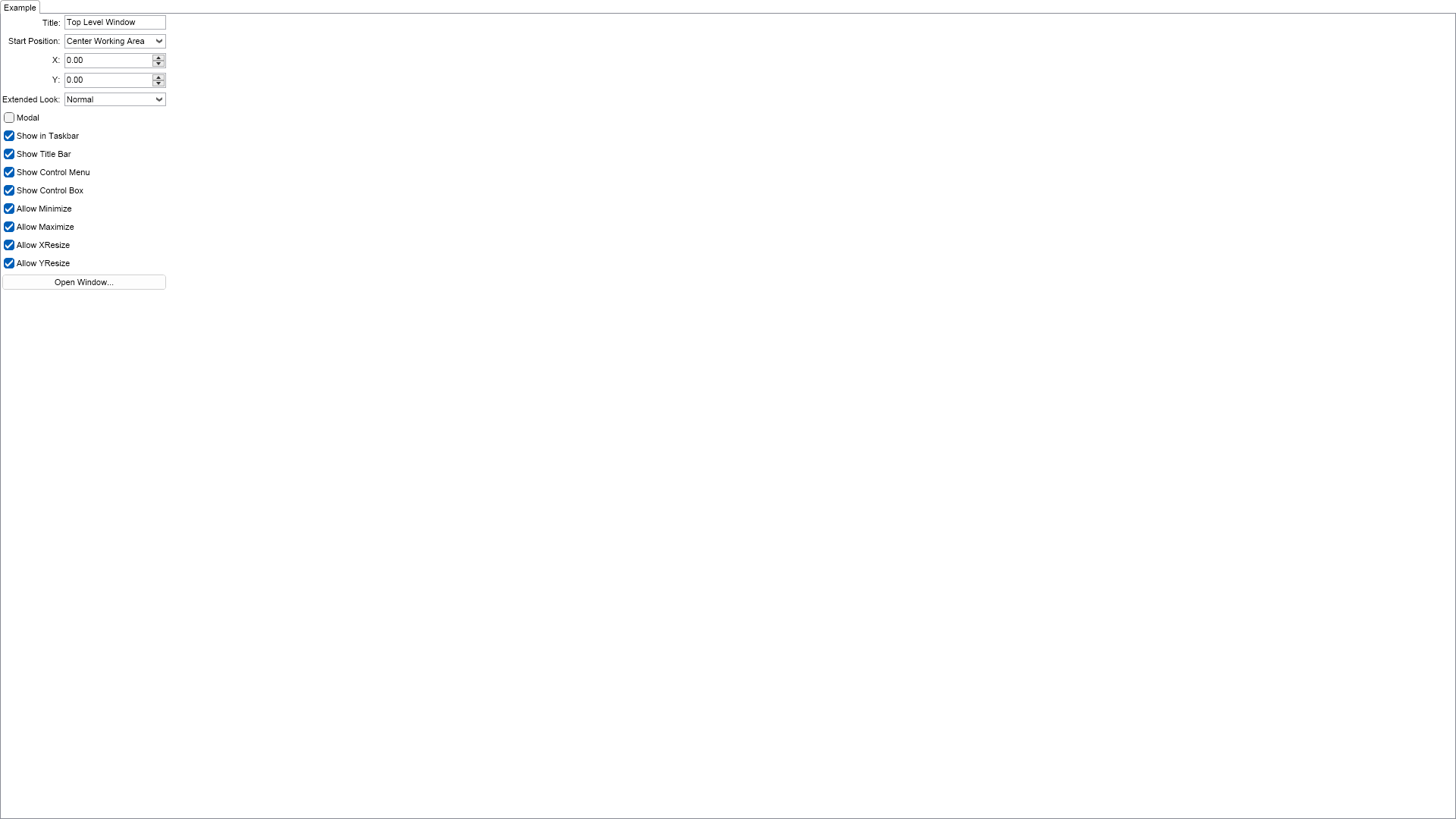
using Nevron.Nov;
using Nevron.Nov.DataStructures;
using Nevron.Nov.Dom;
using Nevron.Nov.Editors;
using Nevron.Nov.Graphics;
using Nevron.Nov.Layout;
using Nevron.Nov.Presentation;
using Nevron.Nov.UI;
using Nevron.Nov.Windows.Forms;
using System.Windows.Forms;

namespace NovWinFormsProject
{
	public partial class Form1 : Form
	{
		#region Constructors

		public Form1()
		{
			InitializeComponent();

			// Set form title
			Text = "NOV WinForms - NTopLevelWindowPropertiesExample";

			// Create the NOV example and its controls
			NWidget exampleContent = CreateExampleContent();
			NWidget exampleControls = CreateExampleControls();
			if (exampleControls != null)
			{
				exampleControls.PreferredWidth = 300;
			}

			// Place the example and its controls in a pair box
			NPairBox pairBox = new NPairBox(exampleContent, exampleControls);
			pairBox.FillMode = ENStackFillMode.First;
			pairBox.FitMode = ENStackFitMode.First;
			pairBox.Margins = new NMargins(NDesign.HorizontalSpacing, NDesign.VerticalSpacing);

			// Host the example in the form
			NNovWidgetHost host = new NNovWidgetHost(pairBox);
			host.Dock = DockStyle.Fill;
			Controls.Add(host);
		}

		#endregion

		#region Example

		public NWidget CreateExampleContent()
		{
			// Create and initialize a top level window
			m_Window = new NTopLevelWindow();
			m_Window.Title = "Top Level Window";
			m_Window.RemoveFromParentOnClose = true;
			m_Window.AllowXResize = true;
			m_Window.AllowYResize = true;
			m_Window.PreferredSize = new NSize(300, 300);
			m_Window.QueryManualStartPosition += OnWindowQueryManualStartPosition;
			m_Window.Closed += OnWindowClosed;

			// Create the top level window's content
			NStackPanel stack = new NStackPanel();
			stack.FitMode = ENStackFitMode.First;
			stack.FillMode = ENStackFillMode.First;

			NLabel label = new NLabel("This is a top level window.");
			label.HorizontalPlacement = ENHorizontalPlacement.Center;
			label.VerticalPlacement = ENVerticalPlacement.Center;
			stack.Add(label);

			NButton closeButton = new NButton("Close");
			closeButton.HorizontalPlacement = ENHorizontalPlacement.Center;
			closeButton.Click += OnCloseButtonClick;
			stack.Add(closeButton);
			m_Window.Content = stack;

			// Create example content
			m_SettingsStack = new NStackPanel();
			m_SettingsStack.HorizontalPlacement = ENHorizontalPlacement.Left;

			NList editors = NDesigner.GetDesigner(m_Window).CreateMemberEditors(m_Window,
				NTopLevelWindow.TitleProperty,
				NTopLevelWindow.StartPositionProperty,
				NTopLevelWindow.XProperty,
				NTopLevelWindow.YProperty,
                NStylePropertyEx.ExtendedLookPropertyEx,

				NTopLevelWindow.ModalProperty,
				NTopLevelWindow.ShowInTaskbarProperty,
				NTopLevelWindow.ShowTitleBarProperty,
				NTopLevelWindow.ShowControlMenuProperty,
				NTopLevelWindow.ShowControlBoxProperty,

				NTopLevelWindow.AllowMinimizeProperty,
				NTopLevelWindow.AllowMaximizeProperty,
				NTopLevelWindow.AllowXResizeProperty,
				NTopLevelWindow.AllowYResizeProperty);

            // Change the text of the extended look property editor
            label = (NLabel)editors[4].GetFirstDescendant(new NInstanceOfSchemaFilter(NLabel.NLabelSchema));
            label.Text = "Extended Look:";

            // Add the created property editors to the stack
			for (int i = 0, count = editors.Count; i < count; i++)
			{
				m_SettingsStack.Add(editors[i]);
			}

			// Create a button that opens the window
			NButton openWindowButton = new NButton("Open Window...");
            openWindowButton.Content.HorizontalPlacement = ENHorizontalPlacement.Center;
			openWindowButton.Click += OnOpenWindowButtonClick;
			m_SettingsStack.Add(openWindowButton);

			return new NUniSizeBoxGroup(m_SettingsStack);
		}
		public NWidget CreateExampleControls()
		{
			return null;
		}
		public string GetExampleDescription()
		{
			return @"

	This example demonstrates how to create, configure and open top level windows. Use the controls
	above to configure the properties of the top level window and then click ""Open Window...""
	button to show it.

";
		}

		///
		/// Gets the relevant documentation links for the example
		///
		///
		public (string Name, string Url)[] GetDocumentationUrls()
		{
			return new[]
			{
				("Top Level Windows", "https://www.nevron.com/docs/openvision/ui-top-level-windows.html"),
				("Windows and the Desktop", "https://www.nevron.com/docs/openvision/ui-windows-and-the-desktop.html"),
			};
		}
		protected internal void OnClosing()
		{
			base.OnClosing();

			m_Window.Close();
		}

		#endregion

		#region Implementation
		#endregion

		#region Event Handlers

		private void OnOpenWindowButtonClick(NEventArgs args)
		{
			DisplayWindow.Windows.Add(m_Window);
			m_Window.Open();
			m_SettingsStack.Enabled = false;
		}
		private void OnCloseButtonClick(NEventArgs args)
		{
			m_Window.Close();
		}
		private void OnWindowQueryManualStartPosition(NEventArgs args)
		{
			// Get the top level window which queries for position
			NTopLevelWindow window = (NTopLevelWindow)args.TargetNode;

			// Set the top level window bounds (in DIPs)
			window.Bounds = new NRectangle(window.X, window.Y, window.DefaultWidth, window.DefaultHeight);
		}
		private void OnWindowClosed(NEventArgs args)
		{
			m_SettingsStack.Enabled = true;
		}

		#endregion

		#region Fields

		private NTopLevelWindow m_Window;
		private NStackPanel m_SettingsStack;

		#endregion

		#region Static Methods
		#endregion

		#region Constants
		#endregion

		#region Nested Types
		#endregion
	}
}

 Chart for .NET
 Diagram for .NET
 User Interface for .NET
 Vision for SSRS
 Chart for SSRS
 Gauge for SSRS
 Map for SSRS
 Barcode for SSRS
 Vision for SharePoint
 Chart for SharePoint
 Gauge for SharePoint
 Map for SharePoint
 Barcode for SharePoint
 Open Vision for .NET


 Vision for .NET