using Nevron.Nov;
using Nevron.Nov.DataStructures;
using Nevron.Nov.Dom;
using Nevron.Nov.Editors;
using Nevron.Nov.Graphics;
using Nevron.Nov.Layout;
using Nevron.Nov.Presentation;
using Nevron.Nov.UI;
using Nevron.Nov.Windows.Forms;
using System;
using System.Windows.Forms;

namespace NovWinFormsProject
{
	public partial class Form1 : Form
	{
		#region Constructors

		public Form1()
		{
			InitializeComponent();

			// Set form title
			Text = "NOV WinForms - NTextBoxExample";

			// Create the NOV example and its controls
			NWidget exampleContent = CreateExampleContent();
			NWidget exampleControls = CreateExampleControls();
			if (exampleControls != null)
			{
				exampleControls.PreferredWidth = 300;
			}

			// Place the example and its controls in a pair box
			NPairBox pairBox = new NPairBox(exampleContent, exampleControls);
			pairBox.FillMode = ENStackFillMode.First;
			pairBox.FitMode = ENStackFitMode.First;
			pairBox.Margins = new NMargins(NDesign.HorizontalSpacing, NDesign.VerticalSpacing);

			// Host the example in the form
			NNovWidgetHost host = new NNovWidgetHost(pairBox);
			host.Dock = DockStyle.Fill;
			Controls.Add(host);
		}

		#endregion

		#region Example

		public NWidget CreateExampleContent()
		{
#region InternalCode
			//string text1 = "श्रीमद् श्रीमद् श्रीमद् भगवद्गीता अध्याय अर्जुन विषाद योग धृतराष्ट्र उवाच। धर्मक्षेत्रे कुरुक्षेत्रे समवेता युयुत्सवः मामकाः पाण्डवाश्चैव किमकुर्वत संजय";
//			string text1 = "The LayoutEngine does all the work necessary to display Unicode text written in languages with complex writing systems such as Hindi (हिन्दी) Thai (ไทย) and Arabic (العربية). Here's a sample of some text written in Sanskrit: श्रीमद् श्रीमद् श्रीमद् भगवद्गीता अध्याय अर्जुन विषाद योग धृतराष्ट्र उवाच। धर्मक्षेत्रे कुरुक्षेत्रे समवेता युयुत्सवः मामकाः पाण्डवाश्चैव किमकुर्वत संजय Here's a sample of some text written in Arabic: أساسًا، تتعامل الحواسيب فقط مع الأرقام، وتقوم بتخزين الأحرف والمحارف الأخرى بعد أن تُعطي رقما معينا لكل واحد منها. وقبل اختراع here's a sample of some text written in Thai: บทที่๑พายุไซโคลนโดโรธีอาศัยอยู่ท่ามกลางทุ่งใหญ่ในแคนซัสกับลุงเฮนรีชาวไร่และป้าเอ็มภรรยาชาวไร่บ้านของพวกเขาหลังเล็กเพราะไม้สร้างบ้านต้องขนมาด้วยเกวียนเป็นระยะทางหลายไมล์";
//			string text1 = "Malyam: ഉൾപ്പെടുന്ന ഒരു ലിപിയാണ് മലയാള ലിപി. മലയാള ഭാഷ എഴുതന്നതിനാണ് മുഖ്യമായും ഈ ലിപി ഉപയോഗിക്കുന്നത്. സംസ്കൃതം, കൊങ്കണി, തുളു എന്നീ ഭാഷകൾ എഴുതുന്നതിനും വളരെക്കുറച്ച് ആളുകൾ മാത്രം സംസാരിക്കുന്ന പണിയ, കുറുമ്പ തുടങ്ങിയ ഭാഷകൾ എഴുതുന്നതിനും മലയാളലിപി ഉപയോഗിക്കാറുണ്ട്";
//			string text1 = "Once upon a time a Wolf was lapping at a spring on a hillside, when, looking up, what should he see but a Lamb just beginning to drink a little lower down. ‘There’s my supper,’ thought he, ‘if only I can find some excuse to seize it.’ Then he called out to the Lamb, ‘How dare you muddle the water from which I am drinking?’ ‘Nay, master, nay,’ said Lambikin; ‘if the water be muddy up there, I cannot be the cause of it, for it runs down from you to me.’ ‘Well, then,’ said the Wolf, ‘why did you call me bad names this time last year?’ ‘That cannot be,’ said the Lamb; ‘I am only six months old.’ ‘I don’t care,’ snarled the Wolf; ‘if it was not you it was your father;’ and with that he rushed upon the poor little Lamb and .WARRA WARRA WARRA WARRA WARRA .ate her all up. But before she died she gasped out .’Any excuse will serve a tyrant.’";
//          string text1 = "أساسًا، تتعامل الحواسيب فقط مع الأرقام، وتقوم بتخزين الأحرف والمحارف الأخرى بعد أن تُعطي رقما معينا لكل واحد منها. وقبل اختراع";
//          string text1 = "CAPITAL" + (char)'A' + (char)0x0301 + (char)'B' + (char)0x0327 + 'C' + (char)0x0308 + (char)'a' + (char)0x0301 + (char)'b' + (char)0x0327 + 'c' + (char)0x0308; ;
//          string text1 = "T" + (char)0x0327 + 'c' + (char)0x0308;
            // string text1 = "C" + (char)0x0308;
			//string text1 = "This is some text. This is some text. This is some text.";
#endregion

			m_TextBox = new NTextBox();
			m_TextBox.Hint = "Enter some text here.";

			return m_TextBox;
		}

		public NWidget CreateExampleControls()
		{
			NStackPanel stack = new NStackPanel();

			// font families
			m_FontFamiliesComboBox = new NComboBox();

			string[] fontFamilies = NApplication.FontService.InstalledFontsMap.FontFamilies;
			int selectedIndex = 0;

			for (int i = 0; i < fontFamilies.Length; i++)
			{
				m_FontFamiliesComboBox.Items.Add(new NComboBoxItem(fontFamilies[i]));

				if (fontFamilies[i] == NFontDescriptor.DefaultSansFamilyName)
				{
					selectedIndex = i;
				}
			}

			m_FontFamiliesComboBox.SelectedIndex = selectedIndex;
			m_FontFamiliesComboBox.SelectedIndexChanged += OnFontStyleChanged;
			stack.Add(m_FontFamiliesComboBox);

			// font sizes
			stack.Add(new NLabel("Font Size:"));
			m_FontSizeComboBox = new NComboBox();
			for (int i = 5; i < 72; i++)
			{
				m_FontSizeComboBox.Items.Add(new NComboBoxItem(i.ToString()));
			}

			m_FontSizeComboBox.SelectedIndex = 4;
			m_FontSizeComboBox.SelectedIndexChanged += OnFontStyleChanged;
			stack.Add(m_FontSizeComboBox);

			// add style controls
			m_BoldCheckBox = new NCheckBox();
			m_BoldCheckBox.Content = new NLabel("Bold");
			m_BoldCheckBox.CheckedChanged += OnFontStyleChanged;
			stack.Add(m_BoldCheckBox);

			m_ItalicCheckBox = new NCheckBox();
			m_ItalicCheckBox.Content = new NLabel("Italic");
			m_ItalicCheckBox.CheckedChanged += OnFontStyleChanged;
			stack.Add(m_ItalicCheckBox);

			m_UnderlineCheckBox = new NCheckBox();
			m_UnderlineCheckBox.Content = new NLabel("Underline");
			m_UnderlineCheckBox.CheckedChanged += OnFontStyleChanged;
			stack.Add(m_UnderlineCheckBox);

			m_StrikeTroughCheckBox = new NCheckBox();
			m_StrikeTroughCheckBox.Content = new NLabel("Strikethrough");
			m_StrikeTroughCheckBox.CheckedChanged += OnFontStyleChanged;
			stack.Add(m_StrikeTroughCheckBox);

			// properties
			NList editors = NDesigner.GetDesigner(m_TextBox).CreateMemberEditors(
				m_TextBox,
				NTextBox.EnabledProperty,
				NTextBox.ReadOnlyProperty,
				NTextBox.MultilineProperty,
				NTextBox.WordWrapProperty,
				NTextBox.AlwaysShowSelectionProperty,
				NTextBox.AlwaysShowCaretProperty,
				NTextBox.AcceptsTabProperty,
				NTextBox.AcceptsEnterProperty,
				NTextBox.ShowCaretProperty,
				NTextBox.HorizontalPlacementProperty,
				NTextBox.VerticalPlacementProperty,
				NTextBox.TextAlignProperty,
				NTextBox.DirectionProperty,
				NTextBox.HScrollModeProperty,
				NTextBox.VScrollModeProperty,
				NTextBox.CharacterCasingProperty,
				NTextBox.PasswordCharProperty,
				NTextBox.HintProperty,
				NTextBox.HintFillProperty);

			NStackPanel propertiesStack = new NStackPanel();
			for (int i = 0; i < editors.Count; i++)
			{
				propertiesStack.Add(editors[i]);
			}

			stack.Add(new NGroupBox("Properties", new NUniSizeBoxGroup(propertiesStack)));

			// make sure font style is updated
			OnFontStyleChanged(null);

			return stack;
		}
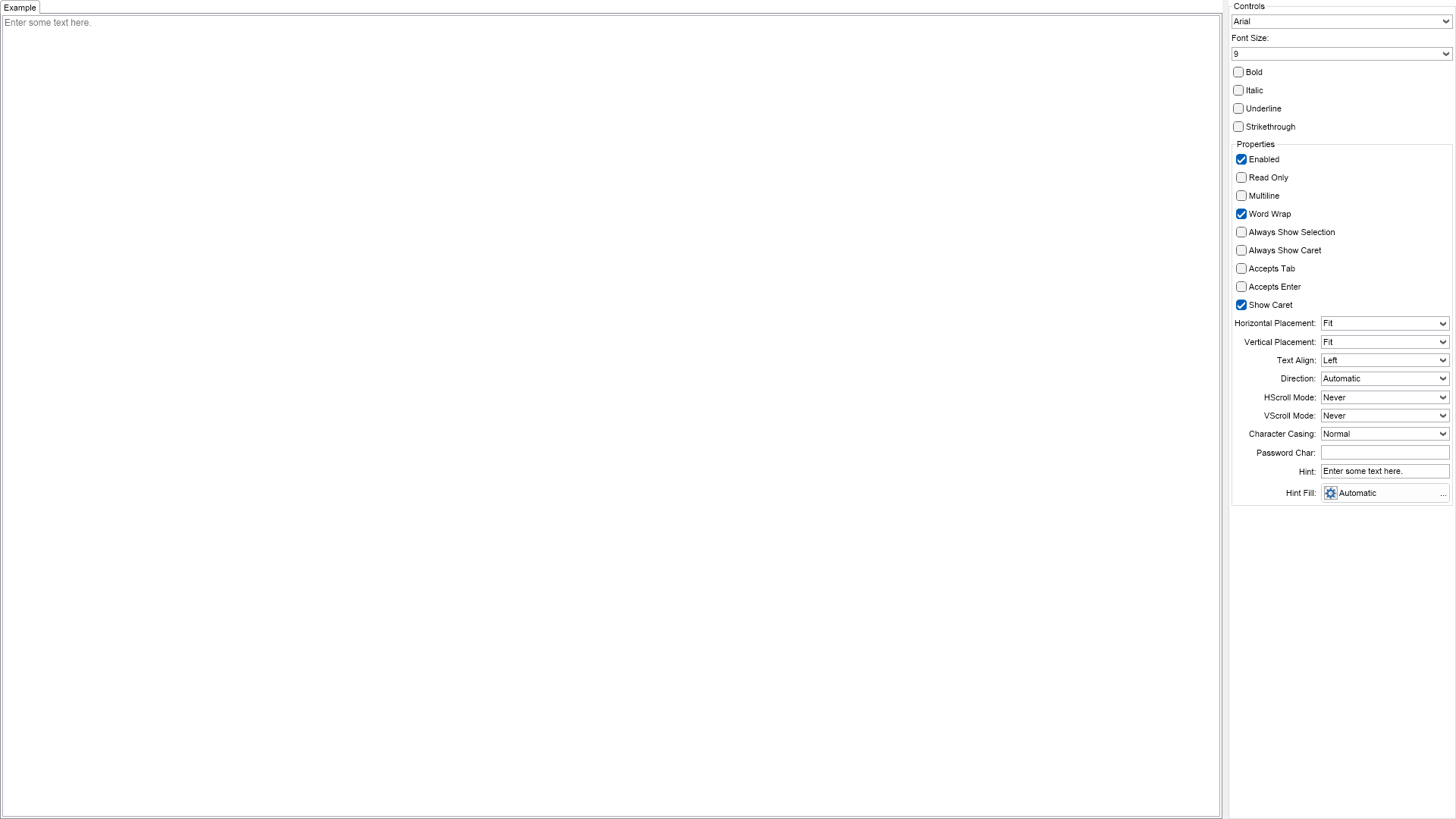
		public string GetExampleDescription()
		{
			return @"

	This example demonstrates how to create and use text boxes. The controls on the right let you
	change the text box's font, alignment, placement, etc.

";
		}

		///
		/// Gets the relevant documentation links for the example
		///
		///
		public (string Name, string Url)[] GetDocumentationUrls()
		{
			return new[]
			{
				("Text Box", "https://www.nevron.com/docs/openvision/ui-text-box.html"),
				("Text Widgets Overview", "https://www.nevron.com/docs/openvision/ui-text-widgets-overview.html"),
			};
		}

		#endregion

		#region Implementation
		#endregion

		#region Event Handlers

		private void OnFontStyleChanged(NValueChangeEventArgs args)
		{
			string fontFamily = (m_FontFamiliesComboBox.SelectedItem.Content as NLabel).Text;
			int fontSize = Int32.Parse((m_FontSizeComboBox.SelectedItem.Content as NLabel).Text);

			ENFontStyle fontStyle = ENFontStyle.Regular;

			if (m_BoldCheckBox.Checked)
			{
				fontStyle |= ENFontStyle.Bold;
			}

			if (m_ItalicCheckBox.Checked)
			{
				fontStyle |= ENFontStyle.Italic;
			}

			if (m_UnderlineCheckBox.Checked)
			{
				fontStyle |= ENFontStyle.Underline;
			}

			if (m_StrikeTroughCheckBox.Checked)
			{
                fontStyle |= ENFontStyle.Strikethrough;
			}

			m_TextBox.Font = new NFont(fontFamily, fontSize, fontStyle);
		}

		#endregion

		#region Fields

		private NTextBox m_TextBox;

		private NComboBox m_FontFamiliesComboBox;
		private NComboBox m_FontSizeComboBox;
		private NCheckBox m_BoldCheckBox;
		private NCheckBox m_ItalicCheckBox;
		private NCheckBox m_UnderlineCheckBox;
		private NCheckBox m_StrikeTroughCheckBox;

		#endregion

		#region Static Methods
		#endregion

		#region Constants
		#endregion

		#region Nested Types
		#endregion
	}
}

 Chart for .NET
 Diagram for .NET
 User Interface for .NET
 Vision for SSRS
 Chart for SSRS
 Gauge for SSRS
 Map for SSRS
 Barcode for SSRS
 Vision for SharePoint
 Chart for SharePoint
 Gauge for SharePoint
 Map for SharePoint
 Barcode for SharePoint
 Open Vision for .NET


 Vision for .NET