Scroll Content Example for Blazor

Nevron NOV UserInterface for Blazor ships with hundreds of examples with full source code, as part of the Nevron Open Vision Suite. All Blazor UserInterface examples are also available as a stand-alone Visual Studio solution in C#, which you can download from the links below.

Scroll Content Example for Blazor Description

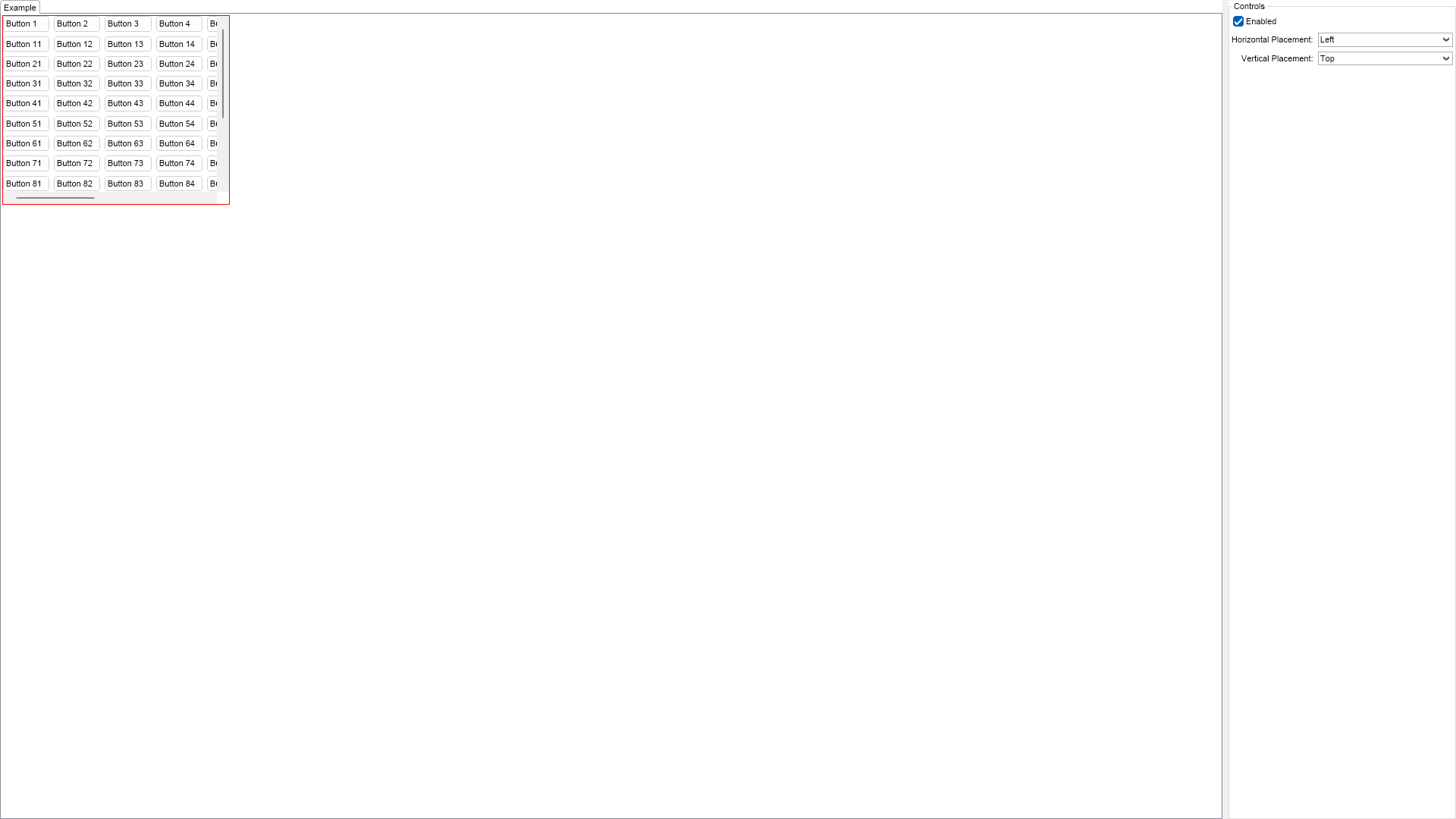
This example demonstrates how to use the scroll content widget. The scroll content is a widget, which contains a single other widget, and allows for its scrolling. It measures to fit the contained element without scrollbars, but if this is not possible, the scroll content element will display scrollbars. The contained element is always sized to its desired size.


Scroll Content Example

C# Scroll Content Example Code for Nevron UserInterface for Blazor
Language: C#

using Nevron.Nov;
using Nevron.Nov.DataStructures;
using Nevron.Nov.Dom;
using Nevron.Nov.Editors;
using Nevron.Nov.Graphics;
using Nevron.Nov.Layout;
using Nevron.Nov.Presentation;
using Nevron.Nov.UI;
using Nevron.Nov.Windows.Forms;
using System.Windows.Forms;

namespace NovWinFormsProject
{
	public partial class Form1 : Form
	{
		#region Constructors

		public Form1()
		{
			InitializeComponent();

			// Set form title
			Text = "NOV WinForms - NScrollContentExample";

			// Create the NOV example and its controls
			NWidget exampleContent = CreateExampleContent();
			NWidget exampleControls = CreateExampleControls();
			if (exampleControls != null)
			{
				exampleControls.PreferredWidth = 300;
			}

			// Place the example and its controls in a pair box
			NPairBox pairBox = new NPairBox(exampleContent, exampleControls);
			pairBox.FillMode = ENStackFillMode.First;
			pairBox.FitMode = ENStackFitMode.First;
			pairBox.Margins = new NMargins(NDesign.HorizontalSpacing, NDesign.VerticalSpacing);

			// Host the example in the form
			NNovWidgetHost host = new NNovWidgetHost(pairBox);
			host.Dock = DockStyle.Fill;
			Controls.Add(host);
		}

		#endregion

		#region Example

		public NWidget CreateExampleContent()
		{
			m_ScrollContent = new NScrollContent();
			m_ScrollContent.HorizontalPlacement = ENHorizontalPlacement.Left;
			m_ScrollContent.VerticalPlacement = ENVerticalPlacement.Top;
			m_ScrollContent.SetBorder(1, NColor.Red);
            m_ScrollContent.PreferredSize = new NSize(300, 250);

			// Create a table with some buttons
			NTableFlowPanel table = new NTableFlowPanel();
			table.MaxOrdinal = 10;
			for (int i = 1; i <= 150; i++)
			{
				table.Add(new NButton("Button " + i.ToString()));
			}

			m_ScrollContent.Content = table;
			return m_ScrollContent;
		}
		public NWidget CreateExampleControls()
		{
			NList editors = NDesigner.GetDesigner(m_ScrollContent).CreateMemberEditors(
				m_ScrollContent,
				NScrollContent.EnabledProperty,
				NScrollContent.HorizontalPlacementProperty,
				NScrollContent.VerticalPlacementProperty);

			NStackPanel stack = new NStackPanel();
			
			for (int i = 0, count = editors.Count; i < count; i++)
			{
				stack.Add(editors[i]);
			}

			return new NUniSizeBoxGroup(stack);
		}
		public string GetExampleDescription()
		{
			return @"

This example demonstrates how to use the scroll content widget. The scroll content is a widget, which contains a single other widget, and allows for its scrolling. It measures to fit the contained element without scrollbars, but if this is not possible, the scroll content element will display scrollbars. The contained element is always sized to its desired size.

"; } /// /// Gets the relevant documentation links for the example /// /// public (string Name, string Url)[] GetDocumentationUrls() { return new[] { ("Scroll Content Element", "https://www.nevron.com/docs/openvision/ui-scroll-content-element.html"), ("Containers Overview", "https://www.nevron.com/docs/openvision/ui-containers-overview.html"), }; } #endregion #region Implementation #endregion #region Event Handlers #endregion #region Fields private NScrollContent m_ScrollContent; #endregion #region Static Methods #endregion #region Constants #endregion #region Nested Types #endregion } }

Download a fully functional C# (.cs) Scroll Content Example for Blazor Solution