using Nevron.Nov;
using Nevron.Nov.Dom;
using Nevron.Nov.Editors;
using Nevron.Nov.Graphics;
using Nevron.Nov.Layout;
using Nevron.Nov.UI;
using Nevron.Nov.Windows.Forms;
using System.Windows.Forms;

namespace NovWinFormsProject
{
	public partial class Form1 : Form
	{
		#region Constructors

		public Form1()
		{
			InitializeComponent();

			// Set form title
			Text = "NOV WinForms - NContextMenuExample";

			// Create the NOV example and its controls
			NWidget exampleContent = CreateExampleContent();
			NWidget exampleControls = CreateExampleControls();
			if (exampleControls != null)
			{
				exampleControls.PreferredWidth = 300;
			}

			// Place the example and its controls in a pair box
			NPairBox pairBox = new NPairBox(exampleContent, exampleControls);
			pairBox.FillMode = ENStackFillMode.First;
			pairBox.FitMode = ENStackFitMode.First;
			pairBox.Margins = new NMargins(NDesign.HorizontalSpacing, NDesign.VerticalSpacing);

			// Host the example in the form
			NNovWidgetHost host = new NNovWidgetHost(pairBox);
			host.Dock = DockStyle.Fill;
			Controls.Add(host);
		}

		#endregion

		#region Example

		public NWidget CreateExampleContent()
		{
			m_TextChecked = new bool[] { true, true, false };
			m_ImageAndTextChecked = new bool[] { true, false, true };

			NStackPanel leftStack = new NStackPanel();
			leftStack.Add(CreateWidget("Text Only", CreateTextContextMenu));
			leftStack.Add(CreateWidget("Image and Text", CreateImageAndTextContextMenu));
			leftStack.Add(CreateWidget("Checkable Text Only", CreateCheckableTextContextMenu));
			leftStack.Add(CreateWidget("Checkable Image And Text", CreateCheckableImageAndTextContextMenu));

			NStackPanel rightStack = new NStackPanel();
			rightStack.Add(CreateWidget("Text Only", CreateTextContextMenu));
			rightStack.Add(CreateWidget("Image and Text", CreateImageAndTextContextMenu));
			rightStack.Add(CreateWidget("Checkable Text Only", CreateCheckableTextContextMenu));
			rightStack.Add(CreateWidget("Checkable Image And Text", CreateCheckableImageAndTextContextMenu));

			NStackPanel stack = new NStackPanel();
			stack.Direction = ENHVDirection.LeftToRight;
			stack.HorizontalPlacement = ENHorizontalPlacement.Left;
			stack.VerticalPlacement = ENVerticalPlacement.Top;
			stack.HorizontalSpacing = 10;

			stack.Add(new NGroupBox("Left Button Context Menu", leftStack));
			stack.Add(new NGroupBox("Right Button Context Menu", rightStack));

			return stack;
		}
		public NWidget CreateExampleControls()
		{
			return null;
		}
		public string GetExampleDescription()
		{
			return @"

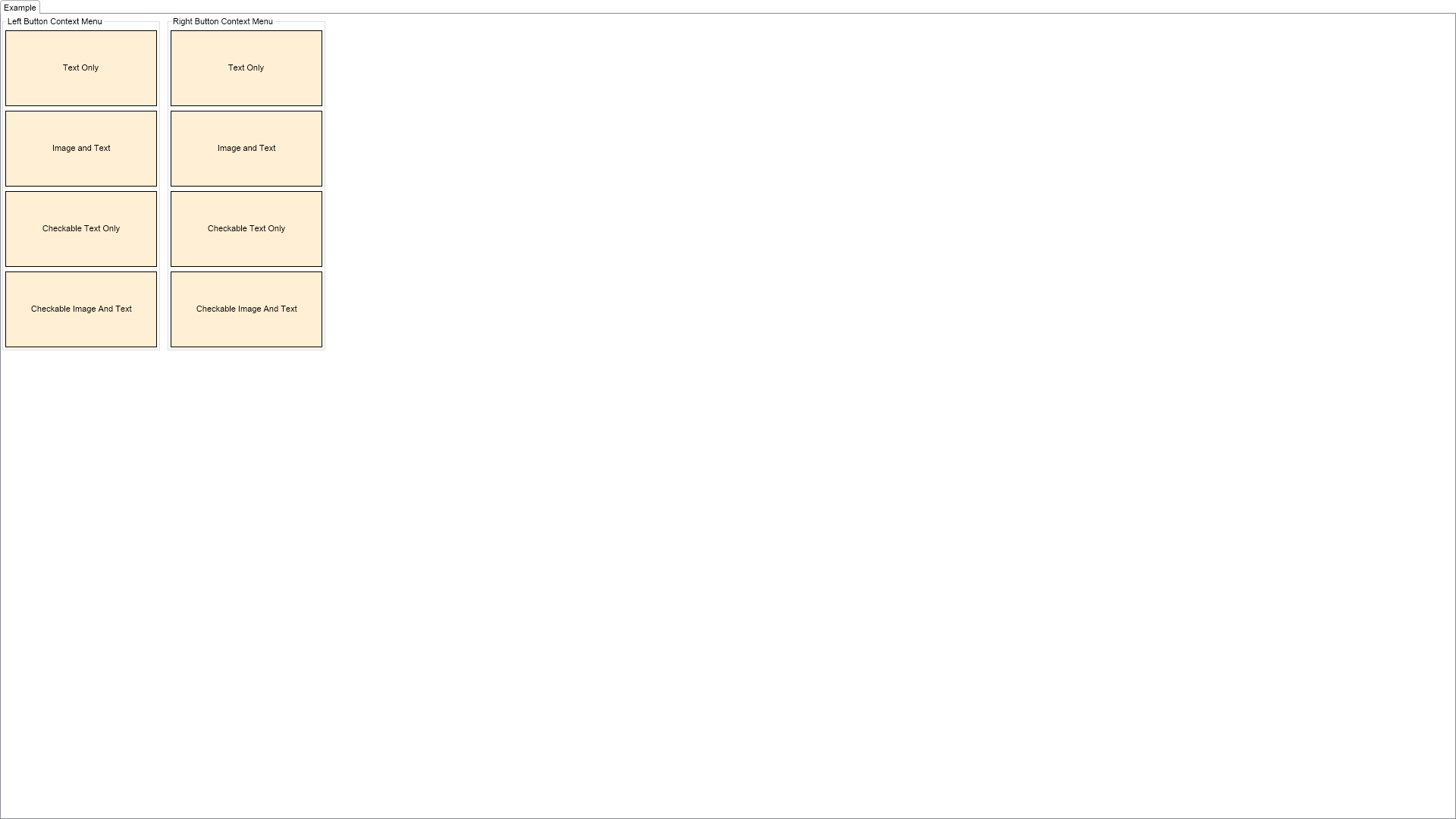
	This example demonstrates how to create context menus. It creates several widgets and a context menu
	for each of them. The example shows how to create different types of menu items such as text only
	menu items, menu items with image and text, checkable text only menu items and checkable image and
	text menu items.
";
		}

		///
		/// Gets the relevant documentation links for the example
		///
		///
		public (string Name, string Url)[] GetDocumentationUrls()
		{
			return new[]
			{
				("Context Menu", "https://www.nevron.com/docs/openvision/ui-context-menu.html"),
				("Context Popups Overview", "https://www.nevron.com/docs/openvision/ui-context-popups-overview.html"),
			};
		}

		#endregion

		#region Implementation

		private NWidget CreateWidget(string text, CreateMenuDelegate createMenuDelegate)
		{
			NLabel label = new NLabel(text);
			label.HorizontalPlacement = ENHorizontalPlacement.Center;
			label.VerticalPlacement = ENVerticalPlacement.Center;
			label.TextFill = new NColorFill(NColor.Black);

			NContentHolder widget = new NContentHolder(label);
			widget.HorizontalPlacement = ENHorizontalPlacement.Left;
			widget.VerticalPlacement = ENVerticalPlacement.Top;
			widget.BackgroundFill = new NColorFill(NColor.PapayaWhip);
			widget.Border = NBorder.CreateFilledBorder(NColor.Black);
			widget.BorderThickness = new NMargins(1);
			widget.PreferredSize = new NSize(200, 100);
			widget.Tag = createMenuDelegate;
			widget.MouseDown += OnTargetWidgetMouseDown;

			return widget;
		}

		private NMenu CreateTextContextMenu()
		{
			NMenu contextMenu = new NMenu();
			for (int i = 0; i < 3; i++)
			{
				contextMenu.Items.Add(new NMenuItem("Option " + (i + 1).ToString()));
			}

			return contextMenu;
		}
		private NMenu CreateImageAndTextContextMenu()
		{
			NMenu contextMenu = new NMenu();
			for (int i = 0; i < 3; i++)
			{
				contextMenu.Items.Add(new NMenuItem(MenuItemImages[i], "Option " + (i + 1).ToString()));
			}

			return contextMenu;
		}
		private NMenu CreateCheckableTextContextMenu()
		{
			NMenu contextMenu = new NMenu();
			for (int i = 0; i < 3; i++)
			{
				NCheckableMenuItem menuItem = new NCheckableMenuItem(null, "Option " + (i + 1).ToString(), m_TextChecked[i]);
				menuItem.Tag = i;
				menuItem.CheckedChanged += OnTextCheckableMenuItemCheckedChanged;
				contextMenu.Items.Add(menuItem);
			}

			return contextMenu;
		}
		private NMenu CreateCheckableImageAndTextContextMenu()
		{
			NMenu contextMenu = new NMenu();

			for (int i = 0; i < 3; i++)
			{
				NCheckableMenuItem menuItem = new NCheckableMenuItem(MenuItemImages[i], "Option " + (i + 1).ToString(), m_ImageAndTextChecked[i]);
				menuItem.Tag = i;
				menuItem.CheckedChanged += OnImageAndTextCheckableMenuItemCheckedChanged;
				contextMenu.Items.Add(menuItem);
			}

			return contextMenu;
		}

		#endregion

		#region Event Handlers

		private void OnTextCheckableMenuItemCheckedChanged(NValueChangeEventArgs args)
		{
			int index = (int)args.CurrentTargetNode.Tag;
			m_TextChecked[index] = (bool)args.NewValue;
		}
		private void OnImageAndTextCheckableMenuItemCheckedChanged(NValueChangeEventArgs args)
		{
			int index = (int)args.CurrentTargetNode.Tag;
			m_ImageAndTextChecked[index] = (bool)args.NewValue;
		}
		private void OnTargetWidgetMouseDown(NMouseButtonEventArgs args)
		{
			NGroupBox ownerGroupBox = (NGroupBox)args.CurrentTargetNode.GetFirstAncestor(NGroupBox.NGroupBoxSchema);
			string groupBoxTitle = ((NLabel)ownerGroupBox.Header.Content).Text;

			if ((groupBoxTitle.StartsWith("Left") && args.Button != ENMouseButtons.Left) ||
				(groupBoxTitle.StartsWith("Right") && args.Button != ENMouseButtons.Right))
				return;

			// Mark the event as handled
			args.Cancel = true;

			// Create and show the popup
			CreateMenuDelegate createMenuDelegate = (CreateMenuDelegate)args.CurrentTargetNode.Tag;
			NMenu contextMenu = createMenuDelegate();
			NPopupWindow.OpenInContext(new NPopupWindow(contextMenu), args.CurrentTargetNode, args.ScreenPosition);
		}

		#endregion

		#region Fields

		private bool[] m_TextChecked;
		private bool[] m_ImageAndTextChecked;

		#endregion

		#region Static Methods
		#endregion

		#region Constants

		private static readonly NImage[] MenuItemImages = new NImage[]{
			Nevron.Nov.Graphics.NImage.FromBytes(Nevron.Nov.NConvert.FromBase64String("iVBORw0KGgoAAAANSUhEUgAAABAAAAAQCAYAAAAf8/9hAAACC0lEQVR42q2RA8wYQRSEp7YU1bZtm3EtxEVY27Zt27ZtW/ot3GK6u1dbL5l8s553h/9S2XJn44zZ85tZTp81r57l3IWLqlmOmzCup+O4cR0tp06dms9yxeqVrXMXyNUVo8dOOE+SY8ZNtOCgQQMf+RzEz9mjRw/HTp06USnF5i2a8+bNm4wzds0bmjGEldTwrIRGrDD0NGKEsvTHwl8XVoqw5+LDVMtaGUBDEtC0tCLWnZIQEpDSgy0t40DqOGDcOIgVEvuP3QpzF6w+GGAWACHp5EnYF41oEtCnZ+jSwYgQ2t0IrNxxjlprp+FLz//Qm9iM8ZTzIRGKAaGCpet3YnxN4kNFRIT90CtNSOV7oTVevnyO+PHjAcu2nub0jdc4YM5hdh+7xb3QZ+bBL7ye24diSCtGtS/Kl9WSu/l+sw+5BFiy+eQPY0s/tj3sfES04p2KSfnojcc9x665C+KazT+MLd/HFg+uIUb4PjBWuz8jFPxasOHIL1uwse3LJ0sl5rbCCT7O2wSYt/bQx9ijll+gH1t//NpvQoX1Jrbg/Vee85cfx3Ljvqv0W1D6m9jKKCYmwngN0p9XJOLFjQMvNgK2a8aJA1txZq3cx0SpM+L5y0C8DQxCqaL5EBAUbMZvUbhAbjx98RYBAUHOv3gdgIDAYGTLmtXsCcKezcuAqUt22igfVa5hF8vf1juHUU3mmXe81QAAAABJRU5ErkJggg==")),
			Nevron.Nov.Graphics.NImage.FromBytes(Nevron.Nov.NConvert.FromBase64String("iVBORw0KGgoAAAANSUhEUgAAABAAAAAQCAIAAACQkWg2AAAABnRSTlMAAAAAAABupgeRAAABu0lEQVR42sUPA6yQQfjuz7ZtN2ZzbMpNaYpTtjQvY0pz1lg927ZtHz50/9PY3PpsiH8O8vPvRKeImIiQEB07AIfdQB3Q0dDT8bZ1i8RfgNsZkH0l5Z4jV7yO1oKCgtOnT9+6dcvJsLAwa61fyT4BsUVHIioqoamlxUNEF713754rGDly5PTp0758/V5SWgYolGULPhlg7SR6Tc0tPQHQWFtUVAQAJ06cLCgszC8sMca0aP6RTMW1oq2VWttIado621Na9wTEHj16jh07Lig4KCExKTIsuKG2esqUySR441wGZAsCSGrrZWRL/2kAQBIXzp56dyomr7ho0pA+Y9JCC3KyR02anZVfExaTZSwBEiLNXzCuowGhpb74/q592zdE/rgxb2z/HCqPvbxp3YuiwUOHbt6wBJD9BuK8guKOBgCrualqqFSL580OCgxYOHl4dlZ1i6a0jMKikipjoKNn8rTJfgM66DvK23E/6u3+ct271cqf1UPHHX6kjJg2feL4ieNFFyRmVzkpH7z6sX7VUkCuadStClo1dqSZ2SBJZiBPg2egB0n58tnlnkR0+trdNq2V0sZa54r/DH8AtopTKVMOx+0AAAAASUVORK5CYII=")),
			Nevron.Nov.Graphics.NImage.FromBytes(Nevron.Nov.NConvert.FromBase64String("iVBORw0KGgoAAAANSUhEUgAAABAAAAAQCAYAAAAf8/9hAAACs0lEQVR4Aa2SA8wtRwBGz+xePtu2bSus7Tao7aBmVEW1bdvus237v76rUad2o/cli8E5Q8G/5IHnl/TMeP4juYyYDbEslaP37rz+HBfVcPPNGyx/yl8E9z21tHne46JmTdJ3jB+RpmfHEMI9rFpdYUNxgFy1cfeVqlR4/OabTw3+Irj5sS9zXZq2nJ7xvLub5LzBh8/Ik04nqFoFL9iPF29Cl3fxwc4j2Liz/KZo0uayy8+asB1APPDEkh7C98/o1FbcOnawT4f2GiKDTkKELCCCA4hwF7gHvZNdyWS+2zPEzF2+7+TmLdt+KR55dunanu1U/9mjKtC07f/C+F1BFtG17XwbXcji3W1eT6VTqf6zhy5F1ZvhBWVE7Kbs1i2S3WACLMoJI2QkMXI1SRjgmYDpmWtZqh87NmWBoJLg9TuG1N921gKJAe0e5R4Ta4xOKJRL1BdfwI4dB0lh4eONg5jaPiSX8dm9v0KzplmEEFgLBovwfIyxlKqSlq1aUIpCPtx83M99UsYY2nbpzxdzdzB7QhdatcjzyQ+7fga0/ukxaGXBCKZN68reAwf45vNN1LvMQe394hfB5GFtmJcWfL1oL77n0Tjnk836GPMTDArBwUKNL77YQakW4HXoRN/BHZk71/wiMMDAfq346oftjBrcmnHDOuE5kbFQk1CWgtZ1yVdfb2bXxiqTZ46mEoGSTuCmSNU9r7y1jsmjOzB8cDsH+kQGImVxnFuzdeUMfUf1JRAp5j8/FztmLFprnEDz4qtrGDagNYOHtKMWCwqRppoIlDFECURSuMeSSOjYq5e71pLK59872LpHaUaM7kzfPi1YX4A9ZaiEPuW6RUkPYwRBoB1sqQcGqSBo1JtaY0Wzov1lCd+9s4TPY0kcJURhTOL+ZSJRTm6t5bfY31/QDMshyY/gFJCcZo3GBQAAAABJRU5ErkJggg=="))
		};

		#endregion

		#region Nested Types

		private delegate NMenu CreateMenuDelegate();

		#endregion
	}
}

 Chart for .NET
 Diagram for .NET
 User Interface for .NET
 Vision for SSRS
 Chart for SSRS
 Gauge for SSRS
 Map for SSRS
 Barcode for SSRS
 Vision for SharePoint
 Chart for SharePoint
 Gauge for SharePoint
 Map for SharePoint
 Barcode for SharePoint
 Open Vision for .NET


 Vision for .NET