using Nevron.Nov;
using Nevron.Nov.Dom;
using Nevron.Nov.Graphics;
using Nevron.Nov.Layout;
using Nevron.Nov.UI;
using Nevron.Nov.Windows.Forms;
using System.Windows.Forms;

namespace NovWinFormsProject
{
	public partial class Form1 : Form
	{
		#region Constructors

		public Form1()
		{
			InitializeComponent();

			// Set form title
			Text = "NOV WinForms - NUserPanelExample";

			// Create the NOV example and its controls
			NWidget exampleContent = CreateExampleContent();
			NWidget exampleControls = CreateExampleControls();
			if (exampleControls != null)
			{
				exampleControls.PreferredWidth = 300;
			}

			// Place the example and its controls in a pair box
			NPairBox pairBox = new NPairBox(exampleContent, exampleControls);
			pairBox.FillMode = ENStackFillMode.First;
			pairBox.FitMode = ENStackFitMode.First;
			pairBox.Margins = new NMargins(NDesign.HorizontalSpacing, NDesign.VerticalSpacing);

			// Host the example in the form
			NNovWidgetHost host = new NNovWidgetHost(pairBox);
			host.Dock = DockStyle.Fill;
			Controls.Add(host);
		}

		#endregion

		#region Example

		public NWidget CreateExampleContent()
		{
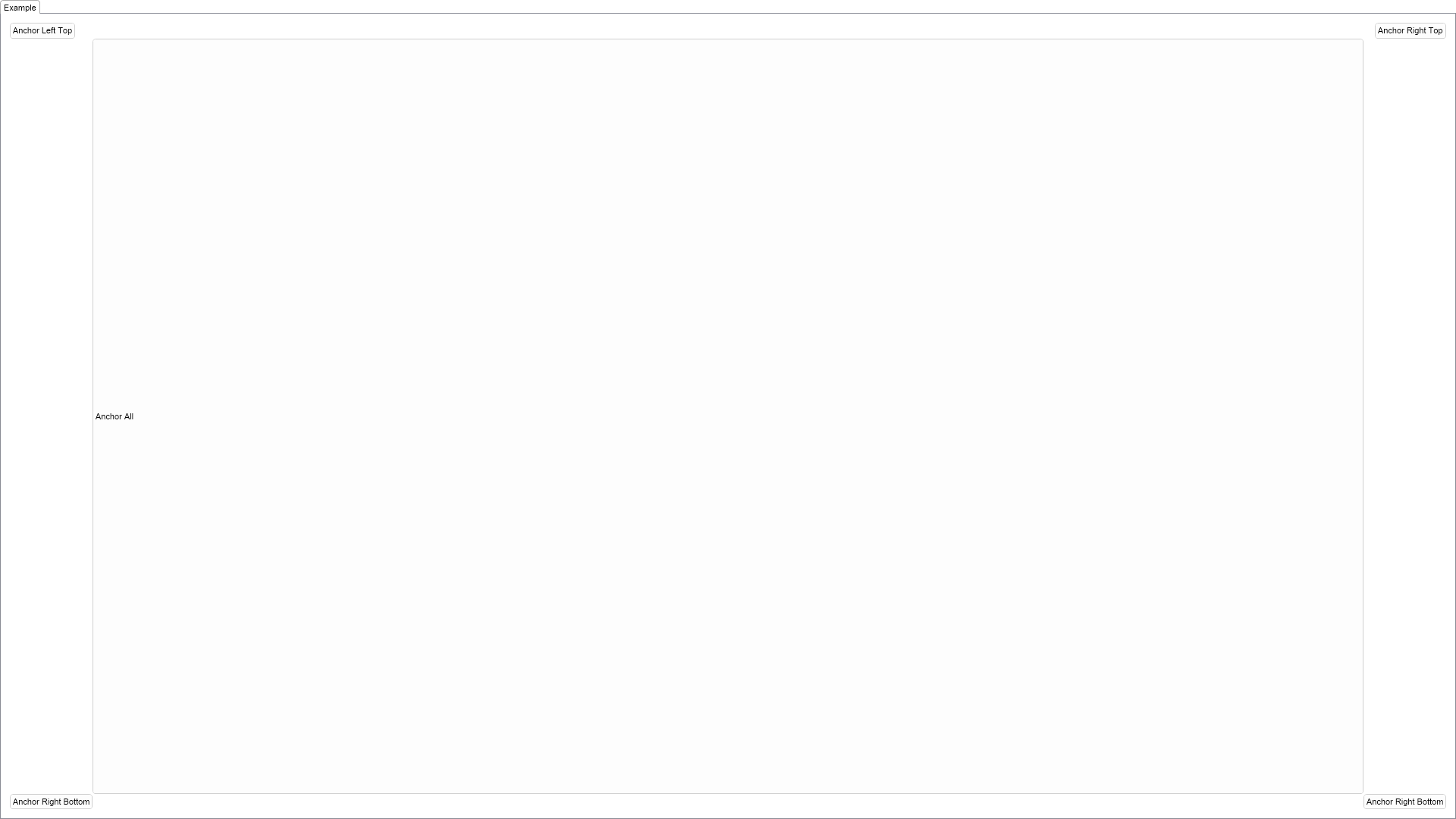
            NUserPanel panel = new NUserPanel();
			panel.HorizontalPlacement = ENHorizontalPlacement.Fit;
			panel.VerticalPlacement = ENVerticalPlacement.Fit;

			// create a button that is anchored at the left-top
			// the button is sized to its desired size
			NButton button0 = new NButton("Anchor Left Top");
			button0.SetValue(NButton.XProperty, 10.0);
			button0.SetValue(NButton.YProperty, 10.0);
			button0.SetFx("Width", "DesiredWidth");
			button0.SetFx("Height", "DesiredHeight");
			panel.Add(button0);

			// create a button that is anchored at the right-top
			// the button is sized to its desired size,
			// and the X is computed ralatively to the parent right side.
			NButton button1 = new NButton("Anchor Right Top");
			button1.SetFx("X", "$Parent.Width - Width - 10");
			button1.SetValue(NButton.YProperty, 10.0);
			button1.SetFx("Width", "DesiredWidth");
			button1.SetFx("Height", "DesiredHeight");
			panel.Add(button1);

			// create a button that is anchored at the right-bottom
			// the button is sized to its desired size,
			// and the X and Y are computed ralatively to the parent right bottom sides.
			NButton button2 = new NButton("Anchor Right Bottom");
			button2.SetFx("X", "$Parent.Width - Width - 10");
			button2.SetFx("Y", "$Parent.Height - Height - 10");
			button2.SetFx("Width", "DesiredWidth");
			button2.SetFx("Height", "DesiredHeight");
			panel.Add(button2);

			// create a button that is anchored at the left-bottom
			// the button is sized to its desired size,
			// and the Y is computed ralatively to the parent bottom side.
			NButton button3 = new NButton("Anchor Right Bottom");
			button3.SetValue(NButton.XProperty, 10.0);
			button3.SetFx("Y", "$Parent.Height - Height - 10");
			button3.SetFx("Width", "DesiredWidth");
			button3.SetFx("Height", "DesiredHeight");
			panel.Add(button3);

			// create a button which is anchored to inner corners of the other four buttons
			NButton button4 = new NButton("Anchor All");
			button4.SetFx("X", "MAX($Parent.0.X + $Parent.0.Width, $Parent.3.X + $Parent.3.Width)");
			button4.SetFx("Y", "MAX($Parent.0.Y + $Parent.0.Height, $Parent.1.Y + $Parent.1.Height)");
			button4.SetFx("Width", "MIN($Parent.1.X, $Parent.2.X) - X");
			button4.SetFx("Height", "MIN($Parent.2.Y, $Parent.3.Y) - Y");
			panel.Add(button4);

			return panel;
		}
		public NWidget CreateExampleControls()
		{
			return null;
		}
		public string GetExampleDescription()
		{
			return @"

	This example demonstrates how to create a panel and how to add widgets to it.
	The example also shows how to assign expressions to some properties of the
	widgets so that they become anchored to the sides of the panel.

";
		}

		///
		/// Gets the relevant documentation links for the example
		///
		///
		public (string Name, string Url)[] GetDocumentationUrls()
		{
			return new[]
			{
				("User Panel", "https://www.nevron.com/docs/openvision/ui-panel.html"),
				("Panels Overview", "https://www.nevron.com/docs/openvision/ui-panels-overview.html"),
			};
		}

		#endregion

		#region Implementation
		#endregion

		#region Event Handlers
		#endregion

		#region Fields
		#endregion

		#region Static Methods
		#endregion

		#region Constants
		#endregion

		#region Nested Types
		#endregion
	}
}

 Chart for .NET
 Diagram for .NET
 User Interface for .NET
 Vision for SSRS
 Chart for SSRS
 Gauge for SSRS
 Map for SSRS
 Barcode for SSRS
 Vision for SharePoint
 Chart for SharePoint
 Gauge for SharePoint
 Map for SharePoint
 Barcode for SharePoint
 Open Vision for .NET


 Vision for .NET