using Nevron.Nov;
using Nevron.Nov.DataStructures;
using Nevron.Nov.Dom;
using Nevron.Nov.Editors;
using Nevron.Nov.Graphics;
using Nevron.Nov.Layout;
using Nevron.Nov.UI;
using Nevron.Nov.Windows.Forms;
using System;
using System.Collections.Generic;
using System.Windows.Forms;

namespace NovWinFormsProject
{
	public partial class Form1 : Form
	{
		#region Constructors

		public Form1()
		{
			InitializeComponent();

			// Set form title
			Text = "NOV WinForms - NTreeViewItemsManipulationExample";

			// Create the NOV example and its controls
			NWidget exampleContent = CreateExampleContent();
			NWidget exampleControls = CreateExampleControls();
			if (exampleControls != null)
			{
				exampleControls.PreferredWidth = 300;
			}

			// Place the example and its controls in a pair box
			NPairBox pairBox = new NPairBox(exampleContent, exampleControls);
			pairBox.FillMode = ENStackFillMode.First;
			pairBox.FitMode = ENStackFitMode.First;
			pairBox.Margins = new NMargins(NDesign.HorizontalSpacing, NDesign.VerticalSpacing);

			// Host the example in the form
			NNovWidgetHost host = new NNovWidgetHost(pairBox);
			host.Dock = DockStyle.Fill;
			Controls.Add(host);
		}

		#endregion

		#region Example

		public NWidget CreateExampleContent()
		{
			// Create the tree view
			m_TreeView = new NTreeView();
			m_TreeView.HorizontalPlacement = ENHorizontalPlacement.Left;
			// Check whether the application is in touch mode and set the width of the tree view.
			bool touchMode = NApplication.Desktop.TouchMode;
			m_TreeView.PreferredWidth = touchMode ? 300 : 200;

			// Add some items
			for (int i = 0; i < 32; i++)
			{
				bool checkBox = (i >= 8 && i < 16) || i >= 24;
				bool image = i >= 16;

				NTreeViewItem l1Item = CreateTreeViewItem(String.Format("Item {0}", i));
				m_TreeView.Items.Add(l1Item);

				for (int j = 0; j < 8; j++)
				{
					NTreeViewItem l2Item = CreateTreeViewItem(String.Format("Item {0}.{1}", i, j));
					l1Item.Items.Add(l2Item);

					for (int k = 0; k < 2; k++)
					{
						NTreeViewItem l3Item = CreateTreeViewItem(String.Format("Item {0}.{1}.{2}", i, j, k));
						l2Item.Items.Add(l3Item);
					}
				}
			}

			// Hook to the tree view events
			m_TreeView.SelectedPathChanged += OnTreeViewSelectedPathChanged;
			return m_TreeView;
		}
		public NWidget CreateExampleControls()
		{
			NStackPanel stack = new NStackPanel();
			stack.FillMode = ENStackFillMode.Last;
			stack.FitMode = ENStackFitMode.Last;

			// Create the commands group box
			stack.Add(CreateCommandsGroupBox());

			// Create the events log
			m_EventsLog = new NExampleEventsLog();
			stack.Add(m_EventsLog);

			return stack;
		}
		public string GetExampleDescription()
		{
			return @"

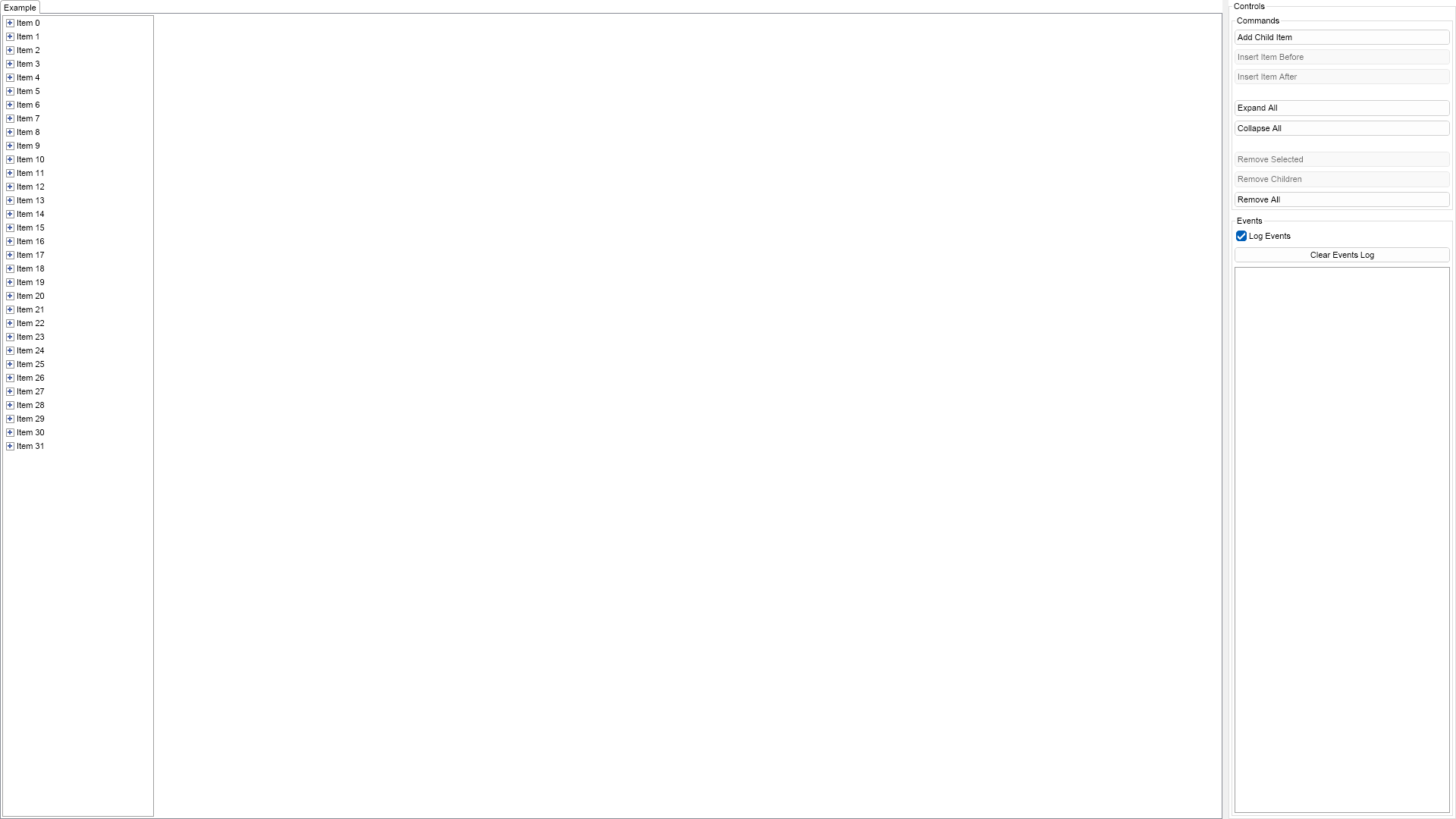
	This example demonstrates how to create a simple tree view with text only items and how to add/remove items.
	You can use the buttons on the right to add/remove items from the tree view.

";
		}

		///
		/// Gets the relevant documentation links for the example
		///
		///
		public (string Name, string Url)[] GetDocumentationUrls()
		{
			return new[]
			{
				("Tree View", "https://www.nevron.com/docs/openvision/ui-tree-view.html"),
				("Widget Elements", "https://www.nevron.com/docs/openvision/ui-widget-elements.html"),
				("User Input", "https://www.nevron.com/docs/openvision/ui-user-input.html"),
			};
		}

		#endregion

		#region Implementation

		private NTreeViewItem CreateTreeViewItem(string text)
		{
			NTreeViewItem item = new NTreeViewItem(text);
			item.Tag = text;
			item.ExpandedChanged += OnTreeViewItemExpandedChanged;
			return item;
		}
		private NGroupBox CreateCommandsGroupBox()
		{
			NStackPanel commandsStack = new NStackPanel();

			// Create the command buttons
			m_AddButton = new NButton("Add Child Item");
			m_AddButton.Click += OnAddButtonClicked;
			commandsStack.Add(m_AddButton);

			m_InsertBeforeButton = new NButton("Insert Item Before");
			m_InsertBeforeButton.Click += OnAddButtonClicked;
			commandsStack.Add(m_InsertBeforeButton);

			m_InsertAfterButton = new NButton("Insert Item After");
			m_InsertAfterButton.Click += OnAddButtonClicked;
			commandsStack.Add(m_InsertAfterButton);

			NButton expandAllButton = new NButton("Expand All");
			expandAllButton.Margins = new NMargins(0, 15, 0, 0);
			expandAllButton.Click += OnExpandAllClicked;
			commandsStack.Add(expandAllButton);

			NButton collapseAllButton = new NButton("Collapse All");
			collapseAllButton.Margins = new NMargins(0, 0, 0, 15);
			collapseAllButton.Click += OnCollapseAllClicked;
			commandsStack.Add(collapseAllButton);

			m_RemoveSelectedButton = new NButton("Remove Selected");
			m_RemoveSelectedButton.Click += OnRemoveSelectedButtonClicked;
			commandsStack.Add(m_RemoveSelectedButton);

			m_RemoveChildrenButton = new NButton("Remove Children");
			m_RemoveChildrenButton.Click += OnRemoveChildrenButtonClicked;
			commandsStack.Add(m_RemoveChildrenButton);

			m_RemoveAllButton = new NButton("Remove All");
			m_RemoveAllButton.Click += OnRemoveAllButtonClicked;
			commandsStack.Add(m_RemoveAllButton);

			// Create the commands group box
			NGroupBox commmandsGroupBox = new NGroupBox("Commands");
			commmandsGroupBox.Content = commandsStack;

			UpdateButtonsState();
			return commmandsGroupBox;
		}
		private void UpdateButtonsState()
		{
			NTreeViewItem selectedItem = m_TreeView.SelectedItem;
			if (selectedItem == null)
			{
				m_InsertBeforeButton.Enabled = false;
				m_InsertAfterButton.Enabled = false;
				m_RemoveSelectedButton.Enabled = false;
				m_RemoveChildrenButton.Enabled = false;
			}
			else
			{
				m_InsertBeforeButton.Enabled = true;
				m_InsertAfterButton.Enabled = true;
				m_RemoveSelectedButton.Enabled = true;
				m_RemoveChildrenButton.Enabled = selectedItem.Items.Count > 0;
			}
		}

		#endregion

		#region Event Handlers

		private void OnAddButtonClicked(NEventArgs args)
		{
			NTreeViewItem selItem = m_TreeView.SelectedItem;
			string text = selItem == null ? "Item " + m_TreeView.Items.Count.ToString() :
				selItem.Tag.ToString();

			if (args.TargetNode == m_AddButton)
			{
				if (selItem == null)
				{
					// Add the item as a last item in the tree view
					m_TreeView.Items.Add(CreateTreeViewItem(text));
				}
				else
				{
					// Add the item as a last item in the selected item
					text += "." + selItem.Items.Count.ToString();
					selItem.Items.Add(CreateTreeViewItem(text));
				}
			}
			else if (args.TargetNode == m_InsertBeforeButton)
			{
				// Insert the item before the selected one
				NTreeViewItemCollection items = (NTreeViewItemCollection)selItem.ParentNode;
				text += ".Before";
				items.Insert(selItem.IndexInParent, CreateTreeViewItem(text));
			}
			else if (args.TargetNode == m_InsertAfterButton)
			{
				// Insert the item after the selected one
				NTreeViewItemCollection items = (NTreeViewItemCollection)selItem.ParentNode;
				text += ".After";
				items.Insert(selItem.IndexInParent + 1, CreateTreeViewItem(text));
			}

			if (m_TreeView.Items.Count == 1)
			{
				m_RemoveAllButton.Enabled = true;
			}
		}
		private void OnRemoveSelectedButtonClicked(NEventArgs args)
		{
			NTreeViewItem selectedItem = m_TreeView.SelectedItem;
			if (selectedItem == null)
				return;

			selectedItem.ParentNode.RemoveChild(selectedItem);
		}
		private void OnRemoveChildrenButtonClicked(NEventArgs arg1)
		{
			NTreeViewItem selectedItem = m_TreeView.SelectedItem;
			if (selectedItem == null)
				return;

			selectedItem.Items.RemoveAllChildren();
			m_RemoveChildrenButton.Enabled = false;
		}
		private void OnRemoveAllButtonClicked(NEventArgs args)
		{
			m_TreeView.Items.Clear();
			m_RemoveAllButton.Enabled = false;
		}
		private void OnExpandAllClicked(NEventArgs args)
		{
			IEnumerator treeIterator = m_TreeView.GetSubtreeIterator(ENTreeTraversalOrder.DepthFirstPreOrder, NIsFilter.Instance);
			IEnumerator itemIterator = new NAsEnumerator(treeIterator);

			while (itemIterator.MoveNext())
			{
				itemIterator.Current.Expanded = true;
			}
		}
		private void OnCollapseAllClicked(NEventArgs args)
		{
            IEnumerator treeIterator = m_TreeView.GetSubtreeIterator(ENTreeTraversalOrder.DepthFirstPreOrder, NIsFilter.Instance);
            IEnumerator itemIterator = new NAsEnumerator(treeIterator);

			while (itemIterator.MoveNext())
			{
				itemIterator.Current.Expanded = false;
			}
		}

		private void OnTreeViewSelectedPathChanged(NValueChangeEventArgs args)
		{
			UpdateButtonsState();

			NTreeViewItem selectedItem = m_TreeView.SelectedItem;
			if (selectedItem != null)
			{
				m_EventsLog.LogEvent("Selected: " + selectedItem.Tag.ToString());
			}
		}
		private void OnTreeViewItemExpandedChanged(NValueChangeEventArgs args)
		{
			NTreeViewItem item = (NTreeViewItem)args.TargetNode;
			if (item.Expanded)
			{
				m_EventsLog.LogEvent("Expanded: " + item.Tag.ToString());
			}
			else
			{
				m_EventsLog.LogEvent("Collapsed: " + item.Tag.ToString());
			}
		}

		#endregion

		#region Fields

		private NButton m_AddButton;
		private NButton m_InsertBeforeButton;
		private NButton m_InsertAfterButton;
		private NButton m_RemoveSelectedButton;
		private NButton m_RemoveChildrenButton;
		private NButton m_RemoveAllButton;

		private NTreeView m_TreeView;
		private NExampleEventsLog m_EventsLog;

		#endregion

		#region Static Methods
		#endregion

		#region Constants
		#endregion

		#region Nested Types
		#endregion
	}
}

 Chart for .NET
 Diagram for .NET
 User Interface for .NET
 Vision for SSRS
 Chart for SSRS
 Gauge for SSRS
 Map for SSRS
 Barcode for SSRS
 Vision for SharePoint
 Chart for SharePoint
 Gauge for SharePoint
 Map for SharePoint
 Barcode for SharePoint
 Open Vision for .NET


 Vision for .NET