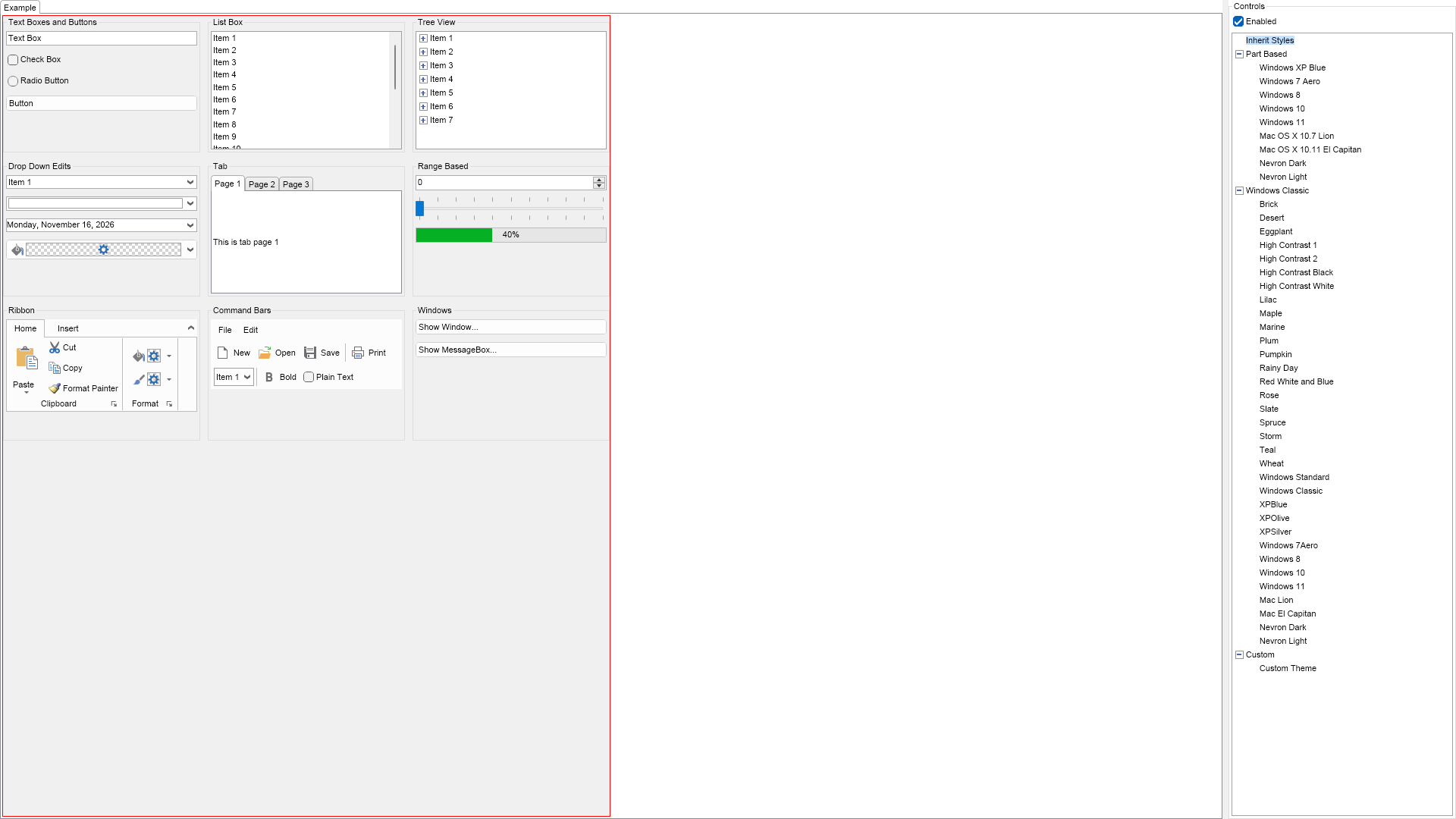
using Nevron.Nov;
using Nevron.Nov.Dom;
using Nevron.Nov.Graphics;
using Nevron.Nov.Layout;
using Nevron.Nov.UI;
using Nevron.Nov.Windows.Forms;
using System.Windows.Forms;

namespace NovWinFormsProject
{
	public partial class Form1 : Form
	{
		#region Constructors

		public Form1()
		{
			InitializeComponent();

			// Set form title
			Text = "NOV WinForms - NDocumentBoxAndThemesExample";

			// Create the NOV example and its controls
			NWidget exampleContent = CreateExampleContent();
			NWidget exampleControls = CreateExampleControls();
			if (exampleControls != null)
			{
				exampleControls.PreferredWidth = 300;
			}

			// Place the example and its controls in a pair box
			NPairBox pairBox = new NPairBox(exampleContent, exampleControls);
			pairBox.FillMode = ENStackFillMode.First;
			pairBox.FitMode = ENStackFitMode.First;
			pairBox.Margins = new NMargins(NDesign.HorizontalSpacing, NDesign.VerticalSpacing);

			// Host the example in the form
			NNovWidgetHost host = new NNovWidgetHost(pairBox);
			host.Dock = DockStyle.Fill;
			Controls.Add(host);
		}

		#endregion

		#region Example

		public NWidget CreateExampleContent()
		{
			NTableFlowPanel table = new NTableFlowPanel();
			table.HorizontalSpacing = 10;
			table.VerticalSpacing = 10;
			table.MaxOrdinal = 3;

			table.Add(CreateGroupBox("Text Boxes and Buttons", CreateTextBoxesAndButtons()));
			table.Add(CreateGroupBox("List Box", CreateListBox()));
			table.Add(CreateGroupBox("Tree View", CreateTreeView()));

			table.Add(CreateGroupBox("Drop Down Edits", CreateDropDownEdits()));
			table.Add(CreateGroupBox("Tab", CreateTab()));
			table.Add(CreateGroupBox("Range Based", CreateRangeBased()));

			table.Add(CreateGroupBox("Ribbon", CreateRibbon()));
			table.Add(CreateGroupBox("Command Bars", CreateCommandBars()));
			table.Add(CreateGroupBox("Windows", CreateWindows()));

			// Create the document box
			m_DocumentBox = new NDocumentBox();
			m_DocumentBox.HorizontalPlacement = ENHorizontalPlacement.Left;
			m_DocumentBox.SetBorder(1, NColor.Red);
            m_DocumentBox.Surface = new NDocumentBoxSurface(table);

			return m_DocumentBox;
		}
		public NWidget CreateExampleControls()
		{
			NStackPanel stack = new NStackPanel();
			stack.FillMode = ENStackFillMode.Last;
			stack.FitMode = ENStackFitMode.Last;

			NCheckBox enabledCheckBox = new NCheckBox("Enabled", true);
			enabledCheckBox.CheckedChanged += OnEnabledCheckBoxCheckedChanged;
			stack.Add(enabledCheckBox);

			// Create the theme tree view
			NTheme theme;
			NTreeViewItem rootItem, themeItem;

			NTreeView themeTreeView = new NTreeView();
			stack.Add(themeTreeView);

			//
			// Add the "Inherit Styles" root tree view item
			//
			rootItem = new NTreeViewItem("Inherit Styles");
			rootItem.Tag = "inherit";
			themeTreeView.Items.Add(rootItem);
			themeTreeView.SelectedItem = rootItem;

			//
			// Add the part based UI themes to the tree view
			//
			rootItem = new NTreeViewItem("Part Based");
			rootItem.Expanded = true;
			themeTreeView.Items.Add(rootItem);

            themeItem = new NTreeViewItem("Windows XP Blue");
            themeItem.Tag = new NWindowsXPBlueTheme();
            rootItem.Items.Add(themeItem);

			themeItem = new NTreeViewItem("Windows 7 Aero");
			themeItem.Tag = new NWindowsAeroTheme();
			rootItem.Items.Add(themeItem);

			themeItem = new NTreeViewItem("Windows 8");
			themeItem.Tag = new NWindows8Theme();
			rootItem.Items.Add(themeItem);

			themeItem = new NTreeViewItem("Windows 10");
			themeItem.Tag = new NWindows10Theme();
			rootItem.Items.Add(themeItem);

			themeItem = new NTreeViewItem("Windows 11");
			themeItem.Tag = new NWindows11Theme();
			rootItem.Items.Add(themeItem);

			themeItem = new NTreeViewItem("Mac OS X 10.7 Lion");
			themeItem.Tag = new NMacLionTheme();
			rootItem.Items.Add(themeItem);

			themeItem = new NTreeViewItem("Mac OS X 10.11 El Capitan");
			themeItem.Tag = new NMacElCapitanTheme();
			rootItem.Items.Add(themeItem);

			themeItem = new NTreeViewItem("Nevron Dark");
			themeItem.Tag = new NNevronDarkTheme();
			rootItem.Items.Add(themeItem);

			themeItem = new NTreeViewItem("Nevron Light");
			themeItem.Tag = new NNevronLightTheme();
			rootItem.Items.Add(themeItem);

			//
			// Add the windows classic UI themes to the tree view
			//
			rootItem = new NTreeViewItem("Windows Classic");
			rootItem.Expanded = true;
			themeTreeView.Items.Add(rootItem);

			ENUIThemeScheme[] windowsClassicSchemes = NEnum.GetValues();
			for(int i = 0, count = windowsClassicSchemes.Length; i < count; i++)
			{
				ENUIThemeScheme scheme = windowsClassicSchemes[i];
				theme = new NWindowsClassicTheme(scheme);
				themeItem = new NTreeViewItem(NStringHelpers.InsertSpacesBeforeUppersAndDigits(scheme.ToString()));
				themeItem.Tag = theme;
				rootItem.Items.Add(themeItem);
			}

			//
			// Add the custom themes to the tree view
			//
			rootItem = new NTreeViewItem("Custom");
			rootItem.Expanded = true;
			themeTreeView.Items.Add(rootItem);

			themeItem = new NTreeViewItem("Custom Theme");
			themeItem.Tag = new NCustomTheme();
			rootItem.Items.Add(themeItem);

			// Subscribe to the selected path changed event
			themeTreeView.SelectedPathChanged += OnThemeTreeViewSelectedPathChanged;

			return stack;
		}
		public string GetExampleDescription()
		{
			return @"

	This example demonstrates how to use document boxes. The document box is a widget that has a document.
	If you set the InheritStyleSheetsProperty of the document box's document to false, then the widgets hosted
	in it will not inherit the styling of the document the document box is placed in.


	This example also demonstrates the UI themes incuded in Nevron Open Vision. Select a theme from the tree view on
	the right to apply it to the document box and see how the widgets look when that theme is applied.


	The last item in the tree view is a custom theme that changes the mouse over state of buttons, flat buttons (i.e.
	buttons in ribbon and toolbars) and tab page headers. The custom theme is defined in the beginning of the example's
	source code.

";
		}

		///
		/// Gets the relevant documentation links for the example
		///
		///
		public (string Name, string Url)[] GetDocumentationUrls()
		{
			return new[]
			{
				("Document Box", "https://www.nevron.com/docs/openvision/ui-document-box.html"),
				("Using UI Themes", "https://www.nevron.com/docs/openvision/using-ui-themes.html"),
				("UI Themes Overview", "https://www.nevron.com/docs/openvision/ui-themes-overview.html"),
			};
		}

		#endregion

		#region Implementation

		private NStackPanel CreateTextBoxesAndButtons()
		{
			// Create buttons
			NStackPanel stack = new NStackPanel();
			stack.VerticalSpacing = 10;

			stack.Add(new NTextBox("Text Box"));

			NCheckBox checkBox = new NCheckBox("Check Box");
            checkBox.Click += OnCheckBoxClick;
			checkBox.ToggleCheckedOnClick = false;
			stack.Add(checkBox);

			NRadioButton radioButton = new NRadioButton("Radio Button");
			stack.Add(radioButton);

			NButton button = new NButton("Button");
			stack.Add(button);

			return stack;
		}

        private void OnCheckBoxClick(NEventArgs arg)
        {
			NCheckBox checkBox = (NCheckBox)arg.TargetNode;
			if (checkBox.Checked)
			{
				checkBox.Checked = false;
				if (checkBox.Indeterminate)
				{
					checkBox.Indeterminate = false;
				}
				else
				{
					checkBox.Indeterminate = true;
				}
			}
			else
			{
				checkBox.Checked = true;
			}
        }

        private NListBox CreateListBox()
		{
			NListBox listBox = new NListBox();
			for (int i = 1; i <= 20; i++)
			{
				listBox.Items.Add(new NListBoxItem("Item " + i));
			}

			return listBox;
		}
		private NTreeView CreateTreeView()
		{
			NTreeView treeView = new NTreeView();
			for (int i = 1; i <= 7; i++)
			{
				string itemName = "Item " + i;
				NTreeViewItem item = new NTreeViewItem(itemName);
				treeView.Items.Add(item);

				itemName += ".";
				for (int j = 1; j <= 3; j++)
				{
					NTreeViewItem childItem = new NTreeViewItem(itemName + j);
					item.Items.Add(childItem);
				}
			}

			return treeView;
		}

		private NStackPanel CreateDropDownEdits()
		{
			NStackPanel stack = new NStackPanel();
			stack.VerticalSpacing = 10;

			stack.Add(CreateComboBox());

			NColorBox colorBox = new NColorBox();
			stack.Add(colorBox);

			NDateTimeBox dateTimeBox = new NDateTimeBox();
			stack.Add(dateTimeBox);

			NFillSplitButton splitButton = new NFillSplitButton();
			stack.Add(splitButton);

			return stack;
		}
		private NComboBox CreateComboBox()
		{
			NComboBox comboBox = new NComboBox();
			comboBox.Items.Add(new NComboBoxItem("Item 1"));
			comboBox.Items.Add(new NComboBoxItem("Item 2"));
			comboBox.Items.Add(new NComboBoxItem("Item 3"));
			comboBox.Items.Add(new NComboBoxItem("Item 4"));
			comboBox.SelectedIndex = 0;

			return comboBox;
		}
		private NTab CreateTab()
		{
			NTab tab = new NTab();
			tab.TabPages.Add(new NTabPage("Page 1", "This is tab page 1"));
			tab.TabPages.Add(new NTabPage("Page 2", "This is tab page 2"));
			tab.TabPages.Add(new NTabPage("Page 3", "This is tab page 3"));
			return tab;
		}
		private NStackPanel CreateRangeBased()
		{
			NStackPanel stack = new NStackPanel();
			stack.VerticalSpacing = 10;

			NNumericUpDown numericUpDown = new NNumericUpDown();
			stack.Add(numericUpDown);

			NSlider slider = new NSlider();
			stack.Add(slider);

			NProgressBar progressBar = new NProgressBar();
			progressBar.PreferredHeight = 20;
			progressBar.Value = 40;
			stack.Add(progressBar);

			return stack;
		}

		private NRibbon CreateRibbon()
		{
			NRibbon ribbon = new NRibbon();
			ribbon.VerticalPlacement = ENVerticalPlacement.Top;

			//
			// Create the "Home" ribbon tab page
			//
			NRibbonTabPage pageHome = new NRibbonTabPage("Home");
			ribbon.Tab.TabPages.Add(pageHome);

			// Create the "Clipboard" group of the "Home" tab page
			NRibbonGroup group = new NRibbonGroup("Clipboard");
			group.Icon = Nevron.Nov.Graphics.NImage.FromBytes(Nevron.Nov.NConvert.FromBase64String("iVBORw0KGgoAAAANSUhEUgAAABAAAAAQCAYAAAAf8/9hAAAAvklEQVR4AZWSQQrCMBBFBS8gCgjiWTzX/B7AA7gSgV5CsknoDQSXgndJx3yRQuPokIEHzVAej5CFiBwLweAEYLPwpuu6oKozuIsxUnIBsG4WAAg555BSouQMYOUKDnJ9w28n2i/gXkT0B3cAe6+Ae62HuxgjJU8Au78FlgCA5pw1pUTJA8C2LiAzQTmTmYDzkdyaCvq+/7qTpgLOOI4T/KelwLxU8ylXBSaTwJ6GAmNYtfQLfEFDgS0ZCuowvABHnjR+cwTY5AAAAABJRU5ErkJggg=="));
			pageHome.Groups.Add(group);

			NRibbonSplitButton pasteSplitButton = NRibbonSplitButton.CreateLarge("Paste", Nevron.Nov.Graphics.NImage.FromBytes(Nevron.Nov.NConvert.FromBase64String("iVBORw0KGgoAAAANSUhEUgAAACAAAAAgCAYAAABzenr0AAABL0lEQVR4AWMgBVRUVPgCcTwU+wMxIwPNAcLySCD+j4bj6emALpClMD7UAROpZsGr7WmdQPwLiP+D8MttaR/Or8isB8lVVpQvAFr2G2rpKyB+AWX/qagoX9zdVOIBUvd8a9pzmH6oWZ2kOOA3kmawTxtqyg5ALCKM66rLjkDN+Y+Ef5PigP/oDoD5mkj8B5s5ZDvg0ab0dlKj8cHG9B4KHUA5pqcDRh0w6oByIGZhoBYgx2ezZ88mtow4XVVVJUZ1B4AMxwf+/fsHdsDu3bv/V1ZWXoE6gv4OAAI0R9DfARiOoLoD7Co2I2NMByAcAU4TNA4BBMCVUOnjAERUoGCQPppHAR5AlxAYSQ5ARAEhPPhD4PcAOgDRLKdjFFAOKA8Byh0w6oDdIMPIwLsZBgsAAKC4xOr5AXZ9AAAAAElFTkSuQmCC")));
            pasteSplitButton.CollapseToMedium = ENCollapseCondition.Never;
			pasteSplitButton.CollapseToSmall = ENCollapseCondition.Never;

			NMenu pasteMenu = new NMenu();
			pasteMenu.Items.Add(new NMenuItem("Paste"));
			pasteMenu.Items.Add(new NMenuItem("Paste Special..."));
			pasteMenu.Items.Add(new NMenuItem("Paste as Link"));
			pasteSplitButton.Popup.Content = pasteMenu;

			group.Items.Add(pasteSplitButton);

			NRibbonCollapsiblePanel collapsiblePanel = new NRibbonCollapsiblePanel();
			collapsiblePanel.InitialState = ENRibbonWidgetState.Medium;
			group.Items.Add(collapsiblePanel);

			collapsiblePanel.Add(new NRibbonButton("Cut", null, Nevron.Nov.Graphics.NImage.FromBytes(Nevron.Nov.NConvert.FromBase64String("iVBORw0KGgoAAAANSUhEUgAAABAAAAAQCAYAAAAf8/9hAAABOElEQVR4AY3QM5SeQRiG4S+2bdtu4j5VbFsTm2hjVUkbc+122a2tZm0n797F+53zE3POVTzzjM5Y9jDGfMRSy8fQdQMRjp6uxVcUYZifA76h3lNxFYJvPjYfgiDKUzkb/yHY6aGfiBrtT3m7IQ6CCoxy6cK1q8EgbwdshKg/DvMnIequFcAniTqHRWjSnIk+/g4YiVII2lACQTNWWoGM/eb+0nPmQrXDSzqOmFu7fG5aZP4MxtlF5vfzZebr5ZXmS/gS80Mgy8y3klXm8/FF5tcz1lzHGNfNo5AHCVA5pjse8F6LFOzEa4iL79iNBDs7HlAKwUrN3dABQQUE07SbpbkJXewD7Odv0XwKovMfIHiC/tiuudY+wHHDfy1EncR8NENcPHT9yE0IRhoisMOhW4MQZCEWB+yuE+WUNEHiWZ7cAAAAAElFTkSuQmCC"))));
			collapsiblePanel.Add(new NRibbonButton("Copy", null, Nevron.Nov.Graphics.NImage.FromBytes(Nevron.Nov.NConvert.FromBase64String("iVBORw0KGgoAAAANSUhEUgAAABAAAAAQCAYAAAAf8/9hAAAAvklEQVR4AZWSQQrCMBBFBS8gCgjiWTzX/B7AA7gSgV5CsknoDQSXgndJx3yRQuPokIEHzVAej5CFiBwLweAEYLPwpuu6oKozuIsxUnIBsG4WAAg555BSouQMYOUKDnJ9w28n2i/gXkT0B3cAe6+Ae62HuxgjJU8Au78FlgCA5pw1pUTJA8C2LiAzQTmTmYDzkdyaCvq+/7qTpgLOOI4T/KelwLxU8ylXBSaTwJ6GAmNYtfQLfEFDgS0ZCuowvABHnjR+cwTY5AAAAABJRU5ErkJggg=="))));
			collapsiblePanel.Add(new NRibbonButton("Format Painter", null, Nevron.Nov.Graphics.NImage.FromBytes(Nevron.Nov.NConvert.FromBase64String("iVBORw0KGgoAAAANSUhEUgAAABAAAAAQCAYAAAAf8/9hAAAB4ElEQVR4AcXPA2woVgCF4TvbVjwEM2vjWbVt27Zt27Zt27bt9qzubPzJib8L8j/0AaOdY8mmjV3OESHkxh9VT5DT2AXsHYsO7J3HoCAXB3lpg4PfQuwJSam42AsvUatZWGbs2Dt1Q0igCYwUHqCluLf5a5j6BA0Nj6C2rgHDI6MIDA6Bk2cuRARPsCcovuLc/KUvPJMaIFFbkGCOns6U05tnZmZRWVWDnt4+6BmYQkjQEpRfcW1d4i8J+aYkSTWnLt92qjLTGquLGTg8KMbRYQkGBjLhFxiKsbFxWFrbIyYuEXfuc+NxQiLJRT21PhjsiMDeTuEJvMQnO9jJQn2lK3T0jeDrHwxtPSPIKamB7RYHjukj5KTSmPuB/Q3eWJpNvsT7u9nYWY3F6pgDFnr1UJSpDz4hCRiZWkJIVAos126fHPACuSja6iW1hkL700MO9vKxOeuHlVG7UzzWoIj2XD4Ee4iAk08ErNfvnOBb5KfZyDxtXJFhifFuVywNmp1jJbTn8aEsggVpLl/gBt1HJ/g2+bU0eN7zD3dXxnibIcYaFa+w6xdgoXjnBMuR3+vGJ8TOWFkYjdlSx5j5DH93if9YYuyvB2lJccBWgx6sFO9e4j+btuA9mtWnCMkg/2bfAxwyRdFvICBXAAAAAElFTkSuQmCC"))));

			// Create the "Format" group of the "Home" tab page
			group = new NRibbonGroup("Format");
			pageHome.Groups.Add(group);

			collapsiblePanel = new NRibbonCollapsiblePanel();
			collapsiblePanel.InitialState = ENRibbonWidgetState.Medium;
			group.Items.Add(collapsiblePanel);

			NFillSplitButton fillSplitButton = new NFillSplitButton();
			collapsiblePanel.Add(fillSplitButton);

			NStrokeSplitButton strokeSplitButton = new NStrokeSplitButton();
			collapsiblePanel.Add(strokeSplitButton);

			//
			// Add an "Insert" ribbon tab page
			//
			ribbon.Tab.TabPages.Add(new NRibbonTabPage("Insert"));

			return ribbon;
		}
		private NCommandBarManager CreateCommandBars()
		{
			NCommandBarManager manager = new NCommandBarManager();

			// Create a menu bar in the first lane
			NCommandBarLane lane1 = new NCommandBarLane();
			manager.TopDock.Add(lane1);

			NMenuBar menuBar = new NMenuBar();
			menuBar.HideGripperAndPendant();
			lane1.Add(menuBar);

			NMenuDropDown fileMenu = new NMenuDropDown("File");
			menuBar.Items.Add(fileMenu);

			NMenuItem newMenuItem = new NMenuItem(Nevron.Nov.Presentation.NResources.Image_File_New_svg, "New");
			fileMenu.Items.Add(newMenuItem);
			newMenuItem.Items.Add(new NMenuItem("Project"));
			newMenuItem.Items.Add(new NMenuItem("Web Site"));
			newMenuItem.Items.Add(new NMenuItem("File"));

			fileMenu.Items.Add(new NMenuItem(Nevron.Nov.Presentation.NResources.Image_File_Open_svg, "Open"));
			fileMenu.Items.Add(new NMenuItem(Nevron.Nov.Presentation.NResources.Image_File_Save_svg, "Save"));
			fileMenu.Items.Add(new NMenuSeparator());
			fileMenu.Items.Add(new NMenuItem(Nevron.Nov.Presentation.NResources.Image_File_Print_svg, "Print"));

			NMenuDropDown editMenu = new NMenuDropDown("Edit");
			menuBar.Items.Add(editMenu);

			editMenu.Items.Add(new NMenuItem(Nevron.Nov.Presentation.NResources.Image_Edit_Undo_svg, "Undo"));
			editMenu.Items.Add(new NMenuItem(Nevron.Nov.Presentation.NResources.Image_Edit_Redo_svg, "Redo"));

			// Add a toolbar in the second lane
			NCommandBarLane lane2 = new NCommandBarLane();
			manager.TopDock.Add(lane2);

			NToolBar toolbar = new NToolBar();
			toolbar.HideGripperAndPendant();
			lane2.Add(toolbar);

			toolbar.Items.Add(NButton.CreateImageAndText(Nevron.Nov.Presentation.NResources.Image_File_New_svg, "New"));
			toolbar.Items.Add(NButton.CreateImageAndText(Nevron.Nov.Presentation.NResources.Image_File_Open_svg, "Open"));
			toolbar.Items.Add(NButton.CreateImageAndText(Nevron.Nov.Presentation.NResources.Image_File_Save_svg, "Save"));
			toolbar.Items.Add(new NCommandBarSeparator());
			toolbar.Items.Add(NButton.CreateImageAndText(Nevron.Nov.Presentation.NResources.Image_File_Print_svg, "Print"));

			// Add a toolbar in the third lane
			NCommandBarLane lane3 = new NCommandBarLane();
			manager.TopDock.Add(lane3);

			toolbar = new NToolBar();
			toolbar.HideGripperAndPendant();
			lane3.Add(toolbar);

			toolbar.Items.Add(CreateComboBox());
			toolbar.Items.Add(new NCommandBarSeparator());
			toolbar.Items.Add(NToggleButton.CreateImageAndText(Nevron.Nov.Presentation.NResources.Image_FontStyle_Bold_svg, "Bold"));
			toolbar.Items.Add(new NCheckBox("Plain Text"));

			return manager;
		}
		private NStackPanel CreateWindows()
		{
			NStackPanel stack = new NStackPanel();
			stack.VerticalSpacing = 10;

			// create a button which shows a top-level window, added to the NDocumentBoxSurface.Windows collection.
			// such top-level windows will use the style sheets applied to the NDocumentBox.
			NButton windowButton = new NButton("Show Window...");
			windowButton.Click += delegate (NEventArgs arg)
			{
				NTopLevelWindow window = NApplication.CreateTopLevelWindow(m_DocumentBox.Surface);
				window.Title = "Top-Level Window";

				NStackPanel windowStack = new NStackPanel();

				NLabel label = new NLabel("Top-level windows that are added to the NDocumentBoxSurface Windows collection,\r\n will use the NDocumentBox styling.");
				windowStack.Add(label);

				NButtonStrip buttonStrip = new NButtonStrip();
				buttonStrip.AddCloseButton();
				windowStack.Add(buttonStrip);

				window.Content = windowStack;
				window.Open();
			};
			stack.Add(windowButton);

			// message box
			NButton showMessageBoxButton = new NButton("Show MessageBox...");
			showMessageBoxButton.Click += delegate (NEventArgs arg)
			{
				NMessageBoxSettings msgBoxSettings = new NMessageBoxSettings("Message boxes that are added to the NDocumentBoxSurface Windows collection,\r\n will use the NDocumentBox styling.", "Message box title");
				msgBoxSettings.WindowsContainer = m_DocumentBox.Surface;
				NMessageBox.Show(msgBoxSettings);
			};
			stack.Add(showMessageBoxButton);

			return stack;
		}

		private NGroupBox CreateGroupBox(object header, object content)
		{
			NGroupBox groupBox = new NGroupBox(header, content);

			// Check whether the application is in touch mode and set the size of the group box accordingly
			groupBox.PreferredSize = NApplication.Desktop.TouchMode ?
				new NSize(360, 250) : // touch mode size
				new NSize(260, 180);  // regular mode size

			return groupBox;
		}

		#endregion

		#region Event Handlers

		private void OnEnabledCheckBoxCheckedChanged(NValueChangeEventArgs arg)
		{
			m_DocumentBox.Surface.Content.Enabled = (bool)arg.NewValue;
		}
		private void OnThemeTreeViewSelectedPathChanged(NValueChangeEventArgs arg1)
		{
			NTreeView treeView = (NTreeView)arg1.CurrentTargetNode;
			NTreeViewItem selectedItem = treeView.SelectedItem;
			if (selectedItem == null)
				return;

			if (selectedItem.Tag is NTheme)
			{
				// Apply the selected theme to the document box's document
				NTheme theme = (NTheme)selectedItem.Tag;
				m_DocumentBox.Document.InheritStyleSheets = false;
				m_DocumentBox.Document.StyleSheets.ApplyTheme(theme);

				NStyleSheet styleSheet = new NStyleSheet();
				NRule rule = styleSheet.CreateRule(
					sb =>
					{
						sb.Type(NWrapFlowLayout.NWrapFlowLayoutSchema);
					}
				);

				rule.AddValueDeclaration(NWrapFlowLayout.DirectionProperty, ENHVDirection.LeftToRight);

				m_DocumentBox.Document.StyleSheets.Add(styleSheet);
			}
			else if (NStringHelpers.Equals(selectedItem.Tag, "inherit"))
			{
				// Make the document inherit its style sheets and clear all current ones
				m_DocumentBox.Document.InheritStyleSheets = true;
				m_DocumentBox.Document.StyleSheets.Clear();
			}
		}

		#endregion

		#region Fields

		private NDocumentBox m_DocumentBox;

		#endregion

		#region Static Methods
		#endregion

		#region Constants
		#endregion

	#region Nested Types

	///
	/// A custom NOV theme based on the Windows 11 theme.
	///
	public class NCustomTheme : NWindows11Theme
	{
		///
		/// Static constructor.
		///
		static NCustomTheme()
		{
			NCustomThemeSchema = NSchema.Create(typeof(NCustomTheme), NWindows11ThemeSchema);
		}

		///
		/// Creates button styles.
		///
		protected override void CreateButtonStyles(NSchema buttonSchema)
		{
			// Change mouse over background fill to orange
			NColorSkinState mouseOverState = (NColorSkinState)Skins.Button.GetState(NSkinState.MouseOver);
			mouseOverState.BackgroundFill = new NColorFill(NColor.Orange);

			// Change pressed button border to 3px purple border, background fill to dark red and text fill to white
			NColorSkinState pressedState = (NColorSkinState)Skins.Button.GetState(NSkinState.Pressed);
			pressedState.SetBorderFill(new NColorFill(NColor.Green));
			pressedState.BorderThickness = new NMargins(3);
			pressedState.BackgroundFill = new NColorFill(NColor.DarkRed);
			pressedState.TextFill = new NColorFill(NColor.White);

			// Call base to skin the buttons
			base.CreateButtonStyles(buttonSchema);
		}
		///
		/// Creates flat button styles, which are buttons commonly in ribbon and toolbars.
		///
		protected override void CreateFlatButtonStyles()
		{
			NColorSkinState mouseOverState = (NColorSkinState)Skins.FlatButton.GetState(NSkinState.MouseOver);
			mouseOverState.BackgroundFill = new NColorFill(NColor.Orange);

			// Call base to skin flat buttons
			base.CreateFlatButtonStyles();
		}
		///
		/// Creates the tab styles. Overriden to make the mouse over state orange.
		///
		protected override void CreateTabStyles()
		{
			// Modify the tab skins
			NColor backgroundColor = NColor.Orange;

			NSkin[] tabSkins = new NSkin[] {
			  TabSkins.Top.Far,
			  TabSkins.Top.Inner,
			  TabSkins.Top.NearAndFar,
			  TabSkins.Top.Near };

			for (int i = 0; i < tabSkins.Length; i++)
			{
				NColorSkinState state = (NColorSkinState)tabSkins[i].GetState(NSkinState.MouseOver);
				state.BackgroundFill = new NColorFill(backgroundColor);
			}

			// Call base to skin the tab widget
			base.CreateTabStyles();
		}

		///
		/// Schema associated with NCustomTheme.
		///
		public static readonly NSchema NCustomThemeSchema;
	}

	#endregion
	}
}

 Chart for .NET
 Diagram for .NET
 User Interface for .NET
 Vision for SSRS
 Chart for SSRS
 Gauge for SSRS
 Map for SSRS
 Barcode for SSRS
 Vision for SharePoint
 Chart for SharePoint
 Gauge for SharePoint
 Map for SharePoint
 Barcode for SharePoint
 Open Vision for .NET


 Vision for .NET