using Nevron.Nov;
using Nevron.Nov.Dom;
using Nevron.Nov.Graphics;
using Nevron.Nov.Layout;
using Nevron.Nov.UI;
using Nevron.Nov.Windows.Forms;
using System.Windows.Forms;

namespace NovWinFormsProject
{
	public partial class Form1 : Form
	{
		#region Constructors

		public Form1()
		{
			InitializeComponent();

			// Set form title
			Text = "NOV WinForms - NCommandBarsExample";

			// Create the NOV example and its controls
			NWidget exampleContent = CreateExampleContent();
			NWidget exampleControls = CreateExampleControls();
			if (exampleControls != null)
			{
				exampleControls.PreferredWidth = 300;
			}

			// Place the example and its controls in a pair box
			NPairBox pairBox = new NPairBox(exampleContent, exampleControls);
			pairBox.FillMode = ENStackFillMode.First;
			pairBox.FitMode = ENStackFitMode.First;
			pairBox.Margins = new NMargins(NDesign.HorizontalSpacing, NDesign.VerticalSpacing);

			// Host the example in the form
			NNovWidgetHost host = new NNovWidgetHost(pairBox);
			host.Dock = DockStyle.Fill;
			Controls.Add(host);
		}

		#endregion

		#region Example

		public NWidget CreateExampleContent()
		{
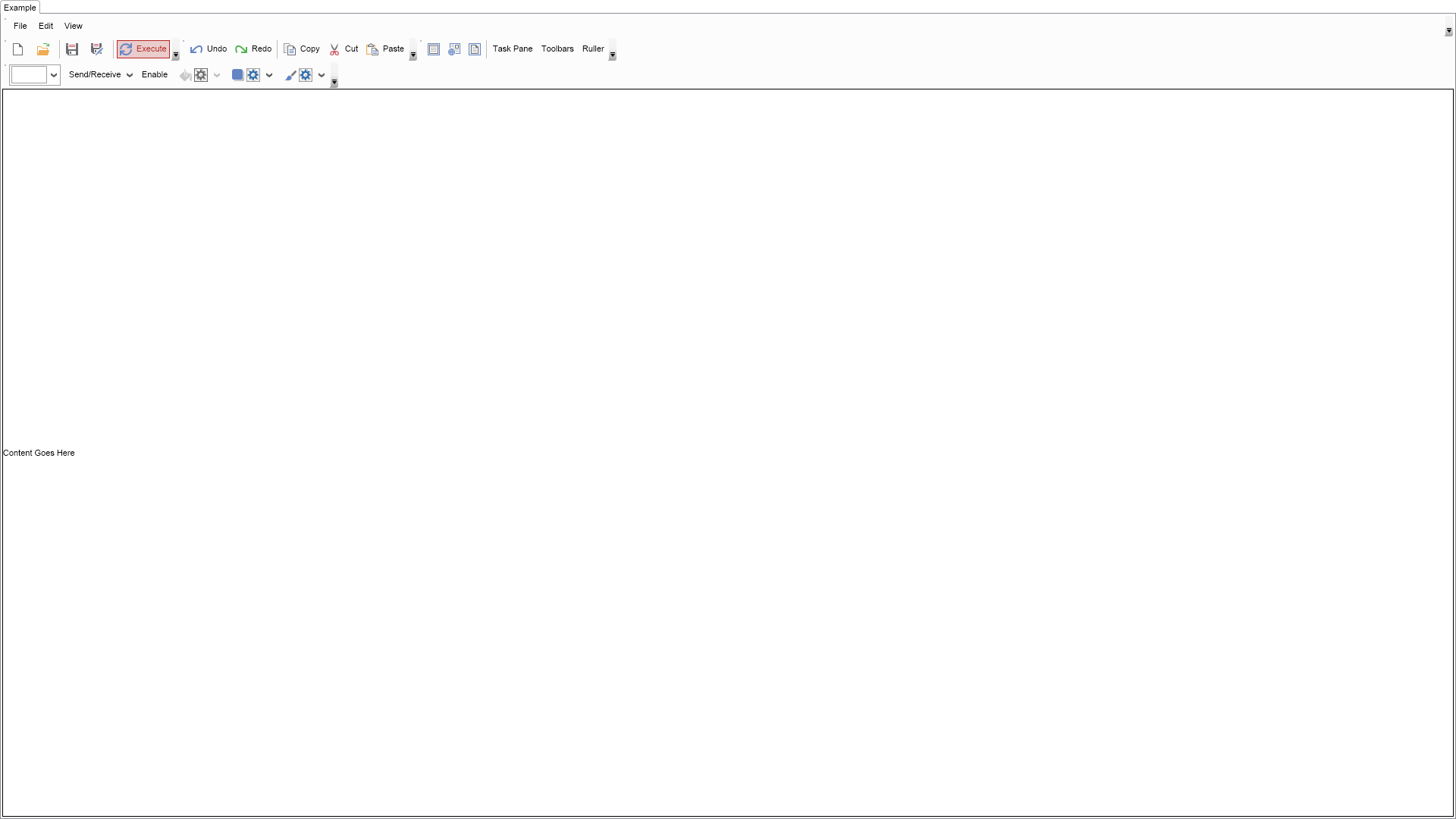
			NCommandBarManager manager = new NCommandBarManager();

			// Create two lanes
			NCommandBarLane lane0 = new NCommandBarLane();
			manager.TopDock.Add(lane0);

			NCommandBarLane lane1 = new NCommandBarLane();
			manager.TopDock.Add(lane1);

			NCommandBarLane lane2 = new NCommandBarLane();
			manager.TopDock.Add(lane2);
			NCommandBarLane lane3 = new NCommandBarLane();
			manager.TopDock.Add(lane3);

			// Create a menu bar in the first lane
			NMenuBar menuBar = new NMenuBar();
			lane0.Add(menuBar);

			menuBar.Items.Add(CreateFileMenu());
			menuBar.Items.Add(CreateEditMenu());
			menuBar.Items.Add(CreateViewMenu());
			menuBar.Text = "Main Menu";

			// Create the File toolbar
			NToolBar fileToolBar = new NToolBar();
			lane1.Add(fileToolBar);
			fileToolBar.Text = "File";

			AddToolBarItem(fileToolBar, Nevron.Nov.Presentation.NResources.Image_File_New_svg, null, "New");
			AddToolBarItem(fileToolBar, Nevron.Nov.Presentation.NResources.Image_File_Open_svg, null, "Open");
			fileToolBar.Items.Add(new NCommandBarSeparator());

			AddToolBarItem(fileToolBar, Nevron.Nov.Presentation.NResources.Image_File_Save_svg, null, "Save...");
			AddToolBarItem(fileToolBar, Nevron.Nov.Presentation.NResources.Image_File_SaveAs_svg, null, "Save As...");
			fileToolBar.Items.Add(new NCommandBarSeparator());

			NButton executeButton = AddToolBarItem(fileToolBar, Nevron.Nov.Presentation.NResources.Image_Edit_Update_svg, "Execute");
			executeButton.UserClass = NUITheme.UserClassAlert; // Make this an alert button (i.e. a red button)

			// Create the Edit toolbar
			NToolBar editToolBar = new NToolBar();
			lane1.Add(editToolBar);
			editToolBar.Text = "Edit";

			AddToolBarItem(editToolBar, Nevron.Nov.Presentation.NResources.Image_Edit_Undo_svg, "Undo");
			AddToolBarItem(editToolBar, Nevron.Nov.Presentation.NResources.Image_Edit_Redo_svg, "Redo");
			editToolBar.Items.Add(new NCommandBarSeparator());
			AddToolBarItem(editToolBar, Nevron.Nov.Presentation.NResources.Image_Edit_Copy_svg, "Copy");
			AddToolBarItem(editToolBar, Nevron.Nov.Presentation.NResources.Image_Edit_Cut_svg, "Cut");
			AddToolBarItem(editToolBar, Nevron.Nov.Presentation.NResources.Image_Edit_Paste_svg, "Paste");

			// Create the View toolbar
			NToolBar viewToolBar = new NToolBar();
			lane1.Add(viewToolBar);
			viewToolBar.Text = "View";

			// Add toggle buttons in a toggle button group which acts like radio buttons.
			AddToggleToolBarItem(viewToolBar, Nevron.Nov.Text.NResources.Image_Layout_Normal_svg, "Normal Layout");
			AddToggleToolBarItem(viewToolBar, Nevron.Nov.Text.NResources.Image_Layout_Web_svg, "Web Layout");
			AddToggleToolBarItem(viewToolBar, Nevron.Nov.Text.NResources.Image_Layout_Print_svg, "Print Layout");

			viewToolBar.Items.Add(new NCommandBarSeparator());
			AddToolBarItem(viewToolBar, null, "Task Pane");
			AddToolBarItem(viewToolBar, null, "Toolbars");
			AddToolBarItem(viewToolBar, null, "Ruller");

			NToolBar toolbar = new NToolBar();
			lane2.Add(toolbar);
			toolbar.Text = "Toolbar";
			toolbar.Wrappable = true;

			NColorBox colorBoxItem = new NColorBox();
			colorBoxItem.Tooltip = new NTooltip("Select Color");
			NCommandBar.SetText(colorBoxItem, "Select Color");
			toolbar.Items.Add(colorBoxItem);

			NMenuSplitButton splitButton = new NMenuSplitButton();
			splitButton.ActionButton.Content = NWidget.FromObject("Send/Receive");
			splitButton.Menu.Items.Add(new NMenuItem("Send Receive All"));
			splitButton.SelectedIndexChanged += OnSplitButtonSelectedIndexChanged;
			splitButton.Menu.Items.Add(new NMenuItem("Send All"));
			splitButton.Menu.Items.Add(new NMenuItem("Receive All"));

			toolbar.Items.Add(splitButton);

			// Add toggle button which enable/disables the next fill split button.
			NToggleButton toggleButton = new NToggleButton("Enable");
			toggleButton.CheckedChanged += OnToggleButtonCheckedChanged;
			toolbar.Items.Add(toggleButton);

			// Add fill split button
			NFillSplitButton fillButton = new NFillSplitButton();
			fillButton.Tooltip = new NTooltip("Select Fill");
			fillButton.Enabled = false;
			toolbar.Items.Add(fillButton);

			// Add shadow split button
			NShadowSplitButton shadowButton = new NShadowSplitButton();
			shadowButton.Tooltip = new NTooltip("Select Shadow");
			toolbar.Items.Add(shadowButton);

			// Add stroke split button
			NStrokeSplitButton strokeButton = new NStrokeSplitButton();
			strokeButton.Tooltip = new NTooltip("Select Stroke");
			toolbar.Items.Add(strokeButton);

			manager.Content = new NLabel("Content Goes Here");
			manager.Content.AllowFocus = true;
			manager.Content.MouseDown += OnContentMouseDown;
			manager.Content.Border = NBorder.CreateFilledBorder(NColor.Black);
			manager.Content.BackgroundFill = new NColorFill(NColor.White);
			manager.Content.BorderThickness = new NMargins(1);
			manager.Content.GotFocus += OnContentGotFocus;
			manager.Content.LostFocus += OnContentLostFocus;

			return manager;
		}
		public NWidget CreateExampleControls()
		{
			return null;
		}
		public string GetExampleDescription()
		{
			return @"

	This example demonstrates how to create and populate various types of command bars such as menu bars and toolbars.

";
		}

		///
		/// Gets the relevant documentation links for the example
		///
		///
		public (string Name, string Url)[] GetDocumentationUrls()
		{
			return new[]
			{
				("Command Bars Overview", "https://www.nevron.com/docs/openvision/ui-command-bars-overview.html"),
				("Toolbars", "https://www.nevron.com/docs/openvision/ui-toolbars.html"),
			};
		}

		#endregion

		#region Implementation

		private NMenuDropDown CreateFileMenu()
		{
			NMenuDropDown file = new NMenuDropDown("File");

			NMenuItem newMenuItem = CreateMenuItem("New", Presentation.NResources.Image_File_New_svg);
			file.Items.Add(newMenuItem);

			newMenuItem.Items.Add(new NMenuItem("Project"));
			newMenuItem.Items.Add(new NMenuItem("Web Site"));
			newMenuItem.Items.Add(new NMenuItem("File"));

			NMenuItem openMenuItem = CreateMenuItem("Open", Presentation.NResources.Image_File_Open_svg);
			file.Items.Add(openMenuItem);

			openMenuItem.Items.Add(new NMenuItem("Project"));
			openMenuItem.Items.Add(new NMenuItem("Web Site"));
			openMenuItem.Items.Add(new NMenuItem("File"));

			file.Items.Add(new NMenuSeparator());

			file.Items.Add(CreateMenuItem("Save", Presentation.NResources.Image_File_Save_svg));
			file.Items.Add(CreateMenuItem("Save As...", Presentation.NResources.Image_File_SaveAs_svg));

			return file;
		}
		private NMenuDropDown CreateEditMenu()
		{
			NMenuDropDown edit = new NMenuDropDown("Edit");

			edit.Items.Add(CreateMenuItem("Undo", Presentation.NResources.Image_Edit_Undo_svg));
			edit.Items.Add(CreateMenuItem("Redo", Presentation.NResources.Image_Edit_Redo_svg));
			edit.Items.Add(new NMenuSeparator());
			edit.Items.Add(CreateMenuItem("Cut", Presentation.NResources.Image_Edit_Cut_svg));
			edit.Items.Add(CreateMenuItem("Copy", Presentation.NResources.Image_Edit_Copy_svg));
			edit.Items.Add(CreateMenuItem("Paste", Presentation.NResources.Image_Edit_Paste_svg));

			return edit;
		}
		private NMenuDropDown CreateViewMenu()
		{
			NMenuDropDown view = new NMenuDropDown("View");
			view.Items.Add(CreateCheckableMenuItem("Normal", Nov.Text.NResources.Image_Layout_Normal_svg));
			view.Items.Add(CreateCheckableMenuItem("Web Layout", Nov.Text.NResources.Image_Layout_Web_svg));
			view.Items.Add(CreateCheckableMenuItem("Print Layout", Nov.Text.NResources.Image_Layout_Print_svg));
			view.Items.Add(new NMenuSeparator());
			view.Items.Add(new NMenuItem("Task Pane"));
			view.Items.Add(new NMenuItem("Toolbars"));
			view.Items.Add(new NMenuItem("Ruler"));

			return view;
		}

		private NToggleButton AddToggleToolBarItem(NToolBar toolBar, NImage image, string tooltip)
		{
			NToggleButton toggleButton = new NToggleButton(image);
			toggleButton.Tooltip = new NTooltip(tooltip);
			NCommandBar.SetText(toggleButton, tooltip);
			NCommandBar.SetImage(toggleButton, image);
			toolBar.Items.Add(toggleButton);

			return toggleButton;
		}
		private NButton AddToolBarItem(NToolBar toolBar, NImage image, string text)
		{
			return AddToolBarItem(toolBar, image, text, text);
		}
		private NButton AddToolBarItem(NToolBar toolBar, NImage image, string text, string tooltip)
		{
			NButton button;
			if (text == null)
			{
				text = string.Empty;
			}

			if (image == null)
			{
				button = new NButton(text);
			}
			else
			{
				button = new NButton(NPairBox.Create(image, text));
			}

			if (!string.IsNullOrEmpty(tooltip))
			{
				button.Tooltip = new NTooltip(tooltip);
			}

			toolBar.Items.Add(button);

			NCommandBar.SetText(button, text);

			if (image != null)
			{
				NCommandBar.SetImage(button, (NImage)image.DeepClone());
			}

			return button;
		}
		private NMenuItem CreateMenuItem(string text, NImage image)
		{
			if (image == null)
			{
				return new NMenuItem(text);
			}
			else
			{
				NImageBox imageBox = new NImageBox(image);
				imageBox.HorizontalPlacement = ENHorizontalPlacement.Center;
				imageBox.VerticalPlacement = ENVerticalPlacement.Center;
				return new NMenuItem(imageBox, text);
			}
		}
		private NCheckableMenuItem CreateCheckableMenuItem(string text, NImage image)
		{
			NCheckableMenuItem item = new NCheckableMenuItem(text);
			item.CheckedChanging += item_CheckedChanging;
			item.CheckedChanged += item_CheckedChanged;

			if (image != null)
			{
				NImageBox imageBox = new NImageBox(image);
				imageBox.HorizontalPlacement = ENHorizontalPlacement.Center;
				imageBox.VerticalPlacement = ENVerticalPlacement.Center;
				item.Header = imageBox;
				item.Content = new NLabel(text);
			}

			return item;
		}

		#endregion

		#region Event Handlers

		private void OnContentLostFocus(NFocusChangeEventArgs args)
		{
			(args.TargetNode as NLabel).Border = NBorder.CreateFilledBorder(NColor.Black);
		}
		private void OnContentGotFocus(NFocusChangeEventArgs args)
		{
			(args.TargetNode as NLabel).Border = NBorder.CreateFilledBorder(NColor.Red);
		}
		private void OnContentMouseDown(NMouseButtonEventArgs args)
		{
			(args.TargetNode as NLabel).Focus();
		}
		private void OnSplitButtonSelectedIndexChanged(NValueChangeEventArgs arg)
		{
			NMenuSplitButton menuSplitButton = (NMenuSplitButton)arg.CurrentTargetNode;
			NMenuItem menuItem = (NMenuItem)menuSplitButton.Items[menuSplitButton.SelectedIndex];
			NLabel label = (NLabel)menuItem.Content;
			menuSplitButton.ActionButton.Content = NWidget.FromObject(label.Text);
		}
		private void OnToggleButtonCheckedChanged(NValueChangeEventArgs arg)
		{
			NToggleButton button = arg.CurrentTargetNode as NToggleButton;
			if (button == null)
			{
				return;
			}

			//Get the toolbar items collection and enable or disable the next button in the collection
			NCommandBarItemCollection toolbarItems = button.ParentNode as NCommandBarItemCollection;
			if (toolbarItems == null)
			{
				return;
			}

			int buttonIndex = toolbarItems.IndexOfChild(button);
			NFillSplitButton fillSplitButton = toolbarItems[buttonIndex + 1] as NFillSplitButton;
			if (fillSplitButton == null)
			{
				return;
			}

			if (button.Checked)
			{
				fillSplitButton.Enabled = true;
				((NLabel)button.Content).Text = "Disable";
			}
			else
			{
				fillSplitButton.Enabled = false;
				((NLabel)button.Content).Text = "Enable";
			}
		}
		void item_CheckedChanging(NValueChangeEventArgs arg)
		{
			bool isChecked = (bool)arg.NewValue;
			if (isChecked)
				return;

			// Make sure the user is not trying to uncheck the checked item
			NCheckableMenuItem item = (NCheckableMenuItem)arg.TargetNode;
			NMenuItemCollection items = item.ParentNode as NMenuItemCollection;

			for (int i = 0, count = items.Count; i < count; i++)
			{
				NCheckableMenuItem currentItem = items[i] as NCheckableMenuItem;
				if (currentItem == null)
				{
					continue;
				}

				if (currentItem != item && currentItem.Checked)
					return;
			}

			arg.Cancel = true;
		}

		void item_CheckedChanged(NValueChangeEventArgs arg)
		{
			bool isChecked = (bool)arg.NewValue;
			if (isChecked == false)
				return;

			NCheckableMenuItem item = (NCheckableMenuItem)arg.TargetNode;
			NMenuItemCollection items = item.ParentNode as NMenuItemCollection;

			for (int i = 0, count = items.Count; i < count; i++)
			{
				NCheckableMenuItem currentItem = items[i] as NCheckableMenuItem;
				if (currentItem == null)
				{
					continue;
				}

				if (currentItem != item && currentItem.Checked)
				{
					// We've found the previously checked item, so uncheck it
					currentItem.Checked = false;
					break;
				}
			}
		}
		#endregion

		#region Fields
		#endregion

		#region Static Methods
		#endregion

		#region Constants
		#endregion

		#region Nested Types
		#endregion
	}
}

 Chart for .NET
 Diagram for .NET
 User Interface for .NET
 Vision for SSRS
 Chart for SSRS
 Gauge for SSRS
 Map for SSRS
 Barcode for SSRS
 Vision for SharePoint
 Chart for SharePoint
 Gauge for SharePoint
 Map for SharePoint
 Barcode for SharePoint
 Open Vision for .NET


 Vision for .NET