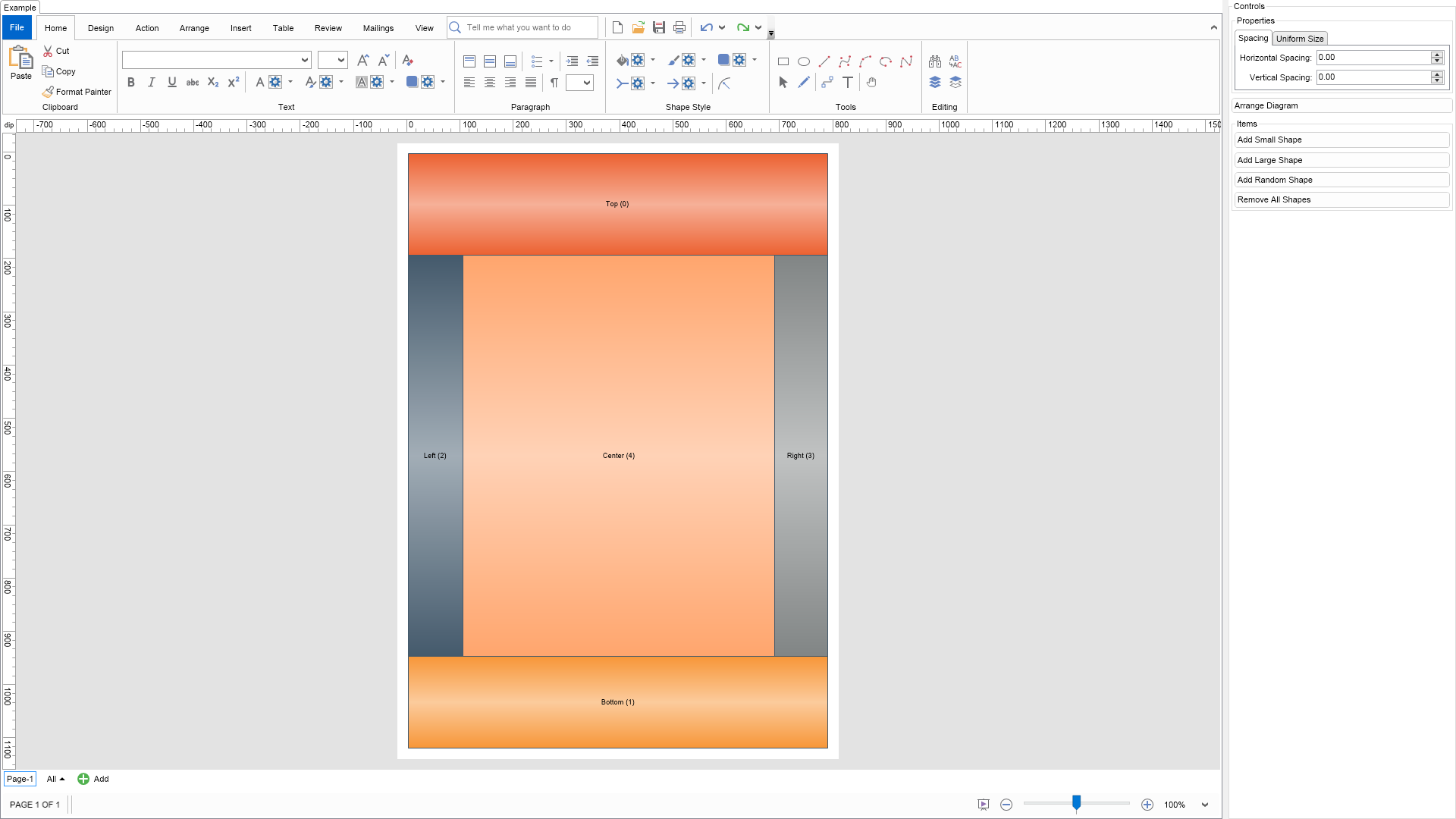
Nevron NOV Diagram for Blazor ships with hundreds of examples with full source code, as part of the Nevron Open Vision Suite.
All Blazor Diagram examples are also available as a stand-alone Visual Studio solution
in C#,
which you can download from the links below.
Dock Layout Example for Blazor Description
The dock layout arranges cells sequentially within the available layout area.
Each cell docks to a specified edge or fills the remaining center area.
Docking order affects the arrangement because each cell reduces the space available to subsequent cells.
Layout Properties
HorizontalSpacing and VerticalSpacing - specify the minimum horizontal and vertical gaps between cells.
Both default to 0.
UniformWidths - controls how cell widths are standardized before measurement and arrangement.
The default value, None, initially uses each cell's desired width.
UniformHeights - controls how cell heights are standardized before measurement and arrangement.
The default value, None, initially uses each cell's desired height.
Per-Item Properties
DockArea - an extended property applied individually to each arranged item.
It specifies where the item's cell docks within the remaining layout area:
Left - docks to the left edge and fills the available height.
Right - docks to the right edge and fills the available height.
Top - docks to the top edge and fills the available width.
Bottom - docks to the bottom edge and fills the available width.
Center - fills the remaining space in both dimensions.
To experiment with the layout, change its properties in the property grid and click the Layout button.
C# Dock Layout Example Code for Nevron Diagram for Blazor
Language: C#
using Nevron.Nov;
using Nevron.Nov.DataStructures;
using Nevron.Nov.Diagram;
using Nevron.Nov.Diagram.Layout;
using Nevron.Nov.Diagram.Shapes;
using Nevron.Nov.Dom;
using Nevron.Nov.Editors;
using Nevron.Nov.Graphics;
using Nevron.Nov.Layout;
using Nevron.Nov.UI;
using Nevron.Nov.Windows.Forms;
using System;
using System.Windows.Forms;
namespace NovWinFormsProject
{
public partial class Form1 : Form
{
#region Constructors
public Form1()
{
InitializeComponent();
// Set form title
Text = "NOV WinForms - NDockLayoutExample";
// Create the NOV example and its controls
NWidget exampleContent = CreateExampleContent();
NWidget exampleControls = CreateExampleControls();
if (exampleControls != null)
{
exampleControls.PreferredWidth = 300;
}
// Place the example and its controls in a pair box
NPairBox pairBox = new NPairBox(exampleContent, exampleControls);
pairBox.FillMode = ENStackFillMode.First;
pairBox.FitMode = ENStackFitMode.First;
pairBox.Margins = new NMargins(NDesign.HorizontalSpacing, NDesign.VerticalSpacing);
// Host the example in the form
NNovWidgetHost host = new NNovWidgetHost(pairBox);
host.Dock = DockStyle.Fill;
Controls.Add(host);
}
#endregion
#region Example
public NWidget CreateExampleContent()
{
// Create a simple drawing
NDrawingViewWithRibbon drawingViewWithRibbon = new NDrawingViewWithRibbon();
m_DrawingView = drawingViewWithRibbon.View;
m_DrawingView.Document.HistoryService.Pause();
try
{
InitDiagram(m_DrawingView.Document);
}
finally
{
m_DrawingView.Document.HistoryService.Resume();
}
return drawingViewWithRibbon;
}
public NWidget CreateExampleControls()
{
m_Layout.Changed += OnLayoutChanged;
NStackPanel stack = new NStackPanel();
// property editor
NEditor editor = NDesigner.GetDesigner(m_Layout).CreateStandaloneEditor(m_Layout);
stack.Add(new NGroupBox("Properties", editor));
NButton arrangeButton = new NButton("Arrange Diagram");
arrangeButton.Click += OnArrangeButtonClick;
stack.Add(arrangeButton);
// items stack
NStackPanel itemsStack = new NStackPanel();
// NOTE: For Cells layout we provide the user with the ability to add shapes with different sizes so that he/she can test the layouts
NButton addSmallItemButton = new NButton("Add Small Shape");
addSmallItemButton.Click += OnAddSmallItemButtonClick;
itemsStack.Add(addSmallItemButton);
NButton addLargeItemButton = new NButton("Add Large Shape");
addLargeItemButton.Click += OnAddLargeItemButtonClick;
itemsStack.Add(addLargeItemButton);
NButton addRandomItemButton = new NButton("Add Random Shape");
addRandomItemButton.Click += OnAddRandomItemButtonClick;
itemsStack.Add(addRandomItemButton);
NButton removeAllItemsButton = new NButton("Remove All Shapes");
removeAllItemsButton.Click += OnRemoveAllItemsButtonClick;
itemsStack.Add(removeAllItemsButton);
stack.Add(new NGroupBox("Items", itemsStack));
return stack;
}
public string GetExampleDescription()
{
return @"
The dock layout arranges cells sequentially within the available layout area.
Each cell docks to a specified edge or fills the remaining center area.
Docking order affects the arrangement because each cell reduces the space available to subsequent cells.
Layout Properties
HorizontalSpacing and VerticalSpacing - specify the minimum horizontal and vertical gaps between cells.
Both default to 0.
UniformWidths - controls how cell widths are standardized before measurement and arrangement.
The default value, None, initially uses each cell's desired width.
UniformHeights - controls how cell heights are standardized before measurement and arrangement.
The default value, None, initially uses each cell's desired height.
Per-Item Properties
DockArea - an extended property applied individually to each arranged item.
It specifies where the item's cell docks within the remaining layout area:
Left - docks to the left edge and fills the available height.
Right - docks to the right edge and fills the available height.
Top - docks to the top edge and fills the available width.
Bottom - docks to the bottom edge and fills the available width.
Center - fills the remaining space in both dimensions.
To experiment with the layout, change its properties in the property grid and click the Layout button.
";
}
///
/// Gets the relevant documentation links for the example
///
///
public (string Name, string Url)[] GetDocumentationUrls()
{
return new[]
{
("Dock Layout", "https://www.nevron.com/docs/openvision/dock-layout.html"),
("Layouts Overview", "https://www.nevron.com/docs/openvision/diagram-drawing-layouts-overview.html"),
("Graph Regions and Regions Layouts", "https://www.nevron.com/docs/openvision/diagram-graph-regions-and-region-layouts.html"),
("Layouts Overview", "https://www.nevron.com/docs/openvision/layouts-overview.html"),
};
}
private void InitDiagram(NDrawingDocument drawingDocument)
{
// Hide ports
drawingDocument.Content.ScreenVisibility.ShowPorts = false;
NPage activePage = drawingDocument.Content.ActivePage;
m_ShapeFactory = new NBasicShapeFactory();
int min = 100;
int max = 200;
NShape shape;
Random random = new Random();
for (int i = 0; i < 5; i++)
{
shape = m_ShapeFactory.CreateShape(ENBasicShape.Rectangle);
NColor[] shapeLightColors = new NColor[] {
new NColor(236, 97, 49),
new NColor(247, 150, 56),
new NColor(68, 90, 108),
new NColor(129, 133, 133),
new NColor(255, 165, 109)};
NColor[] shapeDarkColors = new NColor[] {
new NColor(246, 176, 152),
new NColor(251, 203, 156),
new NColor(162, 173, 182),
new NColor(192, 194, 194),
new NColor(255, 210, 182)};
shape.Geometry.Fill = new NStockGradientFill(ENGradientStyle.Horizontal, ENGradientVariant.Variant3, shapeLightColors[i], shapeDarkColors[i]);
shape.Geometry.Stroke = new NStroke(1, new NColor(68, 90, 108));
// Generate random width and height
float width = random.Next(min, max);
float height = random.Next(min, max);
switch (i)
{
case 0:
shape.LayoutData.DockArea = ENDockArea.Top;
shape.Text = "Top (" + i.ToString() + ")";
break;
case 1:
shape.LayoutData.DockArea = ENDockArea.Bottom;
shape.Text = "Bottom (" + i.ToString() + ")";
break;
case 2:
shape.LayoutData.DockArea = ENDockArea.Left;
shape.Text = "Left (" + i.ToString() + ")";
break;
case 3:
shape.LayoutData.DockArea = ENDockArea.Right;
shape.Text = "Right (" + i.ToString() + ")";
break;
case 4:
shape.LayoutData.DockArea = ENDockArea.Center;
shape.Text = "Center (" + i.ToString() + ")";
break;
}
shape.SetBounds(new NRectangle(0, 0, width, height));
activePage.Items.Add(shape);
}
// Arrange diagram
ArrangeDiagram(drawingDocument);
// Fit page
drawingDocument.Content.ActivePage.ZoomMode = ENZoomMode.Fit;
}
#endregion
#region Implementation
///
/// Arranges the shapes in the active page.
///
///
private void ArrangeDiagram(NDrawingDocument drawingDocument)
{
// get all top-level shapes that reside in the active page
NPage activePage = drawingDocument.Content.ActivePage;
NList shapes = activePage.GetShapes(false);
// create a layout context and use it to arrange the shapes using the current layout
NDrawingLayoutContext layoutContext = new NDrawingLayoutContext(drawingDocument, activePage);
m_Layout.Arrange(shapes.CastAll
Download a fully functional C# (.cs) Dock Layout Example for Blazor Solution

 Chart for .NET
 Diagram for .NET
 User Interface for .NET
 Vision for SSRS
 Chart for SSRS
 Gauge for SSRS
 Map for SSRS
 Barcode for SSRS
 Vision for SharePoint
 Chart for SharePoint
 Gauge for SharePoint
 Map for SharePoint
 Barcode for SharePoint
 Open Vision for .NET


 Vision for .NET