using Nevron.Nov;
using Nevron.Nov.Diagram;
using Nevron.Nov.Diagram.Batches;
using Nevron.Nov.Diagram.Expressions;
using Nevron.Nov.Dom;
using Nevron.Nov.Graphics;
using Nevron.Nov.Layout;
using Nevron.Nov.UI;
using Nevron.Nov.Windows.Forms;
using System.Windows.Forms;

namespace NovWinFormsProject
{
	public partial class Form1 : Form
	{
		#region Constructors

		public Form1()
		{
			InitializeComponent();

			// Set form title
			Text = "NOV WinForms - NCustomShapesExample";

			// Create the NOV example and its controls
			NWidget exampleContent = CreateExampleContent();
			NWidget exampleControls = CreateExampleControls();
			if (exampleControls != null)
			{
				exampleControls.PreferredWidth = 300;
			}

			// Place the example and its controls in a pair box
			NPairBox pairBox = new NPairBox(exampleContent, exampleControls);
			pairBox.FillMode = ENStackFillMode.First;
			pairBox.FitMode = ENStackFitMode.First;
			pairBox.Margins = new NMargins(NDesign.HorizontalSpacing, NDesign.VerticalSpacing);

			// Host the example in the form
			NNovWidgetHost host = new NNovWidgetHost(pairBox);
			host.Dock = DockStyle.Fill;
			Controls.Add(host);
		}

		#endregion

        #region Example

        public NWidget CreateExampleContent()
        {
            // Create a simple drawing
            NDrawingViewWithRibbon drawingViewWithRibbon = new NDrawingViewWithRibbon();
            m_DrawingView = drawingViewWithRibbon.View;

            m_DrawingView.Document.HistoryService.Pause();
            try
            {
                InitDiagram(m_DrawingView.Document);
            }
            finally
            {
                m_DrawingView.Document.HistoryService.Resume();
            }

            return drawingViewWithRibbon;
        }
        public NWidget CreateExampleControls()
        {
            return null;
        }
        public string GetExampleDescription()
        {
            return @"

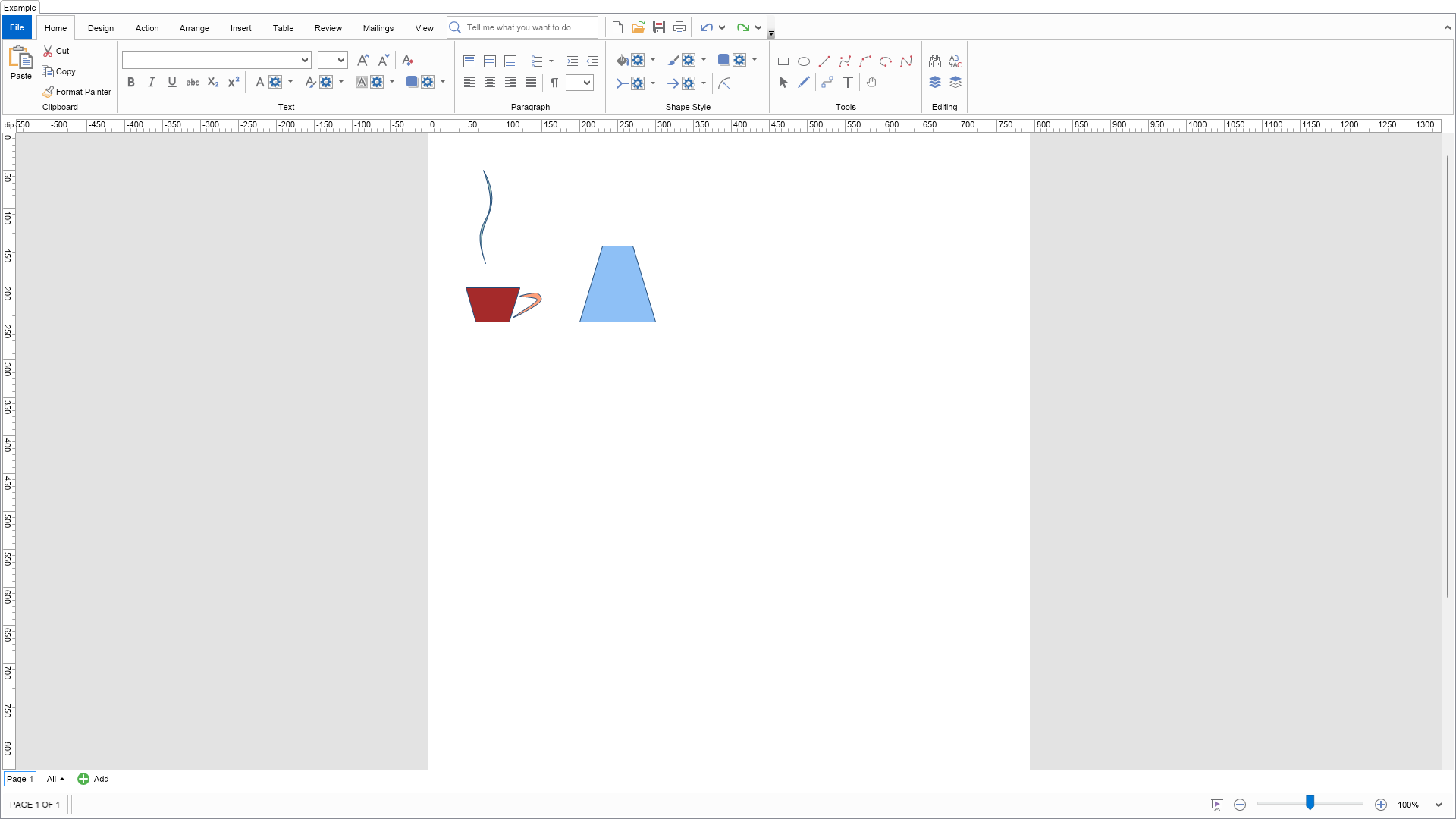
    Demonstrates how to create custom shapes by combining shapes and also how to create custom formula shapes with control points.


    The Coffee Cup shape is created by grouping shapes with different fill styles inside a group.
    By using this approach you can create shapes that mix different fill and stroke styles.


    The Trapezoid Shape is a replica of the Visio Trapezoid Smart Shape.
    It demonstrates that with NOV Diagram you can replicate the Shape Sheet behavior of almost any Visio shape.
    Select the shape and move its control point to modify the trapezoid strip width.
    Note that the geometry, left and right ports and XControl point behavior of this shape are driven by formula expressions.

            ";
        }

        ///
        /// Gets the relevant documentation links for the example
        ///
        ///
        public (string Name, string Url)[] GetDocumentationUrls()
        {
            return new[]
            {
                ("Shapes", "https://www.nevron.com/docs/openvision/diagram-shapes.html"),
                ("Geometry", "https://www.nevron.com/docs/openvision/diagram-shape-geometry.html"),
                ("Controls", "https://www.nevron.com/docs/openvision/diagram-controls.html"),
            };
        }

        private void InitDiagram(NDrawingDocument drawingDocument)
        {
            m_DrawingView.ActivePage.Interaction.GluingShapes += Interaction_GluingShapes;

            // create the coffee cup
            NShape coffeeCup = CreateCoffeeCupShape();
            coffeeCup.SetBounds(new NRectangle(50, 50, 100, 200));
            drawingDocument.Content.ActivePage.Items.Add(coffeeCup);

            NShape trapedzoid = CreateTrapedzoidShape();
            trapedzoid.SetBounds(new NRectangle(200, 150, 100, 100));
            drawingDocument.Content.ActivePage.Items.Add(trapedzoid);
        }

        ///
        /// Creates a custom shape that is essentially a group consisting of three other shapes each with different filling.
        /// You need to use groups to have shapes that mix different fill, or stroke styles.
        ///
        ///
        private NShape CreateCoffeeCupShape()
        {
            // create the points and paths from which the shape consits
            NPoint[] cupPoints = new NPoint[] {
                new NPoint(45, 268),
                new NPoint(63, 331),
                new NPoint(121, 331),
                new NPoint(140, 268) };

            NGraphicsPath handleGraphicsPath = new NGraphicsPath();
            handleGraphicsPath.AddClosedCurve(new NPoint[] {
                new NPoint(175, 295),
                new NPoint(171, 278),
                new NPoint(140, 283),
                new NPoint(170, 290),
                new NPoint(128, 323) }, 1);

            NGraphicsPath steamGraphicsPath = new NGraphicsPath();
            steamGraphicsPath.AddCubicBeziers(new NPoint[] {
                new NPoint(92, 270),
                new NPoint(53, 163),
                new NPoint(145, 160),
                new NPoint(86, 50),
                new NPoint(138, 194),
                new NPoint(45, 145),
                new NPoint(92, 270) });
            steamGraphicsPath.CloseFigure();

            // calculate some bounds
            NRectangle handleBounds = handleGraphicsPath.ExactBounds;
            NRectangle cupBounds = NGeometry2D.GetBounds(cupPoints);
            NRectangle steamBounds = steamGraphicsPath.ExactBounds;
            NRectangle geometryBounds = NRectangle.Union(cupBounds, handleBounds, steamBounds);

            // normalize the points and paths by transforming them to relative coordinates
            NRectangle normalRect = new NRectangle(0, 0, 1, 1);
            NMatrix transform = NMatrix.CreateBoundsStretchMatrix(geometryBounds, normalRect);
            transform.TransformPoints(cupPoints);
            handleGraphicsPath.Transform(transform);
            steamGraphicsPath.Transform(transform);

            // create the cup shape
            NDrawPolygon cupPolygon = new NDrawPolygon(normalRect, cupPoints);
            cupPolygon.Relative = true;
            NShape cupShape = new NShape();
            cupShape.Init2DShape();
            cupShape.Geometry.Fill = new NColorFill(NColor.Brown);
            cupShape.Geometry.Add(cupPolygon);
            cupShape.SetBounds(geometryBounds);

            // create the cup handle
            NDrawPath handlePath = new NDrawPath(normalRect, handleGraphicsPath);
            handlePath.Relative = true;
            NShape handleShape = new NShape();
            handleShape.Init2DShape();
            handleShape.Geometry.Fill = new NColorFill(NColor.LightSalmon);
            handleShape.Geometry.Add(handlePath);
            handleShape.SetBounds(geometryBounds);

            // create the steam
            NDrawPath steamPath = new NDrawPath(steamGraphicsPath.Bounds, steamGraphicsPath);
            steamPath.Relative = true;
            NShape steamShape = new NShape();
            steamShape.Init2DShape();
            steamShape.Geometry.Fill = new NColorFill(new NColor(50, 122, 122, 122));
            steamShape.Geometry.Add(steamPath);
            steamShape.SetBounds(geometryBounds);

            // group the shapes as a single group
            NGroup group;
            NBatchGroup batch = new NBatchGroup(m_DrawingView.Document);
            batch.Build(cupShape, handleShape, steamShape);
            batch.Group(null, out group);

            // alter some properties of the group
            group.SelectionMode = ENGroupSelectionMode.GroupOnly;
            group.SnapToShapes = false;

            return group;
        }
        ///
        /// Creates a custom shape that is a replica of the Visio Trapedzoid shape. With NOV diagram you can replicate the smart behavior of any Visio smart shape.
        ///
        ///
        private NShape CreateTrapedzoidShape()
        {
            NShape shape = new NShape();
            shape.Init2DShape();

            // add controls
            NControl control = new NControl();
            control.SetFx(NControl.XProperty, new NShapeWidthFactorFx(0.3));
            control.Y = 0.0d;
            control.SetFx(NControl.XBehaviorProperty, string.Format("IF(X

 Chart for .NET
 Diagram for .NET
 User Interface for .NET
 Vision for SSRS
 Chart for SSRS
 Gauge for SSRS
 Map for SSRS
 Barcode for SSRS
 Vision for SharePoint
 Chart for SharePoint
 Gauge for SharePoint
 Map for SharePoint
 Barcode for SharePoint
 Open Vision for .NET


 Vision for .NET