The symmetrical layout represents an implementation of the Fruchertman and Reingold force directed layout (with some modifications).
It uses attractive and repulsive forces, which aim to produce a drawing with uniform distance between each set of connected vertices. Because of that the drawing tends to be symmetrical.
The attractive and repulsive forces are coupled in an instance of the NDesiredDistanceForce class, accessible from the DesiredDistanceForce property.
To experiment with the layout behavior just change the properties of the layout in the property grid and click the Layout button.
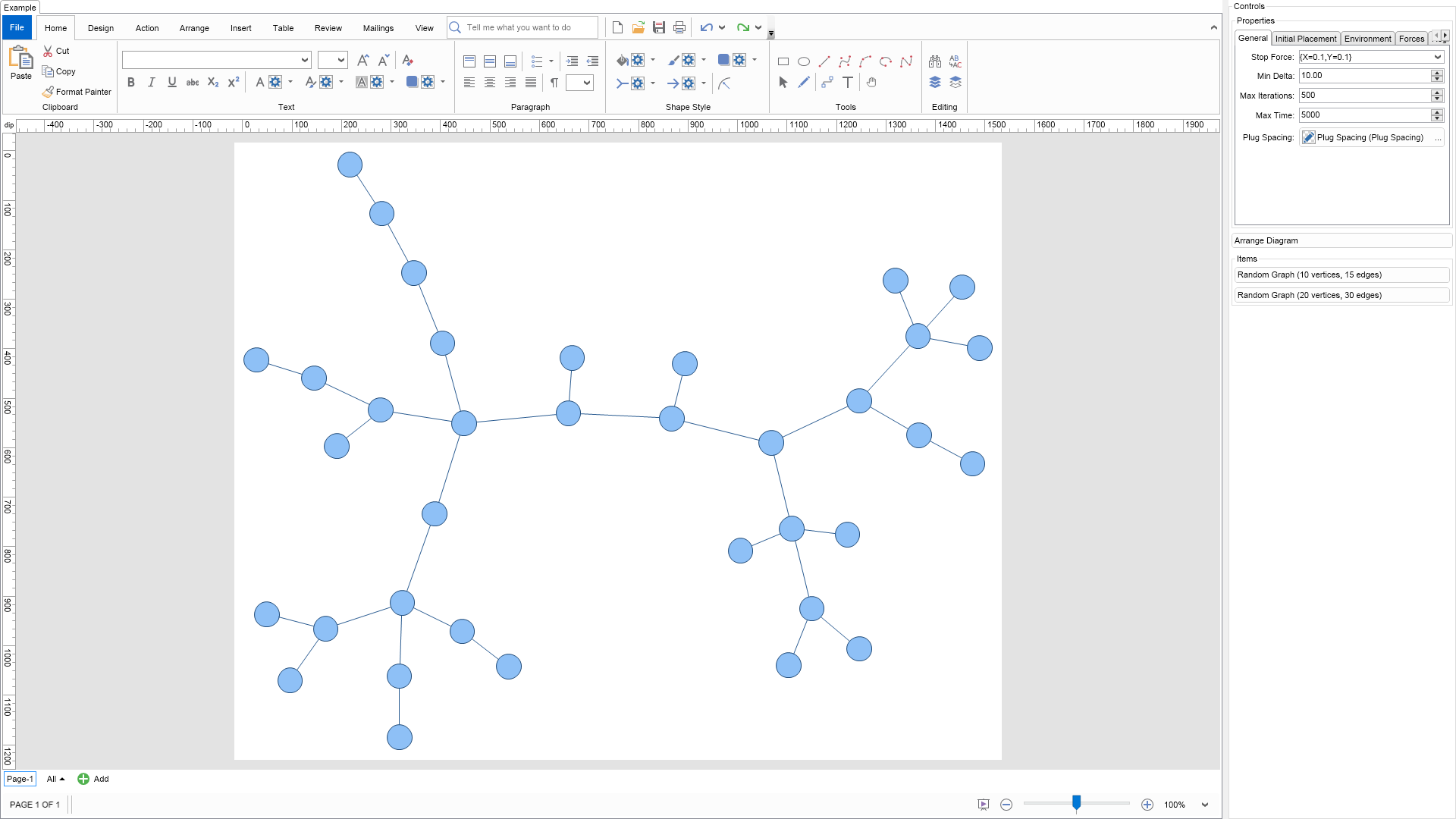
| Language: C# |
using Nevron.Nov;
using Nevron.Nov.DataStructures;
using Nevron.Nov.Diagram;
using Nevron.Nov.Diagram.Layout;
using Nevron.Nov.Diagram.Shapes;
using Nevron.Nov.Dom;
using Nevron.Nov.Editors;
using Nevron.Nov.Graphics;
using Nevron.Nov.Layout;
using Nevron.Nov.UI;
using Nevron.Nov.Windows.Forms;
using System.Windows.Forms;
namespace NovWinFormsProject
{
public partial class Form1 : Form
{
#region Constructors
public Form1()
{
InitializeComponent();
// Set form title
Text = "NOV WinForms - NSymmetricalGraphLayoutExample";
// Create the NOV example and its controls
NWidget exampleContent = CreateExampleContent();
NWidget exampleControls = CreateExampleControls();
if (exampleControls != null)
{
exampleControls.PreferredWidth = 300;
}
// Place the example and its controls in a pair box
NPairBox pairBox = new NPairBox(exampleContent, exampleControls);
pairBox.FillMode = ENStackFillMode.First;
pairBox.FitMode = ENStackFitMode.First;
pairBox.Margins = new NMargins(NDesign.HorizontalSpacing, NDesign.VerticalSpacing);
// Host the example in the form
NNovWidgetHost host = new NNovWidgetHost(pairBox);
host.Dock = DockStyle.Fill;
Controls.Add(host);
}
#endregion
#region Example
public NWidget CreateExampleContent()
{
// Create a simple drawing
NDrawingViewWithRibbon drawingViewWithRibbon = new NDrawingViewWithRibbon();
m_DrawingView = drawingViewWithRibbon.View;
m_DrawingView.Document.HistoryService.Pause();
try
{
InitDiagram(m_DrawingView.Document);
}
finally
{
m_DrawingView.Document.HistoryService.Resume();
}
return drawingViewWithRibbon;
}
public NWidget CreateExampleControls()
{
m_Layout.Changed += OnLayoutChanged;
NStackPanel stack = new NStackPanel();
// property editor
NEditor editor = NDesigner.GetDesigner(m_Layout).CreateStandaloneEditor(m_Layout);
stack.Add(new NGroupBox("Properties", editor));
NButton arrangeButton = new NButton("Arrange Diagram");
arrangeButton.Click += OnArrangeButtonClick;
stack.Add(arrangeButton);
// items stack
NStackPanel itemsStack = new NStackPanel();
// NOTE: For Graph layouts we provide the user with the ability to generate random graph diagrams so that he/she can test the layouts
NButton randomGraph1Button = new NButton("Random Graph (10 vertices, 15 edges)");
randomGraph1Button.Click += OnRandomGraph1ButtonClick;
itemsStack.Add(randomGraph1Button);
NButton randomGraph2Button = new NButton("Random Graph (20 vertices, 30 edges)");
randomGraph2Button.Click += OnRandomGraph2ButtonClick;
itemsStack.Add(randomGraph2Button);
stack.Add(new NGroupBox("Items", itemsStack));
return stack;
}
public string GetExampleDescription()
{
return @"
The symmetrical layout represents an implementation of the Fruchertman and Reingold force directed layout (with some modifications).
It uses attractive and repulsive forces, which aim to produce a drawing with uniform distance between each set of connected vertices. Because of that the drawing tends to be symmetrical.
The attractive and repulsive forces are coupled in an instance of the NDesiredDistanceForce class, accessible from the DesiredDistanceForce property.
To experiment with the layout behavior just change the properties of the layout in the property grid and click the Layout button.
";
}
///
/// Gets the relevant documentation links for the example
///
///
public (string Name, string Url)[] GetDocumentationUrls()
{
return new[]
{
("Symmetrical Layout", "https://www.nevron.com/docs/openvision/diagram-symmetrical-layout.html"),
("Layouts Overview", "https://www.nevron.com/docs/openvision/diagram-drawing-layouts-overview.html"),
("Graph Regions and Regions Layouts", "https://www.nevron.com/docs/openvision/diagram-graph-regions-and-region-layouts.html"),
("Shape Navigation", "https://www.nevron.com/docs/openvision/diagram-shape-navigation.html"),
};
}
private void InitDiagram(NDrawingDocument drawingDocument)
{
// Hide ports
drawingDocument.Content.ScreenVisibility.ShowPorts = false;
// Create random diagram
NGenericTreeTemplate template = new NGenericTreeTemplate();
template.Balanced = false;
template.Levels = 6;
template.BranchNodes = 3;
template.HorizontalSpacing = 10;
template.VerticalSpacing = 10;
template.VertexShape = ENBasicShape.Circle;
template.VertexSize = new NSize(50, 50);
template.VertexSizeDeviation = 0;
template.Create(drawingDocument);
// Arrange diagram
ArrangeDiagram(drawingDocument);
// Fit active page
drawingDocument.Content.ActivePage.ZoomMode = ENZoomMode.Fit;
}
#endregion
#region Implementation
///
/// Arranges the shapes in the active page.
///
///
private void ArrangeDiagram(NDrawingDocument drawingDocument)
{
// get all top-level shapes that reside in the active page
NPage activePage = drawingDocument.Content.ActivePage;
NList shapes = activePage.GetShapes(false);
// create a layout context and use it to arrange the shapes using the current layout
NDrawingLayoutContext layoutContext = new NDrawingLayoutContext(drawingDocument, activePage);
m_Layout.Arrange(shapes.CastAll