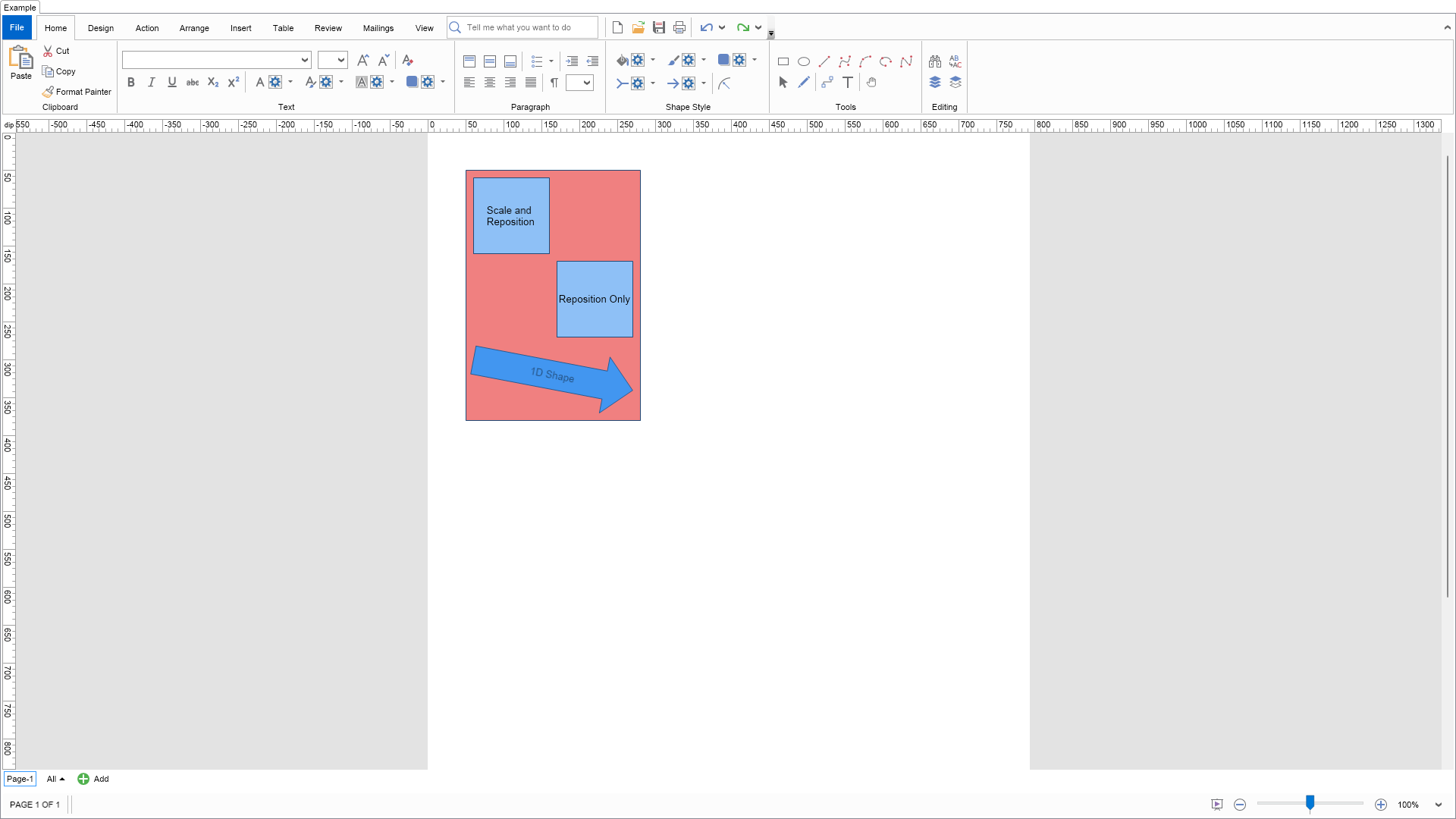
Demonstrates how 2D and 1D shapes can be resized when they are placed in groups.
When a 2D shape whose ResizeInGroup property is set to ScaleAndReposition is resized inside a group, NOV Diagram will express the shape size as a fraction of the group Width and Height, and bind the shape pin point to a relative position inside group coordinate system. When the group is resized, the 2D shape will scale and reposition with the group.
When a 2D shape whose ResizeInGroup property is set to RepositionOnly is resized inside a group, NOV Diagram will set a constant size to the shape and bind the shape pin point to a relative position inside group coordinate system. When the group is resized, the 2D shape will only reposition itself.
When you move the Begin or End points of a 1D shape inside a group, NOV Diagram will bind the respective end-point to a relative position inside group coordinate system. When the group is resized, the 1D shape will get stretched.

| Language: C# |
using Nevron.Nov;
using Nevron.Nov.Diagram;
using Nevron.Nov.Diagram.Shapes;
using Nevron.Nov.Dom;
using Nevron.Nov.Graphics;
using Nevron.Nov.Layout;
using Nevron.Nov.UI;
using Nevron.Nov.Windows.Forms;
using System.Windows.Forms;
namespace NovWinFormsProject
{
public partial class Form1 : Form
{
#region Constructors
public Form1()
{
InitializeComponent();
// Set form title
Text = "NOV WinForms - NResizeInGroupsExample";
// Create the NOV example and its controls
NWidget exampleContent = CreateExampleContent();
NWidget exampleControls = CreateExampleControls();
if (exampleControls != null)
{
exampleControls.PreferredWidth = 300;
}
// Place the example and its controls in a pair box
NPairBox pairBox = new NPairBox(exampleContent, exampleControls);
pairBox.FillMode = ENStackFillMode.First;
pairBox.FitMode = ENStackFitMode.First;
pairBox.Margins = new NMargins(NDesign.HorizontalSpacing, NDesign.VerticalSpacing);
// Host the example in the form
NNovWidgetHost host = new NNovWidgetHost(pairBox);
host.Dock = DockStyle.Fill;
Controls.Add(host);
}
#endregion
#region Example
public NWidget CreateExampleContent()
{
// Create a simple drawing
NDrawingViewWithRibbon drawingViewWithRibbon = new NDrawingViewWithRibbon();
m_DrawingView = drawingViewWithRibbon.View;
m_DrawingView.Document.HistoryService.Pause();
try
{
InitDiagram(m_DrawingView.Document);
}
finally
{
m_DrawingView.Document.HistoryService.Resume();
}
return drawingViewWithRibbon;
}
public NWidget CreateExampleControls()
{
return null;
}
public string GetExampleDescription()
{
return @"
Demonstrates how 2D and 1D shapes can be resized when they are placed in groups.
When a 2D shape whose ResizeInGroup property is set to ScaleAndReposition is resized inside a group,
NOV Diagram will express the shape size as a fraction of the group Width and Height,
and bind the shape pin point to a relative position inside group coordinate system.
When the group is resized, the 2D shape will scale and reposition with the group.
When a 2D shape whose ResizeInGroup property is set to RepositionOnly is resized inside a group,
NOV Diagram will set a constant size to the shape and bind the shape pin point
to a relative position inside group coordinate system.
When the group is resized, the 2D shape will only reposition itself.
When you move the Begin or End points of a 1D shape inside a group,
NOV Diagram will bind the respective end-point to a relative position inside group coordinate system.
When the group is resized, the 1D shape will get stretched.
";
}
///
/// Gets the relevant documentation links for the example
///
///
public (string Name, string Url)[] GetDocumentationUrls()
{
return new[]
{
("Groups", "https://www.nevron.com/docs/openvision/diagram-groups.html"),
("Shapes", "https://www.nevron.com/docs/openvision/diagram-shapes.html"),
};
}
private void InitDiagram(NDrawingDocument drawingDocument)
{
// create the group
NGroup group = new NGroup();
// make some background for the group
NDrawRectangle drawRect = new NDrawRectangle(0, 0, 1, 1);
drawRect.Relative = true;
group.Geometry.Add(drawRect);
group.Geometry.Fill = new NColorFill(NColor.LightCoral);
group.SetBounds(new NRectangle(50, 50, 230, 330));
NBasicShapeFactory basicShapes = new NBasicShapeFactory();
NConnectorShapeFactory connectorShapes = new NConnectorShapeFactory();
// create a rectangle that is scaled and repositioned
NShape rect1 = basicShapes.CreateShape(ENBasicShape.Rectangle);
rect1.Text = "Scale and Reposition";
group.Shapes.Add(rect1);
rect1.ResizeInGroup = ENResizeInGroup.ScaleAndReposition;
rect1.SetBounds(new NRectangle(10, 10, 100, 100));
// create a rectangle that is only repositioned
NShape rect2 = basicShapes.CreateShape(ENBasicShape.Rectangle);
rect2.Text = "Reposition Only";
group.Shapes.Add(rect2);
rect2.ResizeInGroup = ENResizeInGroup.RepositionOnly;
rect2.SetBounds(new NRectangle(120, 120, 100, 100));
// create a 1D shape
NShape arrow = connectorShapes.CreateShape(ENConnectorShape.Single45DegreesArrow);
arrow.Text = "1D Shape";
group.Shapes.Add(arrow);
arrow.SetBeginPoint(new NPoint(10, 250));
arrow.SetEndPoint(new NPoint(220, 290));
// add the group
drawingDocument.Content.ActivePage.Items.Add(group);
}
#endregion
#region Implementation
#endregion
#region Event Handlers
#endregion
#region Fields
private NDrawingView m_DrawingView;
#endregion
#region Static Methods
#endregion
#region Constants
#endregion
#region Nested Types
#endregion
}
}