Diagram Designer Example for Blazor

Nevron NOV Diagram for Blazor ships with hundreds of examples with full source code, as part of the Nevron Open Vision Suite. All Blazor Diagram examples are also available as a stand-alone Visual Studio solution in C#, which you can download from the links below.

Diagram Designer Example for Blazor Description

Demonstrates how to create a Diagram Designer application that has all the necessary UI components of an enterprise diagramming application, including:

  • Diagram View - represented by the NDrawingView widget.
  • Diagram Ribbon - a ribbon populated with diagram-related commands via an instance of the NDiagramRibbonBuilder class.
  • Library Browser - represented by the NLibraryBrowser class. Manages the libraries the user opens or creates. Diagrams are easily constructed by dragging and dropping shapes from libraries to the Drawing View.
  • Drawing Explorer - represented by the NDrawingExplorer class. Helps with the browsing and exploration of the shapes and layers from which drawing pages are constructed.
  • Pan and Zoom View - represented by the NPanAndZoomView class. Helps with the quick scrolling and zooming of drawing pages, and also helps users see a bird's-eye view of the entire page.
  • Side Bar - represented by the NSideBar class. Helps you quickly format the currently selected objects, resize them, and change their properties.
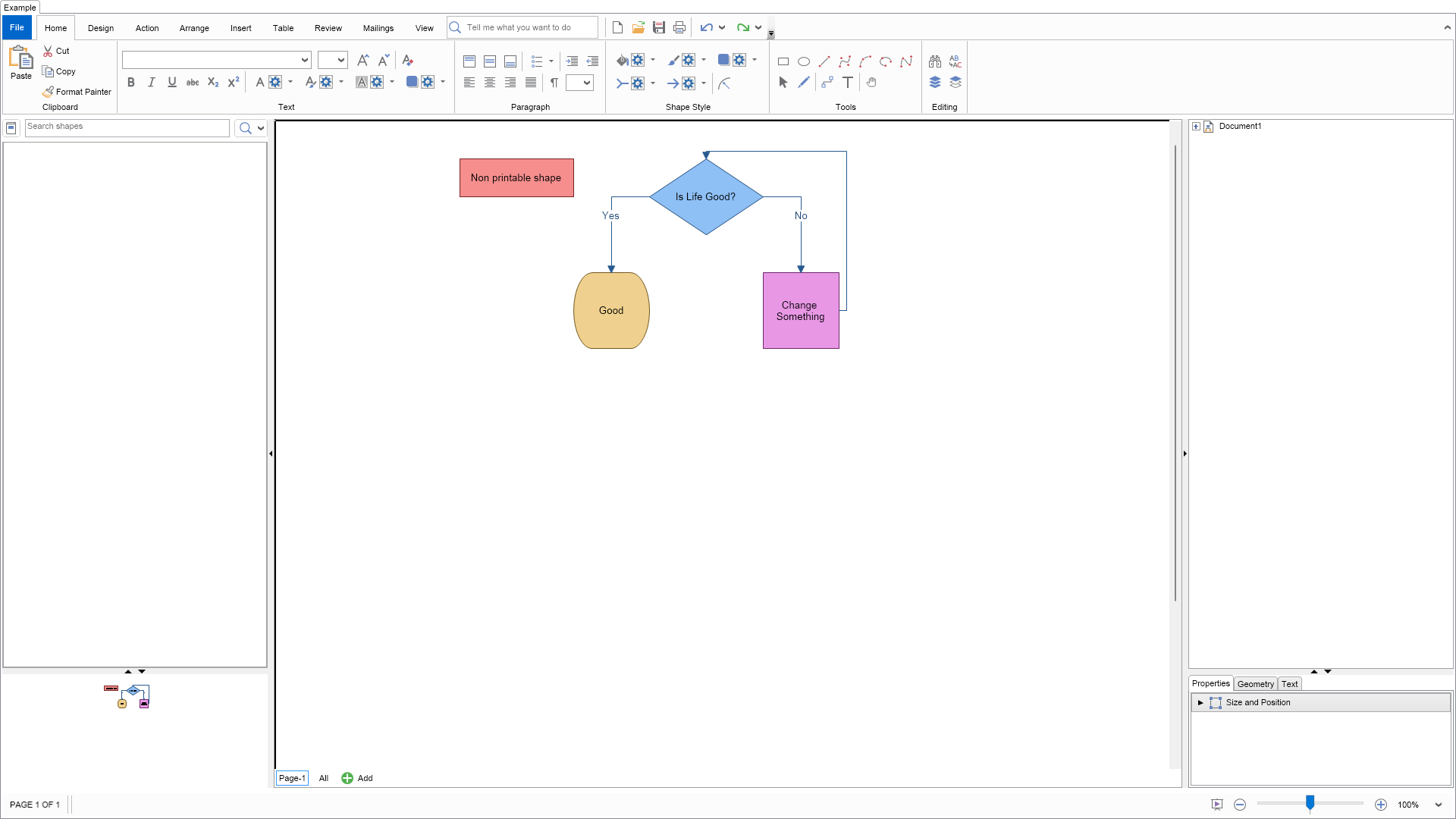
Diagram Designer Example

C# Diagram Designer Example Code for Nevron Diagram for Blazor
Language: C#

using Nevron.Nov;
using Nevron.Nov.DataStructures;
using Nevron.Nov.Diagram;
using Nevron.Nov.Diagram.UI;
using Nevron.Nov.Dom;
using Nevron.Nov.Examples.Diagram;
using Nevron.Nov.Graphics;
using Nevron.Nov.Layout;
using Nevron.Nov.UI;
using Nevron.Nov.Windows.Forms;
using System.Windows.Forms;

namespace NovWinFormsProject
{
	public partial class Form1 : Form
	{
		#region Constructors

		public Form1()
		{
			InitializeComponent();

			// Set form title
			Text = "NOV WinForms - NDiagramDesignerExample";

			// Create the NOV example and its controls
			NWidget exampleContent = CreateExampleContent();
			NWidget exampleControls = CreateExampleControls();
			if (exampleControls != null)
			{
				exampleControls.PreferredWidth = 300;
			}

			// Place the example and its controls in a pair box
			NPairBox pairBox = new NPairBox(exampleContent, exampleControls);
			pairBox.FillMode = ENStackFillMode.First;
			pairBox.FitMode = ENStackFitMode.First;
			pairBox.Margins = new NMargins(NDesign.HorizontalSpacing, NDesign.VerticalSpacing);

			// Host the example in the form
			NNovWidgetHost host = new NNovWidgetHost(pairBox);
			host.Dock = DockStyle.Fill;
			Controls.Add(host);
		}

		#endregion

        #region Example

        public NWidget CreateExampleContent()
        {
            // Create a pan and zoom view
            NPanAndZoomView panAndZoomView = new NPanAndZoomView();

            // Create a library browser that displays all predefined shape factories
            m_LibraryBrowser = new NLibraryBrowser();
            m_LibraryBrowser.LibraryViewType = ENLibraryViewType.Thumbnails;

            // Create pan and zoom
            m_PanAndZoom = new NPanAndZoomView();
            m_PanAndZoom.PreferredSize = new NSize(150, 150);

            // Create side bar
            m_SideBar = new NSideBar();

            // Create drawing explorer
            m_DrawingExplorer = new NDrawingExplorer();

            // Create a drawing view
            NDrawingView drawingView = new NDrawingView();
			drawingView.HorizontalPlacement = ENHorizontalPlacement.Fit;
			drawingView.VerticalPlacement = ENVerticalPlacement.Fit;

            // Bind components to drawing view
            m_LibraryBrowser.DrawingView = drawingView;
            m_LibraryBrowser.ResetLibrariesAsync();
            m_PanAndZoom.DrawingView = drawingView;
            m_SideBar.DrawingView = drawingView;
            m_DrawingExplorer.DrawingView = drawingView;

            // Create Library Browser - Pan View splitter
            NSplitter libraryPanSplitter = new NSplitter();
            libraryPanSplitter.Thumb.CollapseMode = ENSplitterCollapseMode.BothPanes;
            libraryPanSplitter.Orientation = ENHVOrientation.Vertical;
            libraryPanSplitter.SplitMode = ENSplitterSplitMode.OffsetFromFarSide;
            libraryPanSplitter.Pane1.Content = m_LibraryBrowser;
            libraryPanSplitter.Pane2.Content = m_PanAndZoom;

            // Create Drawing Explorer - Side Bar splitter
            NSplitter exlorerPropertiesSplitter = new NSplitter();
            exlorerPropertiesSplitter.Thumb.CollapseMode = ENSplitterCollapseMode.BothPanes;
            exlorerPropertiesSplitter.Orientation = ENHVOrientation.Vertical;
            exlorerPropertiesSplitter.SplitMode = ENSplitterSplitMode.OffsetFromFarSide;
            exlorerPropertiesSplitter.Pane1.Content = m_DrawingExplorer;
            exlorerPropertiesSplitter.Pane2.Content = m_SideBar;

            // Create the main splitter
            NMultiSplitter mainSplitter = new NMultiSplitter();
            mainSplitter.Orientation = ENHVOrientation.Horizontal;

            mainSplitter.Widgets.Add(libraryPanSplitter);

            NSplitterThumb thumb1 = new NSplitterThumb();
            thumb1.CollapseMode = ENSplitterCollapseMode.PreviousPane;
            thumb1.SplitMode = ENSplitterSplitMode.OffsetFromNearSide;
            thumb1.SplitOffset = 350;
            mainSplitter.Widgets.Add(thumb1);

            mainSplitter.Widgets.Add(drawingView);

            NSplitterThumb thumb2 = new NSplitterThumb();
            thumb2.CollapseMode = ENSplitterCollapseMode.NextPane;
            thumb2.SplitMode = ENSplitterSplitMode.OffsetFromFarSide;
            thumb2.SplitOffset = 350;
            mainSplitter.Widgets.Add(thumb2);

            exlorerPropertiesSplitter.PreferredWidth = 100;
            mainSplitter.Widgets.Add(exlorerPropertiesSplitter);

			// Create a simple flowchart on the active page
			DiagramHelpers.CreateSimpleFlowchart(drawingView.ActivePage);

			// Create the ribbon UI
			NDiagramRibbonBuilder builder = new NDiagramRibbonBuilder();
            return builder.CreateUI(mainSplitter, drawingView);
        }
        public NWidget CreateExampleControls()
        {
            return null;
        }
        public string GetExampleDescription()
        {
            return @"

Demonstrates how to create a Diagram Designer application that has all the necessary UI components of an enterprise diagramming application, including:

  • Diagram View - represented by the NDrawingView widget.
  • Diagram Ribbon - a ribbon populated with diagram-related commands via an instance of the NDiagramRibbonBuilder class.
  • Library Browser - represented by the NLibraryBrowser class. Manages the libraries the user opens or creates. Diagrams are easily constructed by dragging and dropping shapes from libraries to the Drawing View.
  • Drawing Explorer - represented by the NDrawingExplorer class. Helps with the browsing and exploration of the shapes and layers from which drawing pages are constructed.
  • Pan and Zoom View - represented by the NPanAndZoomView class. Helps with the quick scrolling and zooming of drawing pages, and also helps users see a bird's-eye view of the entire page.
  • Side Bar - represented by the NSideBar class. Helps you quickly format the currently selected objects, resize them, and change their properties.
"; } /// /// Gets the relevant documentation links for the example /// /// public (string Name, string Url)[] GetDocumentationUrls() { return new[] { ("Diagram Ribbon Overview", "https://www.nevron.com/docs/openvision/diagram-ribbon-overview.html"), ("Drawing View and Drawing Document", "https://www.nevron.com/docs/openvision/diagram-drawing-view-and-drawing-document.html"), ("Drawing Explorer", "https://www.nevron.com/docs/openvision/diagram-drawing-explorer.html"), ("Library Browser", "https://www.nevron.com/docs/openvision/diagram-library-browser.html"), ("Context Menu", "https://www.nevron.com/docs/openvision/diagram-context-menu.html"), }; } protected void AccumulateAdditionalSourceCodeFiles(NList types) { types.Add("DiagramHelpers.cs"); } #endregion #region Implementation #endregion #region Event Handlers #endregion #region Fields private NLibraryBrowser m_LibraryBrowser; private NPanAndZoomView m_PanAndZoom; private NSideBar m_SideBar; private NDrawingExplorer m_DrawingExplorer; #endregion #region Static Methods #endregion #region Constants #endregion #region Nested Types #endregion } }

Download a fully functional C# (.cs) Diagram Designer Example for Blazor Solution