Clickomania Game Example for Blazor

Nevron NOV Diagram for Blazor ships with hundreds of examples with full source code, as part of the Nevron Open Vision Suite. All Blazor Diagram examples are also available as a stand-alone Visual Studio solution in C#, which you can download from the links below.

Clickomania Game Example for Blazor Description

The example demonstrates how to use table blocks and how to handle events in NOV Diagram. We've implemented the popular Clickomania game using a table block and table cell mouse down events.

Clickomania is a one-player game (puzzle) with the following rules. The board is a rectangular grid (this is where the table block support comes in handy). Initially the board is full of square blocks each colored one of k colors. A group is a collection of squares connected along edges that all have the same color. At any step, the player can click any group of size at least two. This move causes those blocks to disappear, and any blocks stacked above them fall straight down as far as they can. This falling is similar to Tetris, but each column falls independently. In particular, we never leave an internal hole. One final twist on the rules is that, if an entire column becomes empty of blocks, then the left and right components are slid together to remove the vertical hole.
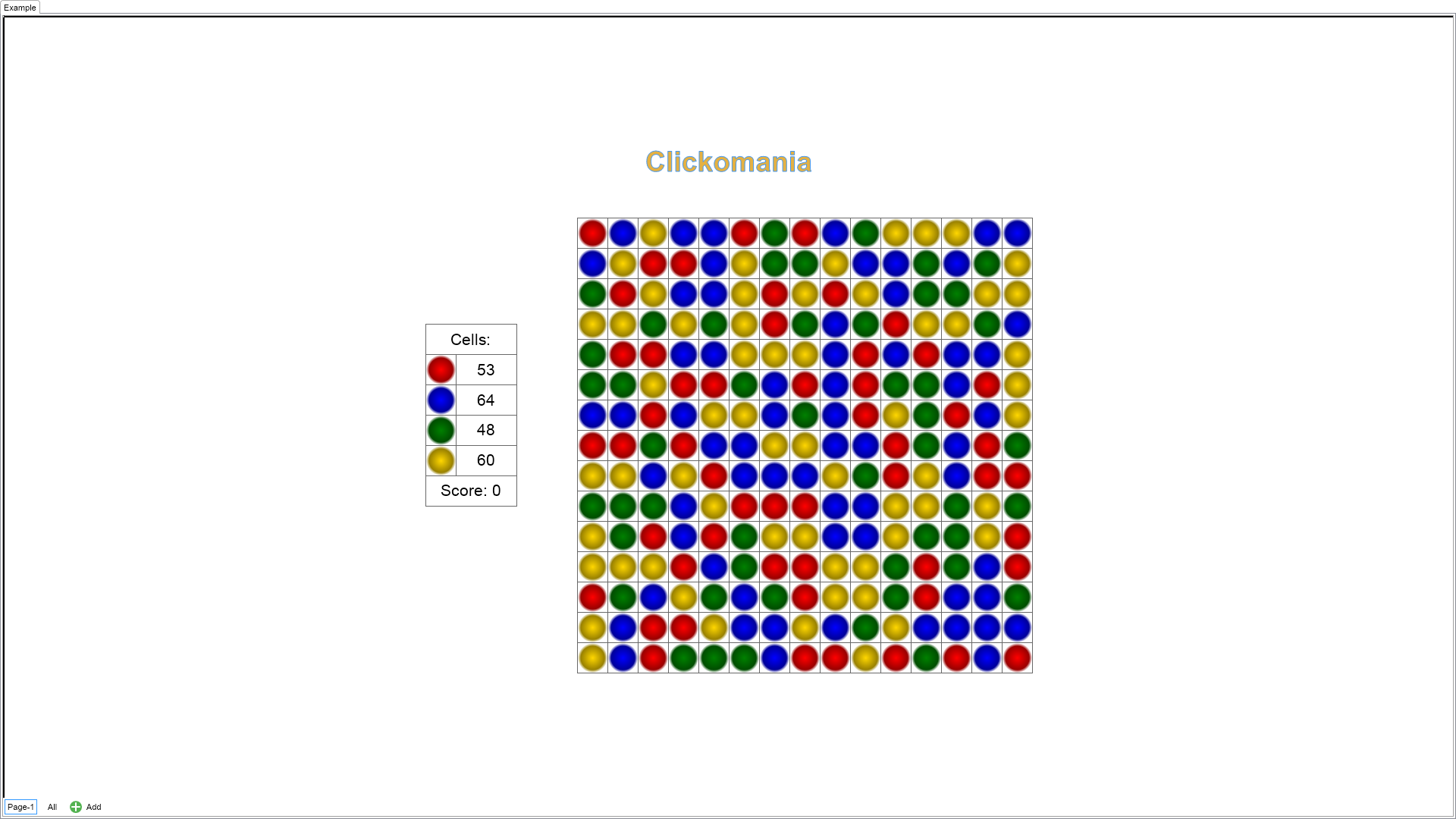

Clickomania Game Example

C# Clickomania Game Example Code for Nevron Diagram for Blazor
Language: C#

using Nevron.Nov;
using Nevron.Nov.DataStructures;
using Nevron.Nov.Diagram;
using Nevron.Nov.Diagram.Themes;
using Nevron.Nov.Dom;
using Nevron.Nov.Graphics;
using Nevron.Nov.Layout;
using Nevron.Nov.Text;
using Nevron.Nov.TrueType;
using Nevron.Nov.UI;
using Nevron.Nov.Windows.Forms;
using System;
using System.Windows.Forms;

namespace NovWinFormsProject
{
	public partial class Form1 : Form
	{
		#region Constructors

		public Form1()
		{
			InitializeComponent();

			// Set form title
			Text = "NOV WinForms - NClickomaniaGameExample";

			// Create the NOV example and its controls
			NWidget exampleContent = CreateExampleContent();
			NWidget exampleControls = CreateExampleControls();
			if (exampleControls != null)
			{
				exampleControls.PreferredWidth = 300;
			}

			// Place the example and its controls in a pair box
			NPairBox pairBox = new NPairBox(exampleContent, exampleControls);
			pairBox.FillMode = ENStackFillMode.First;
			pairBox.FitMode = ENStackFitMode.First;
			pairBox.Margins = new NMargins(NDesign.HorizontalSpacing, NDesign.VerticalSpacing);

			// Host the example in the form
			NNovWidgetHost host = new NNovWidgetHost(pairBox);
			host.Dock = DockStyle.Fill;
			Controls.Add(host);
		}

		#endregion

		#region Example

		public NWidget CreateExampleContent()
		{
			m_DrawingView = new NDrawingView();
			m_DrawingView.Document.HistoryService.Pause();

            // hide grid and ports
            m_DrawingView.Content.ScreenVisibility.ShowGrid = false;
            m_DrawingView.Content.ScreenVisibility.ShowPorts = false;

            NStyleSheet styleSheet = CreateStyles();
			m_DrawingView.Document.StyleSheets.Add(styleSheet);

			NPage page = m_DrawingView.ActivePage;

			page.Items.Add(CreateTitleShape("Clickomania"));
			page.Items.Add(CreateInfoShape());
			page.Items.Add(CreateBoardShape());

			page.SizeToContent();

			m_CellsToClear = new NList();
			m_Score = 0;
			UpdateInfo();

			m_Timer = new NTimer(ClearCellsDelay);
			m_Timer.Tick += OnTimerTick;

			return m_DrawingView;
		}
		public NWidget CreateExampleControls()
		{
			return null;
		}
		public string GetExampleDescription()
		{
			return @"

The example demonstrates how to use table blocks and how to handle events in NOV Diagram. We've implemented the popular Clickomania game using a table block and table cell mouse down events.

Clickomania is a one-player game (puzzle) with the following rules. The board is a rectangular grid (this is where the table block support comes in handy). Initially the board is full of square blocks each colored one of k colors. A group is a collection of squares connected along edges that all have the same color. At any step, the player can click any group of size at least two. This move causes those blocks to disappear, and any blocks stacked above them fall straight down as far as they can. This falling is similar to Tetris, but each column falls independently. In particular, we never leave an internal hole. One final twist on the rules is that, if an entire column becomes empty of blocks, then the left and right components are slid together to remove the vertical hole.

"; } /// /// Gets the relevant documentation links for the example /// /// public (string Name, string Url)[] GetDocumentationUrls() { return new[] { ("Shape Events", "https://www.nevron.com/docs/openvision/diagram-shape-events.html"), ("Shapes", "https://www.nevron.com/docs/openvision/diagram-shapes.html"), }; } #endregion #region Implementation #endregion #region Event Handlers private void OnCellMouseDown(NMouseButtonEventArgs arg) { if (m_CellsToClear.Count > 0) return; if (arg.Cancel || arg.Button != ENMouseButtons.Left) return; // Get the clicked cell and mark the event as handled NTableCell cell = (NTableCell)arg.CurrentTargetNode; arg.Cancel = true; if (String.IsNullOrEmpty(cell.UserClass)) return; int x = cell.Column.GetAggregationInfo().Index; int y = cell.Row.GetAggregationInfo().Index; if (!Test(x, y, cell.UserClass)) return; // Highlight the adjacent cells of same color HighlightCellsOfSameColor(x, y, cell.UserClass, m_CellsToClear); m_Timer.Start(); } private void OnTimerTick() { m_Timer.Stop(); ClearCells(m_CellsToClear); m_CellsToClear.Clear(); } #endregion #region Fields private NDrawingView m_DrawingView; private NTableBlockContent m_Table; private NTableBlockContent m_InfoTable; private NList m_CellsToClear; private int m_Score; private NTimer m_Timer; #endregion #region Static Methods #endregion #region Constants private static readonly NSizeI BoardSize = new NSizeI(15, 15); private static readonly NColor TableBorderColor = NColor.DimGray; private static readonly NMargins TableBorderThickness = new NMargins(1); private const int ClearCellsDelay = 1000; private const string HighlightedClassName = "Highlighted"; private static readonly string[] CellClasses = new string[] { "Red", "Blue", "Green", "Gold" }; #endregion #region Nested Types #endregion } }

Download a fully functional C# (.cs) Clickomania Game Example for Blazor Solution

Related Documentation Links