Nevron NOV Diagram for Blazor ships with hundreds of examples with full source code, as part of the Nevron Open Vision Suite.
All Blazor Diagram examples are also available as a stand-alone Visual Studio solution
in C#,
which you can download from the links below.
Family Tree (Lincoln Family) Example for Blazor Description
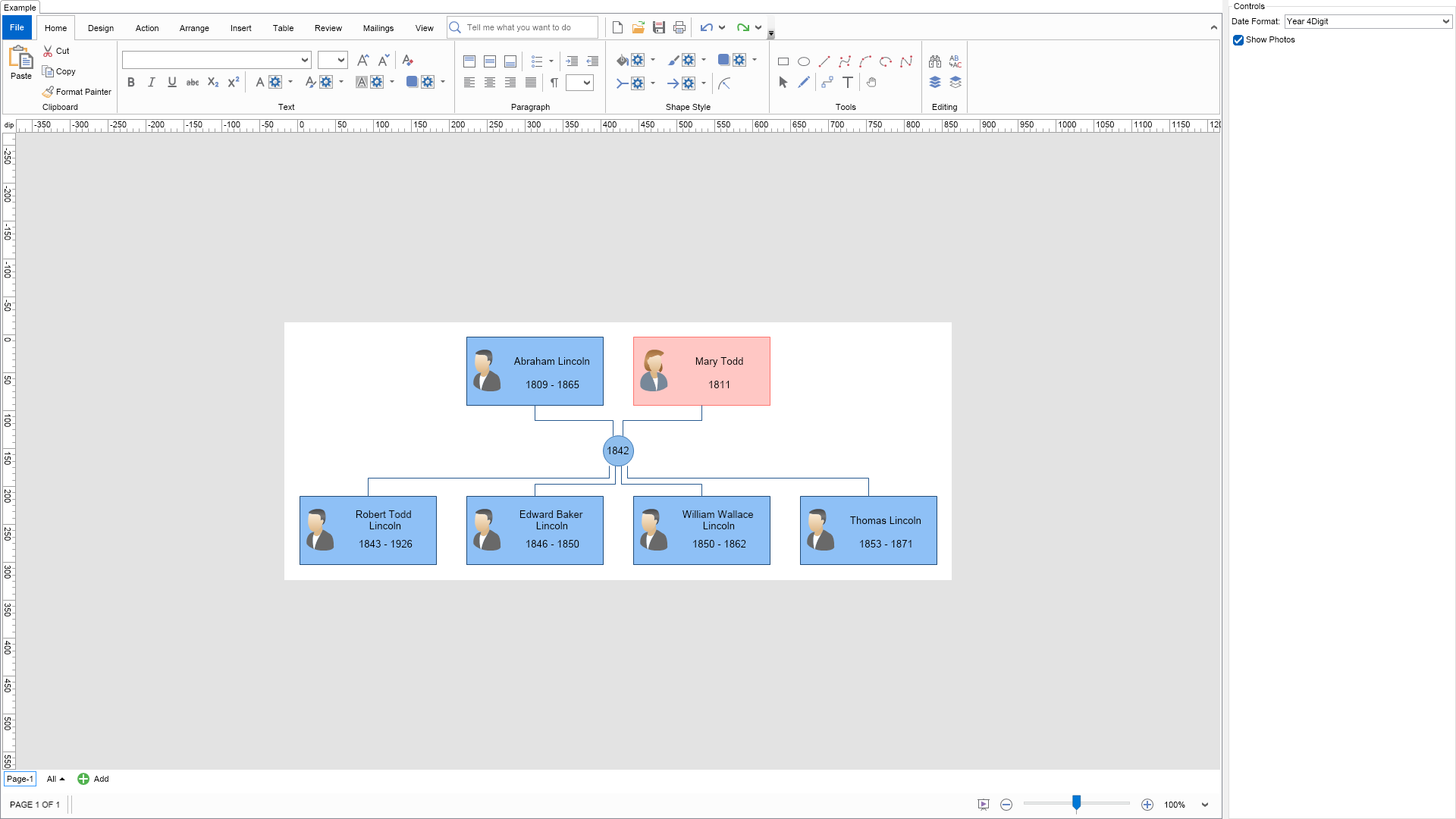
This example demonstrates how to create and arrange Family Tree diagrams. Use the controls
on the right to change the family tree settings. You can also click the "Settings" button
in the "Family Tree" contextual ribbon tab.
C# Family Tree (Lincoln Family) Example Code for Nevron Diagram for Blazor
Language: C#
using Nevron.Nov;
using Nevron.Nov.DataStructures;
using Nevron.Nov.Diagram;
using Nevron.Nov.Diagram.Layout;
using Nevron.Nov.Diagram.Shapes.FamilyTree.FamilyTree;
using Nevron.Nov.Dom;
using Nevron.Nov.Editors;
using Nevron.Nov.Graphics;
using Nevron.Nov.Layout;
using Nevron.Nov.UI;
using Nevron.Nov.Windows.Forms;
using System.Windows.Forms;
namespace NovWinFormsProject
{
public partial class Form1 : Form
{
#region Constructors
public Form1()
{
InitializeComponent();
// Set form title
Text = "NOV WinForms - NFamilyTreeExample";
// Create the NOV example and its controls
NWidget exampleContent = CreateExampleContent();
NWidget exampleControls = CreateExampleControls();
if (exampleControls != null)
{
exampleControls.PreferredWidth = 300;
}
// Place the example and its controls in a pair box
NPairBox pairBox = new NPairBox(exampleContent, exampleControls);
pairBox.FillMode = ENStackFillMode.First;
pairBox.FitMode = ENStackFitMode.First;
pairBox.Margins = new NMargins(NDesign.HorizontalSpacing, NDesign.VerticalSpacing);
// Host the example in the form
NNovWidgetHost host = new NNovWidgetHost(pairBox);
host.Dock = DockStyle.Fill;
Controls.Add(host);
}
#endregion
#region Example
public NWidget CreateExampleContent()
{
// Create a drawing view with a ribbon
NDrawingViewWithRibbon drawingViewWithRibbon = new NDrawingViewWithRibbon();
m_DrawingView = drawingViewWithRibbon.View;
// hide grid and ports
m_DrawingView.Content.ScreenVisibility.ShowGrid = false;
m_DrawingView.Content.ScreenVisibility.ShowPorts = false;
// Create a family tree diagram
m_DrawingView.Document.HistoryService.Pause();
try
{
InitDiagram(m_DrawingView.Document);
}
finally
{
m_DrawingView.Document.HistoryService.Resume();
}
return drawingViewWithRibbon;
}
public NWidget CreateExampleControls()
{
NStackPanel stack = new NStackPanel();
// Get the family tree drawing extension
NFamilyTreeExtension familyTreeExtension = (NFamilyTreeExtension)m_DrawingView.Content.Extensions.FindByType(NFamilyTreeExtension.FamilyTreeExtensionType);
// Create property editors
NList propertyEditors = NDesigner.GetDesigner(familyTreeExtension).CreateMemberEditors(familyTreeExtension,
NFamilyTreeExtension.DateFormatProperty,
NFamilyTreeExtension.ShowPhotosProperty
);
for (int i = 0; i < propertyEditors.Count; i++)
{
stack.Add(propertyEditors[i]);
}
return new NUniSizeBoxGroup(stack);
}
public string GetExampleDescription()
{
return @"
This example demonstrates how to create and arrange Family Tree diagrams. Use the controls
on the right to change the family tree settings. You can also click the ""Settings"" button
in the ""Family Tree"" contextual ribbon tab.
";
}
///
/// Gets the relevant documentation links for the example
///
///
public (string Name, string Url)[] GetDocumentationUrls()
{
return new[]
{
("Shapes", "https://www.nevron.com/docs/openvision/diagram-shapes.html"),
("Layered Tree Layout", "https://www.nevron.com/docs/openvision/diagram-layered-tree-layout.html"),
("Routable Connectors", "https://www.nevron.com/docs/openvision/diagram-routable-connectors.html"),
("Text Block", "https://www.nevron.com/docs/openvision/diagram-text-block.html"),
};
}
#endregion
#region Implementation
private void InitDiagram(NDrawingDocument drawingDocument)
{
// Get drawing and the active page
NDrawing drawing = drawingDocument.Content;
// Set the family tree extension to the drawing to activate the "Family Tree" ribbon tab
drawing.Extensions = new NDiagramExtensionCollection();
drawing.Extensions.Add(new NFamilyTreeExtension());
// Create a family tree diagram in the active page of the drawing
CreateFamilyTree(drawing.ActivePage);
}
private void CreateFamilyTree(NPage page)
{
NFamilyTreeShapeFactory shapeFactory = new NFamilyTreeShapeFactory();
// Create the parents
NShape fatherShape = shapeFactory.CreateShape(ENFamilyTreeShape.Male);
fatherShape.SetShapePropertyValue("FirstName", "Abraham");
fatherShape.SetShapePropertyValue("LastName", "Lincoln");
fatherShape.SetShapePropertyValue("BirthDate", new NMaskedDateTime(1809, 02, 12));// NMaskedDateTime
fatherShape.SetShapePropertyValue("DeathDate", new NMaskedDateTime(1865, 04, 15));
page.Items.Add(fatherShape);
NShape motherShape = shapeFactory.CreateShape(ENFamilyTreeShape.Female);
motherShape.SetShapePropertyValue("FirstName", "Mary");
motherShape.SetShapePropertyValue("LastName", "Todd");
motherShape.SetShapePropertyValue("BirthDate", new NMaskedDateTime(1811));
page.Items.Add(motherShape);
// Create the children
NShape childShape1 = shapeFactory.CreateShape(ENFamilyTreeShape.Male);
childShape1.SetShapePropertyValue("FirstName", "Thomas");
childShape1.SetShapePropertyValue("LastName", "Lincoln");
childShape1.SetShapePropertyValue("BirthDate", new NMaskedDateTime(1853, 4, 4));
childShape1.SetShapePropertyValue("DeathDate", new NMaskedDateTime(1871));
page.Items.Add(childShape1);
NShape childShape2 = shapeFactory.CreateShape(ENFamilyTreeShape.Male);
childShape2.SetShapePropertyValue("FirstName", "Robert Todd");
childShape2.SetShapePropertyValue("LastName", "Lincoln");
childShape2.SetShapePropertyValue("BirthDate", new NMaskedDateTime(1843, 8, 1));
childShape2.SetShapePropertyValue("DeathDate", new NMaskedDateTime(1926, 7, 26));
page.Items.Add(childShape2);
NShape childShape3 = shapeFactory.CreateShape(ENFamilyTreeShape.Male);
childShape3.SetShapePropertyValue("FirstName", "William Wallace");
childShape3.SetShapePropertyValue("LastName", "Lincoln");
childShape3.SetShapePropertyValue("BirthDate", new NMaskedDateTime(1850, 12, 21));
childShape3.SetShapePropertyValue("DeathDate", new NMaskedDateTime(1862, 2, 20));
page.Items.Add(childShape3);
NShape childShape4 = shapeFactory.CreateShape(ENFamilyTreeShape.Male);
childShape4.SetShapePropertyValue("FirstName", "Edward Baker");
childShape4.SetShapePropertyValue("LastName", "Lincoln");
childShape4.SetShapePropertyValue("BirthDate", new NMaskedDateTime(1846, 3, 10));
childShape4.SetShapePropertyValue("DeathDate", new NMaskedDateTime(1850, 2, 1));
page.Items.Add(childShape4);
// Create the relationship shape
NShape relShape = shapeFactory.CreateShape(ENFamilyTreeShape.Relationship);
relShape.SetShapePropertyValue("MarriageDate", new NMaskedDateTime(1842, 11, 4));
page.Items.Add(relShape);
page.Items.Add(CreateConnector(fatherShape, relShape));
page.Items.Add(CreateConnector(motherShape, relShape));
page.Items.Add(CreateConnector(relShape, childShape1));
page.Items.Add(CreateConnector(relShape, childShape2));
page.Items.Add(CreateConnector(relShape, childShape3));
page.Items.Add(CreateConnector(relShape, childShape4));
// Arrange the family tree shapes
NFamilyGraphLayout layout = new NFamilyGraphLayout();
object[] shapes = page.GetShapes(false).ToArray
Download a fully functional C# (.cs) Family Tree (Lincoln Family) Example for Blazor Solution

 Chart for .NET
 Diagram for .NET
 User Interface for .NET
 Vision for SSRS
 Chart for SSRS
 Gauge for SSRS
 Map for SSRS
 Barcode for SSRS
 Vision for SharePoint
 Chart for SharePoint
 Gauge for SharePoint
 Map for SharePoint
 Barcode for SharePoint
 Open Vision for .NET


 Vision for .NET