Demonstrates page layers. Layers provide a powerful way to organize and manage the visibility and editing of different page items within a page. They allow you to segregate page items into different categories, which is particularly useful for handling complex diagrams.
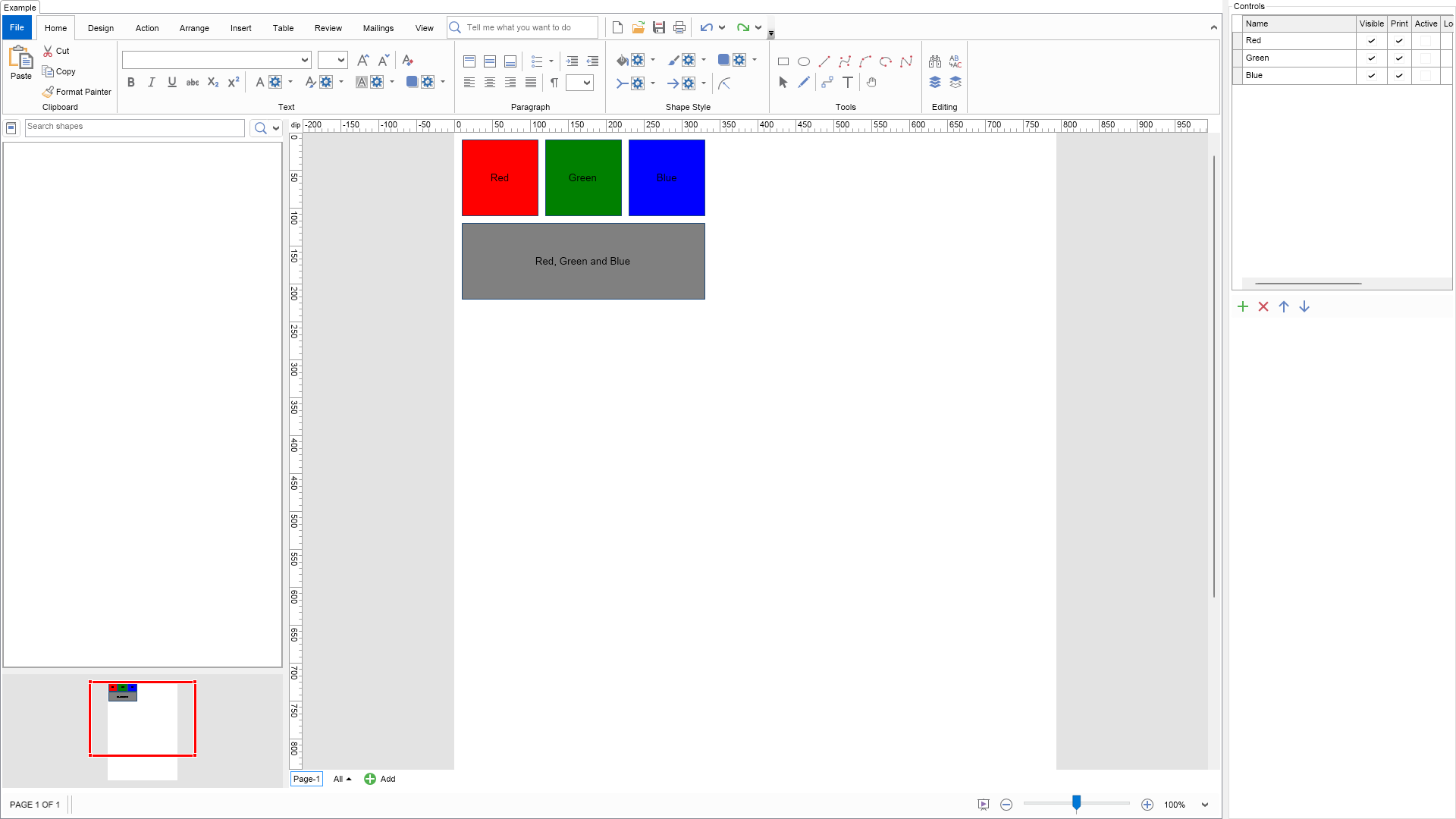
Each shape can be assigned to multiple layers. In the example above, the Red shape is assigned to the Red layer, the Blue shape to the Blue layer, the Green shape to the Green layer, and the Grey shape is assigned to all layers (Red, Green, and Blue).
Use the Layers editor on the right side to explore the behavior of the different layer properties.
| Language: C# |
using Nevron.Nov;
using Nevron.Nov.Diagram;
using Nevron.Nov.Diagram.Editors;
using Nevron.Nov.Diagram.Shapes;
using Nevron.Nov.Diagram.UI;
using Nevron.Nov.Dom;
using Nevron.Nov.Editors;
using Nevron.Nov.Graphics;
using Nevron.Nov.Layout;
using Nevron.Nov.Text;
using Nevron.Nov.UI;
using Nevron.Nov.Windows.Forms;
using System.Windows.Forms;
namespace NovWinFormsProject
{
public partial class Form1 : Form
{
#region Constructors
public Form1()
{
InitializeComponent();
// Set form title
Text = "NOV WinForms - NLayersExample";
// Create the NOV example and its controls
NWidget exampleContent = CreateExampleContent();
NWidget exampleControls = CreateExampleControls();
if (exampleControls != null)
{
exampleControls.PreferredWidth = 300;
}
// Place the example and its controls in a pair box
NPairBox pairBox = new NPairBox(exampleContent, exampleControls);
pairBox.FillMode = ENStackFillMode.First;
pairBox.FitMode = ENStackFitMode.First;
pairBox.Margins = new NMargins(NDesign.HorizontalSpacing, NDesign.VerticalSpacing);
// Host the example in the form
NNovWidgetHost host = new NNovWidgetHost(pairBox);
host.Dock = DockStyle.Fill;
Controls.Add(host);
}
#endregion
#region Example
public NWidget CreateExampleContent()
{
// create a library browser that displays all predefined shape factories
NLibraryBrowser libraryBrowser = new NLibraryBrowser();
libraryBrowser.LibraryViewType = ENLibraryViewType.Thumbnails;
//NLibrary library = new NBasicShapeFactory().CreateLibrary();
//libraryBrowser.AddLibrarySection(library);
// create pan and zoom
NPanAndZoomView m_PanAndZoom = new NPanAndZoomView();
m_PanAndZoom.PreferredSize = new NSize(150, 150);
// create a drawing view
m_DrawingView = new NDrawingView();
m_DrawingView.HorizontalPlacement = ENHorizontalPlacement.Fit;
m_DrawingView.VerticalPlacement = ENVerticalPlacement.Fit;
// bind components to drawing view
libraryBrowser.DrawingView = m_DrawingView;
libraryBrowser.ResetLibrariesAsync();
m_PanAndZoom.DrawingView = m_DrawingView;
// create splitters
NSplitter libraryPanSplitter = new NSplitter();
libraryPanSplitter.Orientation = ENHVOrientation.Vertical;
libraryPanSplitter.SplitMode = ENSplitterSplitMode.OffsetFromFarSide;
libraryPanSplitter.Pane1.Content = libraryBrowser;
libraryPanSplitter.Pane2.Content = m_PanAndZoom;
NSplitter mainSplitter = new NSplitter();
mainSplitter.Orientation = ENHVOrientation.Horizontal;
mainSplitter.SplitMode = ENSplitterSplitMode.OffsetFromNearSide;
mainSplitter.SplitOffset = 370;
mainSplitter.Pane1.Content = libraryPanSplitter;
mainSplitter.Pane2.Content = m_DrawingView;
// Create the ribbon UI
NDiagramRibbonBuilder builder = new NDiagramRibbonBuilder();
m_DrawingView.Document.HistoryService.Pause();
try
{
InitDiagram(m_DrawingView.Document);
}
finally
{
m_DrawingView.Document.HistoryService.Resume();
}
return builder.CreateUI(mainSplitter, m_DrawingView);
}
public NWidget CreateExampleControls()
{
NStackPanel stackPanel = new NStackPanel();
NDesigner designer = NDesigner.GetDesigner(m_DrawingView.Content.Pages[0].Layers);
NNodeEditor editor = designer.CreateStandaloneEditor(m_DrawingView.Content.Pages[0].Layers);
stackPanel.Add(editor);
return stackPanel;
}
public string GetExampleDescription()
{
return @"
Demonstrates page layers. Layers provide a powerful way to organize and manage the visibility and editing of different page items within a page.
They allow you to segregate page items into different categories, which is particularly useful for handling complex diagrams.
Each shape can be assigned to multiple layers. In the example above, the Red shape is assigned to the Red layer, the Blue shape to the Blue layer, the Green shape to the Green layer,
and the Grey shape is assigned to all layers (Red, Green, and Blue).
Use the Layers editor on the right side to explore the behavior of the different layer properties.
";
}
///
/// Gets the relevant documentation links for the example
///
///
public (string Name, string Url)[] GetDocumentationUrls()
{
return new[]
{
("Diagram Layers", "https://www.nevron.com/docs/openvision/diagram-layers.html"),
("Pages", "https://www.nevron.com/docs/openvision/diagram-pages.html"),
};
}
private void InitDiagram(NDrawingDocument drawingDocument)
{
NDrawing drawing = drawingDocument.Content;
// hide the grid
drawing.ScreenVisibility.ShowGrid = false;
// create several layers
NLayer redLayer = new NLayer();
redLayer.Color = NColor.Red;
redLayer.Name = "Red";
drawing.ActivePage.Layers.Add(redLayer);
NLayer greenLayer = new NLayer();
greenLayer.Color = NColor.Green;
greenLayer.Name = "Green";
drawing.ActivePage.Layers.Add(greenLayer);
NLayer blueLayer = new NLayer();
blueLayer.Name = "Blue";
blueLayer.Color = NColor.Blue;
drawing.ActivePage.Layers.Add(blueLayer);
// create several shapes, each assigned to different layer(s)
NBasicShapeFactory shapeFactory = new NBasicShapeFactory();
NShape redShape = shapeFactory.CreateShape(ENBasicShape.Rectangle);
redShape.Text = "Red";
redShape.Geometry.Fill = new NColorFill(NColor.Red);
redShape.SetBounds(10, 10, 100, 100);
redShape.AssignToLayers(redLayer);
drawing.ActivePage.Items.Add(redShape);
NShape greenShape = shapeFactory.CreateShape(ENBasicShape.Rectangle);
greenShape.Text = "Green";
greenShape.Geometry.Fill = new NColorFill(NColor.Green);
greenShape.SetBounds(120, 10, 100, 100);
greenShape.AssignToLayers(greenLayer);
drawing.ActivePage.Items.Add(greenShape);
NShape blueShape = shapeFactory.CreateShape(ENBasicShape.Rectangle);
blueShape.Text = "Blue";
blueShape.Geometry.Fill = new NColorFill(NColor.Blue);
blueShape.SetBounds(230, 10, 100, 100);
blueShape.AssignToLayers(blueLayer);
drawing.ActivePage.Items.Add(blueShape);
NShape grayShape = shapeFactory.CreateShape(ENBasicShape.Rectangle);
grayShape.Text = "Red, Green and Blue";
grayShape.Geometry.Fill = new NColorFill(NColor.Gray);
grayShape.SetBounds(10, 120, 320, 100);
grayShape.AssignToLayers(
redLayer,
greenLayer,
blueLayer);
drawing.ActivePage.Items.Add(grayShape);
}
#endregion
#region Implementation
#endregion
#region Event Handlers
#endregion
#region Fields
private NDrawingView m_DrawingView;
#endregion
#region Static Methods
#endregion
#region Constants
#endregion
#region Nested Types
#endregion
}
}