Nevron NOV Diagram for Blazor ships with hundreds of examples with full source code, as part of the Nevron Open Vision Suite.
All Blazor Diagram examples are also available as a stand-alone Visual Studio solution
in C#,
which you can download from the links below.
Orthogonal Graph Layout Example for Blazor Description
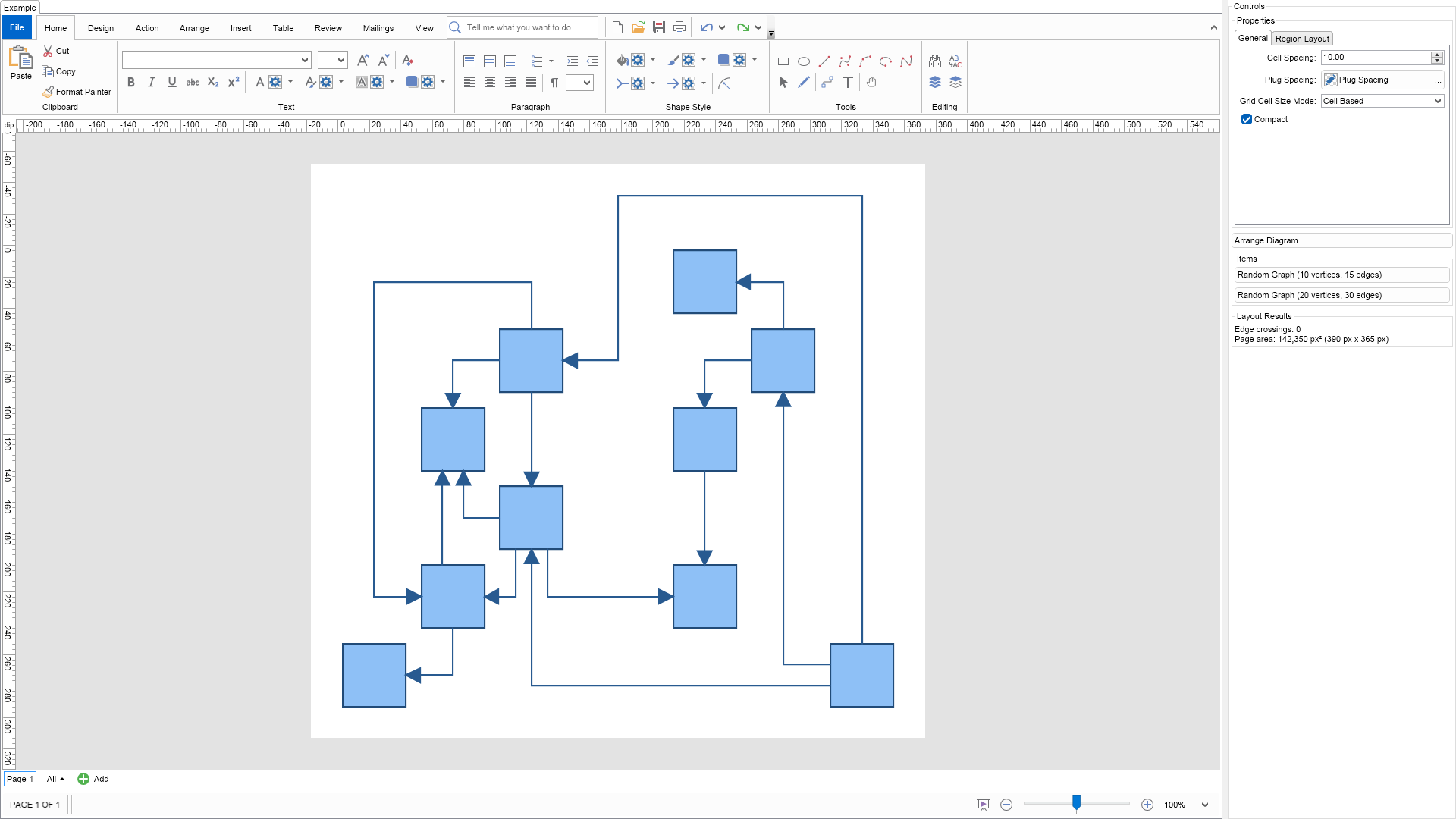
The orthogonal graph layout produces orthogonal graph drawings of all types of graphs
(including those with self-loops and duplicate edges). It tries to compact the graph
drawing area and also to minimize the number of edge crossings and bends.
The most important properties are:
CellSpacing - determines the distance between 2 grid cells. For example if a grid
cell is calculated to have a size of 100 x 100 and the CellSpacing property is set to
10, then the cell size will be 120 x 120. Note that the node is always placed in the
middle of the cell.
GridCellSizeMode - this property is an enum with 2 possible values: GridCellSizeMode.
GridBased and GridCellSizeMode.CellBased. If set to the first the maximal size of a
node in the graph is determined and all cells are scaled to that size. More area
efficient is the second value - it causes the dimensions of each column and row
dimensions to be determined according to the size of the cells they contain.
Compact - if set to true, a compaction algorithm will be applied to the embedded
graph. This will decrease the total area of the drawing with 20 to 50 % (in the average
case) at the cost of some additional time needed for the calculations.
PlugSpacing - determines the spacing between the plugs of a node.
You can set a fixed amount of spacing or a proportional spacing, which means that the plugs
are distributed along the whole side of the node.
To experiment with the layout just change its properties from the property grid and click the Layout button.
To see the layout in action on a different graph, just click the Random Graph button.
C# Orthogonal Graph Layout Example Code for Nevron Diagram for Blazor
Language: C#
using Nevron.Nov;
using Nevron.Nov.DataStructures;
using Nevron.Nov.Diagram;
using Nevron.Nov.Diagram.Layout;
using Nevron.Nov.Diagram.Shapes;
using Nevron.Nov.Dom;
using Nevron.Nov.Editors;
using Nevron.Nov.Graphics;
using Nevron.Nov.Layout;
using Nevron.Nov.UI;
using Nevron.Nov.Windows.Forms;
using System;
using System.Windows.Forms;
namespace NovWinFormsProject
{
public partial class Form1 : Form
{
#region Constructors
public Form1()
{
InitializeComponent();
// Set form title
Text = "NOV WinForms - NOrthogonalGraphLayoutExample";
// Create the NOV example and its controls
NWidget exampleContent = CreateExampleContent();
NWidget exampleControls = CreateExampleControls();
if (exampleControls != null)
{
exampleControls.PreferredWidth = 300;
}
// Place the example and its controls in a pair box
NPairBox pairBox = new NPairBox(exampleContent, exampleControls);
pairBox.FillMode = ENStackFillMode.First;
pairBox.FitMode = ENStackFitMode.First;
pairBox.Margins = new NMargins(NDesign.HorizontalSpacing, NDesign.VerticalSpacing);
// Host the example in the form
NNovWidgetHost host = new NNovWidgetHost(pairBox);
host.Dock = DockStyle.Fill;
Controls.Add(host);
}
#endregion
#region Example
public NWidget CreateExampleContent()
{
// Create a simple drawing
NDrawingViewWithRibbon drawingViewWithRibbon = new NDrawingViewWithRibbon();
m_DrawingView = drawingViewWithRibbon.View;
m_DrawingView.Document.HistoryService.Pause();
try
{
InitDiagram(m_DrawingView.Document);
}
finally
{
m_DrawingView.Document.HistoryService.Resume();
}
return drawingViewWithRibbon;
}
public NWidget CreateExampleControls()
{
m_Layout.Changed += OnLayoutChanged;
NStackPanel stack = new NStackPanel();
// property editor
NEditor editor = NDesigner.GetDesigner(m_Layout).CreateStandaloneEditor(m_Layout);
stack.Add(new NGroupBox("Properties", editor));
NButton arrangeButton = new NButton("Arrange Diagram");
arrangeButton.Click += OnArrangeButtonClick;
stack.Add(arrangeButton);
// items stack
NStackPanel itemsStack = new NStackPanel();
// NOTE: For Graph layouts we provide the user with the ability to generate random graph diagrams so that he/she can test the layouts
NButton randomGraph1Button = new NButton("Random Graph (10 vertices, 15 edges)");
randomGraph1Button.Click += OnRandomGraph1ButtonClick;
itemsStack.Add(randomGraph1Button);
NButton randomGraph2Button = new NButton("Random Graph (20 vertices, 30 edges)");
randomGraph2Button.Click += OnRandomGraph2ButtonClick;
itemsStack.Add(randomGraph2Button);
stack.Add(new NGroupBox("Items", itemsStack));
// Create the layout result label
m_ResultLabel = new NLabel();
stack.Add(new NGroupBox("Layout Results", m_ResultLabel));
UpdateResultLabel();
return stack;
}
public string GetExampleDescription()
{
return @"
The orthogonal graph layout produces orthogonal graph drawings of all types of graphs
(including those with self-loops and duplicate edges). It tries to compact the graph
drawing area and also to minimize the number of edge crossings and bends.
The most important properties are:
CellSpacing - determines the distance between 2 grid cells. For example if a grid
cell is calculated to have a size of 100 x 100 and the CellSpacing property is set to
10, then the cell size will be 120 x 120. Note that the node is always placed in the
middle of the cell.
GridCellSizeMode - this property is an enum with 2 possible values: GridCellSizeMode.
GridBased and GridCellSizeMode.CellBased. If set to the first the maximal size of a
node in the graph is determined and all cells are scaled to that size. More area
efficient is the second value - it causes the dimensions of each column and row
dimensions to be determined according to the size of the cells they contain.
Compact - if set to true, a compaction algorithm will be applied to the embedded
graph. This will decrease the total area of the drawing with 20 to 50 % (in the average
case) at the cost of some additional time needed for the calculations.
PlugSpacing - determines the spacing between the plugs of a node.
You can set a fixed amount of spacing or a proportional spacing, which means that the plugs
are distributed along the whole side of the node.
To experiment with the layout just change its properties from the property grid and click the Layout button.
To see the layout in action on a different graph, just click the Random Graph button.
";
}
///
/// Gets the relevant documentation links for the example
///
///
public (string Name, string Url)[] GetDocumentationUrls()
{
return new[]
{
("Orthogonal Layout", "https://www.nevron.com/docs/openvision/diagram-orthogonal-layout.html"),
("Layouts Overview", "https://www.nevron.com/docs/openvision/diagram-drawing-layouts-overview.html"),
("Graph Regions and Regions Layouts", "https://www.nevron.com/docs/openvision/diagram-graph-regions-and-region-layouts.html"),
("Shape Navigation", "https://www.nevron.com/docs/openvision/diagram-shape-navigation.html"),
};
}
private void InitDiagram(NDrawingDocument drawingDocument)
{
const double width = 40;
const double height = 40;
const double distance = 80;
// Hide ports
drawingDocument.Content.ScreenVisibility.ShowPorts = false;
NBasicShapeFactory basicShapes = new NBasicShapeFactory();
NPage activePage = drawingDocument.Content.ActivePage;
int[] from = new int[] { 1, 1, 1, 2, 2, 2, 3, 3, 4, 4, 4, 5, 5, 6 };
int[] to = new int[] { 2, 3, 4, 4, 5, 8, 6, 7, 5, 8, 10, 8, 9, 10 };
NShape[] shapes = new NShape[10];
int vertexCount = shapes.Length;
int edgeCount = from.Length;
int count = vertexCount + edgeCount;
for (int i = 0; i < count; i++)
{
if (i < vertexCount)
{
int j = vertexCount % 2 == 0 ? i : i + 1;
shapes[i] = basicShapes.CreateShape(ENBasicShape.Rectangle);
if (vertexCount % 2 != 0 && i == 0)
{
shapes[i].SetBounds(new NRectangle(
(width + (distance * 1.5)) / 2,
distance + (j / 2) * (distance * 1.5),
width,
height));
}
else
{
shapes[i].SetBounds(new NRectangle(
width / 2 + (j % 2) * (distance * 1.5),
height + (j / 2) * (distance * 1.5),
width,
height));
}
activePage.Items.Add(shapes[i]);
}
else
{
NRoutableConnector edge = new NRoutableConnector();
edge.UserClass = NDR.StyleSheetNameConnectors;
activePage.Items.Add(edge);
edge.GlueBeginToShape(shapes[from[i - vertexCount] - 1]);
edge.GlueEndToShape(shapes[to[i - vertexCount] - 1]);
}
}
// arrange diagram
ArrangeDiagram(drawingDocument);
// fit active page
drawingDocument.Content.ActivePage.ZoomMode = ENZoomMode.Fit;
}
#endregion
#region Implementation
///
/// Arranges the shapes in the active page.
///
///
private void ArrangeDiagram(NDrawingDocument drawingDocument)
{
// get all top-level shapes that reside in the active page
NPage activePage = drawingDocument.Content.ActivePage;
NList shapes = activePage.GetShapes(false);
// create a layout context and use it to arrange the shapes using the current layout
NDrawingLayoutContext layoutContext = new NDrawingLayoutContext(drawingDocument, activePage);
m_Layout.Arrange(shapes.CastAll
Download a fully functional C# (.cs) Orthogonal Graph Layout Example for Blazor Solution

 Chart for .NET
 Diagram for .NET
 User Interface for .NET
 Vision for SSRS
 Chart for SSRS
 Gauge for SSRS
 Map for SSRS
 Barcode for SSRS
 Vision for SharePoint
 Chart for SharePoint
 Gauge for SharePoint
 Map for SharePoint
 Barcode for SharePoint
 Open Vision for .NET


 Vision for .NET