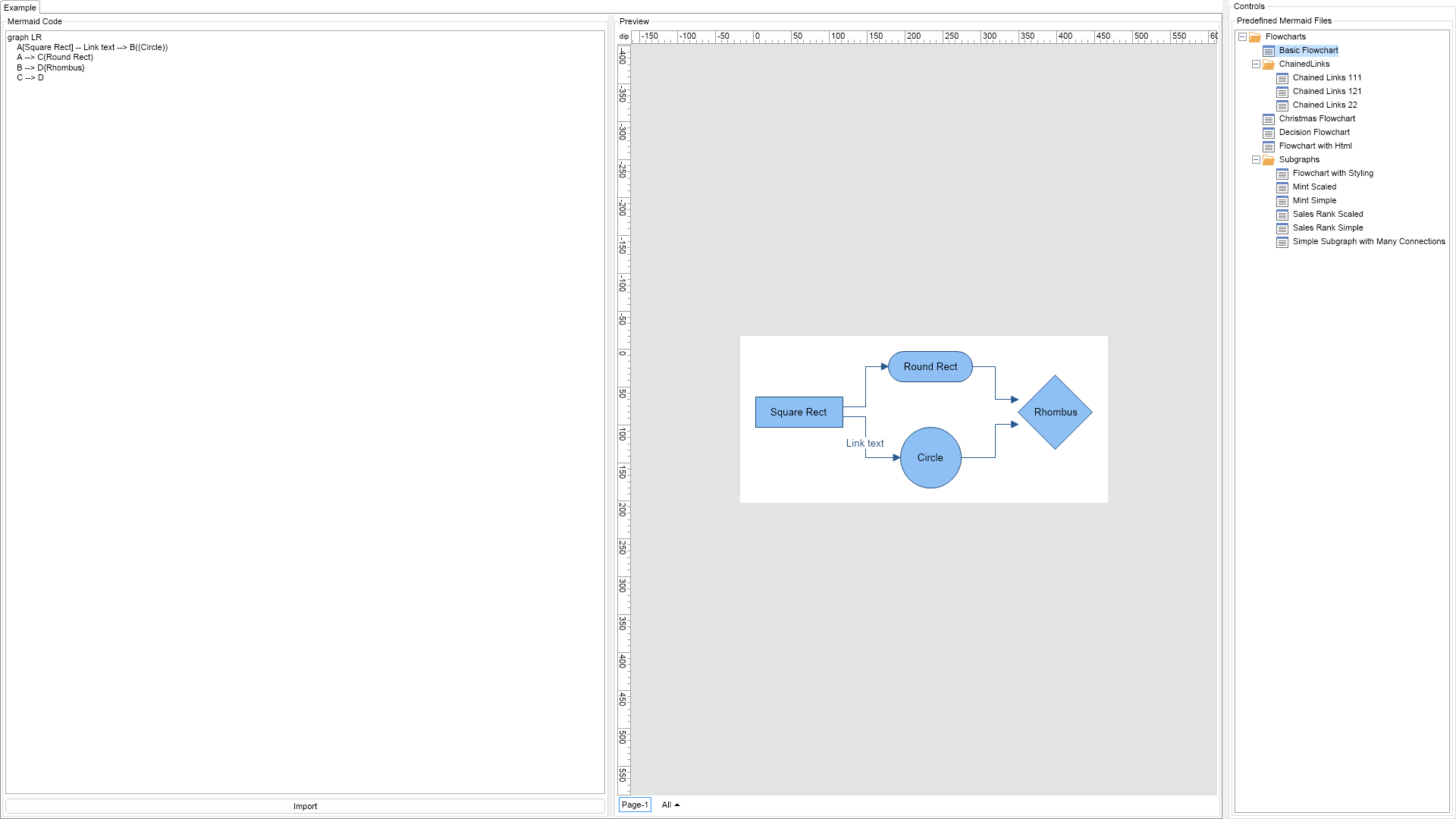
Demonstrates how to import a Mermaid language diagram to NOV Diagram.

| Language: C# |
using Nevron.Nov;
using Nevron.Nov.Diagram;
using Nevron.Nov.Diagram.Formats;
using Nevron.Nov.Dom;
using Nevron.Nov.Graphics;
using Nevron.Nov.IO;
using Nevron.Nov.Layout;
using Nevron.Nov.Text;
using Nevron.Nov.UI;
using Nevron.Nov.Windows.Forms;
using System;
using System.IO;
using System.Windows.Forms;
namespace NovWinFormsProject
{
public partial class Form1 : Form
{
#region Constructors
public Form1()
{
InitializeComponent();
// Set form title
Text = "NOV WinForms - NMermaidDiagramImportExample";
// Create the NOV example and its controls
NWidget exampleContent = CreateExampleContent();
NWidget exampleControls = CreateExampleControls();
if (exampleControls != null)
{
exampleControls.PreferredWidth = 300;
}
// Place the example and its controls in a pair box
NPairBox pairBox = new NPairBox(exampleContent, exampleControls);
pairBox.FillMode = ENStackFillMode.First;
pairBox.FitMode = ENStackFitMode.First;
pairBox.Margins = new NMargins(NDesign.HorizontalSpacing, NDesign.VerticalSpacing);
// Host the example in the form
NNovWidgetHost host = new NNovWidgetHost(pairBox);
host.Dock = DockStyle.Fill;
Controls.Add(host);
}
#endregion
#region Example
private NWidget CreateExampleContent()
{
return null;
}
private NWidget CreateExampleControls()
{
return null;
}
#endregion
#region Implementation
private void ImportMermaid(string mermaidCode)
{
byte[] bytes = NEncoding.UTF8.GetBytes(mermaidCode);
using (MemoryStream stream = new MemoryStream(bytes))
{
ImportMermaid(stream);
}
}
private void ImportMermaid(Stream stream)
{
m_MermaidTextBox.Text = NStreamHelpers.ReadToEndAsString(stream);
stream.Position = 0;
m_DrawingView.LoadFromStream(stream, NDrawingFormat.Mermaid);
m_DrawingView.Content.ScreenVisibility.ShowPorts = false;
}
#endregion
#region Event Handlers
private void OnImportButtonClick(NEventArgs arg1)
{
ImportMermaid(m_MermaidTextBox.Text);
}
private void OnTreeViewSelectedPathChanged(NValueChangeEventArgs arg)
{
NTreeView treeView = (NTreeView)arg.CurrentTargetNode;
NEmbeddedResource embeddedResource = treeView.SelectedItem.Tag as NEmbeddedResource;
if (embeddedResource == null)
return;
using (Stream stream = new MemoryStream(embeddedResource.Data))
{
if (stream != null)
{
ImportMermaid(stream);
}
}
}
#endregion
#region Fields
private NTextBox m_MermaidTextBox;
private NDrawingView m_DrawingView;
#endregion
#region Static Methods
private static NPairBox CreatePairBox(NWidget widget1, NWidget widget2)
{
NPairBox pairBox = new NPairBox(widget1, widget2, ENPairBoxRelation.Box1AboveBox2);
pairBox.FitMode = ENStackFitMode.First;
pairBox.FillMode = ENStackFillMode.First;
pairBox.Spacing = NDesign.VerticalSpacing;
return pairBox;
}
private static NTreeViewItem AddTreeViewItem(NTreeView treeView, string name)
{
string[] tokens = name.Split('_');
return AddTreeViewItem(treeView.Items, tokens, 0);
}
private static NTreeViewItem AddTreeViewItem(NTreeViewItemCollection items, string[] tokens, int index)
{
string name = tokens[index];
if (index == tokens.Length - 1)
{
NTreeViewItem item = new NTreeViewItem(
NPairBox.Create(Presentation.NResources.Image_File_RecentDocuments_svg,
NStringHelpers.InsertSpacesBeforeUppersAndDigits(name)));
item.Tag = name;
items.Add(item);
return item;
}
NTreeViewItem folderItem = null;
for (int i = 0; i < items.Count; i++)
{
if (items[i].Tag.Equals(name))
{
folderItem = items[i];
break;
}
}
if (folderItem == null)
{
folderItem = new NTreeViewItem(NPairBox.Create(Presentation.NResources.Image_File_Folder_svg, name));
folderItem.Tag = name;
items.Add(folderItem);
}
return AddTreeViewItem(folderItem.Items, tokens, index + 1);
}
#endregion
#region Constants
#endregion
#region Nested Types
#endregion
}
}