using Nevron.Nov;
using Nevron.Nov.Diagram;
using Nevron.Nov.Diagram.Shapes;
using Nevron.Nov.Dom;
using Nevron.Nov.Graphics;
using Nevron.Nov.IO;
using Nevron.Nov.Layout;
using Nevron.Nov.UI;
using Nevron.Nov.Windows.Forms;
using System.Windows.Forms;
namespace NovWinFormsProject
{
public partial class Form1 : Form
{
#region Constructors
public Form1()
{
InitializeComponent();
// Set form title
Text = "NOV WinForms - NDimensionShapesExample";
// Create the NOV example and its controls
NWidget exampleContent = CreateExampleContent();
NWidget exampleControls = CreateExampleControls();
if (exampleControls != null)
{
exampleControls.PreferredWidth = 300;
}
// Place the example and its controls in a pair box
NPairBox pairBox = new NPairBox(exampleContent, exampleControls);
pairBox.FillMode = ENStackFillMode.First;
pairBox.FitMode = ENStackFitMode.First;
pairBox.Margins = new NMargins(NDesign.HorizontalSpacing, NDesign.VerticalSpacing);
// Host the example in the form
NNovWidgetHost host = new NNovWidgetHost(pairBox);
host.Dock = DockStyle.Fill;
Controls.Add(host);
}
#endregion
#region Example
public NWidget CreateExampleContent()
{
// Create a simple drawing
NDrawingViewWithRibbon drawingViewWithRibbon = new NDrawingViewWithRibbon();
drawingViewWithRibbon.GetRibbon().Tab.Expanded = false;
m_DrawingView = drawingViewWithRibbon.View;
m_DrawingView.Document.HistoryService.Pause();
try
{
InitDiagram(m_DrawingView.Document);
}
finally
{
m_DrawingView.Document.HistoryService.Resume();
}
return drawingViewWithRibbon;
}
public NWidget CreateExampleControls()
{
return null;
}
public string GetExampleDescription()
{
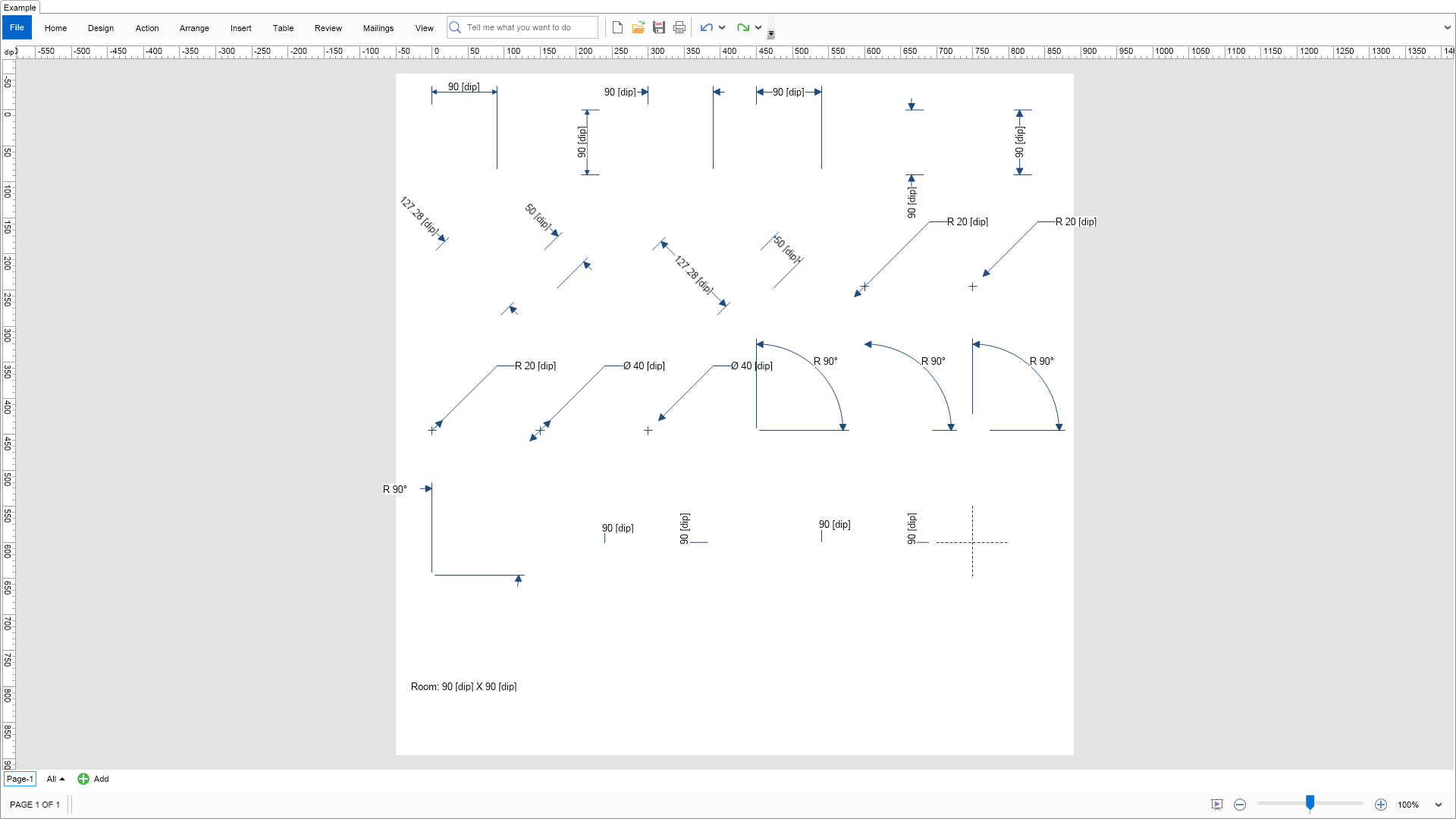
return @"This example shows the dimension shapes from the NDimensionShapesFactory.
";
}
///
/// Gets the relevant documentation links for the example
///
///
public (string Name, string Url)[] GetDocumentationUrls()
{
return new[]
{
("Predefined Libraries", "https://www.nevron.com/docs/openvision/diagram-predefined-libraries.html"),
("Libraries", "https://www.nevron.com/docs/openvision/diagram-libraries.html"),
("Shapes", "https://www.nevron.com/docs/openvision/diagram-shapes.html"),
("Library Browser", "https://www.nevron.com/docs/openvision/diagram-library-browser.html"),
};
}
private void InitDiagram(NDrawingDocument drawingDocument)
{
const double XStep = 150;
const double YStep = 200;
NDrawing drawing = drawingDocument.Content;
NPage activePage = drawing.ActivePage;
activePage.ZoomMode = ENZoomMode.Fit;
// Hide grid and ports
drawing.ScreenVisibility.ShowGrid = false;
drawing.ScreenVisibility.ShowPorts = false;
// Create all shapes from the factory
NDimensionShapeFactory factory = new NDimensionShapeFactory(90, 90);
double x = 0;
double y = 0;
for (int i = 0; i < factory.ShapeCount; i++)
{
NShape shape = factory.CreateShape(i);
shape.HorizontalPlacement = ENHorizontalPlacement.Center;
shape.VerticalPlacement = ENVerticalPlacement.Center;
shape.Tooltip = new NTooltip(shape.Name);
activePage.Items.Add(shape);
if (shape.ShapeType == ENShapeType.Shape1D)
{
ENDimensionShape shapeType = (ENDimensionShape)i;
switch (shapeType)
{
case ENDimensionShape.VerticalBaseline:
case ENDimensionShape.Vertical:
case ENDimensionShape.VerticalOutside:
case ENDimensionShape.OrdinateVertical:
case ENDimensionShape.OrdinateVerticalMultiple:
shape.SetBeginPoint(new NPoint(x + shape.Width, y + shape.Height));
shape.SetEndPoint(new NPoint(x + shape.Width, y));
break;
case ENDimensionShape.OrdinateHorizontalMultiple:
case ENDimensionShape.OrdinateHorizontal:
shape.SetBeginPoint(new NPoint(x, y));
shape.SetEndPoint(new NPoint(x + shape.Width, y));
break;
case ENDimensionShape.Radius:
case ENDimensionShape.RadiusOutside:
case ENDimensionShape.ArcRadius:
case ENDimensionShape.Diameter:
case ENDimensionShape.DiameterOutside:
shape.SetBeginPoint(new NPoint(x, y + shape.Height / 2));
shape.SetEndPoint(new NPoint(x + shape.Width, y - shape.Height / 2));
break;
case ENDimensionShape.AngleCenter:
case ENDimensionShape.AngleEven:
case ENDimensionShape.AngleOutside:
case ENDimensionShape.AngleUneven:
shape.SetBeginPoint(new NPoint(x, y + shape.Width / 2));
shape.SetEndPoint(new NPoint(x + shape.Width, y + shape.Width / 2));
break;
default:
shape.SetBeginPoint(new NPoint(x, y));
shape.SetEndPoint(new NPoint(x + shape.Width, y + shape.Height));
break;
}
}
else
{
shape.SetBounds(x, y, shape.Width, shape.Height);
shape.LocPinY = 1;
}
x += XStep;
if (x > activePage.Width)
{
x = 0;
y += YStep;
}
}
// Size page to content
activePage.Layout.ContentPadding = new NMargins(50);
activePage.SizeToContent();
}
#endregion
#region Implementation
#endregion
#region Event Handlers
#endregion
#region Fields
private NDrawingView m_DrawingView;
#endregion
#region Static Methods
#endregion
#region Constants
#endregion
#region Nested Types
#endregion
}
}

 Chart for .NET
 Diagram for .NET
 User Interface for .NET
 Vision for SSRS
 Chart for SSRS
 Gauge for SSRS
 Map for SSRS
 Barcode for SSRS
 Vision for SharePoint
 Chart for SharePoint
 Gauge for SharePoint
 Map for SharePoint
 Barcode for SharePoint
 Open Vision for .NET


 Vision for .NET