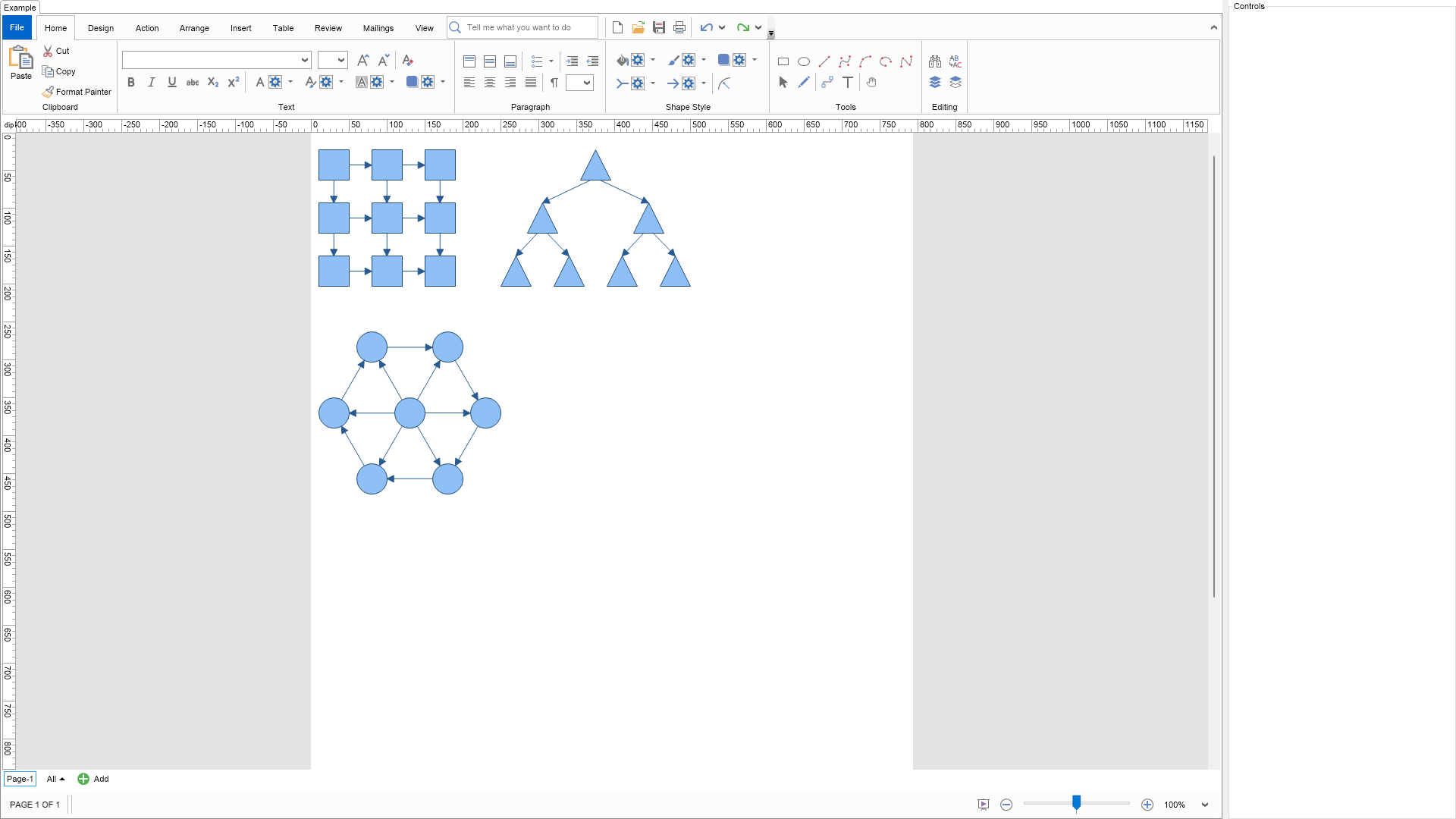
This example demonstrates the shape move slaves.
It is in many cases necessary to implement rigid connected shapes structures. In NOV Diagram this is achieved with the help of shape move slaves.
The move slaves of a shape are such shapes, which are moved together with the shape. The accumulation of the shape move slaves is recursive. For example: if a shape has to be moved, because it is a move slave, then its move slaves will also be moved.
To explore move slaves behavior just select a shape in the diagram and check the shapes, which must be moved when it is move. Then move the shape.
Note that the example will automatically highlight the move slaves of the currently selected shape.
| Language: C# |
using Nevron.Nov;
using Nevron.Nov.DataStructures;
using Nevron.Nov.Diagram;
using Nevron.Nov.Diagram.Shapes;
using Nevron.Nov.Dom;
using Nevron.Nov.Editors;
using Nevron.Nov.Graphics;
using Nevron.Nov.Layout;
using Nevron.Nov.UI;
using Nevron.Nov.Windows.Forms;
using System.Windows.Forms;
namespace NovWinFormsProject
{
public partial class Form1 : Form
{
#region Constructors
public Form1()
{
InitializeComponent();
// Set form title
Text = "NOV WinForms - NTranslationSlavesExample";
// Create the NOV example and its controls
NWidget exampleContent = CreateExampleContent();
NWidget exampleControls = CreateExampleControls();
if (exampleControls != null)
{
exampleControls.PreferredWidth = 300;
}
// Place the example and its controls in a pair box
NPairBox pairBox = new NPairBox(exampleContent, exampleControls);
pairBox.FillMode = ENStackFillMode.First;
pairBox.FitMode = ENStackFitMode.First;
pairBox.Margins = new NMargins(NDesign.HorizontalSpacing, NDesign.VerticalSpacing);
// Host the example in the form
NNovWidgetHost host = new NNovWidgetHost(pairBox);
host.Dock = DockStyle.Fill;
Controls.Add(host);
}
#endregion
#region Example
public NWidget CreateExampleContent()
{
// Create a simple drawing
NDrawingViewWithRibbon drawingViewWithRibbon = new NDrawingViewWithRibbon();
m_DrawingView = drawingViewWithRibbon.View;
m_DrawingView.Document.HistoryService.Pause();
try
{
InitDiagram(m_DrawingView.Document);
}
finally
{
m_DrawingView.Document.HistoryService.Resume();
}
return drawingViewWithRibbon;
}
public NWidget CreateExampleControls()
{
m_PropertyEditorHolder = new NContentHolder();
return m_PropertyEditorHolder;
}
public string GetExampleDescription()
{
return @"
This example demonstrates the shape move slaves.
It is in many cases necessary to implement rigid connected shapes structures. In NOV Diagram this is achieved with the help of shape move slaves.
The move slaves of a shape are such shapes, which are moved together with the shape. The accumulation of the shape move slaves is recursive. For example: if a shape has to be moved, because it is a move slave, then its move slaves will also be moved.
To explore move slaves behavior just select a shape in the diagram and check the shapes, which must be moved when it is move. Then move the shape.
Note that the example will automatically highlight the move slaves of the currently selected shape.
";
}
///
/// Gets the relevant documentation links for the example
///
///
public (string Name, string Url)[] GetDocumentationUrls()
{
return new[]
{
("Shapes", "https://www.nevron.com/docs/openvision/diagram-shapes.html"),
("Snap and Glue", "https://www.nevron.com/docs/openvision/diagram-snap-and-glue.html"),
};
}
private void InitDiagram(NDrawingDocument drawingDocument)
{
NGraphTemplate template;
// create rectangular grid template
template = new NRectangularGridTemplate();
template.Origin = new NPoint(10, 23);
template.VertexShape = ENBasicShape.Rectangle;
template.EdgeUserClass = NDR.StyleSheetNameConnectors;
template.Create(drawingDocument);
// create tree template
template = new NGenericTreeTemplate();
template.Origin = new NPoint(250, 23);
template.VertexShape = ENBasicShape.Triangle;
template.EdgeUserClass = NDR.StyleSheetNameConnectors;
template.Create(drawingDocument);
// create elliptical grid template
template = new NEllipticalGridTemplate();
template.Origin = new NPoint(10, 250);
template.VertexShape = ENBasicShape.Ellipse;
template.EdgeUserClass = NDR.StyleSheetNameConnectors;
template.Create(drawingDocument);
// hook selection events
NPageSelection selection = drawingDocument.Content.ActivePage.Selection;
selection.Mode = Nov.UI.ENSelectionMode.Single;
selection.Selected += OnSelectionSelected;
selection.Deselected += OnSelectionDeselected;
}
#endregion
#region Implementation
///
/// Called when a diagram item has been selected.
///
///
void OnSelectionSelected(NItemEventArgs arg)
{
NShape shape = arg.Item as NShape;
if (shape == null)
return;
// create the shape move slaves property editor
m_PropertyEditorHolder.Content = NDesigner.GetDesigner(shape).CreateMemberEditor(shape, NShape.MoveSlavesProperty);
// subscribe for move slaves property changes.
shape.AddEventHandler(NShape.MoveSlavesProperty.ValueChangedEvent, new NEventHandler(OnMoveSlavesPropertyChanged));
// highlight the shape current slaves
HighlightSlaves(shape);
}
///
/// Called when a diagram item has been deselected.
///
///
void OnSelectionDeselected(NItemEventArgs arg)
{
NShape shape = arg.Item as NShape;
if (shape == null)
return;
// unhook move slaves property changed event
shape.RemoveEventHandler(NShape.MoveSlavesProperty.ValueChangedEvent, new NEventHandler(OnMoveSlavesPropertyChanged));
// clear hightlights
ClearHighlights();
// destroy property editor
m_PropertyEditorHolder.Content = null;
}
///
/// Called when the MoveSlaves property of the currently selected shape has changed.
///
///
void OnMoveSlavesPropertyChanged(NValueChangeEventArgs arg)
{
NShape shape = arg.TargetNode as NShape;
if (shape == null)
return;
// highligh the shape move slaves
HighlightSlaves(shape);
}
///
/// Clears the highlighting on all shapes in the active page.
///
void ClearHighlights()
{
NList shapes = m_DrawingView.ActivePage.GetShapes(true);
for (int i = 0; i < shapes.Count; i++)
{
NShape shape = shapes[i];
shape.Geometry.ClearValue(NGeometry.FillProperty);
shape.Geometry.ClearValue(NGeometry.StrokeProperty);
}
}
///
/// Highlights the move slaves of the specified shape
///
///
void HighlightSlaves(NShape shape)
{
ClearHighlights();
NList shapes = shape.GetMoveSlaves();
for (int i = 0; i < shapes.Count; i++)
{
NShape cur = shapes[i];
cur.Geometry.Fill = new NColorFill(NColor.LightCoral);
cur.Geometry.Stroke = new NStroke(2, NColor.DarkRed);
}
}
#endregion
#region Event Handlers
#endregion
#region Fields
private NDrawingView m_DrawingView;
private NContentHolder m_PropertyEditorHolder;
#endregion
#region Static Methods
#endregion
#region Constants
#endregion
#region Nested Types
#endregion
}
}