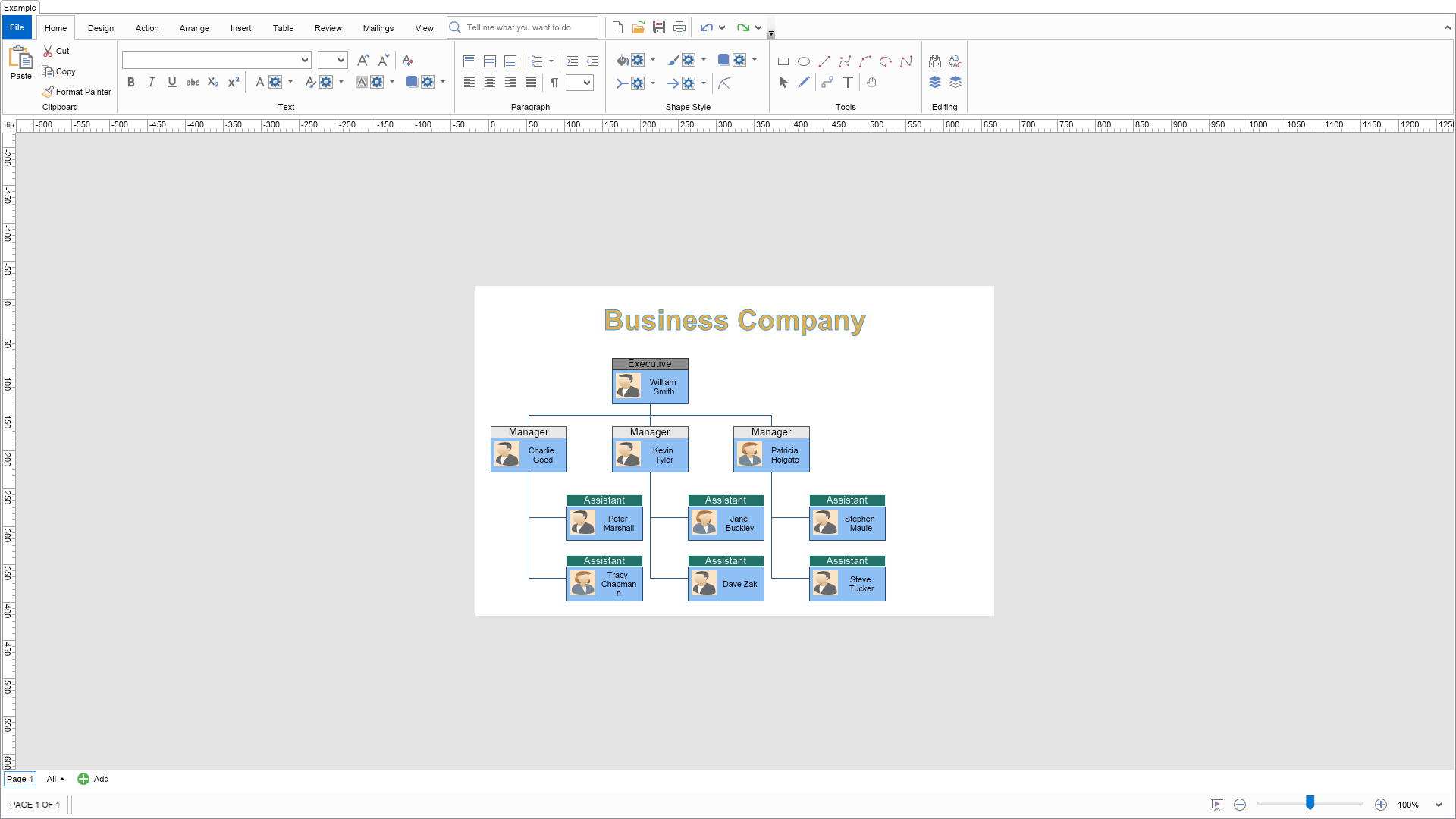
Organization Chart (Business Company) Example for Blazor
Nevron NOV Diagram for Blazor ships with hundreds of examples with full source code, as part of the Nevron Open Vision Suite.
All Blazor Diagram examples are also available as a stand-alone Visual Studio solution
in C#,
which you can download from the links below.
Organization Chart (Business Company) Example for Blazor Description
Demonstrates how to create an organization chart diagram (org chart) of a business company using the following NOV Diagram features:
Theme-based colors for the title - change the page theme from the "Design" tab to see how the style of the title will change, too.
Organization chart shapes - used to represent the employees of the business company.
Tip Over Tree Layout - used to arrange the org chart shapes in a compact way, placing leaf shapes in a column instead of in a row.
C# Organization Chart (Business Company) Example Code for Nevron Diagram for Blazor
Language: C#
using Nevron.Nov;
using Nevron.Nov.DataStructures;
using Nevron.Nov.Diagram;
using Nevron.Nov.Diagram.Layout;
using Nevron.Nov.Diagram.Shapes;
using Nevron.Nov.Diagram.Shapes.Business.OrgChart;
using Nevron.Nov.Diagram.Themes;
using Nevron.Nov.Dom;
using Nevron.Nov.Graphics;
using Nevron.Nov.Layout;
using Nevron.Nov.UI;
using Nevron.Nov.Windows.Forms;
using System.Windows.Forms;
namespace NovWinFormsProject
{
public partial class Form1 : Form
{
#region Constructors
public Form1()
{
InitializeComponent();
// Set form title
Text = "NOV WinForms - NOrgChartBusinessCompanyExample";
// Create the NOV example and its controls
NWidget exampleContent = CreateExampleContent();
NWidget exampleControls = CreateExampleControls();
if (exampleControls != null)
{
exampleControls.PreferredWidth = 300;
}
// Place the example and its controls in a pair box
NPairBox pairBox = new NPairBox(exampleContent, exampleControls);
pairBox.FillMode = ENStackFillMode.First;
pairBox.FitMode = ENStackFitMode.First;
pairBox.Margins = new NMargins(NDesign.HorizontalSpacing, NDesign.VerticalSpacing);
// Host the example in the form
NNovWidgetHost host = new NNovWidgetHost(pairBox);
host.Dock = DockStyle.Fill;
Controls.Add(host);
}
#endregion
#region Example
public NWidget CreateExampleContent()
{
// Create a simple drawing
NDrawingViewWithRibbon drawingViewWithRibbon = new NDrawingViewWithRibbon();
m_DrawingView = drawingViewWithRibbon.View;
// hide grid and ports
m_DrawingView.Content.ScreenVisibility.ShowGrid = false;
m_DrawingView.Content.ScreenVisibility.ShowPorts = false;
m_DrawingView.Document.HistoryService.Pause();
try
{
InitDiagram(m_DrawingView.Document);
}
finally
{
m_DrawingView.Document.HistoryService.Resume();
}
return drawingViewWithRibbon;
}
public NWidget CreateExampleControls()
{
return null;
}
public string GetExampleDescription()
{
return @"
Demonstrates how to create an organization chart diagram (org chart) of a business company using the following NOV Diagram features:
Theme-based colors for the title - change the page theme from the ""Design"" tab to see how the style of the title will change, too.
Organization chart shapes - used to represent the employees of the business company.
Tip Over Tree Layout - used to arrange the org chart shapes in a compact way, placing leaf shapes in a column instead of in a row.
";
}
///
/// Gets the relevant documentation links for the example
///
///
public (string Name, string Url)[] GetDocumentationUrls()
{
return new[]
{
("Layered Tree Layout", "https://www.nevron.com/docs/openvision/diagram-layered-tree-layout.html"),
("Shapes", "https://www.nevron.com/docs/openvision/diagram-shapes.html"),
("Routable Connectors", "https://www.nevron.com/docs/openvision/diagram-routable-connectors.html"),
("Text Block", "https://www.nevron.com/docs/openvision/diagram-text-block.html"),
};
}
private void InitDiagram(NDrawingDocument drawingDocument)
{
NPage page = drawingDocument.Content.ActivePage;
// Create a title shape
NShape titleShape = CreateTitleShape("Business Company");
page.Items.Add(titleShape);
// Recursively create the org chart shapes
CreateOrgShape(page, ExecutiveEmployee);
// Arrange the shapes using a Layered Graph Layout
NTipOverTreeLayout layout = new NTipOverTreeLayout();
layout.LeafsPlacement = ENTipOverChildrenPlacement.ColRight;
layout.RegionLayout.VerticalSpacing = 25; // Controls the spacing between the title and the diagram
NList shapes = page.GetShapes(false, NDiagramFilters.ShapeType2D);
layout.Arrange(shapes.CastAll
Download a fully functional C# (.cs) Organization Chart (Business Company) Example for Blazor Solution

 Chart for .NET
 Diagram for .NET
 User Interface for .NET
 Vision for SSRS
 Chart for SSRS
 Gauge for SSRS
 Map for SSRS
 Barcode for SSRS
 Vision for SharePoint
 Chart for SharePoint
 Gauge for SharePoint
 Map for SharePoint
 Barcode for SharePoint
 Open Vision for .NET


 Vision for .NET