ProductsAll Products
.NET Components
 Open Vision for .NET
 NOV Chart for .NET
 NOV Diagram for .NET
 NOV Rich Text Editor for .NET
 NOV Grid for .NET
 NOV Schedule for .NET
 NOV Gauge for .NET
 NOV Barcode for .NET
 NOV User Interface for .NET
 Vision for .NET
 Chart for .NET
 Diagram for .NET
 User Interface for .NET
 Vision for SSRS
 Chart for SSRS
 Gauge for SSRS
 Map for SSRS
 Barcode for SSRS
 Vision for SharePoint
 Chart for SharePoint
 Gauge for SharePoint
 Map for SharePoint
 Barcode for SharePoint
DownloadsAll Downloads
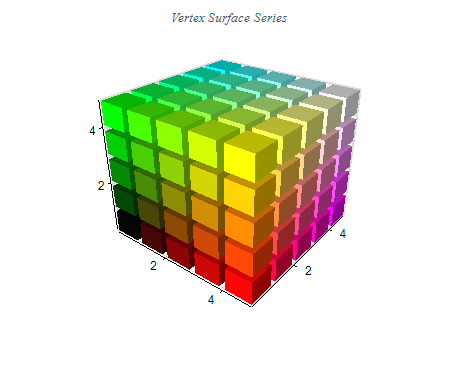
The Vertex Surface (Free Surface) series can display arbitrary shapes and lines in 3D. With this surface type, you can specify the positions of each vertex as well as how the vertices are connected to form the surface mesh.
The Vertex Surface provides various options, including smooth and flat shading, custom color per vertex, palette filling, and others.
Vertex Surface Chart | ||
|
| X Value | Y Value | Z Value |
|---|---|---|
| 2 | 5 | 10 |
| 4 | 5 | 20 |
| 6 | 5 | 15 |
| 8 | 5 | 5 |
| 10 | 5 | 30 |
Choose the Proper Surface Chart Type
The Vertex Surface (Free Surface) Chart is used when other charting types cannot display the specified coordinates in a specific order or the surface cannot model a particular object.
Choose the Right Color Map
Choose a color map that best represents your data. A good color map should provide contrast and allow users to identify areas of interest easily.
Label Your Chart
Add labels and annotations to your chart to provide context and make it easier for users to understand the data they view.
Customize Your Chart
Use the chart's customization features to customize the appearance of your chart, including shading, labels, and annotations. This can help make your data stand out and make it easier to read.